
DocRepair tools: tiered coverage/width audit + live proofing pipeline for building metrics-compatible fonts (Google Fonts docrepair project).
Verified details
These details have been verified by PyPIProject links
GitHub Statistics
Maintainers

Project description
GlyphAudit — DocRepair Tools
Tools for building metrics-compatible replacement fonts — same advances and coverage as the original document face, distinct outlines. The whole toolkit answers one question fast, per glyph, per master: does this typeset like the reference?
In Glyphs.app — the daily interface
One submenu, Script → DocRepair Tools, after pip install docrepair-tools[proof] and glyph-audit proof panel install.
Width Audit — live advance-width mismatches against the reference, with an edit-view overlay of the reference outline.
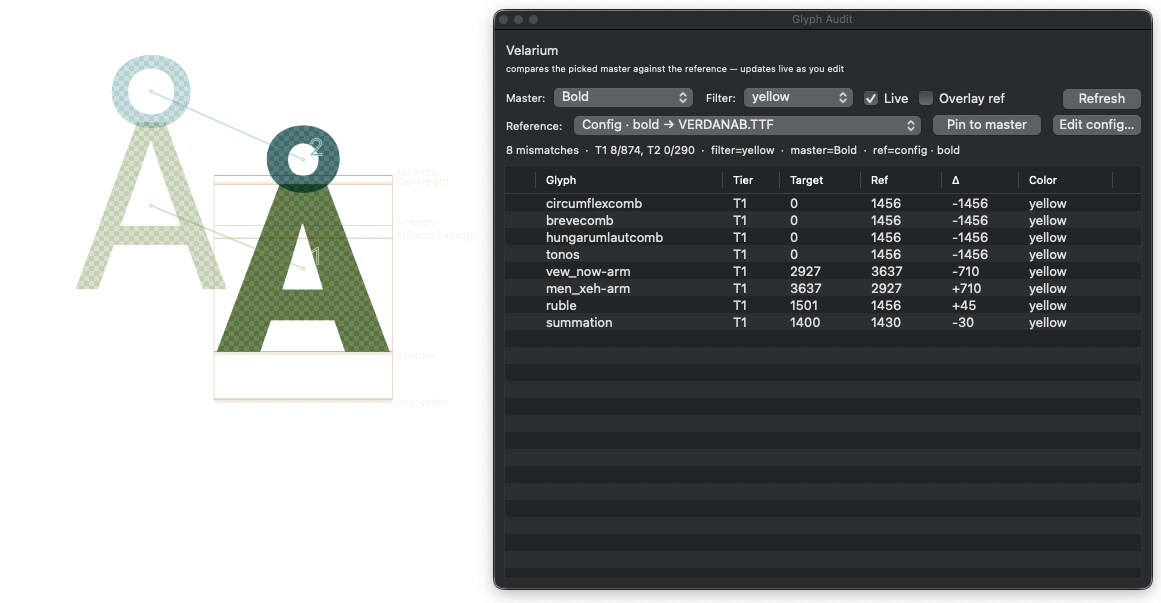
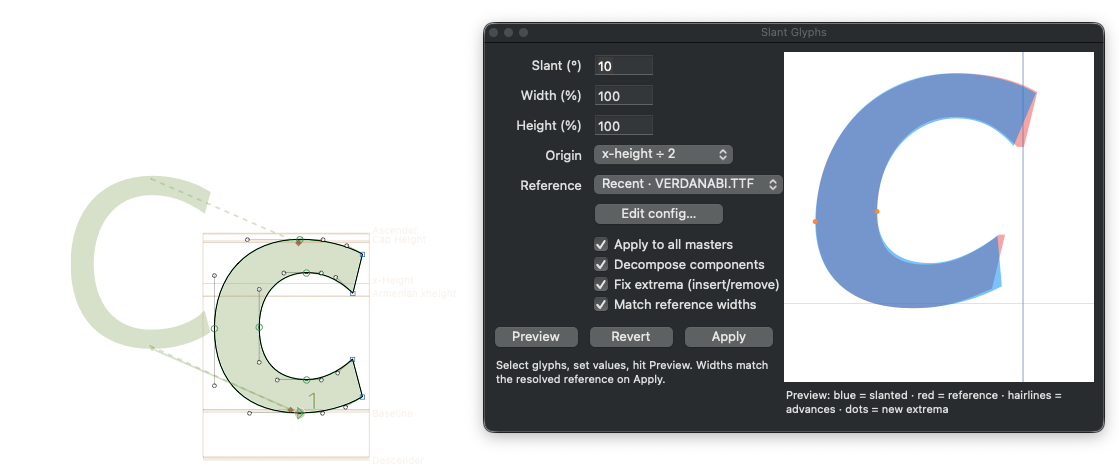
Slant Glyphs — preview and tweak a slant across masters, fix extrema, then match reference widths.
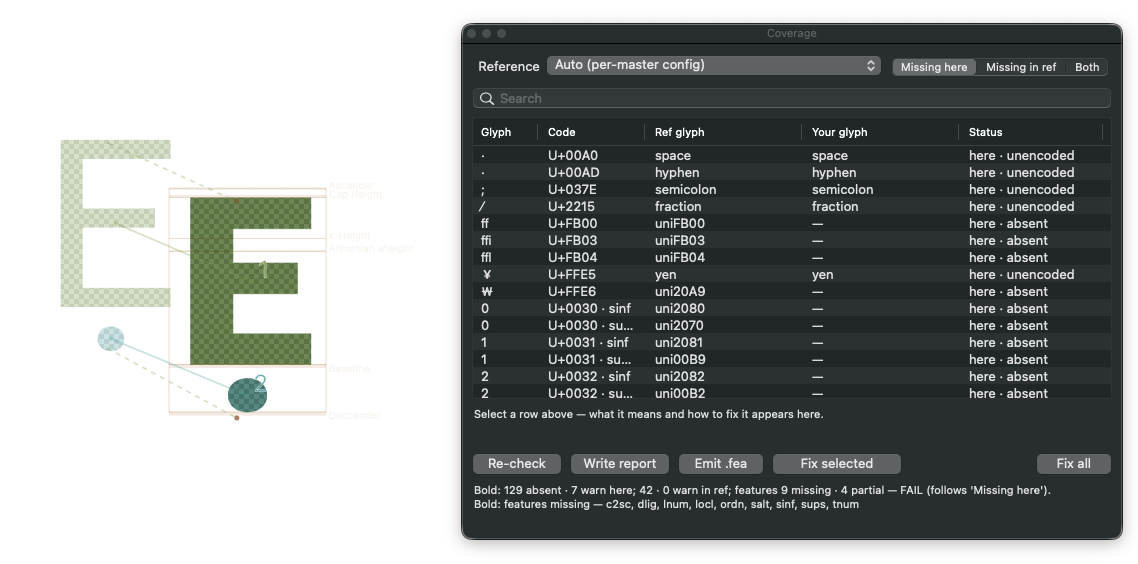
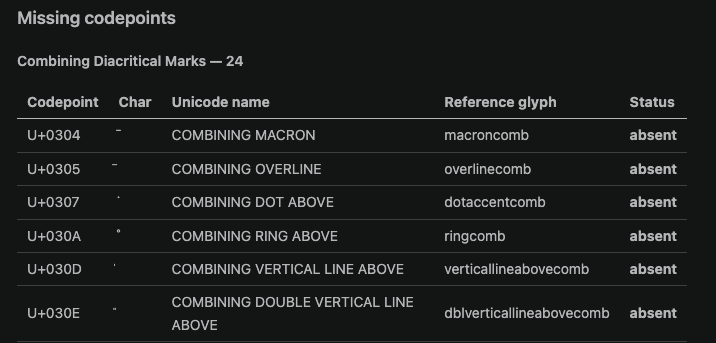
Coverage Check — what's missing in your font or the reference, in a searchable list you can fix from.
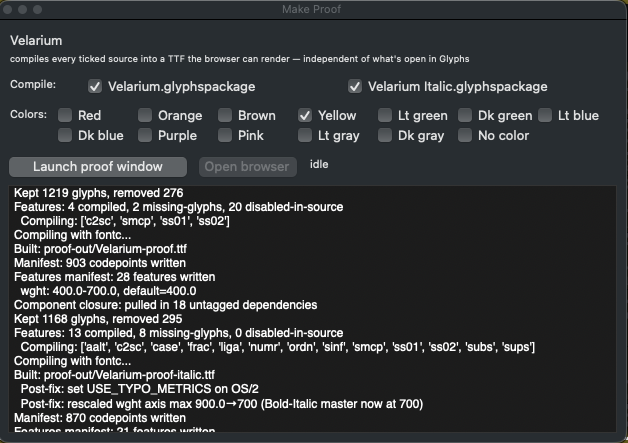
Proof Builder — compile the proof subset and launch the browser compare.
In the browser
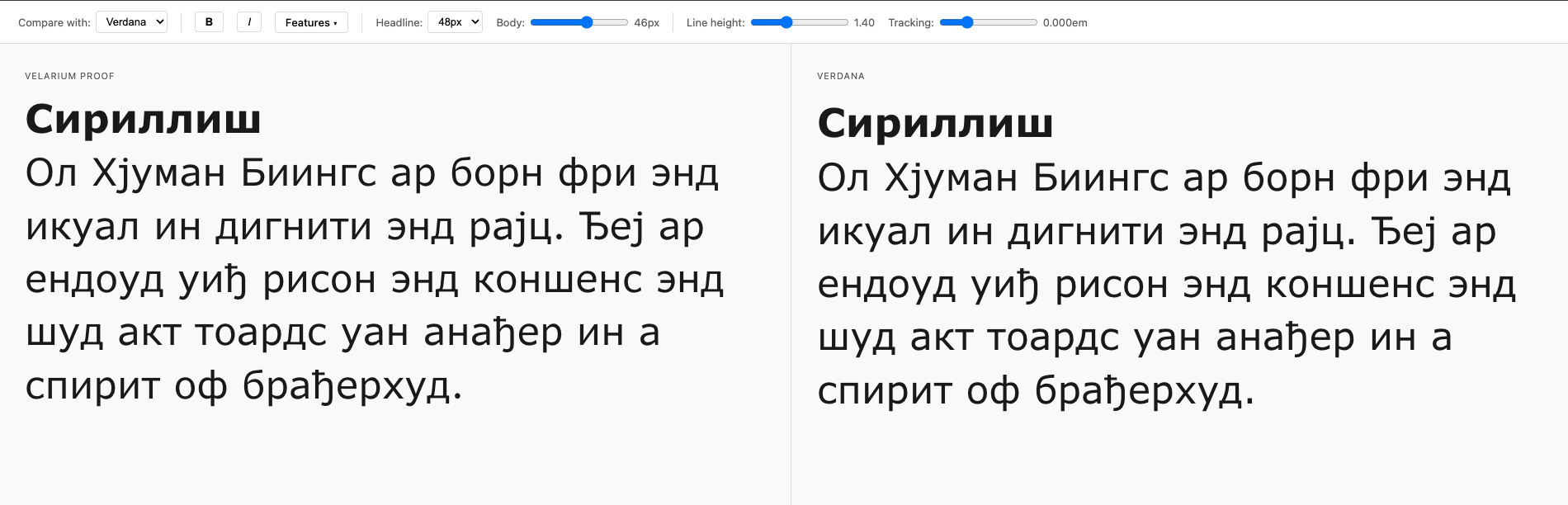
Your working font next to the reference — identical advances produce identical line-wrap, so divergence shows the moment it appears.
From the CLI — automation and CI
glyph-audit — tiered width/coverage audit report. glyph-audit coverage — missing codepoints and feature variants in both directions, feature matching, .fea export, exit-code gate. Details → docs/cli.md.
Install
From PyPI:
pip install docrepair-tools               # core (CLI only)
pip install "docrepair-tools[glyphs]"     # + Glyphs source support
pip install "docrepair-tools[proof]"      # + `glyph-audit proof serve` extras
pip install "docrepair-tools[all]"        # everything

# Note: the console script + Python module are still `glyph-audit` /
# `GlyphAudit` — only the PyPI distribution name is namespaced.
Or from a checkout (editable):
pip install -e ".[glyphs]"
The glyph-audit console command is now on your $PATH (equivalent to python -m GlyphAudit).
Quickstart
glyph-audit --target sources/MyTypeface.glyphspackage \
            --pair Regular=Reference-Regular.ttf \
            --pair Bold=Reference-Bold.ttf
Writes glyph-audit-report.md next to wherever you ran it.
On first run with no --pair and no config, the tool bootstraps ~/.glyph-audit/config.toml from the bundled template and prints next steps.
Configure once
Set up ~/.glyph-audit/config.toml so daily runs are one flag:
[defaults]
filter      = "ready"
from_config = true
output      = "glyph-audit-report.md"

[instances.Regular]
ref = "/path/to/Reference-Regular.ttf"

[instances.Bold]
ref = "/path/to/Reference-Bold.ttf"
Then:
glyph-audit --target sources/MyTypeface.glyphspackage
References can be static TTF/OTF, variable fonts (with axis pinning), system-installed fonts, Glyphs sources, or Google Fonts. Full schema and examples → docs/configuration.md.
Make it even shorter
Once the config is in place, wrap it in your build system or shell. A Makefile recipe pairs nicely with the rest of a typeface project:
TARGET ?= sources/MyTypeface.glyphspackage
audit:
	-glyph-audit --target "$(TARGET)"
make audit                                                # default target
make audit TARGET=sources/MyTypeface-Italic.glyphspackage # override the file
The leading - lets make ignore glyph-audit's non-zero exit when mismatches are found — that's the audit's normal "I found something" signal, not a build failure.
Multiple typefaces?
The defaults above live in ~/.glyph-audit/config.toml so they apply to every project on your machine. If you work on more than one typeface, drop a per-project config alongside the source and point at it explicitly:
glyph-audit --target sources/MyTypeface.glyphspackage --config .glyph-audit.toml
.glyph-audit.toml accepts the same [defaults] and [instances.*] sections. See docs/configuration.md#project-local-config for the gotchas (notably: don't commit it if it holds API keys).
What the report shows
Three tiers per target/reference pair:
- Tier 1 — every encoded glyph, paired by Unicode codepoint.
- Tier 2 — every variant glyph (
a.smcp,I.ss01, …) paired by(codepoint, feature). - Tier 3 — internal helpers (components, ligature parts), listed for completeness.
Mismatches are sorted by severity.
More detail → docs/concepts.md.
Preview — side-by-side proof viewer
A React+Vite app (prebuilt and shipped inside the wheel) renders your work-in-progress font next to a reference in two synced editable panels. Type in the left (proof) panel; the right mirrors verbatim against whichever reference font you configure, so identical advance widths produce identical line wraps — the moment they diverge, you can see exactly where.
It's driven by a glyph-audit.toml at your project root (family name, source list, colour filter, [references]), then:
# Build the proof font + manifests from your source:
glyph-audit proof build

# Build + serve the web view with live rebuild on source changes:
glyph-audit proof serve --watch
The build writes proof TTFs plus proof-config.json, available-{chars,features}.json, and per-reference width manifests into the output dir; the served app overlays those on the shipped web bundle. Flags and subcommands → docs/cli.md.
Live audit panel inside Glyphs.app
For a floating Vanilla window that shows width mismatches in real time while you edit, symlink examples/glyphs/width_audit_panel.py into Glyphs's user-scripts folder:
ln -sf "$(pwd)/examples/glyphs/width_audit_panel.py" \
    "$HOME/Library/Application Support/Glyphs 3/Scripts/Width Audit Panel.py"
Then in Glyphs: hold Option + click the Script menu → Reload Scripts, and the panel appears under Script → Width Audit Panel. It reuses the same [instances.*] references from ~/.glyph-audit/config.toml that the CLI does — no extra setup. Run the menu item again to toggle it off. Details → examples/glyphs/README.md.
Documentation
- docs/cli.md — full flag reference, exit codes, and recipes
- docs/configuration.md — config file schema, all five reference forms (static, VF, system, Glyphs source, Google Fonts)
- docs/concepts.md — what each tier covers, how rows are tagged, how to read the report
- examples/glyphs/README.md — Glyphs.app live-audit panel setup and usage
Limitations
- Tier 2 matches
SingleSubstGSUB lookups only —MultipleSubst/LigatureSubst/ contextual lookups don't pair on the reference side. - Sidebearings (LSB / RSB), kerning, anchors, and outline shapes are not compared. Only advance widths.
Licence
GPL-3.0 — see LICENSE.
Project details
Verified details
These details have been verified by PyPIProject links
GitHub Statistics
Maintainers


Download files
Download the file for your platform. If you're not sure which to choose, learn more about installing packages.
Source Distribution
Built Distribution
Filter files by name, interpreter, ABI, and platform.
If you're not sure about the file name format, learn more about wheel file names.
Copy a direct link to the current filters
File details
Details for the file docrepair_tools-0.2.3.tar.gz.
File metadata
- Download URL: docrepair_tools-0.2.3.tar.gz
- Upload date:
- Size: 210.5 kB
- Tags: Source
- Uploaded using Trusted Publishing? Yes
- Uploaded via: twine/7.0.0 CPython/3.13.14
File hashes
| Algorithm | Hash digest | |
|---|---|---|
| SHA256 |
e1bbfea6909ffde8535d25703601750b2042f92b402290fc5eeb6cc4b8462a88
|
|
| MD5 |
5044b0b78790d49d8e236fb1189760ab
|
|
| BLAKE2b-256 |
8ac1bf6f0182d1b56d711b79ef718c2ef0d627d20cebd3205d94cf26d07b826d
|
Provenance
The following attestation bundles were made for docrepair_tools-0.2.3.tar.gz:
Publisher:
publish.yml on agyeiagyeiagyei/docrepairtools
-
Statement:
-
Statement type:
https://in-toto.io/Statement/v1 -
Predicate type:
https://docs.pypi.org/attestations/publish/v1 -
Subject name:
docrepair_tools-0.2.3.tar.gz -
Subject digest:
e1bbfea6909ffde8535d25703601750b2042f92b402290fc5eeb6cc4b8462a88 - Sigstore transparency entry: 2334586691
- Sigstore integration time:
-
Permalink:
agyeiagyeiagyei/docrepairtools@48860afecfe9fc3cd3b9f02f375dc4b0effa367e -
Branch / Tag:
refs/tags/v0.2.3 - Owner: https://github.com/agyeiagyeiagyei
-
Access:
public
-
Token Issuer:
https://token.actions.githubusercontent.com -
Runner Environment:
github-hosted -
Publication workflow:
publish.yml@48860afecfe9fc3cd3b9f02f375dc4b0effa367e -
Trigger Event:
push
-
Statement type:
File details
Details for the file docrepair_tools-0.2.3-py3-none-any.whl.
File metadata
- Download URL: docrepair_tools-0.2.3-py3-none-any.whl
- Upload date:
- Size: 202.3 kB
- Tags: Python 3
- Uploaded using Trusted Publishing? Yes
- Uploaded via: twine/7.0.0 CPython/3.13.14
File hashes
| Algorithm | Hash digest | |
|---|---|---|
| SHA256 |
3436acc293742570c882f0f6633db4b2527cb543c240a7e1c0154d22e55f4415
|
|
| MD5 |
3afb160cc18feaa2cd97b3ce1df98e97
|
|
| BLAKE2b-256 |
bf515c6ae907050170a816d2365e13ac5e92338916632a5e4aee358027fe8d60
|
Provenance
The following attestation bundles were made for docrepair_tools-0.2.3-py3-none-any.whl:
Publisher:
publish.yml on agyeiagyeiagyei/docrepairtools
-
Statement:
-
Statement type:
https://in-toto.io/Statement/v1 -
Predicate type:
https://docs.pypi.org/attestations/publish/v1 -
Subject name:
docrepair_tools-0.2.3-py3-none-any.whl -
Subject digest:
3436acc293742570c882f0f6633db4b2527cb543c240a7e1c0154d22e55f4415 - Sigstore transparency entry: 2334586708
- Sigstore integration time:
-
Permalink:
agyeiagyeiagyei/docrepairtools@48860afecfe9fc3cd3b9f02f375dc4b0effa367e -
Branch / Tag:
refs/tags/v0.2.3 - Owner: https://github.com/agyeiagyeiagyei
-
Access:
public
-
Token Issuer:
https://token.actions.githubusercontent.com -
Runner Environment:
github-hosted -
Publication workflow:
publish.yml@48860afecfe9fc3cd3b9f02f375dc4b0effa367e -
Trigger Event:
push
-
Statement type:






