









A versions-menu for Sphinx-based documentation.
Historically, many open source projects have hosted their documentation on Read the Docs (RTD). However, RTD has a fixed build process that is essentially limited to just running Sphinx. Moreover, RTD will inject advertisements into your documentation.
A more flexible approach is to build the documentation with continuous integration (e.g., Github Actions) and to deploy the result to Github Pages or any other static site hosting. There are no restrictions on the build process: it may involve make, tox, latex, or any number of custom scripts to augment Sphinx.
The one difficulty that comes with self-hosting project documentation is that out of the box, there is no support for showing multiple releases or branches of the project. This project aims to remedy this. It provides a Sphinx extension and a command-line tool that work together to generate a dynamic versions-menu similar to that on RTD pages.
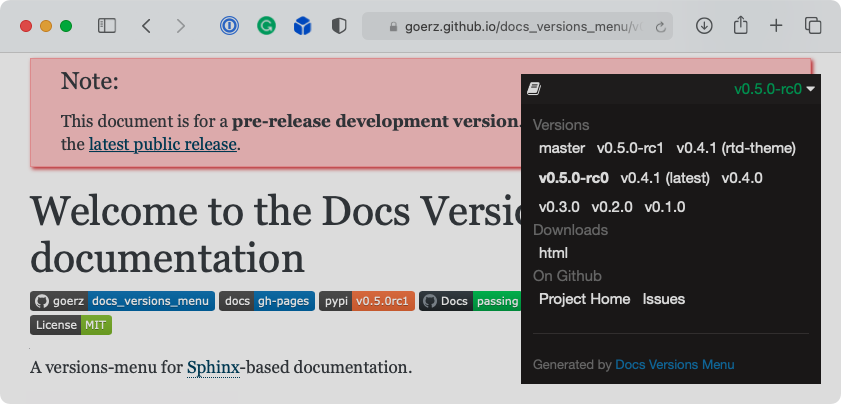
The different “Versions” derive from the folder structure of the hosted documentation, e.g., for Github Pages, the folders in the root of the gh-pages branch. The docs-versions-menu command-line tool, running on the gh-pages branch or on the server hosting the documentation, collects the available versions based on the folders it sees.
The docs_versions_menu Sphinx extension, running during the Sphinx build process, adds Javascript to the documentation that will inject a menu to switch between the found versions. It can also show warnings for outdated or unreleased versions.
See the Docs-Versions-Menu documentation itself for a live example.
Development of Docs-Versions-Menu happens on Github. You can read the full documentation online.
Installation
To install the latest released version of docs-versions-menu, run:
pip install docs-versions-menuOr, to install the latest development version of docs-versions-menu from Github:
pip install git+https://github.com/goerz/docs_versions_menu.git@master#egg=docs_versions_menuThe docs-versions-menu package can also be installed through conda, using the conda-forge channel. See the instructions in the Docs-Versions-Menu Feedstock.
Usage
Showing a versions-menu in your documentation requires two steps:
Add 'docs_versions_menu' to the list of extensions in your Sphinx conf.py.
This adds Javascript to your rendered documentation that displays a dynamic versions-menu based on information in a versions.json file. The script locates versions.json automatically by searching upward from the current URL, so the menu works on any web host, not just Github Pages.
Set up the deployment of the documentation such that it runs the docs-versions-menu command in the webroot.
The command creates the file versions.json that step 1 depends on by analyzing the folders it finds in the webroot.
How to invoke docs-versions-menu depends on the specifics of how the documentation is deployed:
For Github Actions deploying to Github Pages, check out the gh-pages branch, run docs-versions-menu, and commit and push the resulting files. See the workflow file for Docs-Versions-Menu’s documentation.
For Travis deploying to Github Pages with Doctr, tell doctr deploy to invoke the docs-versions-menu command:
doctr deploy --command=docs-versions-menu --no-require-master --build-tags "$DEPLOY_DIR"For deployments to a static web host, use ssh to run the docs-versions-menu command on the server
See the full documentation on Step 1 and Step 2 for details.
Default assumptions
For projects that follow standard best practices, you should not require any customization beyond the above two steps.
Releases should be tagged as e.g. v0.1.0 and deployed to a folder of the same name. That is, a lower case letter v followed by a PEP 440-compatible version identifier.
The master branch should be deployed to a folder master, respectively main to a folder main for projects that use “main” as the default branch name.
Any other branch for which documentation is to be deployed should go in a folder matching the branch name.
Examples
The following projects use Docs-Versions-Menu, respectively its predecessor Doctr-Versions-Menu:
pcds-ci-helpers (an example of shared Travis CI configurations using docs-versions-menu)
lcls-twincat-general (among many other PLC projects at the LCLS)
1 maintainer

Download files
Download the file for your platform. If you're not sure which to choose, learn more about installing packages.
Source Distribution
Built Distribution
Filter files by name, interpreter, ABI, and platform.
If you're not sure about the file name format, learn more about wheel file names.
Copy a direct link to the current filters







