
DocSeer: RAG over research papers — FastAPI + Celery + ChromaDB + Ollama.

Project description
DocSeer
DocSeer is a self-hosted RAG (Retrieval-Augmented Generation) application for research papers. Ingest PDFs, query them in natural language, and explore your library — all running locally via Docker, with no data leaving your machine.
Seer: One who perceives hidden knowledge — interpreting and revealing insights beyond the surface.


Screenshots
Chat
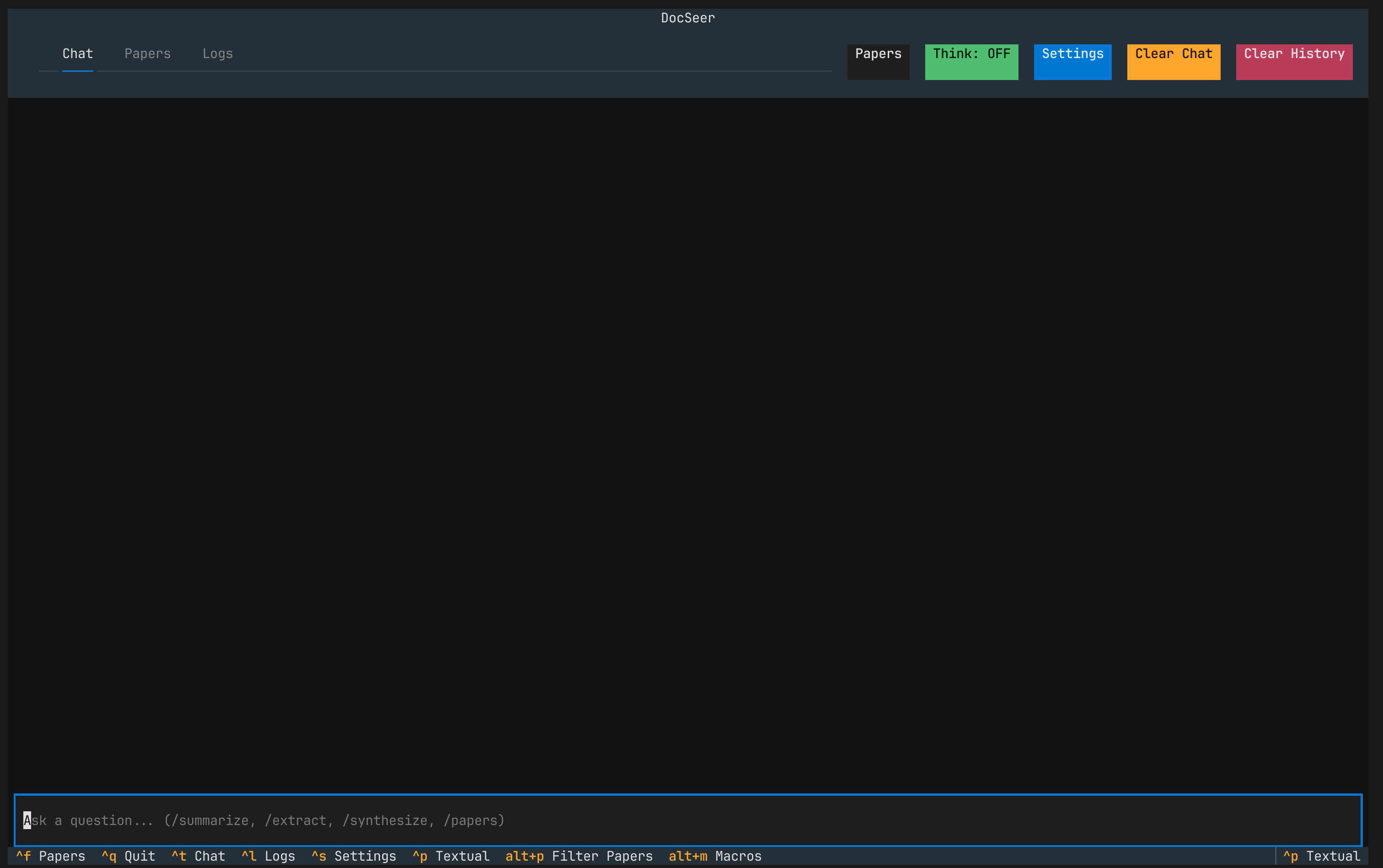
The default landing page of the TUI. Chat with your papers using natural language.
Papers
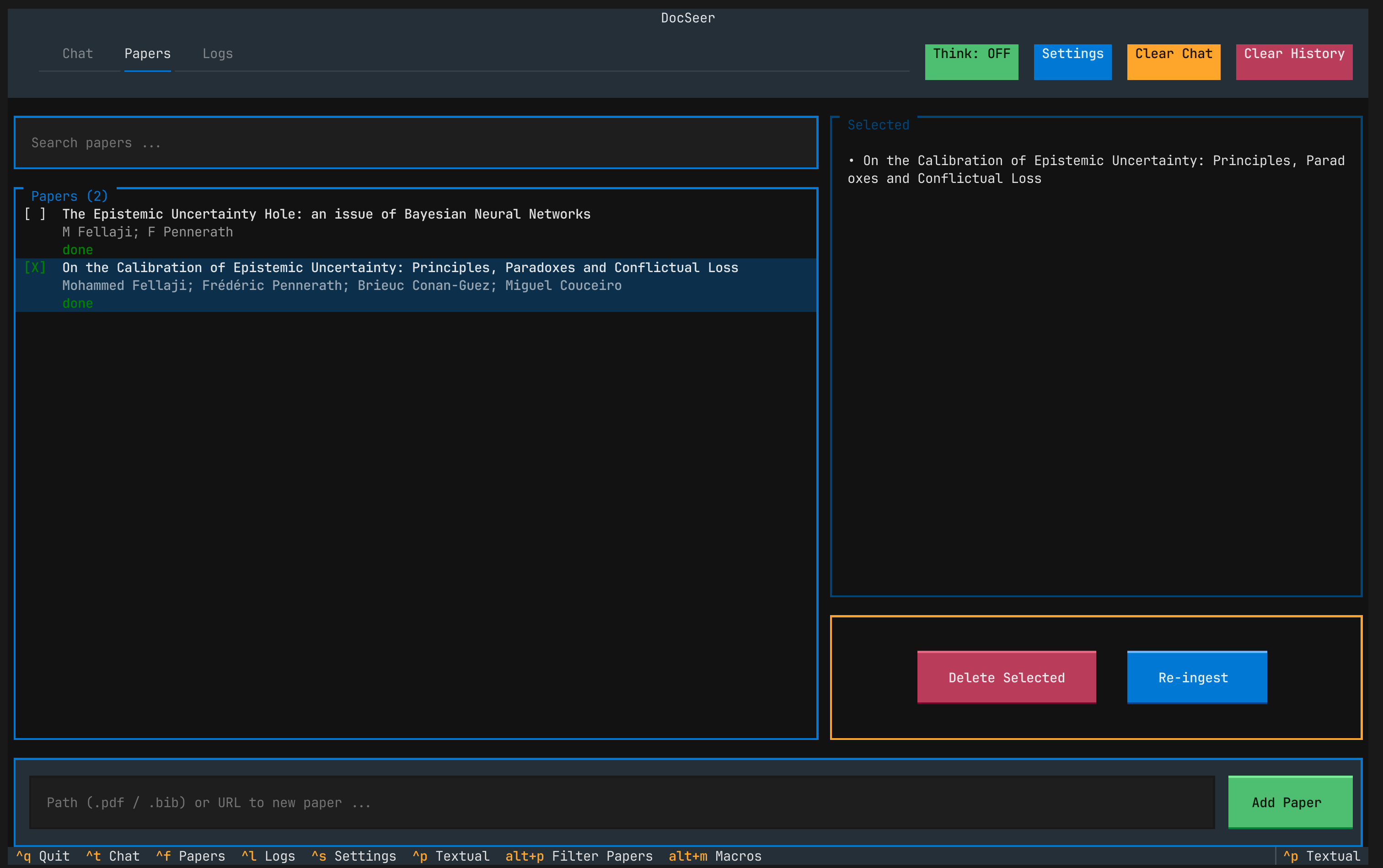
Browse, filter, and manage your paper library. Search, select, and queue papers for ingestion.
Conversation
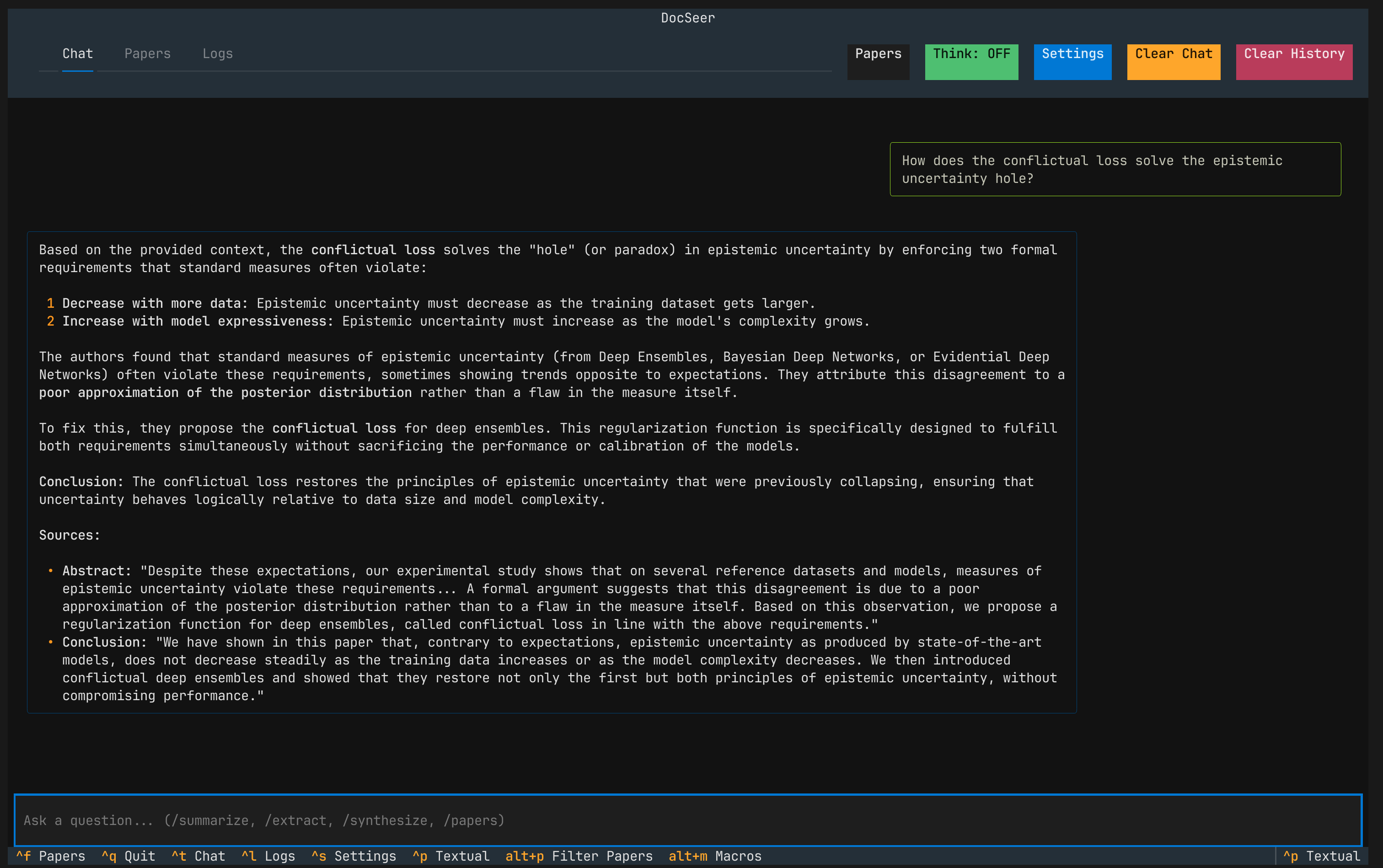
A conversation example showing the Q&A flow with retrieved context from ingested papers.
Architecture
| Layer | Technology |
|---|---|
| API | FastAPI (async, SSE streaming) |
| Task queue | Celery + Redis |
| Vector store | ChromaDB |
| Document store | Local file store (parent chunks) |
| Relational DB | PostgreSQL |
| LLM / embeddings | Ollama (fully local) |
| PDF processing | Docling (content) + GROBID (metadata) |
| Metadata import | Zotero Translation Server + BibTeX parser |
| TUI | Textual |
| Monitoring | Flower (Celery dashboard) |
All services run as Docker containers. The only external network call is the initial Ollama model pull, which happens automatically at startup.
Prerequisites
- Docker with the Compose plugin (
docker compose version) - ~10 GB free disk space (models + database volumes)
That's it. No Python, Ollama, or Postgres installation needed on the host — unless you want to use native Ollama for GPU acceleration (see below).
Quick start
Using the CLI (recommended)
# Install from PyPI
uv pip install docseer

# Start everything and launch the TUI
docseer            # fully Dockerized (CPU)
docseer --native   # macOS Metal GPU (requires native Ollama on host)
Or clone and install in editable mode for development:
git clone https://github.com/fellajimed/docseer.git
cd docseer
uv pip install -e .
One command starts all Docker services (Postgres, Redis, ChromaDB, Ollama, GROBID, Zotero, API, worker, Flower), waits for healthchecks, then opens the Textual TUI. Press Ctrl+C or Ctrl+Q to quit — services stop automatically.
Using make
# 1. Clone the repo
git clone https://github.com/fellajimed/docseer.git
cd docseer

# 2. Create your .env (safe to use defaults for local dev)
make .env        # copies .env.example → .env

# 3. Build, start everything, and open the TUI — all in one shot
make run
make run does the full sequence:
- Builds the API and worker images
- Starts all 9 backend services (Postgres, Redis, ChromaDB, Ollama, GROBID, Zotero, API, worker, Flower) and waits for every healthcheck to pass
- Pulls the configured LLM and embedding models from Ollama if not already present (first boot may take a few minutes)
- Launches the Textual TUI — chat, manage documents, and tail live container logs
To start only the backend without the TUI:
make up
Running with make
DocSeer has two operating modes depending on how Ollama is run. Choose the one that fits your setup.
Mode 1 — Fully Dockerized (default)
Ollama runs as a Docker container. Works on any OS, no extra setup needed. Inference is CPU-only.
make up          # build + start all backend services, wait until healthy
make run         # same as above, then launch the TUI
make down        # stop and remove containers (volumes are kept)
Mode 2 — Native macOS Ollama (recommended on Apple Silicon)
Ollama runs on the host using Apple Metal (GPU), giving 10–50× faster inference than the Docker variant. The rest of the stack (Postgres, Redis, ChromaDB, etc.) still runs in Docker.
One-time setup:
# 1. Install and start Ollama (the macOS app binds to all interfaces by default)
brew install ollama
open -a Ollama

# 2. Pull the required models into the native Ollama
make pull-models-native
Day-to-day usage:
make up-native   # start backend services (skips the Docker Ollama container)
make run-native  # same as above, then launch the TUI
If Ollama.app is already running, make sure it is configured to listen on
0.0.0.0. You can setOLLAMA_HOST=0.0.0.0in your shell or in the Ollama.app environment before launching it.
Service URLs
| Service | URL |
|---|---|
| REST API | http://localhost:8000 |
| API docs (Swagger) | http://localhost:8000/docs |
| Flower (Celery monitor) | http://localhost:5555 |
| Ollama | http://localhost:11434 |
| GROBID | http://localhost:8070 |
Configuration
All settings are environment variables prefixed with DOCSEER_. Copy .env.example to .env and adjust as needed.
cp .env.example .env
You can also pass a YAML config file at runtime with the -c / --config flag. Short names (without the DOCSEER_ prefix) are automatically expanded:
# example config
llm_model: qwen3.5:4b
embedding_model: nomic-embed-text
retriever_topk: 10
chat_num_ctx: 32000
Key settings
| Variable | Default | Description |
|---|---|---|
DOCSEER_LLM_MODEL |
qwen3.5:4b |
Ollama model used for chat |
DOCSEER_EMBEDDING_MODEL |
nomic-embed-text |
Ollama model used for embeddings |
DOCSEER_OLLAMA_PULL_ON_STARTUP |
true |
Pull models at startup if not present locally |
DOCSEER_RETRIEVER_TOPK |
5 |
Number of chunks retrieved per query |
DOCSEER_RERANKER_MODEL |
ms-marco-MultiBERT-L-12 |
FlashRank reranker model |
DOCSEER_CHAT_NUM_CTX |
20000 |
KV-cache context window (tokens) |
DOCSEER_CHAT_NUM_PREDICT |
4096 |
Max tokens per response |
To use a different LLM:
# in your .env
DOCSEER_LLM_MODEL=llama3.2
Important: do not mix embedding models across an existing database.
nomic-embed-textproduces 768-dimensional vectors. Switching models requires wiping and re-ingesting all papers (make clean-db).
Set DOCSEER_OLLAMA_PULL_ON_STARTUP=false if you pre-pull models yourself or work in an air-gapped environment.
All make commands
Backend
| Command | Description |
|---|---|
make up |
Build + start all backend services (Dockerized Ollama), wait until healthy |
make up-native |
Same, but skips Docker Ollama — uses native host Ollama instead |
make down |
Stop and remove containers (volumes are kept) |
make clean |
Full teardown including all volumes — destructive |
make clean-db |
Wipe paper data (Postgres + ChromaDB + docstore) while keeping Ollama models |
make logs |
Tail logs for all backend services |
make status |
Show container status (docker compose ps) |
make build |
Build images without starting |
TUI
| Command | Description |
|---|---|
make run |
Start backend (Dockerized Ollama) then launch the TUI |
make run-native |
Start backend (native Ollama) then launch the TUI |
Models
| Command | Description |
|---|---|
make pull-models |
Pull LLM + embedding models into the Docker Ollama container |
make pull-models-native |
Pull LLM + embedding models into the native host Ollama |
Development
| Command | Description |
|---|---|
make migrate |
Apply Alembic migrations to HEAD |
make shell |
Open a bash shell inside the API container |
make test |
Run the pytest suite inside the API container |
CLI reference
Once installed (uv pip install -e . or pip install docseer), the docseer command manages the full stack.
| Command | Description |
|---|---|
docseer |
Start services, launch TUI, then stop on exit (default) |
docseer run |
Same as above |
docseer run --keep |
Keep services running after TUI exits |
docseer run --native |
Use native macOS Ollama (Metal GPU) |
docseer run --no-wait |
Don't wait for healthchecks (faster startup) |
docseer run --rebuild |
Force rebuild of Docker images |
docseer run -c config.yaml |
Start with YAML config overrides |
docseer start |
Start all Docker services in background |
docseer stop |
Stop all Docker services |
docseer clean |
Stop services and wipe all volumes |
docseer tui |
Launch TUI only (services must already be running) |
docseer ingest <src> [<src> ...] |
Ingest papers — URLs, PDF paths, or .bib files |
docseer ingest --no-trigger <url> |
Save URL metadata only, skip PDF ingestion |
docseer --version |
Show version |
TUI keyboard shortcuts
| Key | Action |
|---|---|
Ctrl+C / Ctrl+Q |
Quit |
Ctrl+T |
Chat tab |
Ctrl+F |
Papers tab |
Ctrl+L |
Logs tab |
Ctrl+S |
DocSeer Settings (LLM model, embedding model, theme) |
Ctrl+P |
Textual Command Palette |
Alt+P |
Filter Papers (open paper picker) |
Alt+M |
Open Macro Selector |
Chat tab:
| Key | Action |
|---|---|
Ctrl+J / Ctrl+M / Ctrl+Enter |
Send message |
Tab |
Auto-complete /macro name |
<char> after / |
Opens Macro Selector modal |
Available macros:
| Macro | Action |
|---|---|
/papers |
Open paper filter picker |
/summarize |
Structured summary of selected papers |
/extract |
Extract contributions, methodology, results |
/synthesize |
Cross-paper synthesis and insights |
/compare |
Side-by-side comparison of papers |
/critique |
Critical analysis of papers |
Type /<char> in the chat input to open the Macro Selector modal, or type the full macro name and press Enter.
Papers tab:
| Key | Action |
|---|---|
| Type a path or URL | Add a paper (PDF, .bib, or any URL) |
Tab → Enter |
Select/deselect papers for the chat filter |
REST API overview
The full interactive documentation is available at http://localhost:8000/docs once the stack is running.
Papers
| Method | Path | Description |
|---|---|---|
GET |
/papers/ |
List all papers |
POST |
/papers/ |
Add a paper and queue ingestion |
GET |
/papers/{id} |
Get a paper by ID |
PUT |
/papers/{id} |
Update paper metadata |
DELETE |
/papers/{id} |
Delete paper and its embeddings |
POST |
/papers/import-bibtex |
Import papers from a BibTeX string |
POST |
/papers/import-url |
Import metadata via Zotero Translation Server |
POST |
/papers/{id}/ingest |
(Re-)trigger PDF ingestion |
Chat
| Method | Path | Description |
|---|---|---|
POST |
/chat/stream |
SSE stream — yields thinking, response, done, error events |
POST |
/chat/invoke |
Blocking single-turn response |
GET |
/chat/history |
Return conversation history |
DELETE |
/chat/history |
Clear conversation history |
Tasks
| Method | Path | Description |
|---|---|---|
GET |
/tasks/{task_id} |
Poll a Celery task (PENDING / STARTED / SUCCESS / FAILURE) |
Pipeline
Ingestion
  PDF / URL
      │
      ▼
  ┌─────────────┐
  │ get_file_bytes()│
  └──────┬──────┘
         │  doc_bytes
         ▼
  ┌──────────────┐     ┌──────────────────┐
  │   GROBID     │     │     Docling      │
  │  (metadata)  │     │ (PDF → Markdown) │
  └──────┬───────┘     └────────┬─────────┘
         │                      │
         ▼                      ▼
     metadata             page_content
         │                      │
         └──────────┬───────────┘
                    ▼
          ┌─────────────────┐
          │ MarkdownHeader  │
          │ TextSplitter    │  parent chunks (by heading)
          └────────┬────────┘
                   │
          ┌─────────────────┐
          │RecursiveCharText│  child chunks (~800 chars, 80 overlap)
          │ TextSplitter    │
          └────────┬────────┘
                   │
         ┌─────────┴──────────┐
         ▼                    ▼
  ┌──────────────┐   ┌────────────────┐
  │   Ollama     │   │LocalFileStore  │
  │  nomic-embed │   │(parent chunks) │
  └──────┬───────┘   └────────────────┘
         │
         ▼
  ┌──────────────┐
  │   ChromaDB   │   child chunk vectors + metadata
  └──────────────┘
Retrieval
  User query
      │
      ▼
  ┌──────────────┐
  │ Ollama embed │   embed query → vector
  └──────┬───────┘
         │
         ▼
  ┌──────────────┐
  │   ChromaDB   │   cosine similarity search (optionally filtered by paper_ids)
  └──────┬───────┘
         │  top-k child chunks (contain parent_id references)
         ▼
  ┌──────────────┐
  │LocalFileStore│   resolve child → parent chunk (full section context)
  └──────┬───────┘
         │  parent chunk text
         ▼
  ┌──────────────┐
  │  Ollama LLM  │   qwen3.5:4b + retrieved context → answer
  └──────┬───────┘
         │  SSE stream (thinking + response tokens)
         ▼
       TUI chat
For the retrieval step, paper_ids can optionally be passed to restrict the search to specific papers. This is how the paper filter in the Chat tab works.
Chunking strategy
  Parent chunk  ───→  Child chunk   ───→  Embedding in ChromaDB
  (heading section)     (800 chars overlap)
       │
       └── stored in LocalFileStore
       │
       └── 120 char overlap carried from previous parent for continuity
During retrieval, child chunks are matched by similarity, then resolved to their parent for richer context.
Ingestion pipeline
- A paper is created via
POST /papers/(withsource_path) orPOST /papers/import-url. - Celery picks up the
ingesttask on theingestqueue. - The worker converts the PDF to Markdown using Docling, extracts metadata via GROBID, chunks the content with a parent-child chunker, and stores vectors in ChromaDB + parent chunks in the local docstore.
- Ingestion is idempotent — re-ingesting a paper first purges its existing vectors and chunks before rebuilding them.
- Poll
GET /tasks/{task_id}or watch Flower at http://localhost:5555 to track progress.
Development
# Install all dependencies (including dev) locally with uv
uv sync

# Run tests
uv run pytest tests/ -v

# Run the API locally (requires running infra services)
uv run uvicorn backend.app.main:app --reload

# Run a Celery worker locally
uv run celery -A backend.app.celery_app.celery_app worker --loglevel=info --queues=ingest
License
MIT License
Release history Release notifications | RSS feed


Download files
Download the file for your platform. If you're not sure which to choose, learn more about installing packages.
Source Distribution
Built Distribution
Filter files by name, interpreter, ABI, and platform.
If you're not sure about the file name format, learn more about wheel file names.
Copy a direct link to the current filters
File details
Details for the file docseer-0.4.3.tar.gz.
File metadata
- Download URL: docseer-0.4.3.tar.gz
- Upload date:
- Size: 58.5 kB
- Tags: Source
- Uploaded using Trusted Publishing? Yes
- Uploaded via: twine/6.1.0 CPython/3.13.12
File hashes
| Algorithm | Hash digest | |
|---|---|---|
| SHA256 |
474c6b17981d9874b1b915fa3d8a269223ab9697a367ed26d23907c196c8e189
|
|
| MD5 |
09dcb7ccf0d164cdfb67a868af7ca16e
|
|
| BLAKE2b-256 |
295b4cabff8726df2c0695ba5c42269a2a017031be27ee86556f1cff95d63a75
|
Provenance
The following attestation bundles were made for docseer-0.4.3.tar.gz:
Publisher:
python-publish.yml on fellajimed/DocSeer
-
Statement:
-
Statement type:
https://in-toto.io/Statement/v1 -
Predicate type:
https://docs.pypi.org/attestations/publish/v1 -
Subject name:
docseer-0.4.3.tar.gz -
Subject digest:
474c6b17981d9874b1b915fa3d8a269223ab9697a367ed26d23907c196c8e189 - Sigstore transparency entry: 1695531500
- Sigstore integration time:
-
Permalink:
fellajimed/DocSeer@10f06909b360623fa0ead180b1eab00dfd7186d3 -
Branch / Tag:
refs/tags/v0.4.3 - Owner: https://github.com/fellajimed
-
Access:
public
-
Token Issuer:
https://token.actions.githubusercontent.com -
Runner Environment:
github-hosted -
Publication workflow:
python-publish.yml@10f06909b360623fa0ead180b1eab00dfd7186d3 -
Trigger Event:
push
-
Statement type:
File details
Details for the file docseer-0.4.3-py3-none-any.whl.
File metadata
- Download URL: docseer-0.4.3-py3-none-any.whl
- Upload date:
- Size: 68.4 kB
- Tags: Python 3
- Uploaded using Trusted Publishing? Yes
- Uploaded via: twine/6.1.0 CPython/3.13.12
File hashes
| Algorithm | Hash digest | |
|---|---|---|
| SHA256 |
b5f64b9f55907e958f9a0eee91489f8423a64a34178a2edd8e540a2293266d39
|
|
| MD5 |
83d25e26bdaa50445fbe010e9677f31b
|
|
| BLAKE2b-256 |
1646b7006da24172fdffb7c1c317dc552ebe1017dae3b927d13a2d4adebe04a7
|
Provenance
The following attestation bundles were made for docseer-0.4.3-py3-none-any.whl:
Publisher:
python-publish.yml on fellajimed/DocSeer
-
Statement:
-
Statement type:
https://in-toto.io/Statement/v1 -
Predicate type:
https://docs.pypi.org/attestations/publish/v1 -
Subject name:
docseer-0.4.3-py3-none-any.whl -
Subject digest:
b5f64b9f55907e958f9a0eee91489f8423a64a34178a2edd8e540a2293266d39 - Sigstore transparency entry: 1695531667
- Sigstore integration time:
-
Permalink:
fellajimed/DocSeer@10f06909b360623fa0ead180b1eab00dfd7186d3 -
Branch / Tag:
refs/tags/v0.4.3 - Owner: https://github.com/fellajimed
-
Access:
public
-
Token Issuer:
https://token.actions.githubusercontent.com -
Runner Environment:
github-hosted -
Publication workflow:
python-publish.yml@10f06909b360623fa0ead180b1eab00dfd7186d3 -
Trigger Event:
push
-
Statement type:






