
Formats Python docstrings to PEP 257 style with configurable line length.

Project description
Docstring Tailor 🪡
Formats Python docstrings to PEP 257 style with configurable line length.



Table of Contents
- Demo
- Installation
- Quick start
- API Overview
- Example docstrings
- What Your Line Length Says About You!
- Resources
- Release Notes
- Roadmap
Demo
Show demo
docstring-tailorformats docstrings to fit a given line length, while preserving its structure throughout — For exapmle blank lines, argument indentation, continuation line alignment, and code blocks in the Examples section all remain intact.- Note: The slider in the Marimo notebook is not part of the package. It was created solely to illustrate how the output changes continuously as the line length varies.

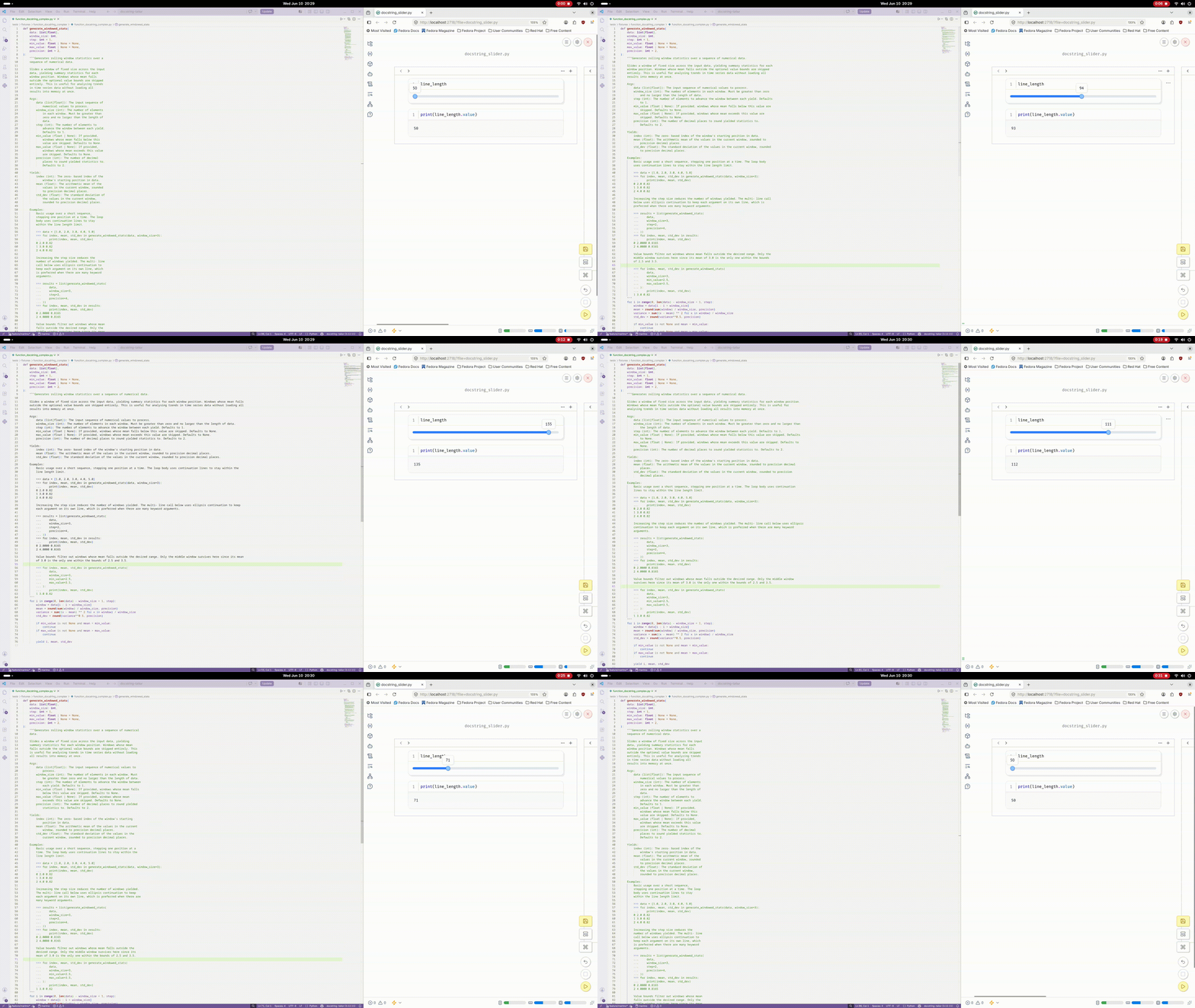
If the image does not show, click here.
Installation
Installation with UV (recommended)
uv add --dev docstring-tailor
Or with pip:
pip install docstring-tailor
Quick start
Run on a single file or directory:
uv run docstring_tailor format my_file.py
uv run docstring_tailor format my_folder
Multiple files and/or folders are also accepted. Without a file path or folder path, it will try to locate the src folder.
The default line length is 100. To customise it:
uv run docstring_tailor format --line-length 88
Configure it permanently in pyproject.toml or in docstring_tailor.toml:
# pyproject.toml
[tool.docstring_tailor]
line-length = 88
# docstring_tailor.toml
line-length = 88
Define a docstring style. Two styles are currently supported: Google and NumPy. Google is the default. Explicit configuration:
uv run docstring_tailor format --style numpy
or in pyproject.toml
[tool.docstring_tailor]
style = "google"
To convert existing docstrings from one style to another, use the convert command instead:
uv run docstring_tailor convert my_file.py --from-style google --to-style numpy
API Overview
Commands
docstring_tailor has two commands: format and convert.
format reformats docstrings in place, in a single style — use this for everyday formatting (adjusting line length, wrapping, whitespace) without changing the docstring style itself.
convert reparses and re-renders docstrings from one style into another — use this the one time you need to migrate a codebase, or part of one, between styles.
uv run docstring_tailor format [PATHS ...] [OPTIONS]
uv run docstring_tailor convert [PATHS ...] --from-style STYLE --to-style STYLE [OPTIONS]
PATHS may contain one or more files and/or directories.
Examples:
uv run docstring_tailor format my_file.py
uv run docstring_tailor format src/
uv run docstring_tailor format src/ tests/test_file.py
uv run docstring_tailor convert src/ --from-style google --to-style numpy
If no paths are provided, docstring_tailor will attempt to locate and format files inside the src directory.
Options
format
Option |
Type |
Default |
Description |
|---|---|---|---|
--line-length |
int |
100 | Maximum number of characters allowed per line after formatting. |
--style |
str |
Docstring style to format to. google or numpy. |
|
--exclude |
str |
— | A glob pattern for paths to exclude. Can be passed multiple times. Single-path patterns (e.g. tests, *.pyi) match by name anywhere in the tree. Relative patterns (e.g. src/generated/*.py) match against the path relative to the project root. |
--diff |
flag | — | Print a unified diff of changes to stdout instead of modifying files. No files are written when this flag is set. |
convert
Option |
Type |
Default |
Description |
|---|---|---|---|
--from-style |
str |
required | Docstring style to convert from. google or numpy. |
--to-style |
str |
required | Docstring style to convert to. google or numpy. Must differ from --from-style. |
--line-length |
int |
100 | Maximum number of characters allowed per line after formatting. |
--exclude |
str |
— | A glob pattern for paths to exclude. Can be passed multiple times. Single-path patterns (e.g. tests, *.pyi) match by name anywhere in the tree. Relative patterns (e.g. src/generated/*.py) match against the path relative to the project root. |
--diff |
flag | — | Print a unified diff of changes to stdout instead of modifying files. No files are written when this flag is set. |
--from-style and --to-style have no config-file or default fallback — both must be given explicitly on every convert invocation, and must be different from each other.
Global
Option |
Type |
Default |
Description |
|---|---|---|---|
--version, -V |
flag | — | Print the installed version and exit. |
--help |
flag | — | Show the help message and exit. |
Examples
CLI
uv run docstring_tailor format src/ --line-length 88
uv run docstring_tailor format my_file.py --style numpy
uv run docstring_tailor format src/ --exclude tests --exclude "src/generated/*.py"
uv run docstring_tailor format src/ --diff
uv run docstring_tailor convert src/ --from-style google --to-style numpy
uv run docstring_tailor convert my_file.py --from-style numpy --to-style google --diff
uv run docstring_tailor --version
uv run docstring_tailor --help
pyproject.toml
[tool.docstring_tailor]
line-length = 88
style = "google"
exclude = ["tests", "src/generated/*.py"]
docstring_tailor.toml
line-length = 88
style = "google"
exclude = ["tests", "src/generated/*.py"]
Example docstrings
- Module docstring
- Class docstring
- Function docstring
- Codeblocks
- Other sections
- Unordered and numbered lists
Module docstring
Google / Numpy (identical for this example)
"""Demonstrates a minimal Google or Numpy style module docstring.

This module exists as a formatting example and illustrates the typical
structure of a docstring, including a concise summary line followed by
an additional descriptive paragraph.
"""
- Leave a blank line between the summary line and the more elaborate description. This applies to both styles.
Class docstring
class ExampleConfiguration:
    """Represents a configuration object used to demonstrate Google-
    style class docstrings.

    This class is provided as a formatting example and illustrates how
    attributes are documented consistently in the Google docstring
    style.

    Attributes:
        example_argument_1 (str): Stores the first configuration value
            provided at initialization.
        example_argument_2 (int): Stores the second configuration
            value provided at initialization.
    """
- The
Attributessection is recognized by the formatter and triggers special indentation rules for attribute entries. - If an attribute's description runs onto the next line, it must be indented one extra level beyond the attribute name. The formatter relies on this indentation to tell a new attribute entry apart from a continuation of the previous one.
NumPy
class ExampleConfiguration:
    """Represents a configuration object used to demonstrate NumPy-
    style class docstrings.

    This class is provided as a formatting example and illustrates how
    attributes are documented consistently in the NumPy docstring
    style.

    Attributes
    ----------
    example_argument_1 : str
        Stores the first configuration value provided at
        initialization.
    example_argument_2 : int
        Stores the second configuration value provided at
        initialization.
    """
- The
Attributessection header is followed by a line of dashes matching its length (----------). - Each attribute is written as
name : type, and its description starts on the next line. Continuation lines are indented to line up with the description, one level deeper than thename : typeline.
Function docstring
def example_function(example_argument_1: str, example_argument_2: int) -> str:
    """Demonstrates a Google-style function docstring with multiple
    sections.

    This function exists purely as a formatting example and
    illustrates how Args, Returns, Examples, and Raises sections are
    structured in a Google-style docstring.

    Args:
        example_argument_1 (str): First example input value used to
            construct a formatted result string.
        example_argument_2 (int): Second example input value used to
            influence the transformation logic.

    Returns:
        str: A formatted string combining both input arguments into a
            single human-readable representation.

    Examples:
        Basic usage with typical inputs produces a simple combined
        string:

        >>> example_function("alpha", 3)
        'alpha-3'

        You can also write text in between two Python REPL sections,
        and this part will be formatted, while the two small code
        sections won't be formatted.

        >>> example_function(
        ...     "beta",
        ...     7,
        ... )
        'beta-7'

    Raises:
        ValueError: Raised when example_argument_2 is negative or
            zero, as only positive integers are considered valid in
            this demonstration.
    """
    if example_argument_2 <= 0:
        raise ValueError("example_argument_2 must be positive")

    return f"{example_argument_1}-{example_argument_2}"
Args,Returns,Examples, andRaisesare all keywords recognized by the package.- You can use either
ArgsorArgumentsfor the argument section, andExampleorExamplesfor the example section. - As with the
Attributessection above, add one extra level of indentation for the description of an argument, return value, or error, whenever it spans multiple lines. - In the
Example(s)section, start the Python REPL with>>>and use...for continuation lines, matching Pydoc conventions. - These same keywords can also be used in module or class docstrings — for example, an
Argssection in a class docstring, or anExample(s)section in a module docstring.
NumPy
def example_function(example_argument_1: str, example_argument_2: int) -> str:
    """Demonstrates a NumPy-style function docstring with multiple
    sections.

    This function exists purely as a formatting example and
    illustrates how Parameters, Returns, Examples, and Raises sections
    are structured in a NumPy-style docstring.

    Parameters
    ----------
    example_argument_1 : str
        First example input value used to construct a formatted
        result string.
    example_argument_2 : int
        Second example input value used to influence the
        transformation logic.

    Returns
    -------
    str
        A formatted string combining both input arguments into a
        single human-readable representation.

    Examples
    --------
    Basic usage with typical inputs produces a simple combined string:

    >>> example_function("alpha", 3)
    'alpha-3'

    You can also write text in between two Python REPL sections, and
    this part will be formatted, while the two small code sections
    won't be formatted.

    >>> example_function(
    ...     "beta",
    ...     7,
    ... )
    'beta-7'

    Raises
    ------
    ValueError
        Raised when example_argument_2 is negative or zero, as only
        positive integers are considered valid in this demonstration.
    """
    if example_argument_2 <= 0:
        raise ValueError("example_argument_2 must be positive")

    return f"{example_argument_1}-{example_argument_2}"
Parameters,Returns,Examples, andRaisesare all keywords recognized by the package. Each is followed by an underline of dashes matching the header's length.- Parameters and return values are documented as
name : type(or justtypefor a return value), with the description indented on the following line(s). - As with the
Attributessection above, add one extra level of indentation for a description that spans multiple lines, so it lines up under thename : typeentry rather than under the header. - In the
Examplessection, start the Python REPL with>>>and use...for continuation lines, matching Pydoc conventions — same as Google style. - These same section keywords can also be used in module or class docstrings — for example, a
Parameterssection in a class docstring, or anExamplessection in a module docstring.
Codeblocks
Google / Numpy (identical for this example)
"""Demonstrates a Google or Numpy style module docstring containing
a code block.

This module-level docstring is used as a formatting example and shows
how code blocks can be embedded inside docstrings using fenced
delimiters.

~~~
def example_function(x, y):
    return x + y
~~~
- A code block can appear inside the
Example(s)section, but it doesn't have to — it can also stand on its own outside of it. - Either backticks (
```) or tildes (~~~) can be used to fence the block, the same way code blocks work in markdown files. This is true for both styles.
Other sections
Google — Yields
def example_generator(n):
    """Generators have a ``Yields`` section instead of a ``Returns``
    section.

    Args:
        n (int): The upper limit of the range to generate, from 0 to
            `n` - 1.

    Yields:
        int: The next number in the range of 0 to `n` - 1.
    """
NumPy — Yields
def example_generator(n):
    """Generators have a ``Yields`` section instead of a ``Returns``
    section.

    Parameters
    ----------
    n : int
        The upper limit of the range to generate, from 0 to `n` - 1.

    Yields
    ------
    int
        The next number in the range of 0 to `n` - 1.
    """
Yieldsis supported as a drop-in replacement forReturnsin both styles, for use in generator functions.
Google — Note
"""Demonstrates a Google-style module docstring containing a Note
section.

This module-level docstring is used as a formatting example and
illustrates how additional informational sections can be included
alongside the main description in a Google-style docstring.

Note:
    The formatting of this docstring is intentionally designed to test
    how note sections are detected and preserved during docstring
    transformation.
"""
Noteis a supported keyword; you can use eitherNoteorNotes.
NumPy — Notes
"""Demonstrates a NumPy-style module docstring containing a Notes
section.

This module-level docstring is used as a formatting example and
illustrates how additional informational sections can be included
alongside the main description in a NumPy-style docstring.

Notes
-----
The formatting of this docstring is intentionally designed to test how
notes sections are detected and preserved during docstring
transformation.
"""
Notesis the conventional NumPy keyword for this section (as opposed toNote, which is the singular form used in Google style).
Unordered and numbered lists
The following examples are valid for both Google and NumPy styles, since list formatting isn't tied to a particular section keyword.
"""Demonstrates that docstrings can include structured lists.

This module-level docstring is used as a formatting example and shows
how unordered lists can be represented inside a docstring. Each list
item is recognized by the formatter and rendered on a separate line.

Items:
- Demonstrates that docstrings may contain structured unordered lists
  that are parsed and formatted consistently by the docstring
  formatter.
- Shows that each list item is treated as an independent element and
  is wrapped separately when exceeding the configured line length.
- Illustrates that long list items may span multiple lines while
  preserving indentation and list structure integrity across
  formatting operations.
"""
"""Demonstrates that docstrings can include structured lists.

This module-level docstring is used as a formatting example and shows
how numbered lists can be represented inside a docstring. Each list
item is recognized by the formatter and rendered on a separate line.

Steps:
1. Demonstrates that docstrings may contain structured numbered lists
   that are parsed and formatted consistently by the docstring
   formatter.
2. Shows that each list item is treated as a separate logical element
   and is wrapped independently when exceeding the configured line
   length.
3. Illustrates that long list items may span multiple lines while
   preserving indentation and list structure integrity across
   formatting operations.
"""
- Unordered and numbered lists can be a nice addition to a docstring from time to time. As with the sections above, indentation is what the formatter uses to detect where a new list item begins.
What Your line-length says about You!
60 characters per line — The Minimalist Monk 🧘
You believe every character has a purpose and every extra column is a personal failure 😤. You keep your docstrings short, your functions tiny, and your emotional attachment to whitespace surprisingly strong. You don't need room to explain your code because your code should be obvious. If a sentence doesn't fit in 60 characters, you simply rewrite the sentence until it does. Brevity is not a preference for you. Brevity is a lifestyle.
80 characters per line — The Digital Archaeologist 🦖
You have been programming for at least half a century, and you still remember when computers were mysterious machines instead of fancy boxes running websites. You believe software peaked before color displays, and honestly, you are a little disappointed with where things went 😔. You know that everything after assembly was already too high-level and a mistake, because real programming means understanding the machine, not asking some framework to do the work for you. You hate GenAI because you believe thinking is the programmer's job. Python? Far too comfortable. Your motto is simple: real programmers toggle individual transistors. Everything after that is just frameworks ⚙️.
88 characters per line — The Black Ritualist 🖤
You are nostalgic for the comforting embrace of Black, where every formatting decision has already been made for you. You don't want to risk the chaos of choosing your own line length because what if you accidentally become different? 😨 You trust the collective wisdom of the formatter, the community, and the thousands of developers who came before you. You are not afraid of change exactly; you are just very comfortable knowing that Black has already decided your fate. Peace through formatting consistency ✨.
100 characters per line — The Peacekeeper 🤝
You chose 100 characters because you wanted everyone to be happy, including the people who review your code and the people who have to read it on a laptop. You looked at 80 characters and thought it felt a little cramped, but you looked at 120 and felt society was moving too fast 😅. You carefully live in the middle, avoiding formatting wars and unnecessary debates. Nobody writes angry comments about your line length, nobody praises it either, and that quiet neutrality is exactly the comfortable existence you wanted.
240 characters per line — The Ultrawide Warrior 🖥️
You claim you increased your line length because it improves readability, but everyone knows the real reason: you want people to notice your enormous ultrawide monitor. You paid for every pixel, and you refuse to leave any of them unemployed 😎. Your docstrings stretch from one side of the screen to the other just to prove your setup is bigger than everyone else's. Whenever someone questions your line length, you casually mention your monitor resolution, refresh rate, and somehow the GPU model.
500 characters per line — The Horizon Programmer 🌌
You don't wrap text because wrapping is a skill issue. You let photons travel uninterrupted across the entire display because your docstrings deserve the full cinematic experience 🎬. You combine programming with neck exercises, allowing you to safely skip neck day at the gym. You don't use a monitor anymore; you rent a cinema, sit in the back row, and program using a telescope pointed at your code 🔭. Your Git diffs require geological surveys, satellite mapping, and a team of explorers. NASA can read your docstrings from orbit 🚀.
Resources
Core resources
Resource |
Description |
Link |
|---|---|---|
| PEP 257 - Docstring Conventions | Documents the semantics and conventions associated with Python docstrings. | Link |
| Google Python Style Guide | Lists dos and don'ts for Python programs. | Link |
| Numpy Style Guide | Describes the syntax and best practices for docstrings used with the numpydoc extension for Sphinx | Link |
| Types of indentation | Wikipedia article that defines different kinds of indentation | Link |
Additional resources
Resource |
Description |
Link |
|---|---|---|
| PEP 8 - Style Guide for Python Code | Gives coding conventions for the Python code comprising the standard library in the main Python distribution. | Link |
Release Notes
Version |
Release date |
Type |
Details |
|---|---|---|---|
0.1.0 |
2026-05-31 | Initial release | First public release of docstring-tailor. Includes
|
0.1.1 |
2026-05-31 | Documentation update | Updated the README.md file with the 'Installation' and 'Quick Start' section. |
0.2.0 |
2026-06-07 | Feature update |
|
0.2.1 |
2026-06-11 | Feature update |
|
0.3.0 |
2026-07-20 | Feature update & bug fixes |
|
Roadmap
Must have
- Parsing-time validation: the parser enforces structural rules on a docstring (e.g. well-formed sections, consistent indentation, correctly closed lists and code blocks) and rejects it if those rules aren't met. Formatting, rendering, and conversion must never run on a docstring that fails this check — malformed input should be refused at the parsing stage, not silently passed through. A dedicated lint/check command exposes these errors directly to the user, with clear and actionable messages, rather than only blocking format/convert silently.
- Parsing module for the remaining docstring formats (Sphinx, Epydoc), extending the existing style-agnostic intermediate representation (IR) to cover all four major styles.
- Formatting module for the remaining docstring formats (Sphinx, Epydoc), driven entirely by the same IR already used for Google and NumPy.
Nice to have
- Make sure the package can be used as a pre-commit hook.
- LSP (Language Server Protocol) support, enabling real-time feedback on malformed
docstrings directly in editors like VS Code, PyCharm and Neovim. Built on top of
the validation layer and the existing parser, with
pyglshandling the protocol. Requires position tracking in the IR (line/column numbers per node) as a prerequisite, for precise diagnostics and editor highlighting. - Make the package available as a VSCode extension.
Maybe later
- Parameter that allows the user to format module, class and function docstrings independently.


Download files
Download the file for your platform. If you're not sure which to choose, learn more about installing packages.
Source Distribution
Built Distribution
Filter files by name, interpreter, ABI, and platform.
If you're not sure about the file name format, learn more about wheel file names.
Copy a direct link to the current filters
File details
Details for the file docstring_tailor-0.3.0.tar.gz.
File metadata
- Download URL: docstring_tailor-0.3.0.tar.gz
- Upload date:
- Size: 85.7 kB
- Tags: Source
- Uploaded using Trusted Publishing? No
- Uploaded via: uv/0.8.13
File hashes
| Algorithm | Hash digest | |
|---|---|---|
| SHA256 |
1cbab7452d4683d6b85967ee1e565913b63cb5134e9d96bcbf97e1958e1ce622
|
|
| MD5 |
81f52e42810a645802994e3bcb3267c3
|
|
| BLAKE2b-256 |
c5e60b38dbde6f032e55d9556490f176ee2fcc945acd114d714b17de58ac2aa2
|
File details
Details for the file docstring_tailor-0.3.0-py3-none-any.whl.
File metadata
- Download URL: docstring_tailor-0.3.0-py3-none-any.whl
- Upload date:
- Size: 52.7 kB
- Tags: Python 3
- Uploaded using Trusted Publishing? No
- Uploaded via: uv/0.8.13
File hashes
| Algorithm | Hash digest | |
|---|---|---|
| SHA256 |
c41b783b7ffc8497d17235a877091920ddf7544ab253198a2546b3870f151cea
|
|
| MD5 |
82a1f556dae4564022483bc65c067f28
|
|
| BLAKE2b-256 |
f2ab5d05598ebe1e01d028f8813122114194203e8fad3034415fcdb37a424db3
|






