
Automatic Markdown Documentation and Directory Tree Generator
This script generates 2 files (directory_tree.md and all_files_content.md) of structured Markdown documentation for any project directory:
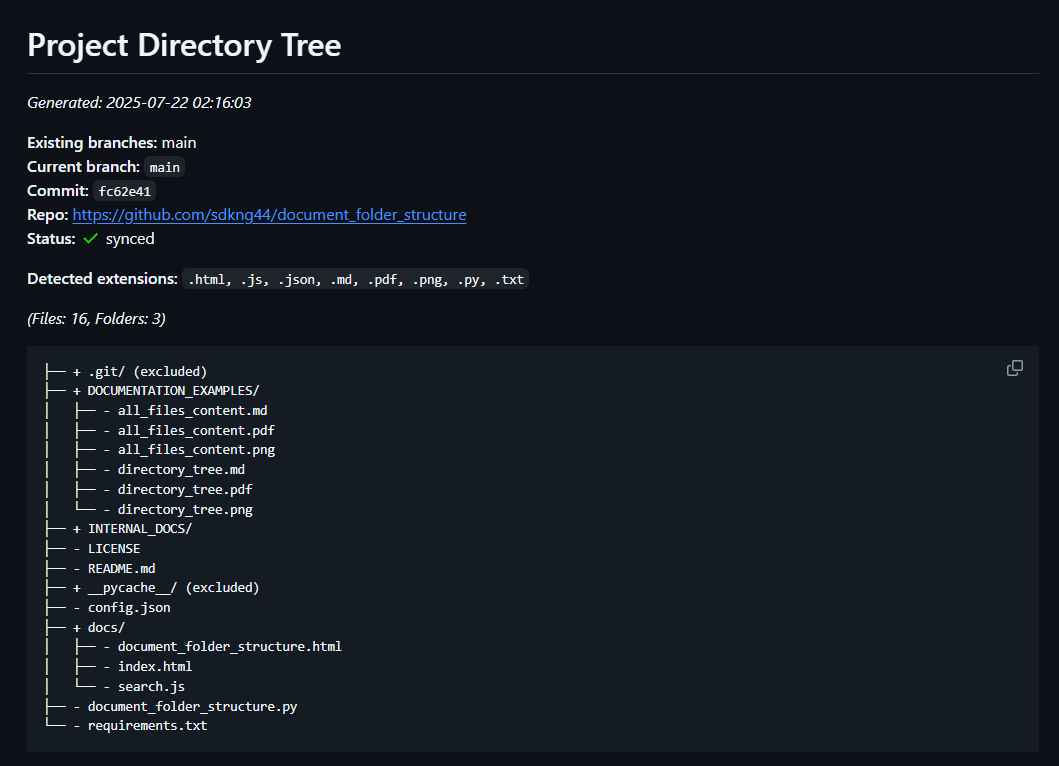
- directory_tree.md: Directory structure with Git metadata (branch, commit, repo, etc.)
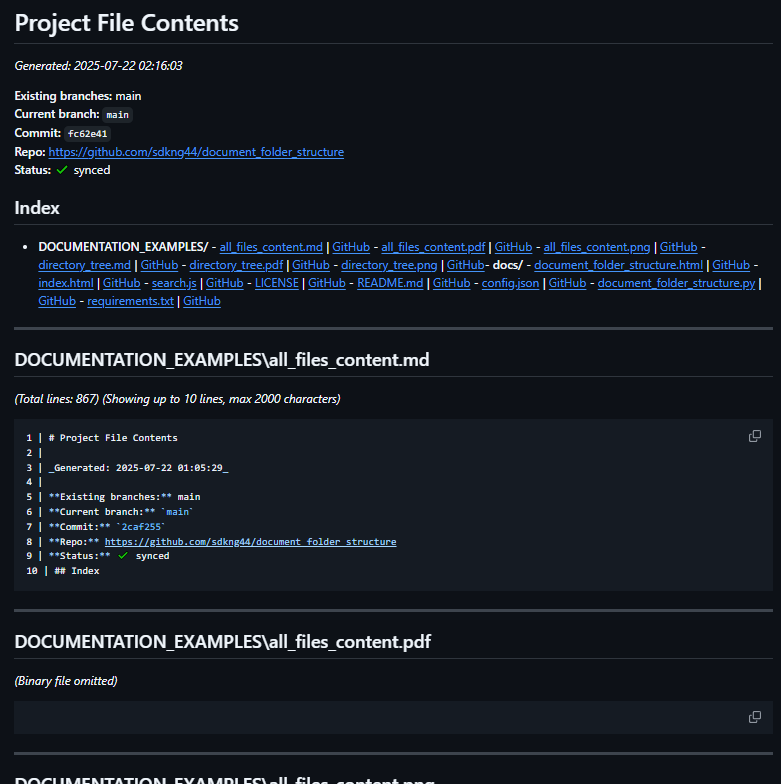
- all_files_content.md: Grouped file index and content previews (with truncation for large files, CSV/Excel previews, and special handling for binaries and logs)
- Skips configured folders/files (see configuration)
- Automatically adds the documentation folder to
.gitignore - Supports GitHub/GitLab links to each file at current commit (if Git is configured)
Documentation Example
Installation
A. Install from PyPI (recommended for most users)
pip install document-folder-structure
B. Install from Source (GitHub)
- 1. Clone the repo:
git clone https://github.com/sdkng44/document-folder-structure.git
cd document-folder-structure
- 2. Install dependencies:
pip install -r requirements.txt
Usage
A. As CLI (after installing from PyPI):
Once installed, run from any folder providing the full path to the project you want to document as an argument:
document-folder-structure C:\path\to\myproject
or in Linux:
document-folder-structure /path/to/your/project
B. From Source (if you cloned the repo):
Always run from the root of the cloned repo (where the document_folder_structure/ folder is).
python -m document_folder_structure C:\path\to\myproject
or in Linux:
python -m document_folder_structure /path/to/your/project
The documentation files will be created inside the INTERNAL_DOCS/ folder within the target project directory you specified.
Optional arguments:
--config Path to JSON configuration file (default: config.json)
--max-depth Maximum directory depth to display (default: 4)
--tree-title Custom title for the directory tree Markdown
--truncate-lines Max lines for README/large files (default: 10)
--truncate-chars Max characters for file previews (default: 2000)
--max-log-lines Max lines to preview for .log files (default: 10)
--max-preview-columns Max columns to preview in CSV/Excel tables (default: 20)
--no-lines Turn off line numeration on Markdown file content preview (default show line numeration)
Example with arguments (on Windows):
document-folder-structure C:\home\user\myproject --max-depth 3 --truncate-lines 8 --max-preview-columns 15 --no-lines
When using --no-lines, line numbers will not be shown in the file previews (except for CSV/Excel tables).
Section headers, line totals, and file separation are always included to keep the documentation clear.
Output
All output files are placed in INTERNAL_DOCS/ inside your project root:
directory_tree.md: Directory tree with Git and file extension summaryall_files_content.md: File index and preview for all non-binary, non-excluded files
If .gitignore does not exist, it is created. The folder INTERNAL_DOCS/ is always added to .gitignore (if not present), to help avoid committing generated documentation.
Configuration
You can customize exclusions, tree directory depth and truncate file content on Markdown documentation in a JSON config file. First 4 lines are for files, extensions and directories exclusion before the tree generation, 5-12 lines are for truncate file content on Markdown documentation.
Example config.json:
{
    "excluded_dirs": ["node_modules", "__pycache__", ".git", "deps", ".fingerprint", "build", "incremental"],
    "excluded_files": [".gitignore", ".849C9593-D756-4E56-8D6E-42412F2A707B"],
    "excluded_extensions": [".log", ".tmp", ".bak", ".db-shm", ".db-wal", ".npmrc", ".prettierignore", ".prettierrc"],
    "max_depth": 4,
    "truncate_files": ["README", "LICENSE", "CHANGELOG", "CONTRIBUTING", "SECURITY"],
    "truncate_exts": [".md", ".txt"],
    "truncate_dirs": ["docs"],
    "truncate_file_pairs": [["document_folder_structure", ".html"]],
    "max_truncate_chars": 2000,
    "truncate_lines": 10,
    "max_log_lines": 10,
	"max_preview_columns": 20
}
Features
- Handles large files, binary files, and non-text files smartly (binary omitted, logs/README truncated)
- Markdown code highlighting by extension (.py, .js, .md, etc.)
- CSV files: Markdown table preview of first N rows and M columns (configurable)
- Excel (.xlsx): Markdown table preview of first N rows per sheet and up to M columns (requires openpyxl)
- Customizable file/folder exclusions by name, extension, or directory
- Adds the documentation folder to .gitignore automatically (with checks for missing/newline)
- Shows a summary of unique file extensions found in the tree
- Supports Linux, macOS, and Windows
Limitations
.xls(old Excel format) preview is not supported—use.xlsxinstead.- For correct GitHub/GitLab links, your repo must have a remote named
origin.
Example Output
After running, you'll find the following in INTERNAL_DOCS/:
directory_tree.mdall_files_content.md
Both files are readable Markdown, suitable for project documentation, onboarding, or quick file audits.
Requirements
- Python 3.6+
- openpyxl (for
.xlsxpreview) - All dependencies listed in
requirements.txt
License
Apache License 2.0
Created by sdkng44@gmail.com
1 maintainer

Download files
Download the file for your platform. If you're not sure which to choose, learn more about installing packages.
Source Distribution
Built Distribution
Filter files by name, interpreter, ABI, and platform.
If you're not sure about the file name format, learn more about wheel file names.
Copy a direct link to the current filters
File details
Details for the file document_folder_structure-0.2.3.tar.gz.
File metadata
- Download URL: document_folder_structure-0.2.3.tar.gz
- Upload date:
- Size: 17.3 kB
- Tags: Source
- Uploaded using Trusted Publishing? Yes
- Uploaded via:
twine/6.1.0 CPython/3.12.9
File hashes
| Algorithm | Hash digest | |
|---|---|---|
| SHA256 |
5107334edc97e5763287f56a493cacdfe3aa426a3462ac4bb358a86f76e30c27
|
|
| MD5 |
07f7de8eb7005b534a3ad6d9b9d28592
|
|
| BLAKE2b-256 |
496474f30922497ecf62af2584172254c3989fc0ec76d9958ac58198ae2e7d70
|
Provenance
The following attestation bundles were made for document_folder_structure-0.2.3.tar.gz:
Publisher:
python-pypi-publish.yml on sdkng44/document-folder-structure
-
Statement:
-
Statement type:
https://in-toto.io/Statement/v1 -
Predicate type:
https://docs.pypi.org/attestations/publish/v1 -
Subject name:
document_folder_structure-0.2.3.tar.gz -
Subject digest:
5107334edc97e5763287f56a493cacdfe3aa426a3462ac4bb358a86f76e30c27 - Sigstore transparency entry: 307419317
- Sigstore integration time:
-
Permalink:
sdkng44/document-folder-structure@270e71f5fee3acb718110998459e3763fc5ea415 -
Branch / Tag:
refs/tags/v0.2.3 - Owner: https://github.com/sdkng44
-
Access:
public
-
Token Issuer:
https://token.actions.githubusercontent.com -
Runner Environment:
github-hosted -
Publication workflow:
python-pypi-publish.yml@270e71f5fee3acb718110998459e3763fc5ea415 -
Trigger Event:
push
-
Statement type:
File details
Details for the file document_folder_structure-0.2.3-py3-none-any.whl.
File metadata
- Download URL: document_folder_structure-0.2.3-py3-none-any.whl
- Upload date:
- Size: 16.5 kB
- Tags: Python 3
- Uploaded using Trusted Publishing? Yes
- Uploaded via:
twine/6.1.0 CPython/3.12.9
File hashes
| Algorithm | Hash digest | |
|---|---|---|
| SHA256 |
b6bed34230de101cb1148b54b9deaeef42d00bf9ffc5c31e280f70c6a80a9d87
|
|
| MD5 |
df54dd831a8773577d297d4cb218d7c1
|
|
| BLAKE2b-256 |
d0cc0c16cb41cfa7775386d9d5af6e617b4e93abcdb58d34ad77bcf6d4653860
|
Provenance
The following attestation bundles were made for document_folder_structure-0.2.3-py3-none-any.whl:
Publisher:
python-pypi-publish.yml on sdkng44/document-folder-structure
-
Statement:
-
Statement type:
https://in-toto.io/Statement/v1 -
Predicate type:
https://docs.pypi.org/attestations/publish/v1 -
Subject name:
document_folder_structure-0.2.3-py3-none-any.whl -
Subject digest:
b6bed34230de101cb1148b54b9deaeef42d00bf9ffc5c31e280f70c6a80a9d87 - Sigstore transparency entry: 307419319
- Sigstore integration time:
-
Permalink:
sdkng44/document-folder-structure@270e71f5fee3acb718110998459e3763fc5ea415 -
Branch / Tag:
refs/tags/v0.2.3 - Owner: https://github.com/sdkng44
-
Access:
public
-
Token Issuer:
https://token.actions.githubusercontent.com -
Runner Environment:
github-hosted -
Publication workflow:
python-pypi-publish.yml@270e71f5fee3acb718110998459e3763fc5ea415 -
Trigger Event:
push
-
Statement type:














