

Dodaios
English · 简体中文
Dodaios is an open-source agent OS for your desktop: it runs your coding agents, browser and apps by voice or chat, on your own machine.
Formerly Personal Jarvis. Same project, same license, new name (why).




Install · Why Dodaios · Code by talking · Workflow · Features · Docs · Website · Discord · X
If Dodaios is useful to you, a star on GitHub helps other people find it.
No API key needed if you have a Claude or ChatGPT subscription, or a local model.
Install
Windows (PowerShell)
irm https://raw.githubusercontent.com/Dodaios/Dodaios/main/install/install.ps1 | iex
macOS and Linux
curl -fsSL https://raw.githubusercontent.com/Dodaios/Dodaios/main/install/install.sh | bash
Nothing to install first, no GPU needed. Bring one API key, a Claude or ChatGPT subscription, or a local model. Desktop installers and the server setup are under more ways to install.
Why Dodaios
- Local, no account. The app and your data stay on your machine. There is no sign-up and no cloud of ours between you and your models.
- Any model or subscription. Hosted models, local models through Ollama, or the Claude and ChatGPT plans you already pay for.
- Many coding agents side by side. Claude Code, Codex, OpenCode and more run in live panes you can watch and steer.
- Voice. Your own wake phrase, live conversations and dictation, with speech recognition that can run offline.
| Dodaios | Coding-agent CLIs in separate terminals | Hosted chat assistants | |
|---|---|---|---|
| Runs on your machine | Yes. Models can be local or hosted | The CLI runs locally, the model is usually hosted | No, it runs in the provider's cloud |
| Several coding agents side by side | Yes, in live panes with call signs (T1, T2) | One terminal per agent, switched by hand | No coding-agent panes |
| Voice | Wake phrase, live conversation, dictation | Varies by tool | Varies by provider |
| Open source | Yes, Apache 2.0 | Varies: Codex CLI and OpenCode are, Claude Code is not | Usually not |
Code by talking
Open a project, put Claude Code, Codex or OpenCode in a few panes, and talk to them. Each pane has a call sign, so you steer them like a team:
"T1, run the tests."
"T2, fix whatever T1 finds."
"T3, write the changelog for this release."
"What is T2 doing right now?"
- You speak, Dodaios writes the prompt. It turns your sentence into a full, project-aware brief and types it into the right pane.
- Same job or split job. "Tell T1 and T2 to run the same checks" sends one instruction; "Have T1 and T2 split the audit" hands out separate parts.
- New panes on request. Ask for more agents and Dodaios opens and briefs them. Panes you did not name stay untouched.
- No guessing. If a call sign is unclear, Dodaios asks before it sends anything, and every pane shows whether your instruction really arrived.
- Hang up, the work goes on. An instruction you already gave is still delivered, and the agents keep working after the call ends.
It uses the subscriptions you already pay for, and every pane is still a real terminal you can type into. See the Agentic IDE guide.
From one prompt to a merged pull request
- Plan with the lead agent. Say what you want, by voice or in chat. The lead agent asks what it needs and hands the work to the right agent or pane.
- Build in parallel. Claude Code, Codex, OpenCode and six more coding agents run side by side in live panes, each on its own branch in its own git worktree if you want.
- Review every change. Diffs, source control and an editor sit next to the panes, so you read each line before it lands.
- Ship from the Git panel. Branches, pull requests, CI checks and merges, without switching to the browser.
- Hand off the rest. Assistant agents, built in or running on Hermes and OpenClaw, write the release notes, draft the launch posts and keep their routines going.
- Remember it all. A local memory wiki keeps the context of every chat, agent and project for next time.
Everything in one app
| Agentic IDE Every coding agent in live terminal panes, side by side. |
Git and pull requests Diffs, branches, PRs and CI checks built in. |
Lead agent One assistant that plans, delegates and reports back. |
| Agent team Specialists with their own chat, tools, schedule and memory. |
Hermes and OpenClaw Run agents on the open agent runtimes you already use. |
Voice Wake word, live conversations, dictation and phone calls. |
| Computer use Clicks, types and reads your desktop and browser. |
Memory A local wiki your agents read, write and cite. |
Plugins, MCP and skills More than 40 one-click integrations, or bring your own. |
| Any model Hosted, local, or your Claude and ChatGPT subscriptions. |
Routines Agents do recurring work on a schedule, without being asked. |
Artifacts Every report, page and file your agents make, in one place. |
It is free and open source, and it runs on your own machine: Windows, macOS, Linux, or a server without a screen. You do not need an account, and there is no cloud of ours between you and your models. Every action that could change your system waits for your approval.
Run every coding agent at once
https://github.com/user-attachments/assets/290a8687-f925-4bb1-ac4c-0f23ea948a07
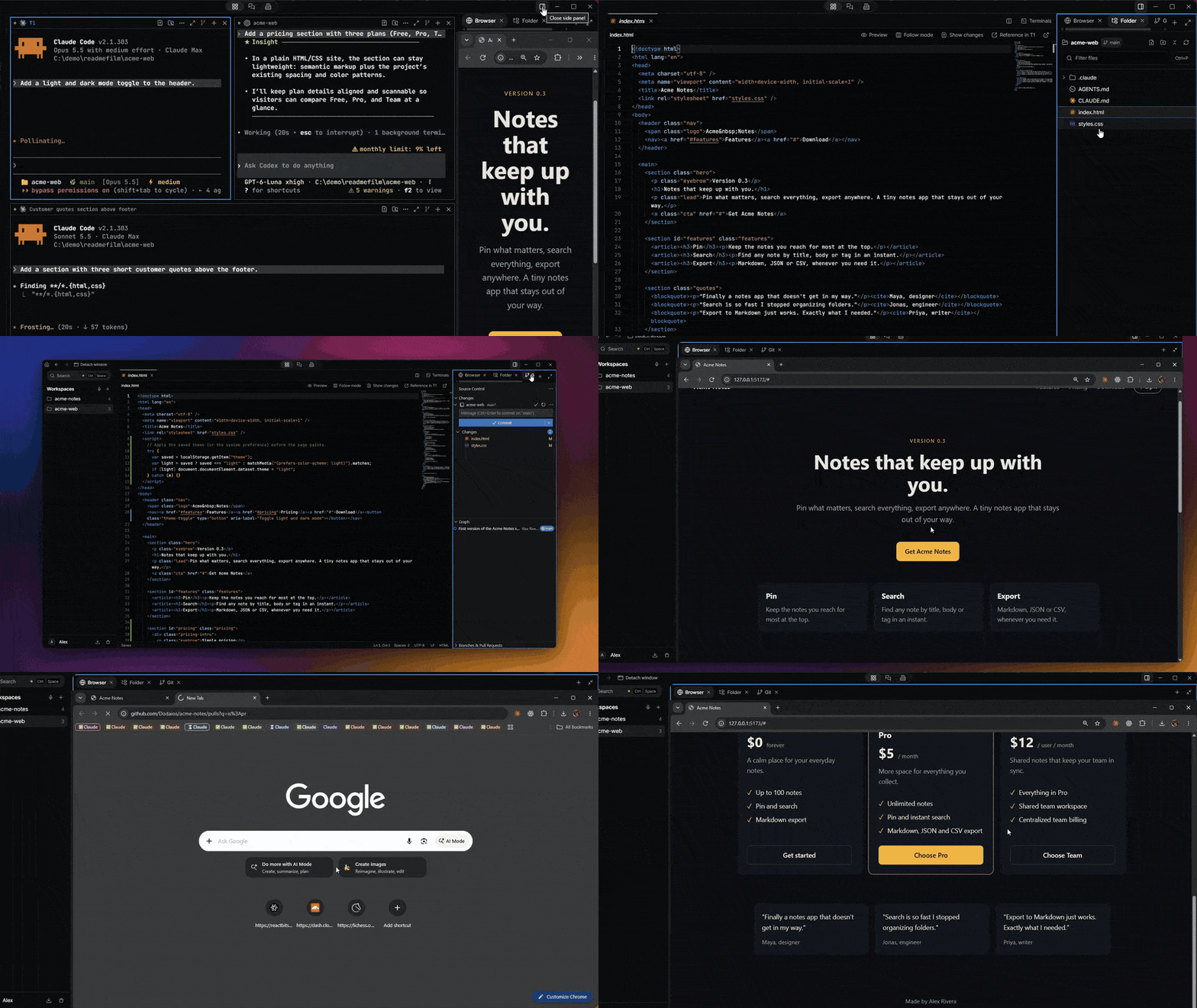
A real recording of the Agentic IDE: three agents at work, your own Chrome in the side panel, files, Git diff and a second workspace.
The Agentic IDE turns one screen into a room full of coding agents. You open a project, split the screen into panes, and give each pane its own coding agent. Every pane gets a short call sign such as T1 or T2, so you can steer them without touching the keyboard. You might say "Tell T1 to write the tests", "What is T2 working on?" or "Send the fix plan to all panes".
- Dodaios finds the coding tools you already have installed and starts any of them in a pane with one key. You keep using the subscriptions you pay for.
- You can send the same task to several panes and compare what comes back.
- You can talk to Dodaios while the agents type, and it passes your brief to the right pane by its call sign.
- Every pane is a real terminal, so you can type into it yourself at any time.
The Agentic IDE guide has the details.
A team of agents that keeps working
Dodaios Agents are specialists you create with one click and keep for as long as you like: a researcher, a release manager, a marketing writer, or whatever your work needs.
- Each agent has one chat that never ends, so tomorrow you continue where you stopped today.
- Agents keep private notes on what they learned from their own work, and they get better at your tasks over time.
- Give an agent a routine and it does the work on schedule, without being asked.
- Files, reports and plans they produce land in Artifacts, and you can see every tool they used along the way.
- Longer coding missions run in their own copy of your repository (a git worktree), can split into parallel workers, and pass a review before you see the result.
Read more in the Agents guide, how agents learn and routines.
Talk to your computer
You pick your own wake phrase, such as "Hey Nova", "Computer" or anything else, and then you talk.
- Conversations are live and take turns naturally. Mid-sentence you can ask it to open a website, check your calendar or start an agent.
- Dictation types what you say into any app and learns your words from a personal dictionary.
- Phone calls go through your own number. You can call Dodaios, or let it call someone for you once you approve.
- Speech recognition and voices can run fully offline. Hosted voices are optional.
Read more in the voice guide and the dictation guide.
Connect your tools
- Install plugins from the marketplace with one sign-in in your browser, or add any MCP server yourself.
- Dodaios finds command-line tools such as GitHub, Vercel, Supabase, Stripe, Docker and the cloud CLIs, and signs you in to them from the app.
- Skills are reusable instructions that Dodaios picks up when your request fits one.
- You can reach Dodaios from Telegram and Discord.
- The
dodaioscommand and a local API give your own scripts, and other agents, the same control you have.
Read more about plugins, MCP, command-line tools and the Dodaios CLI.
You stay in control
Every action Dodaios takes passes a risk check with four levels: safe, monitor, ask and block. Anything that could change your system waits for your approval, and every run is recorded, so you can see later exactly what happened. Your keys are kept in your operating system's credential store. Nothing leaves your machine unless you connect a service that needs it.
Read more about safety and approvals and privacy and local data.
More ways to install
The one-line installer is the quickest way in. You do not need to install anything first. If Python is missing, the installer downloads a private copy just for Dodaios, and on Windows it does the same for Git, without administrator rights or questions. It then adds the desktop launcher and opens the app. If you run it again, it updates your existing installation. You choose your language, wake phrase and models inside the app.
You need one API key, a subscription or a local model. A microphone helps for voice. You do not need a GPU.
After the installer has run, open Dodaios from the desktop launcher or from a terminal:
dodaios # full desktop
If you prefer a regular desktop installer, download one here:
- Dodaios for Windows (x64)
- Dodaios for macOS (Apple Silicon)
- Dodaios for macOS (Intel)
- Dodaios for Linux (AppImage, x86_64)
Windows installers are signed under our code signing policy once the SignPath Foundation program approves the project. Free code signing provided by SignPath.io, certificate by SignPath Foundation.
The macOS disk image is not notarized by Apple yet. The first time you open it on macOS 15, go to System Settings > Privacy & Security and click Open Anyway. Up to macOS 14, right-click the app and choose Open. The one-line installer above does not need this step.
To run Dodaios on a server, use pip install dodaios and dodaios serve,
then open http://localhost:47821 in a browser. Using a microphone from another
computer needs HTTPS. The headless deployment guide
explains the setup. If you install with pip or pipx by hand on an Intel Mac or
on Windows ARM64, you also need the
native package index.
The installer sets that up for you.
First steps
- Finish the short setup in the app. Pick your language, a wake phrase (or a keyboard shortcut instead) and one model.
- Say your wake phrase and ask for something, for example "Plan a small project with me and ask what you need to know."
- Open a project folder in the Agentic IDE, or create your first agent.
Works with
- Models: OpenAI, Anthropic Claude, Google Gemini and Vertex AI, OpenRouter, NVIDIA, Ollama and any OpenAI-compatible local server, plus your Claude Code and Codex subscriptions.
- Coding agents: Claude Code, Codex, OpenCode, Kimi Code, GLM, Grok Build, Antigravity, Cursor CLI and DeepSeek Harness.
- Speech: local Whisper, OpenAI, Gemini, Groq, Deepgram and OpenRouter for listening; Piper (local), ElevenLabs, Cartesia, Inworld, Gemini and OpenRouter voices for speaking.
Docs
- Getting started: quick start, app tour
- Everyday use: voice, dictation, memory
- Agents and automation: agentic IDE, agents, computer use, plugins, MCP, CLI
- Models: providers, local models
- Running and fixing: server, architecture, troubleshooting
Contribute
A good place to start is a good first issue. If none are open, pick any issue labeled help wanted or area:docs, or ask in Discussions. The guide to your first contribution in 10 minutes walks you through it. Questions and ideas go to discussions, and security reports follow SECURITY.md.
A star on GitHub helps other people find Dodaios. Sponsors are listed in SPONSORS.md.

License
Apache 2.0. Releases up to and including 1.6.0 keep their original MIT license. See NOTICE and the trademark guidance.
1 maintainer

Metadata
1 maintainer
Release files for dodaios 4.1.1
For a detailed explanation of source distributions (sdists) and built distributions (wheels), please see the package formats documentation.
Source distribution (sdist)
| File | Size | Uploaded | Provenance | |
|---|---|---|---|---|
| dodaios-4.1.1.tar.gz | 98.6 MB | With provenance | Details |
Built distribution (wheel)
| File | Interpreter | ABI | Platform | Reset |
|---|---|---|---|---|
| dodaios-4.1.1-py3-none-any.whl | Python 3 | none | any | Details |
Total release size: 199.6 MB
Release files / dodaios-4.1.1.tar.gz
| Download URL | dodaios-4.1.1.tar.gz |
|---|---|
| Size | 98.6 MB |
| Tags | Source |
|
SHA-256 checksum How to use checksums |
2b294af9ad5bc34276711a5ac85285ed7eea498add8dcc48e3d0b64aed03a164
|
|
BLAKE2b-256 checksum How to use checksums |
bd19a232d528c020c7d03716b37411a534c4ce135c88272370badfb894c63470
|
| Upload date | |
|
Uploaded using Trusted Publishing? What is trusted publishing? |
Yes |
| Uploaded via |
twine/7.0.0 CPython/3.13.14
|
Provenance
Provenance describes where a file came from. On PyPI, provenance is shared via attestations, which provide a verifiable record of the build or publishing details. View details, limitations and caveats.


PyPI Publish Attestation
PyPI verified that this artifact, at this checksum, originated from the publisher listed below.
Signed by GitHub Actions, verified by PyPI on Oct 26, 2026.
Transparency logRelease files / dodaios-4.1.1-py3-none-any.whl
| Download URL | dodaios-4.1.1-py3-none-any.whl |
|---|---|
| Size | 101.0 MB |
| Tags | Python 3 |
|
SHA-256 checksum How to use checksums |
dc697782d0d9c294cc4ef3f30d1bf3de03f8aa56093f82081e4f46379c76f0fb
|
|
BLAKE2b-256 checksum How to use checksums |
e4e6efdfb3b8984b3597c0c404b3c864891b18d349ccfb1e05075ad814e84f18
|
| Upload date | |
|
Uploaded using Trusted Publishing? What is trusted publishing? |
Yes |
| Uploaded via |
twine/7.0.0 CPython/3.13.14
|
Provenance
Provenance describes where a file came from. On PyPI, provenance is shared via attestations, which provide a verifiable record of the build or publishing details. View details, limitations and caveats.
PyPI Publish Attestation
PyPI verified that this artifact, at this checksum, originated from the publisher listed below.
Signed by GitHub Actions, verified by PyPI on Oct 26, 2026.
Transparency logSecurity for dodaios 4.1.1
Provenance
Provenance describes where a file came from. On PyPI, provenance is shared via attestations, which provide a verifiable record of the build or publishing details. View details, limitations and caveats.
Full provenance
All 2 files in this release have been uploaded with provenance metadata.
Attestation for dodaios-4.1.1.tar.gz
PyPI Publish Attestation
PyPI verified that this artifact, at this checksum, originated from the publisher listed below.
Signed by GitHub Actions, verified by PyPI on Oct 26, 2026.
Transparency logA note on package security
PyPI is a repository for distributing packages, not a service for auditing them. While third-party security researchers and our staff do their best to detect and remove malicious packages, PyPI cannot guarantee the quality, security or suitability of any given package.
To learn more about protecting yourself from malicious actors, visit our package security documentation.














