
Dodgem
Dodgem is a Python package for playing and analyzing the board game Dodgem. It provides:
- A command-line interface to play games, build an offline MongoDB evaluation database by perfect analysis, and traverse the game tree
- Perfect-opponent play on 3×3, 4×4, and 5×5 boards using the MongoDB database with a simple Tkinter GUI
- A compact gzipped JSON file (a curated subset of the MongoDB database) that can be fully loaded into memory, eliminating the need for a large on-disk MongoDB instance
- A Python API for programmatic use
- An online Dodgem page that uses the JSON file
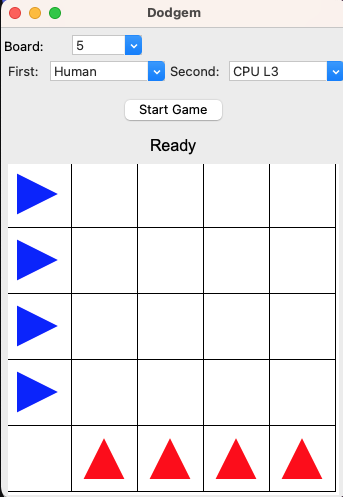
Features
- CPU levels: 1–3 (search + evalmap), 4 (MongoDB-backed, perfect play)
- Evalmap JSON.GZ bundled and refreshable from your MongoDB
- MongoDB-based computation and status reporting
Requirements
- Python 3.10+
- pip
- MongoDB server (only required for database features and CPU level 4; not needed for levels 1–3)
- Tkinter for the GUI
Installation
pip install dodgem-game
Quickstart
- Help
dodgem -h
- Play 10 games on 4x4 at level 4 vs. 4 (requires MongoDB)
dodgem -n 4 -p -r 10 -l 4
- Play a game without MongoDB (levels 1–3) at lavel 2 vs. 3 by showing the process
dodgem -n 4 -p -l 2 -g 3 -r 1 -v 3
- GUI
dodgem --gui
About the data
- The MongoDB evaluation database is computed offline by a nearly perfect analysis.
- The evalmap (JSON.GZ) is a curated subset of that MongoDB database, packaged for fast lookup without MongoDB.
The evalmap produced by this package is used by the online Dodgem page. The online version uses only the evalmap subset (no MongoDB), so it supports CPU levels 1–3. Level 4 (MongoDB-backed) is available in the local CLI/GUI.
Database and Evalmap
- Create MongoDB evaluation DB (per board size):
dodgem -n 4 -c
- Export evalmap JSON.GZ from MongoDB (for all board sizes):
dodgem -e
- Show DB status:
dodgem -n 4 -s
Minimal Python API example
from dodgem import Dodgem

d = Dodgem(n=4)             # loads bundled evalmap by default
d.level = [3, 3]            # both sides level 3 (no MongoDB required)
d.play_games(repetition=5)  # play 5 games and print a summary
Documentation
See https://sekika.github.io/dodgem-py/
- Installation, Quickstart, CLI, GUI
- Game rules, API reference, configuration
- Evalmap format, MongoDB database details
- CPU levels, FAQ
1 maintainer

Metadata
1 maintainer
Release files for dodgem-game 1.0.0
For a detailed explanation of source distributions (sdists) and built distributions (wheels), please see the package formats documentation.
Source distribution (sdist)
| File | Size | Uploaded | |
|---|---|---|---|
| dodgem_game-1.0.0.tar.gz | 5.2 MB | Details |
Built distribution (wheel)
| File | Interpreter | ABI | Platform | Reset |
|---|---|---|---|---|
| dodgem_game-1.0.0-py3-none-any.whl | Python 3 | none | any | Details |
Total release size: 10.3 MB
Release files / dodgem_game-1.0.0.tar.gz
| Download URL | dodgem_game-1.0.0.tar.gz |
|---|---|
| Size | 5.2 MB |
| Tags | Source |
|
SHA-256 checksum How to use checksums |
c6301323d9a613c18e89f0a1f5d38822abf869ab1af12e1efff9abb1c06f876b
|
|
BLAKE2b-256 checksum How to use checksums |
af7f77458427ad66c5979f31ef40db162b5e71de06723969c15de933bbd1bea5
|
| Upload date | |
|
Uploaded using Trusted Publishing? What is trusted publishing? |
No |
| Uploaded via |
twine/6.1.0 CPython/3.13.6
|
Release files / dodgem_game-1.0.0-py3-none-any.whl
| Download URL | dodgem_game-1.0.0-py3-none-any.whl |
|---|---|
| Size | 5.2 MB |
| Tags | Python 3 |
|
SHA-256 checksum How to use checksums |
505f66de09056ea03635bf8db3376aa18e960cb8d1db0d624ff2978f138b5689
|
|
BLAKE2b-256 checksum How to use checksums |
8e5fdf92dc728d11a50df922a9b72a0d0b472949850d79b0c38d7d933b3debcb
|
| Upload date | |
|
Uploaded using Trusted Publishing? What is trusted publishing? |
No |
| Uploaded via |
twine/6.1.0 CPython/3.13.6
|













