
A fan-made Python library for Doki Doki Literature Club!, providing DDLC-style character dialogs, choice menus, and typewriter effects using PySide6. Fully cross-platform.

Project description
dokibox
A fan-made Python library for Doki Doki Literature Club, implementing various in-game prompt boxes using tkinter.
⚠️ Credit & IP Guidelines
dokiboxis a fan derivative work based on Doki Doki Literature Club (DDLC) and is not officially affiliated with Team Salvato. The original game can be downloaded here or from the Steam store page.Any user creating derivative works with this library must strictly follow the official IP guidelines.
Special thanks to Joseph from Team Salvato for his support and responses via email!
Installation
Install from PyPI:
pip install dokibox
Import
import dokibox
ynbox — Yes/No Dialog
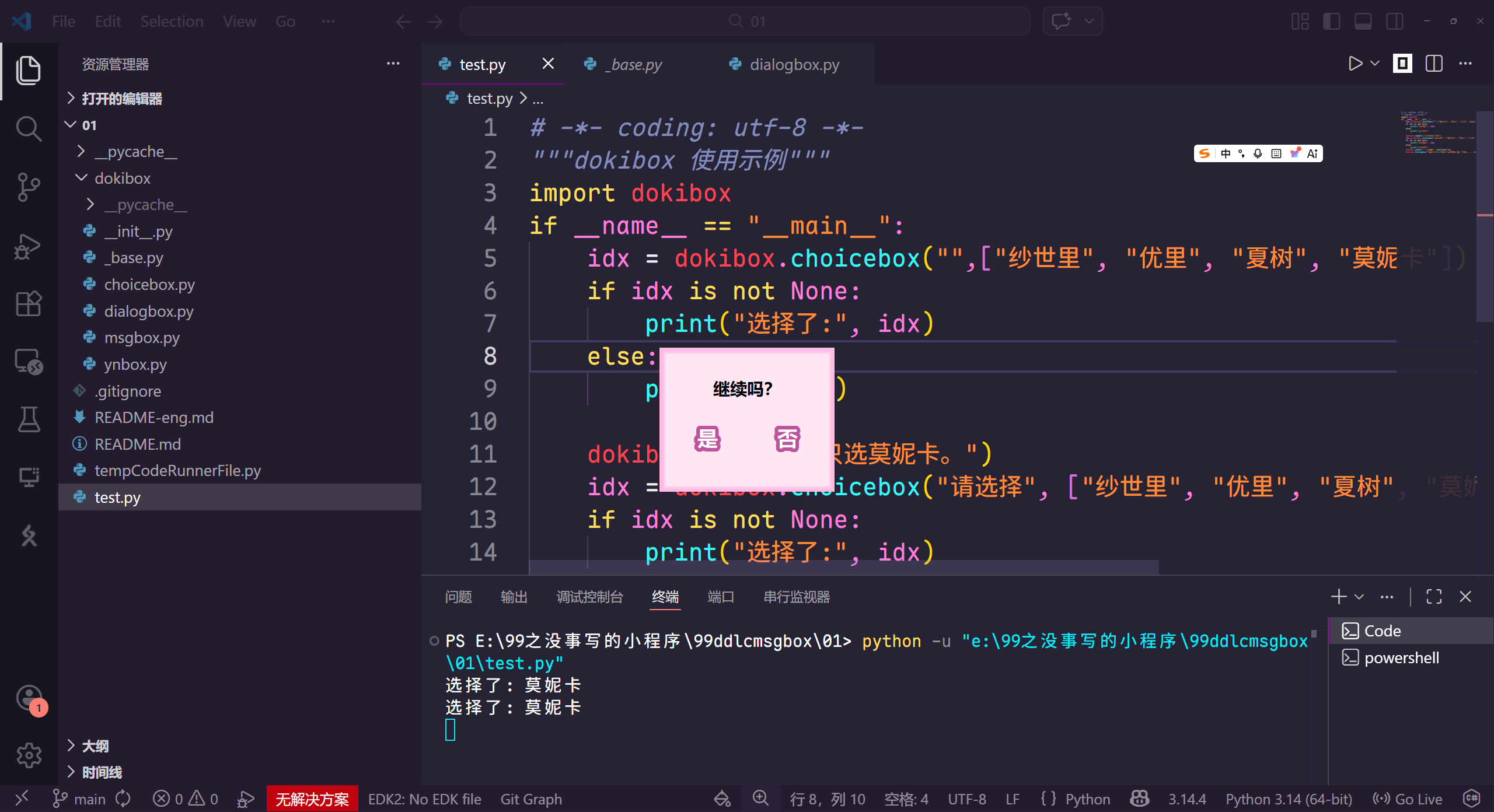
dokibox.ynbox(msg="Delete?", tooltip=False) → bool
| Parameter | Type | Default | Description |
|---|---|---|---|
msg |
str | "" |
Message text |
tooltip |
bool | False |
Tooltip text |
btn_texts |
tuple | None | Confirm button prompt. When set to None, dokibox will automatically detect the system language. To modify, please pass in a tuple, replacing "Yes" with the first parameter and "No" with the second parameter. English is used by default when the language is unknown. |
Return value: clicking "Yes" returns True; clicking "No" or pressing Esc returns False.
if dokibox.ynbox("Delete?"):
    print("User clicked Yes")
msgbox — Message Box
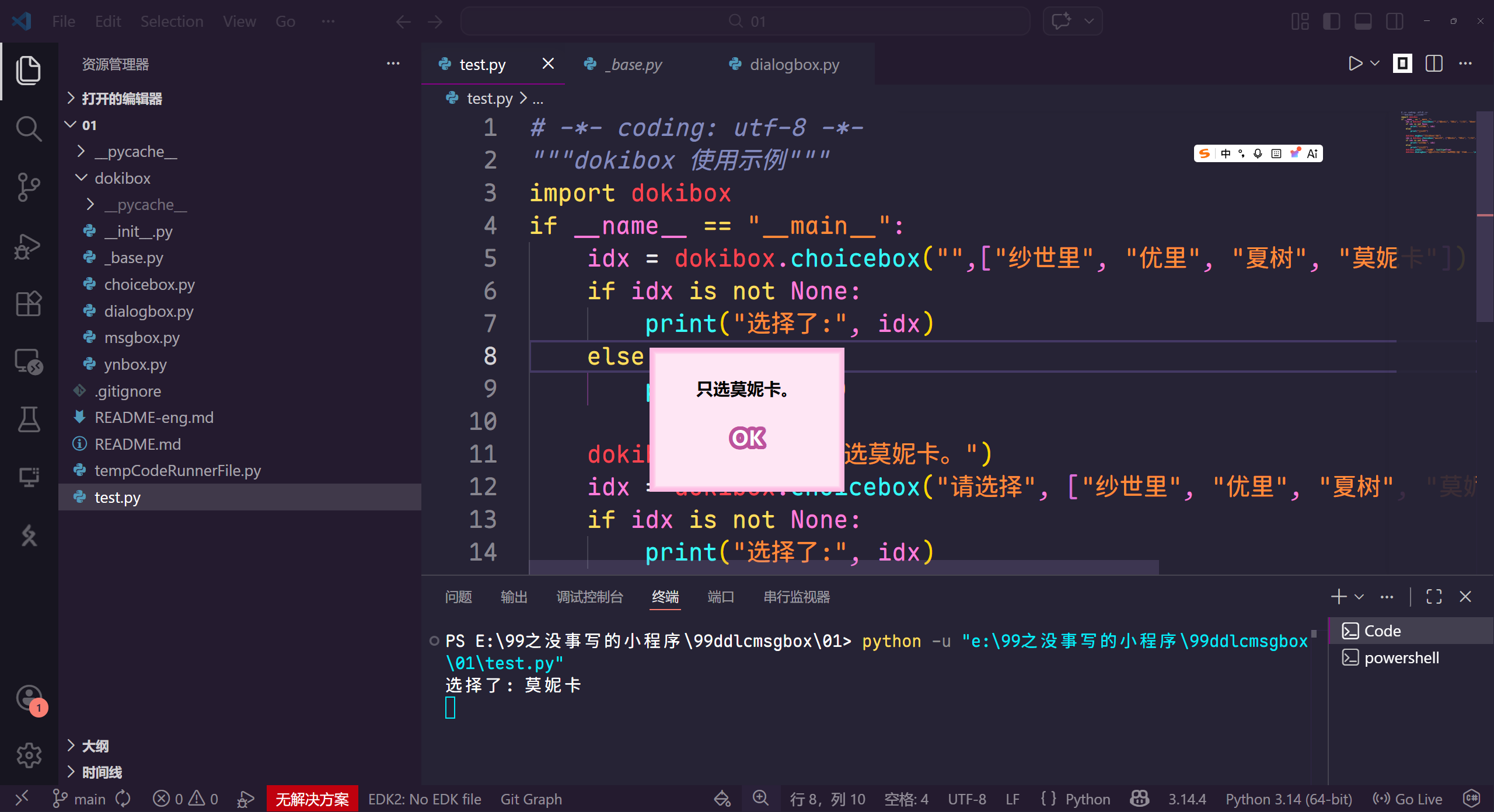
dokibox.msgbox(msg="Operation successful!", tooltip=False) → True
| Parameter | Type | Default | Description |
|---|---|---|---|
msg |
str | "" |
Message text |
tooltip |
bool | False |
Tooltip text |
Single OK button. Closes on click, Enter, or Esc; returns True.
dokibox.msgbox("Saved successfully!")
choicebox — Multiple Choice Dialog
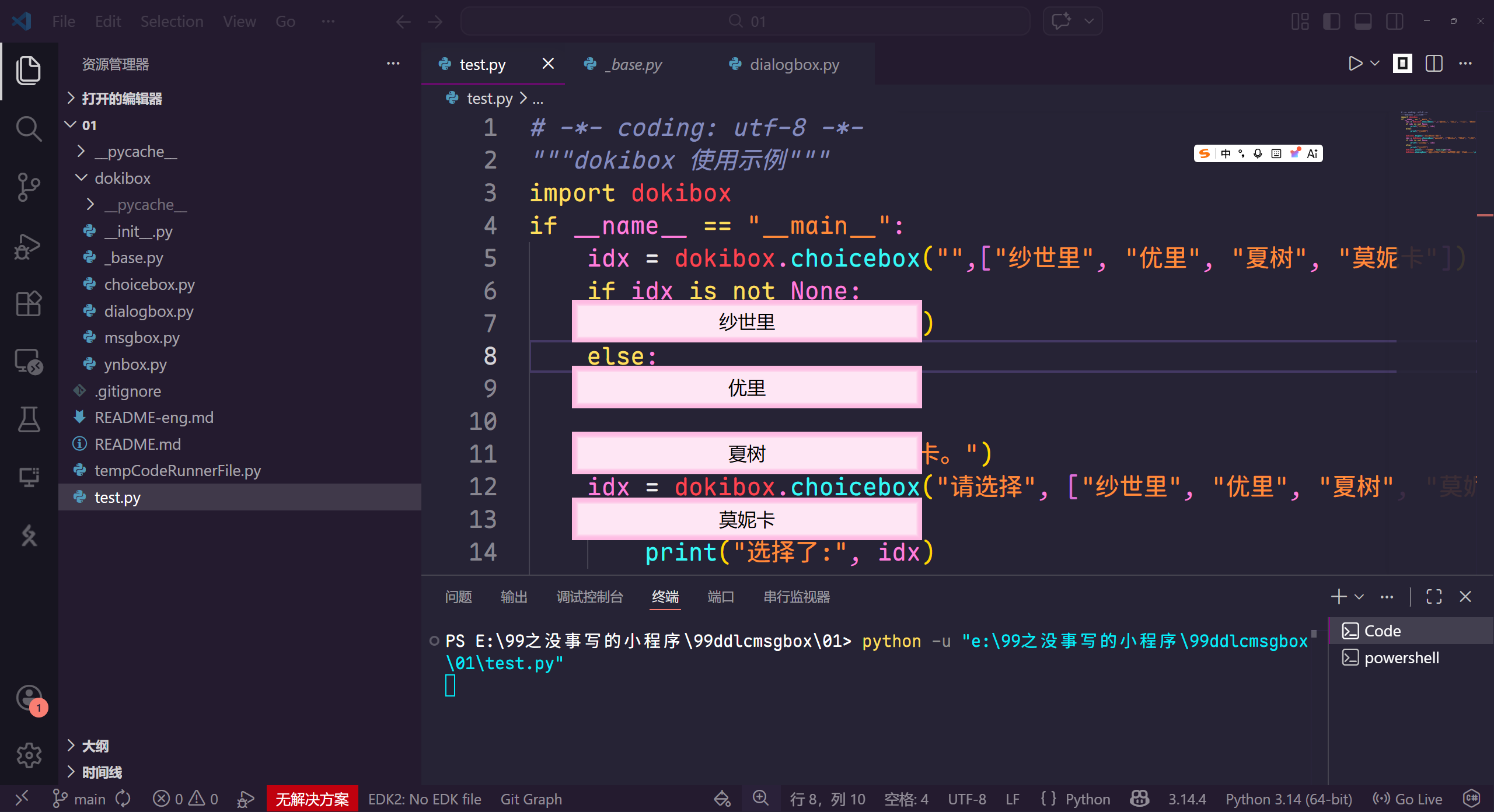
dokibox.choicebox(msg="", choices=None, tooltip=False, force=None) → str | None
| Parameter | Type | Default | Description |
|---|---|---|---|
msg |
str | "" |
Prompt text; hidden when empty |
choices |
list | None |
List of choices |
tooltip |
bool | False |
Tooltip text |
force |
int | None |
Force-select an index (0-based); cursor moves to the center of that choice |
Return value: the selected text content; Esc returns None.
char = dokibox.choicebox("Choose a character", ["Sayori", "Yuri", "Natsuki"], force=1)
print(char)  # "Yuri"
dialogbox — Bottom Dialog Box
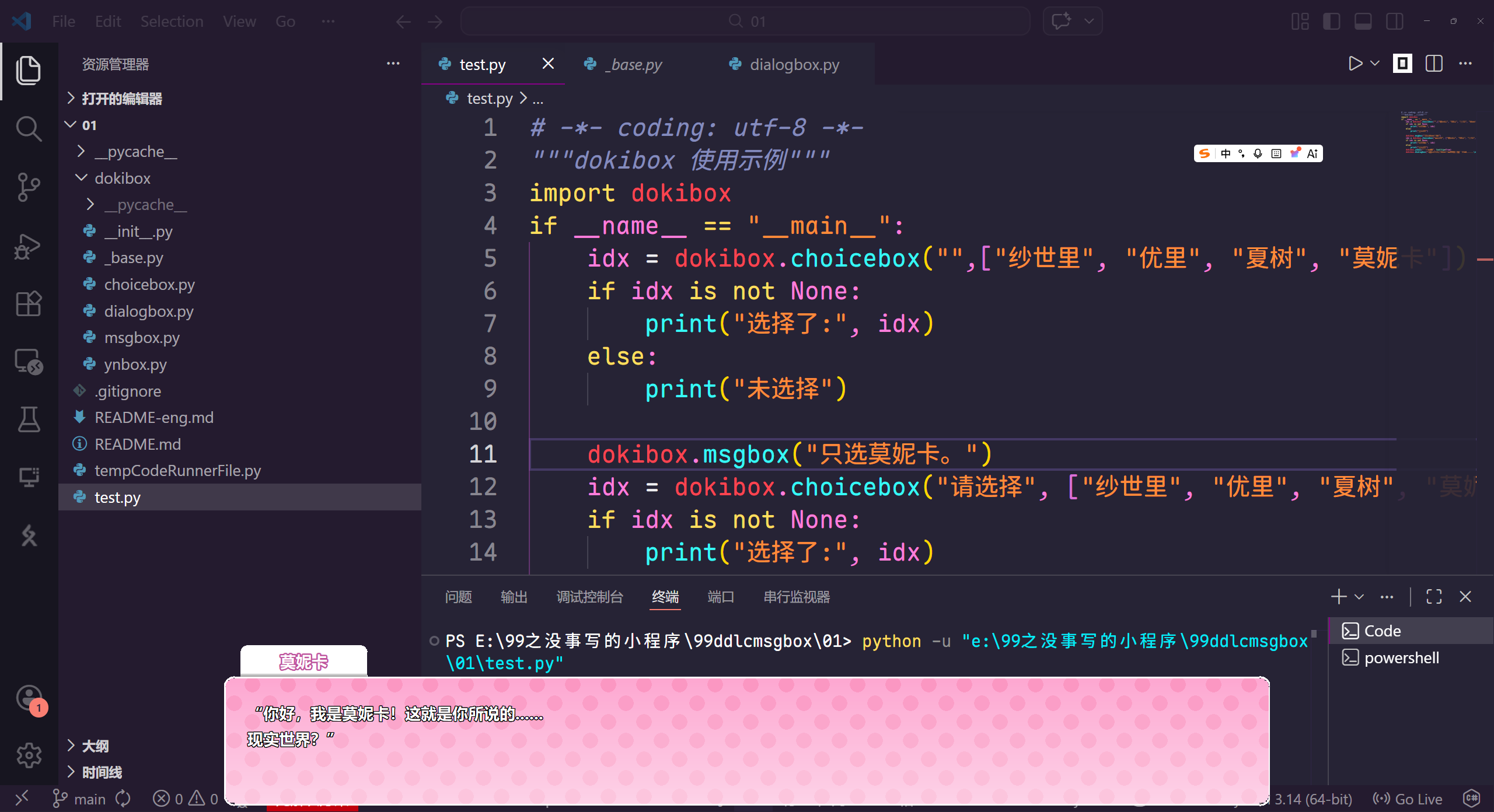
dokibox.dialogbox(msg="", w=None, h=220, name=None, typewriter=True, speed=50, bold=False)
| Parameter | Type | Default | Description |
|---|---|---|---|
msg |
str | "" |
Message text |
w |
int | None |
Width (default 60% of screen width) |
h |
int | 220 |
Height |
name |
str | None |
Character name tag (white rounded label protruding above the dialog) |
typewriter |
bool | True |
Typewriter mode |
chardelay |
int | 50 |
Typewriter interval per character (ms) |
bold |
bool | False |
Bold black stroke on text |
overflow_mode |
string | wrap |
Has three parameters: wrap, overflow, and hide. wrap enables automatic line wrapping, overflow causes content to overflow the screen, and hide hides the content that goes off-screen. |
In typewriter mode:
- Text appears character by character
- First click → reveals full text instantly
- Second click → closes
dokibox.dialogbox("You're actually Administrator, right?", name="Monika")
dokibox.dialogbox("Slower...", speed=80, bold=True)
dokibox.dialogbox("All at once", typewriter=False)
Finally
This project is licensed under the MIT license. When using it, please strictly comply with Team Salvato's relevant fan work IP creation guidelines.
Sayori is my favorite!🎀
Release history Release notifications | RSS feed


Download files
Download the file for your platform. If you're not sure which to choose, learn more about installing packages.
Source Distribution
Built Distribution
Filter files by name, interpreter, ABI, and platform.
If you're not sure about the file name format, learn more about wheel file names.
Copy a direct link to the current filters
File details
Details for the file dokibox-2.1.1.tar.gz.
File metadata
- Download URL: dokibox-2.1.1.tar.gz
- Upload date:
- Size: 18.7 kB
- Tags: Source
- Uploaded using Trusted Publishing? No
- Uploaded via: twine/6.2.0 CPython/3.14.4
File hashes
| Algorithm | Hash digest | |
|---|---|---|
| SHA256 |
5f0108a07886c1aacded9c013d79a32dbdc2c2f38308979ab8c5e7663659374d
|
|
| MD5 |
1436a42de53c717d5ac0e0a3ae13e3f1
|
|
| BLAKE2b-256 |
02cf9688e63f2038378c702451d76a7a8e5549cb3cc137c4cb93bbf7aa0ec958
|
File details
Details for the file dokibox-2.1.1-py3-none-any.whl.
File metadata
- Download URL: dokibox-2.1.1-py3-none-any.whl
- Upload date:
- Size: 21.1 kB
- Tags: Python 3
- Uploaded using Trusted Publishing? No
- Uploaded via: twine/6.2.0 CPython/3.14.4
File hashes
| Algorithm | Hash digest | |
|---|---|---|
| SHA256 |
2d59d87f927d889e7b167558cfdef4107a2cd17e46e8851e3b709bf2867aa6d4
|
|
| MD5 |
88a32510efb5f54aeccc0e77b0be7bfe
|
|
| BLAKE2b-256 |
58dd34be825cc4d7d70fb452e853c712a6ece013bce4e0b1edddb09a5f2b1c3e
|






