
Dokugen (Python Client)
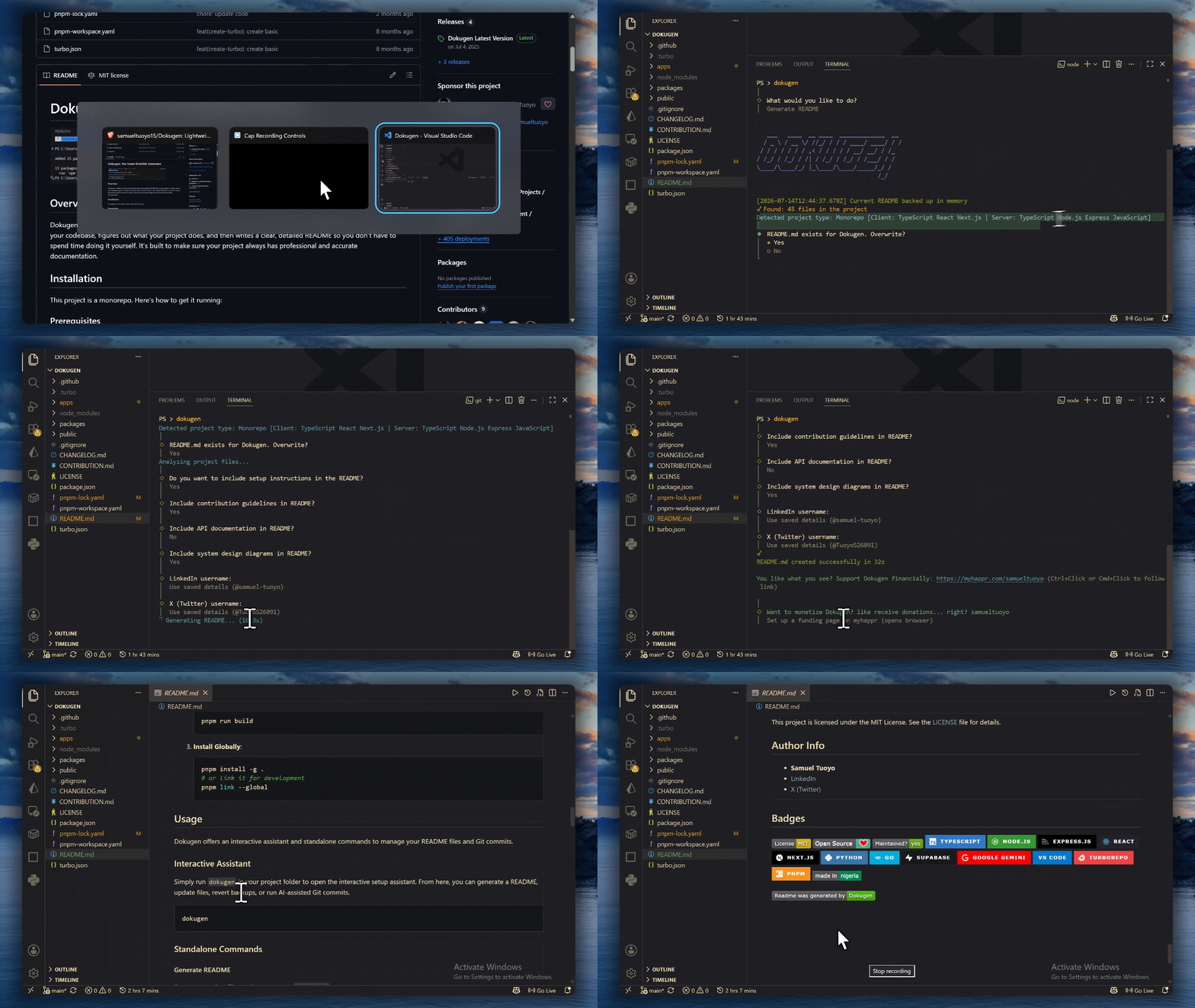

Dokugen is a lightweight, AI-powered CLI tool that automatically generates and maintains README.md files and LICENSE files for your projects. It scans your codebase, understands what your project does, and produces clean, professional documentation, so you don't have to.
Quick Start
Installation
Install Dokugen globally using uv (recommended) or pip:
uv tool install dokugen
# or
pip install dokugen
Usage
1. Launch the Interactive Assistant
Simply run dokugen in your project folder to open the interactive setup assistant. From here, you can generate a README, update existing docs, generate a LICENSE file, revert backups, or run AI-assisted Git commits.
dokugen
Note: If dokugen command is not in your PATH, you can also run it via Python:
python -m dokugen
2. Standalone Commands
Generate README
Scan your project files and construct a new README.md.
dokugen generate
Generate README with a Custom Template
Use any public README.md file as a structure template.
dokugen generate --template https://raw.githubusercontent.com/username/repo/main/README.md
Smart Update README
Intelligently rebuilds auto-generated sections (tech stack, API details, file layout) while keeping your custom text, notes, and badges intact.
dokugen update
Generate LICENSE File
Instantly scaffold a LICENSE file for your project. Dokugen will prompt you to pick from the most common open-source licenses, pre-filled with your name and the current year.
dokugen license
Supported licenses:
- MIT, Simple and permissive. Great for most open-source projects.
- ISC, Same as MIT but shorter.
- Apache 2.0, Permissive with explicit patent rights grant.
- GNU GPLv3, Strong copyleft. Derivatives must also be open source.
- BSD 2-Clause, Permissive. Requires copyright notice preservation.
- Unlicense, Public domain. No rules, no conditions.
AI Git Commit (aic)
Analyze your staged files, generate a Conventional Commit message automatically, commit, and optionally push.
dokugen aic
# or push immediately after committing
dokugen aic --push
Safety Backup Revert (revert)
Accidentally generated something you didn't like? Restore your previous README.md instantly from the automatic backup.
dokugen revert
Generate CHANGELOG (changelog)
Analyze your Git commit history and automatically generate or update a structured CHANGELOG.md adhering to Keep a Changelog standards.
dokugen changelog
# or analyze up to a custom limit of commits
dokugen changelog --limit 100
# or specify a custom model configured on the server
dokugen changelog --model google/gemini-3.1-flash-lite
Features
- Interactive Menu: Run
dokugenwith no arguments to navigate all tool actions through a beautiful console prompt, perfect for both new and experienced developers. - Smart README Updates: Re-run generation without losing your manual modifications. Only auto-generated blocks get updated; your custom content stays untouched.
- LICENSE Generator: Pick from 6 popular open-source licenses and have a properly formatted
LICENSEfile created instantly, pre-filled with your author name and year. - CHANGELOG Generator: Automatically builds and prepends release notes by parsing your Git commit history since the last release tag.
- AI-Powered Commits: Automatic staging and conventional commit message generation via Google Gemini, keeps your commit history clean and consistent.
- Compressed Uploads: Efficiently packages codebases with 70–90% upload size compression to support analyzing larger projects without hitting API size limits.
- Language & Framework Agnostic: Works out of the box with any programming language or framework (JavaScript, TypeScript, Python, Rust, Go, Java, PHP, C++, Django, React, etc.). You don't need Python or Node.js to be your codebase's main language; you can simply install Dokugen globally using Python (
pip/uv) or Node (npm/pnpm/yarn), and run it in any directory. - Custom Templates: Use any public GitHub README as a structural template for your generated docs.
Contributing
Contributions are welcome! Read our Contribution Guide to get started.
License
This project is licensed under the MIT License, see the LICENSE file for details.
Author
- Samuel Tuoyo
- X (Twitter)







1 maintainer

Metadata
1 maintainer
Release files for dokugen 14.2.3
For a detailed explanation of source distributions (sdists) and built distributions (wheels), please see the package formats documentation.
Source distribution (sdist)
| File | Size | Uploaded | Provenance | Actions |
|---|---|---|---|---|
| dokugen-14.2.3.tar.gz | 9.9 MB | Without provenance | Details for dokugen-14.2.3.tar.gz |
Built distribution (wheel)
| File | Interpreter | ABI | Platform | Actions Reset |
|---|---|---|---|---|
| dokugen-14.2.3-py3-none-any.whl | Python 3 | none | any | Details for dokugen-14.2.3-py3-none-any.whl |
Total release size: 9.9 MB
Release files / dokugen-14.2.3.tar.gz
| Download URL | dokugen-14.2.3.tar.gz |
|---|---|
| Size | 9.9 MB |
| Tags | Source |
|
SHA-256 checksum How to use checksums |
11c2743e7afe4ac27ef563af9a0e192fae1d4efde2a80c3e491bab45fb2042c3
|
|
BLAKE2b-256 checksum How to use checksums |
54aca87a7da04033dc10294df8b0a4ea03aefa892e98b6bcb001183347368e62
|
| Upload date | |
|
Uploaded using Trusted Publishing? What is trusted publishing? |
No |
| Uploaded via |
uv/0.12.16 {"installer":{"name":"uv","version":"0.12.16","subcommand":["publish"]},"python":null,"implementation":{"name":null,"version":null},"distro":{"name":"Ubuntu","version":"26.04","id":"resolute","libc":null},"system":{"name":null,"release":null},"cpu":null,"openssl_version":null,"setuptools_version":null,"rustc_version":null,"ci":null}
|
Release files / dokugen-14.2.3-py3-none-any.whl
| Download URL | dokugen-14.2.3-py3-none-any.whl |
|---|---|
| Size | 39.0 kB |
| Tags | Python 3 |
|
SHA-256 checksum How to use checksums |
0eb309b0d13885b2739bdb333425c1dd5e42023e4f440165cec77a244933be77
|
|
BLAKE2b-256 checksum How to use checksums |
637e505d5d9fe336c655617bf72efe28780b5d51f65112a243bda16e4e58df7f
|
| Upload date | |
|
Uploaded using Trusted Publishing? What is trusted publishing? |
No |
| Uploaded via |
uv/0.12.16 {"installer":{"name":"uv","version":"0.12.16","subcommand":["publish"]},"python":null,"implementation":{"name":null,"version":null},"distro":{"name":"Ubuntu","version":"26.04","id":"resolute","libc":null},"system":{"name":null,"release":null},"cpu":null,"openssl_version":null,"setuptools_version":null,"rustc_version":null,"ci":null}
|
Security for dokugen 14.2.3
Provenance
Provenance describes where a file came from. On PyPI, provenance is shared via attestations, which provide a verifiable record of the build or publishing details. View details, limitations and caveats.
No provenance found
None of the files in this release were uploaded with provenance metadata.
A note on package security
PyPI is a repository for distributing packages, not a service for auditing them. While third-party security researchers and our staff do their best to detect and remove malicious packages, PyPI cannot guarantee the quality, security or suitability of any given package.
To learn more about protecting yourself from malicious actors, visit our package security documentation.














