

The trust layer for AI coding agents.
Say what must never break. Prove it holds. Enforce it on every agent edit.







📬 Feature requests, bugs, questions, or feedback: daryl@dont-break.com
🇬🇧 English · 🇫🇷 Français · 🇸🇦 العربية · 🇨🇿 Čeština · 🇩🇰 Dansk · 🇩🇪 Deutsch · 🇬🇷 Ελληνικά · 🇪🇸 Español · 🇮🇷 فارسی · 🇫🇮 Suomi · 🇵🇭 Filipino · 🇮🇱 עברית · 🇮🇳 हिन्दी · 🇭🇺 Magyar · 🇮🇩 Bahasa Indonesia · 🇮🇹 Italiano · 🇯🇵 日本語 · 🇰🇷 한국어 · 🇳🇱 Nederlands · 🇳🇴 Norsk · 🇵🇱 Polski · 🇧🇷 Português (Brasil) · 🇷🇴 Română · 🇷🇺 Русский · 🇸🇪 Svenska · 🇹🇭 ไทย · 🇹🇷 Türkçe · 🇺🇦 Українська · 🇺🇿 Oʻzbekcha · 🇻🇳 Tiếng Việt · 🇨🇳 简体中文 · 🇹🇼 繁體中文
AI agents ship code fast. Nobody ships trust with it. Every team running Cursor, Claude, or CI bots has the same unspoken fear: the day a quick fix silently breaks the one thing that was never supposed to break.
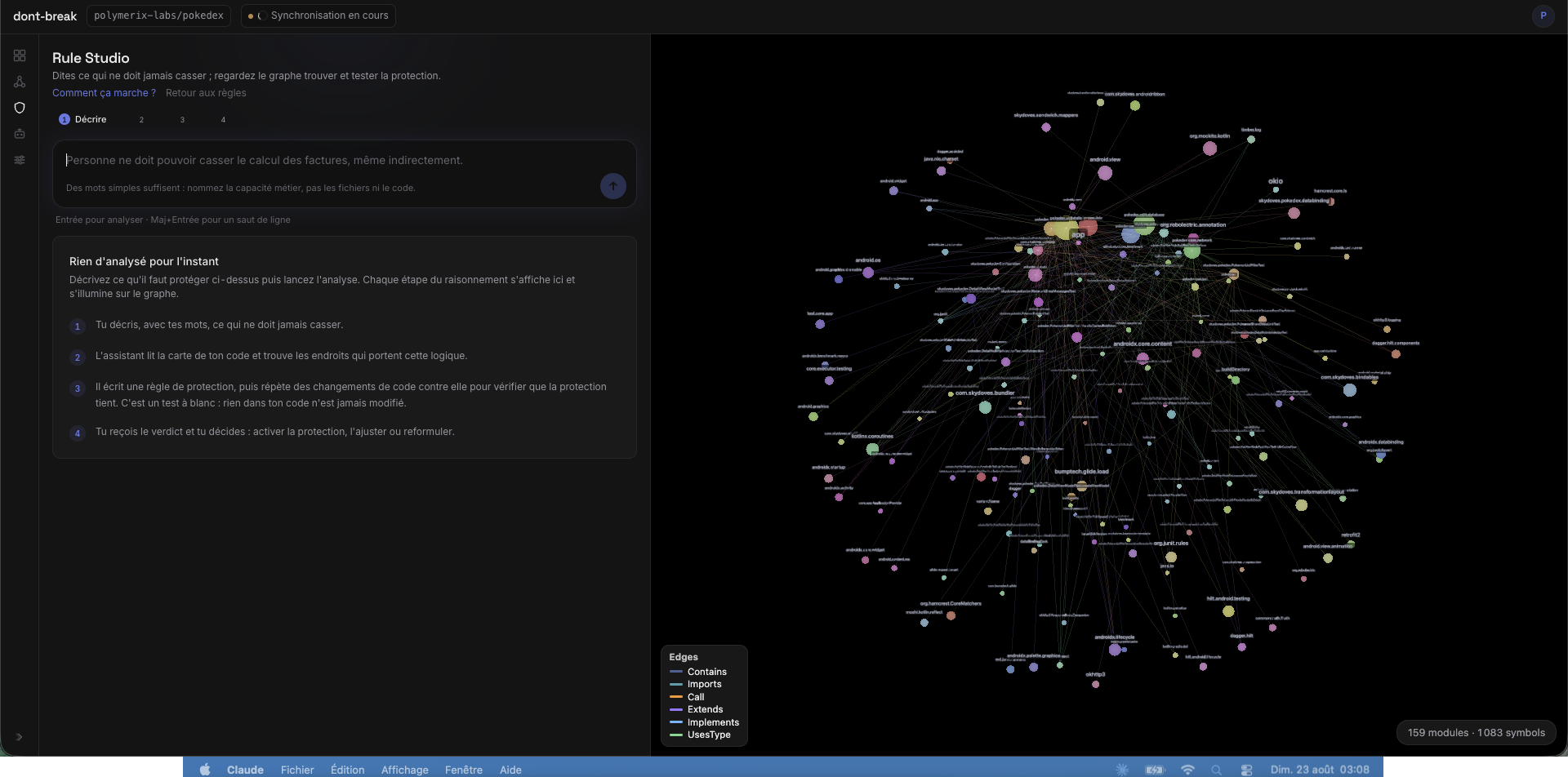
dont-break turns that fear into a contract, in four steps:
- Say it in plain words. "Nobody should be able to break invoice calculation, even indirectly." No file paths, no code.
- Watch it get found. dont-break reads the live map of your codebase and lights up every place that carries that logic — including the paths you forgot existed.
- Watch it get attacked. It writes a protection rule, then replays code changes against it to prove the protection actually holds. A dry run: nothing in your code is touched.
- Activate it. From then on, every agent edit is checked against the rule before it lands — in the editor, in CI, on the dashboard.
30 seconds of quickstart
Requires Python 3.9+ and Node.js (npm). The graph extractor installs itself on first run.
pip install dont-break
dont-break --wake
That opens a local UI on http://127.0.0.1:4040, in your language (32 available). Sign in, pick a project folder, and the map of your code builds itself: a live 3D graph of every module, call, and dependency, with your protected zones lit up on top of it.
What "enforce it on every agent edit" actually means
Most guardrails are prompts, and prompts get ignored. dont-break sits outside the model:
- In the conversation. Connected over MCP, your agent calls
check_changebefore editing andget_impactbefore refactoring. It gets told "this is riskier than it looks — 23 call sites break" before writing, not after. - At the write itself. An editor hook intercepts every file write an agent attempts. The write is compared against your active rules — no prompt engineering, no cooperation required from the model.
- At the merge. The same verdicts run in CI and fail the pipeline when a change reaches a protected zone. What your editor tolerated, the default branch still refuses.
You:    "Rename PokemonService.fetchAll"
Agent:  → get_dependents(PokemonService.fetchAll)   "23 call sites across 4 modules"
        → get_impact(files: [...])                  "radius 3, touches ui/, cache/, api/"
        → get_do_not_touch()                        "PokemonService is a danger zone: fan-in 23, stability 31"
Agent:  "This is riskier than it looks. Here are the 23 places that break,
         and a safer 2-step plan."
That conversation happens automatically once connected. No prompt engineering: the agent skill teaches it.
Two enforcement modes
You pick the strength per folder, in one click:
| Watch mode (default) | Hard mode | |
|---|---|---|
| What happens on a risky agent write | The write lands; the verdict (ok / warn / block) is reported to the agent and to your dashboard as an incident | The write is refused until a check_change has passed for that file |
| Philosophy | Observe first: see what your agents would have broken, build trust in the rules | Enforce: a protected file cannot be touched unchecked, period |
| If dont-break is offline | Fail-open — your agent keeps working, nothing blocks | Fail-closed on protected writes — "hard" is not a lie |
| Best for | First weeks, exploring, low-stakes repos | Payment flows, auth, schemas, anything with an on-call rotation |
Start in Watch, read a week of incidents, then flip the folders that matter to Hard.
Rules with a spine
- A rule is written in plain language, compiled against the real dependency graph, and tested by attack before activation — you see it catch a breaking change before you trust it.
- Agents can propose rules and add reasons, but they can never activate a block, pause someone else's rule, or rewrite history. Humans approve; the audit trail is append-only.
- Every verdict comes with a witness path: the exact chain of dependencies through which your edit reaches the protected zone. No "the linter said no" — you see why.
Pick your fight
"My agent keeps breaking things it never opened"
Plug dont-break into Cursor or Claude Desktop. Your agent checks impact and danger zones before editing, not after.
→ Set up in Cursor / Claude (2 min)
"I want CI to block disasters, not argue about style"
One job that fails the merge when a change hits a protected zone or a fragile hub, grounded in the real dependency graph, not vibes.
→ GitHub Actions · GitLab CI · pre-commit hook
"My team needs to see this, not just me"
Everything above runs on your machine — what your agent is doing, right now, on your working copy. dont-break.com is the other half: every repository, every agent, and what CI actually enforced on the default branch, in one place.
→ Team dashboard
"I just want to interrogate my codebase"
dbq dependents <id> | jq: who breaks if I change this? Your repo becomes a queryable database.
→ Shell + jq recipes
"I'm building my own agent"
The same 11 tools, exposed as typed TypeScript definitions or a generated OpenAPI 3.1 spec.
→ LangChain / OpenAPI / custom agents
The 11 tools your agent gets
| Tool | The question it kills |
|---|---|
find_symbol |
"Which node is this name / file?" (entry point) |
get_dependents |
"Who breaks if I change this?" |
get_impact |
"What's the blast radius of these edits?" |
get_do_not_touch |
"What should I refuse to touch without asking?" |
get_dependencies |
"What does this code rely on?" |
find_path |
"Why does changing A affect B?" |
get_arch_status |
"How carefully should I work in this repo?" |
check_change |
"Does this edit violate a team rule?" |
propose_rule |
"Record a warn now, or a block for a human to approve" |
pause_own_rule |
"Stop evaluating a rule this agent token authored" |
append_rule_reason |
"Add one justification, never edit or delete" |
Query tools are read-only, server-side analysis, capped responses: always safe to call. The three rule tools write team rules under tight limits: they cannot activate a block, pause someone else's rule, or rewrite reasons.
The control room
- Rule Studio: describe what must never break, watch the graph find it, test the protection live before activating it
- Check: pre-edit simulator: pick seeds, get an ok/warn/block verdict, animate the exact path a break would take
- Overview: a verdict in one sentence, stability and AI-navigability readouts, the top actions that would harden your architecture
- Graph: the Nebula 3D scene, protected zones and witness paths lit as overlays
- Agents: connect Cursor, Claude, or CI in one click, with a live try-to-break demo
Keyboard-first: cmd+K opens the command palette.
Connect your agent in 30 seconds
- Open the dont-break app → Agents.
- Sign in, link the folder to a project, click Connect Cursor: one click mints a project-scoped token and fills
mcp.json. - Paste into Cursor (or your MCP client).
- Click Install skill: it writes
.cursor/skills/dont-break/SKILL.md(andAGENTS.mdfor other agents) so agents use the tools without being told.
Languages and capabilities
The languages dont-break maps, and what each one can actually do, live on dont-break.com/language-support.
License
1 maintainer

Metadata
1 maintainer
Release files for dont-break 0.3.20
For a detailed explanation of source distributions (sdists) and built distributions (wheels), please see the package formats documentation.
Source distribution (sdist)
| File | Size | Uploaded | |
|---|---|---|---|
| dont_break-0.3.20.tar.gz | 1.5 MB | Details |
Built distribution (wheel)
| File | Interpreter | ABI | Platform | Reset |
|---|---|---|---|---|
| dont_break-0.3.20-py3-none-any.whl | Python 3 | none | any | Details |
Total release size: 2.8 MB
Release files / dont_break-0.3.20.tar.gz
| Download URL | dont_break-0.3.20.tar.gz |
|---|---|
| Size | 1.5 MB |
| Tags | Source |
|
SHA-256 checksum How to use checksums |
b68d7a5edd1aff90d273c477f0e80844cbfc3990cfaab7fbbd5b8bbf7a3f2d9b
|
|
BLAKE2b-256 checksum How to use checksums |
ca1bf3484f7f0eae488ddca24535a4d4b2f39d3c3ac950cc04c00de0e3baaeff
|
| Upload date | |
|
Uploaded using Trusted Publishing? What is trusted publishing? |
Yes |
| Uploaded via |
twine/7.0.0 CPython/3.11.16
|
Release files / dont_break-0.3.20-py3-none-any.whl
| Download URL | dont_break-0.3.20-py3-none-any.whl |
|---|---|
| Size | 1.4 MB |
| Tags | Python 3 |
|
SHA-256 checksum How to use checksums |
ab92a66f320f4ad50936b814db89cd877e2ee1897a402953b5c5d6d4787f26d0
|
|
BLAKE2b-256 checksum How to use checksums |
494924d47f6df251cd5063962501adb8c45a700f1a0945873a493d771cc76214
|
| Upload date | |
|
Uploaded using Trusted Publishing? What is trusted publishing? |
Yes |
| Uploaded via |
twine/7.0.0 CPython/3.11.16
|














