
Dont-Blink — AI Timelapse for 3D Printers



Dont-Blink watches your 3D print video and captures frames only when the printhead is out of the way, producing clean timelapses with no printhead photobombs.
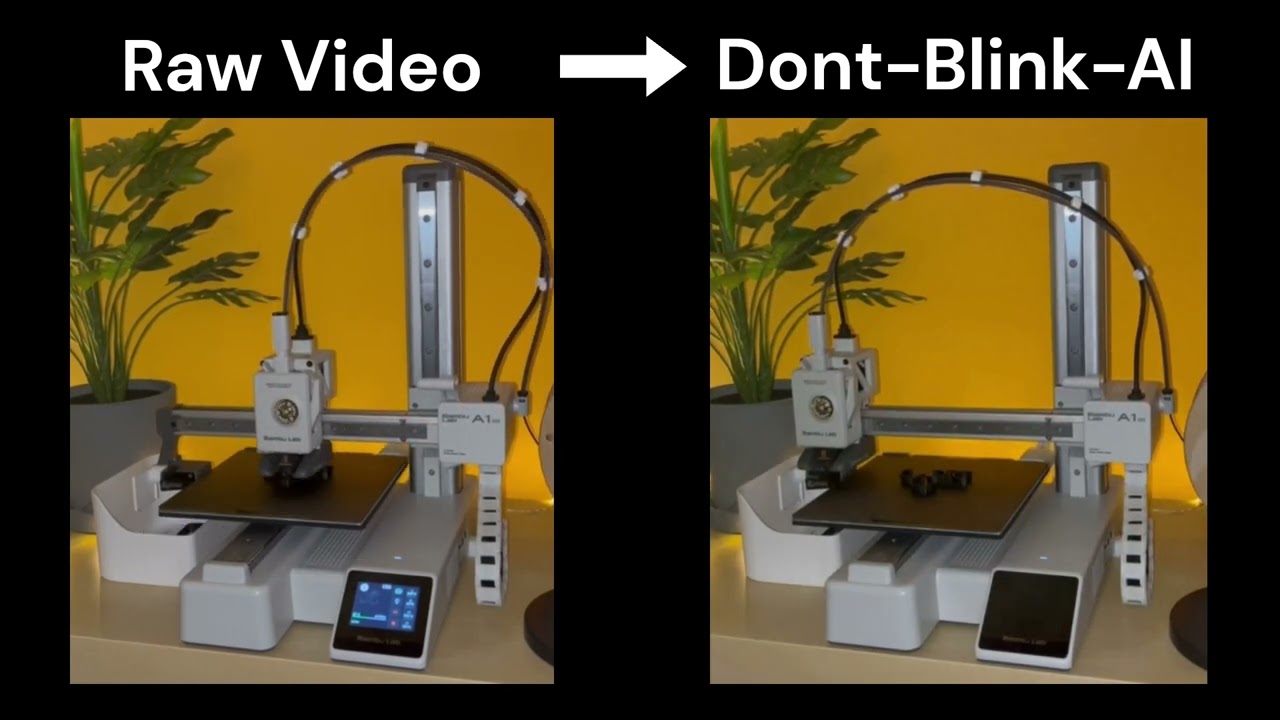
Click to watch the demo
How it works
- A lightweight MobileNetV3-based model detects the printhead position in each frame
- A tracker monitors printhead movement and captures frames when it parks
- Captured frames are stitched into a smooth timelapse video
Works with pre-recorded videos and live camera feeds. Runs on CPU, Apple Silicon (MPS), or NVIDIA GPU.
Quick start
Install
pipx install dontblink
Or with pip:
pip install dontblink
The model weights (~13 MB) download automatically on first run.
Process a video
dontblink process input.mp4
That's it. Output goes to outputs/input/frames/ and outputs/input/timelapse.mp4.
CLI reference
dontblink process <video>              Process a video (recommended entry point)
dontblink process <video> --rotation 90  Override video rotation
dontblink process <video> --print-config Show resolved config and exit

dontblink create-timelapse <dir> <out>  Stitch frames into a timelapse
dontblink process-camera <id> <out>     Process a live camera feed
dontblink visualize-video <in> <out>    Draw bounding boxes on every frame
dontblink test-image <image> [out]      Test model on a single image
dontblink extract-frames <dir>          Extract frames from videos at intervals

dontblink benchmark                     Benchmark inference speed
dontblink doctor                        System diagnostics (paste into bug reports)
dontblink download-model                Download / verify model weights

dontblink --verbose                     Debug logging
dontblink --config path/to/config.yaml  Custom config file
Configuration
Dont-Blink works out of the box with sensible defaults. To customize, create a config.yaml:
dontblink create-config config.yaml
Key settings:
| Setting | Default | Description |
|---|---|---|
detection.device |
auto |
auto, cpu, cuda, or mps |
detection.confidence |
0.5 |
Detection threshold (0.0–1.0) |
processing.batch_size |
1 |
Frames per batch (increase for GPU) |
processing.video_rotation |
0 |
Manual rotation override (0/90/180/270) |
timelapse.fps |
15 |
Output timelapse frame rate |
See config.yaml.example for all options.
Python API
from dontblink.config import Config
from dontblink.detection import DetectionService
from dontblink.video_processor import VideoProcessor
from dontblink.timelapse import TimelapseGenerator

config = Config("config.yaml")
detection = DetectionService(config)
processor = VideoProcessor(config, detection)

stats = processor.process_video_file("input.mp4", "output/frames")

timelapse = TimelapseGenerator(config)
timelapse.create_timelapse("output/frames", "timelapse.mp4")
Architecture
dontblink/
├── cli.py              Command-line interface
├── config.py           YAML configuration with defaults
├── detection.py        Detection service + printhead tracker
├── model_manager.py    Model download, caching, SHA-256 verification
├── video_processor.py  Video/camera processing with batch inference
├── timelapse.py        Timelapse generation from frames
├── utils.py            Device detection, validation, fingerprinting
├── types.py            DetectionResult type
└── ml/                 Training & inference
    ├── model.py        MobileNetV3-Small backbone + detection head
    ├── infer.py        Inference with batch support
    ├── train.py        Training loop with early stopping
    ├── dataset.py      YOLO-format dataset with augmentation
    ├── eval.py         Precision, recall, F1, IoU metrics
    └── config.py       Training hyperparameters
Model
- Backbone: MobileNetV3-Small (ImageNet pre-trained)
- Head: presence score + bounding box (x, y, w, h) in normalized coordinates
- Size: ~13 MB
- Inference: ~16 ms/frame on CPU, ~5 ms on MPS/CUDA
Currently optimized for Bambu Lab A1 Mini but works with other printers given appropriate camera positioning.
Training your own model
Install training dependencies and see the training guide:
pip install dontblink[train]
See TRAINING.md for dataset preparation, training, and evaluation.
Troubleshooting
Run diagnostics and paste the output into bug reports:
dontblink doctor --copy
Contributing
git clone https://github.com/smoothyy3/Dont-Blink.git
cd Dont-Blink
pip install -e ".[dev,train]"
License
GNU Affero General Public License v3.0 — Copyright 2025 Jonas Möbes
1 maintainer

Download files
Download the file for your platform. If you're not sure which to choose, learn more about installing packages.
Source Distribution
Built Distribution
Filter files by name, interpreter, ABI, and platform.
If you're not sure about the file name format, learn more about wheel file names.
Copy a direct link to the current filters
File details
Details for the file dontblink-2.1.1.tar.gz.
File metadata
- Download URL: dontblink-2.1.1.tar.gz
- Upload date:
- Size: 66.5 kB
- Tags: Source
- Uploaded using Trusted Publishing? No
- Uploaded via:
twine/6.2.0 CPython/3.11.11
File hashes
| Algorithm | Hash digest | |
|---|---|---|
| SHA256 |
6766856c41581fa8044a8ffe5d5291d05c960f81b41e3b53cdd5f2b5022af053
|
|
| MD5 |
9a57c2f2dcd7366c50ea26a5c1131702
|
|
| BLAKE2b-256 |
fa1d76344aecce50978a4a20932ecc34cb39afe27369a243f17eff8bf9dbf761
|
File details
Details for the file dontblink-2.1.1-py3-none-any.whl.
File metadata
- Download URL: dontblink-2.1.1-py3-none-any.whl
- Upload date:
- Size: 67.7 kB
- Tags: Python 3
- Uploaded using Trusted Publishing? No
- Uploaded via:
twine/6.2.0 CPython/3.11.11
File hashes
| Algorithm | Hash digest | |
|---|---|---|
| SHA256 |
df4593ccc874c9707166cc7ed6db919e58c6720bf39e12b42807719742742ee8
|
|
| MD5 |
008c5b2eb0bd0c0e0755909d5f55b5ab
|
|
| BLAKE2b-256 |
85f26977d61e5b07bc432974e8c1d8de5bce277bb18092274c5b1e5bed0c067e
|














