
Dora the Explorer
As the name suggests everything, this package is intended for exploring the earth. Imagine you have a set of places (at max 4 places) to vist, how do you know exactly to find the best route to cover all the places? This package helps to find the best route which is pre-planned and displays the route with respect to distance and finally reaching the source place i.e., home.
We have known about one of the famous problems in mathematics - graph theory that is Travelling Salesman Problem. To give a simple gist about the problem, basically there is a salesman who has to travel a bunch of places (cities) to deliver the items. There could be so many possibilities to cover all the cities and reach to his/her source place. But it is very important for a salesman to choose the best possible route which gives a minimal distance. By this he/she can save a lot time and deliver the items at the earliest. For this project, I have considered distance as an important factor, later on time and other factors shall be added.
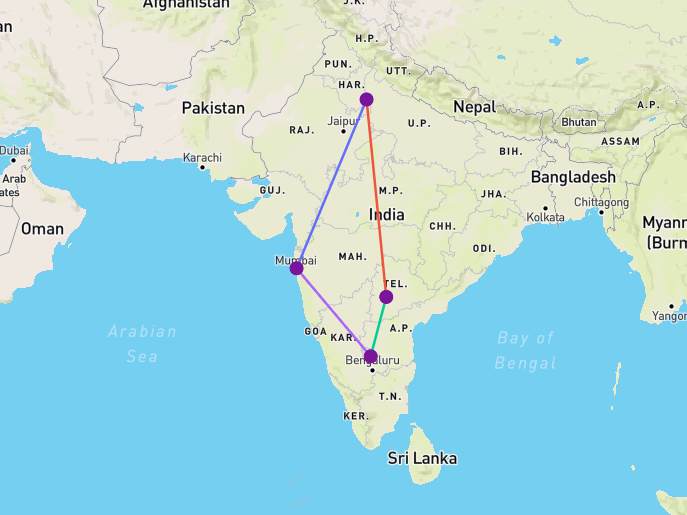
A typical example can be seen below. When selected 4 places that belong to India the result is obtained having the shortest path to cover the places. The path is just a straight line between the cities.
What if we want to get the actual route direction from each city that is joining another city?.
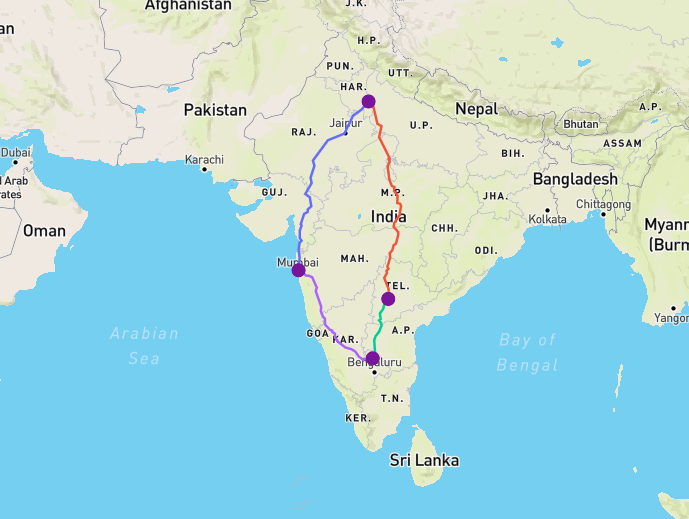
For getting the map results, it is important to have Mapbox API which is a free API. To get the API - register on mapbox website. Once registered, create a secret token by clicking Create a token button by navigating to this page. Save the token as it will be needed for generating the map results.
Installation
pip install dora-explorer --user
Implementation
from dora_explorer.distance_locator import DistanceLocator

dl = DistanceLocator()

from_ = 'Hindupur'
to_ = 'Bengaluru'

distance = dl.get_distance(from_=from_, to_=to_)
print(distance) # 95.84
from dora_explorer.tiny_explore import DoraTheExplorer

place_list = ['Delhi', 'Hyderabad', 'Hindupur', 'Mumbai']
explore = DoraTheExplorer(place_list=place_list)

min_dis = explore.get_min_dis(source_city='Mumbai')
print(min_dis) # 3583.36

geo_token = <Mapbox API Token>
path = explore.get_path(source_city='Mumbai', with_map=True, with_directions=True, geo_token=geo_token)
print(path) # Mumbai >> Delhi >> Hyderabad >> Hindupur >> Mumbai
Note: The source_city param can also be given an integer. Either 1 or 2 or 3 or 4 as in a list of four places is passed.
from dora_explorer.tiny_explore import DoraTheExplorer

place_list = ['Delhi', 'Hyderabad', 'Hindupur', 'Mumbai']
explore = DoraTheExplorer(place_list=place_list)

path = explore.get_path(source_city=1, num_path=True)
print(path) # 1 >> 2 >> 3 >> 4 >> 1
1 maintainer

Metadata
1 maintainer
Release files for dora-explorer 0.2.2
For a detailed explanation of source distributions (sdists) and built distributions (wheels), please see the package formats documentation.
Source distribution (sdist)
| File | Size | Uploaded | Provenance | Actions |
|---|---|---|---|---|
| dora_explorer-0.2.2.tar.gz | 10.7 kB | Without provenance | Details for dora_explorer-0.2.2.tar.gz |
Built distribution (wheel)
| File | Interpreter | ABI | Platform | Actions Reset |
|---|---|---|---|---|
| dora_explorer-0.2.2-py3-none-any.whl | Python 3 | none | any | Details for dora_explorer-0.2.2-py3-none-any.whl |
Total release size: 23.3 kB
Release files / dora_explorer-0.2.2.tar.gz
| Download URL | dora_explorer-0.2.2.tar.gz |
|---|---|
| Size | 10.7 kB |
| Tags | Source |
|
SHA-256 checksum How to use checksums |
e580b8e95eef5fb0a3c95f7b4241cfc8ed97eec0f6003dbbe2ba0853c4024e8d
|
|
BLAKE2b-256 checksum How to use checksums |
cf765bf8ba5669a08cffb387f56ece61cb4c558afd72ad82b553cb67fb3e39f1
|
| Upload date | |
|
Uploaded using Trusted Publishing? What is trusted publishing? |
No |
| Uploaded via |
twine/3.2.0 pkginfo/1.5.0.1 requests/2.24.0 setuptools/49.2.0 requests-toolbelt/0.9.1 tqdm/4.31.0 CPython/3.7.5
|
Release files / dora_explorer-0.2.2-py3-none-any.whl
| Download URL | dora_explorer-0.2.2-py3-none-any.whl |
|---|---|
| Size | 12.6 kB |
| Tags | Python 3 |
|
SHA-256 checksum How to use checksums |
4383d2f36d914946f9cf7cb634ea1ce5babbf5b670b44b8c5078172e06a81381
|
|
BLAKE2b-256 checksum How to use checksums |
167a004488905d0d5d9efa77b180029a6cae165df14908243ed08f6f9136f96c
|
| Upload date | |
|
Uploaded using Trusted Publishing? What is trusted publishing? |
No |
| Uploaded via |
twine/3.2.0 pkginfo/1.5.0.1 requests/2.24.0 setuptools/49.2.0 requests-toolbelt/0.9.1 tqdm/4.31.0 CPython/3.7.5
|
Security for dora-explorer 0.2.2
Provenance
Provenance describes where a file came from. On PyPI, provenance is shared via attestations, which provide a verifiable record of the build or publishing details. View details, limitations and caveats.
No provenance found
None of the files in this release were uploaded with provenance metadata.
A note on package security
PyPI is a repository for distributing packages, not a service for auditing them. While third-party security researchers and our staff do their best to detect and remove malicious packages, PyPI cannot guarantee the quality, security or suitability of any given package.
To learn more about protecting yourself from malicious actors, visit our package security documentation.














