
Dorky is an OSINT (Open Source Intelligence) tool designed for light to medium-level dorking across multiple search engines.

Project description
Dorky





📝Intro
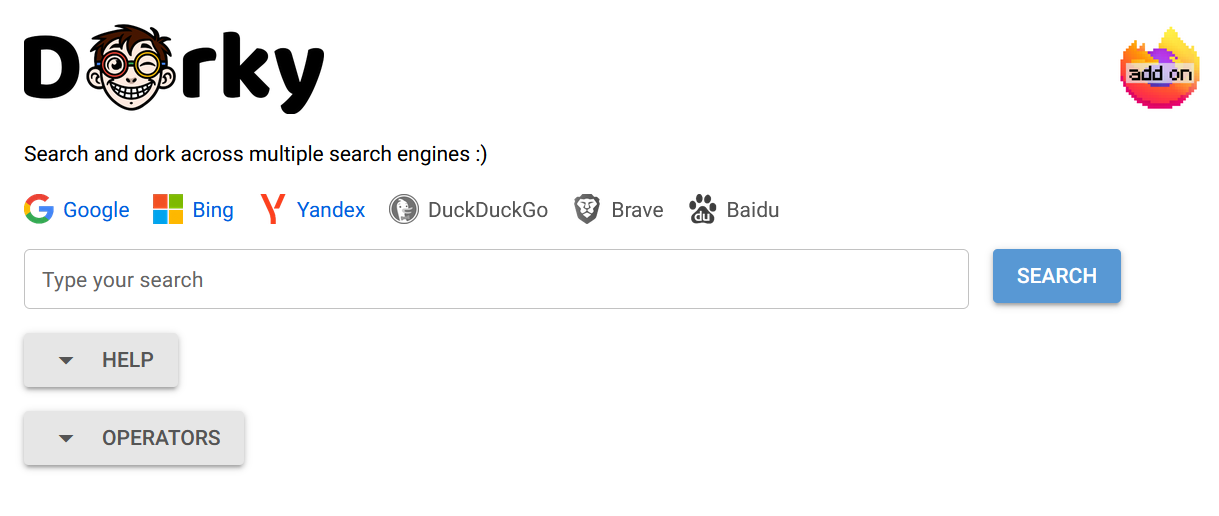
Dorky is a lightweight OSINT companion tool that helps you run search engine "dorks" — those advanced queries — across a range of popular search engines. It’s not magic, but it does make your life easier by handling the dirty work of reformatting and opening light to medium dorks for you.
Try it online at: dorky.uk.
✨ Highlights
Here’s what Dorky can do:
- ✅ Automatically convert Google and custom dorks for use with Google, Bing, Yandex, DuckDuckGo, Brave, and Baidu — all in one click.
- ✅ Instantly open the results in your browser for any selected engine.
- ✅ Firefox extension for easier access and quicker usage.
Under the hood, Dorky maps or approximates compatible search operators using URL tweaking.
☰ Supported Operators
Google style
- " "
- ( )
- OR, |
- -
- site:
- inurl:
- intitle:
- intext:
- filetype:, ext:
- *
- after:
- before:
Custom
- lang:
- country:
- sub:
- last:
- !IP
The full list of supported operators and their compatibility can be found at dorky.uk.
🛠️ Installation
🔹 pipx (recommended)
Install with pipx:
pipx install dorky-app
Run Dorky with pipx without installing it:
pipx run dorky-app [arguments]
🔹 uv (also recommended)
Install with uv:
uv tool install dorky-app
Run Dorky with uv without installing it:
uvx dorky-app [arguments]
🔹 pip
pip install dorky-app
🚀 Getting Started
▶️ Start the Web App
By default, Dorky runs on port 8080. Launch it like this:
dorky-app start
⚙️ Change the Port if needed
Use --port or -p to pick a different port:
dorky-app start --port 8083
# or shorthand
dorky-app start -p 8083
🔐 Set the Secret Key
To store user preferences securely (like selected engines and view states), set a DORKY_SECRET environment variable. If this isn’t set, your preferences reset every time you restart.
🐳 Using Docker?
Fire up Dorky with Docker like so:
docker run -p 8080:8080 -e DORKY_SECRET="your secret" balestek/dorky-app # start dorky on port 8080
docker run -p 8083:8080 -e DORKY_SECRET="your secret" balestek/dorky-app # start dorky on port 8083
⚡ Using Dorky
Visit your local Dorky instance:
Step-by-step
- Allow pop-ups for Dorky domain in your browser settings.
- Click to enable the search engines you want to use.
- Type your query or paste in your dork.
- Hit Enter or click the search button.
🧩 Firefox Add on
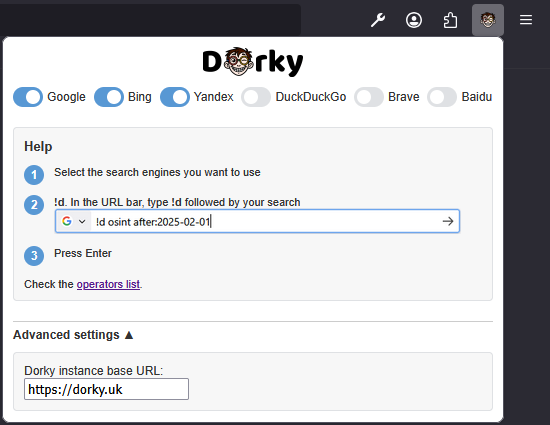
Want to use Dorky directly in your browser?
It aims to provide a seamless experience, allowing you to run Dorky directly from your browser without needing to open the web app separately.
It’s already configured to work out of the box with the dorky.uk instance, but you can also point it to your own self-hosted instance of Dorky if needed.
Step-by-step
- Install the add on.
- Click on the add on icon and select the search engines you need.
- (Optional) Set the Dorky URL in Advanced settings if you are using a self-hosted instance.
- In the firefox omnibox (the address bar), type
!dfollowed by your query or dork. For example:!d osint site:github.com. - Click on Search.
✔️ Requirements
Python version 3.9 or higher is required.
nicegui
📄 License
GPLv3


Download files
Download the file for your platform. If you're not sure which to choose, learn more about installing packages.
Source Distribution
Built Distribution
Filter files by name, interpreter, ABI, and platform.
If you're not sure about the file name format, learn more about wheel file names.
Copy a direct link to the current filters
File details
Details for the file dorky_app-0.1.4.tar.gz.
File metadata
- Download URL: dorky_app-0.1.4.tar.gz
- Upload date:
- Size: 303.1 kB
- Tags: Source
- Uploaded using Trusted Publishing? No
- Uploaded via: python-httpx/0.28.1
File hashes
| Algorithm | Hash digest | |
|---|---|---|
| SHA256 |
b00d25e297011cc29c2ec5cdd6859d1a2336fd8fc090b101c42c4ddb40a70cbf
|
|
| MD5 |
abf6f7a1a24aaee4b52a259ea706cf40
|
|
| BLAKE2b-256 |
2bf8185541a6d712b98e48d5e3ee432cff7cb36a7b98bce2001759f2b03d98ef
|
File details
Details for the file dorky_app-0.1.4-py3-none-any.whl.
File metadata
- Download URL: dorky_app-0.1.4-py3-none-any.whl
- Upload date:
- Size: 304.8 kB
- Tags: Python 3
- Uploaded using Trusted Publishing? No
- Uploaded via: python-httpx/0.28.1
File hashes
| Algorithm | Hash digest | |
|---|---|---|
| SHA256 |
6cd850d2b0e20ef3942e418efa8b1be1acbce8ecc723853fe19e73dca0911c2c
|
|
| MD5 |
50b58847117da756970a06e3b803fd89
|
|
| BLAKE2b-256 |
291919eb69fc4c8732d6993b4a7ef0511df402b1ffea681a06995b284c02b8ae
|






