
DORM
A browser playground for the Django ORM: run Python/ORM code against your database in notebook-style cells and see results as a table.
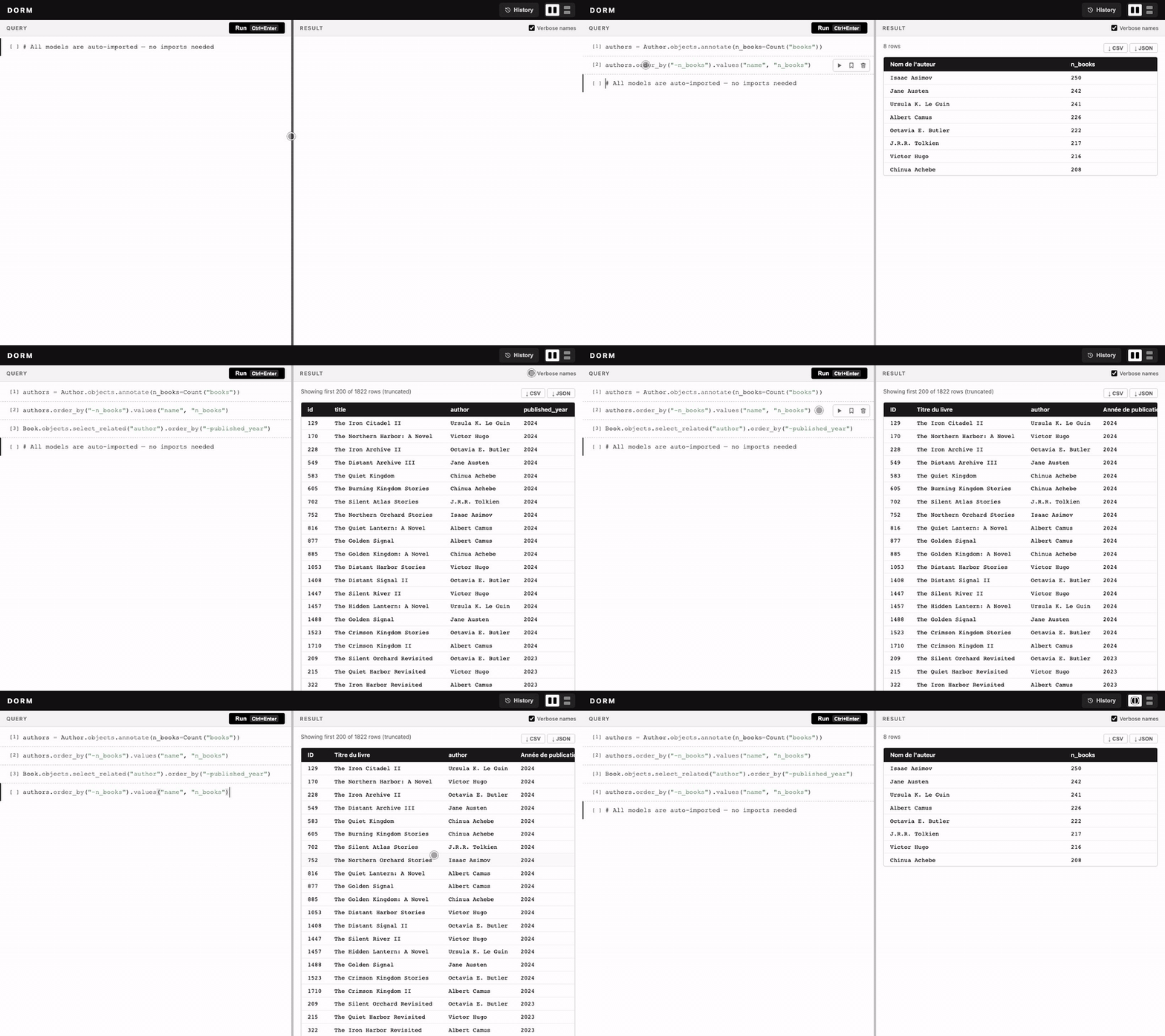
DORM executes arbitrary Python in your Django process. Read Access before enabling it anywhere but your laptop.
Install
pip install dorm-plg # add [redis] for the Redis storage backend
# settings.py
INSTALLED_APPS = [..., "django_htmx", "dorm"]
MIDDLEWARE     = [..., "django_htmx.middleware.HtmxMiddleware"]

# urls.py
from dorm import get_url_prefix
urlpatterns = [..., path(f"{get_url_prefix()}/", include("dorm.urls", namespace="dorm"))]
Open /__dorm__/. DORM has no models and needs no migrations.
Features
- Cells: each run commits a cell and opens a new one. Running a cell re-executes every cell above it first, so variables carry over. Hover a cell to run, save or remove it.
- Editor: Python highlighting, auto-closed quotes and brackets.
Ctrl/Cmd+Enterruns,Alt/Option+↑/↓steps through recent executions,Ctrl/Cmd+/comments. - Auto-imports: all models plus
Q,F,Count,Sum,Avg,Max,Min,Value,OuterRefandSubquery. - History: a modal with Recents and Saved tabs; copy an entry, or insert it into the focused cell.
- Export: CSV (
;) or JSON. Previews show 200 rows; when a result is truncated, you choose between the loaded rows and the full result. The full result re-runs the query, and over 1,500 rows it arrives as a.zipof 1,500-row files.
Access
| Setting | Default | |
|---|---|---|
DORM_URL_NAME |
"__dorm__" |
URL prefix |
DORM_AUTH_ACCESS |
False |
Require login |
DORM_PERMISSION_ACCESS |
False |
Require a permission (superusers always pass) |
DORM_PERMISSION_NAME |
"can_access_dorm_plg" |
Codename (any app) or "app_label.codename" |
-
DEBUG=True: open to everyone, unless you turn on the auth or permission settings. -
DEBUG=False: every DORM URL returns 404 unless all of these hold:DORM_URL_NAMEis a custom valueDORM_AUTH_ACCESS = TrueDORM_PERMISSION_ACCESS = True- the user is logged in and has the permission
manage.py checkreportsdorm.W001when a setting is missing.
DORM defines no permission itself. Create it on one of your models, usually the user model:
class User(AbstractUser):
    class Meta:
        permissions = [("can_access_dorm_plg", "Can access DORM")]
With the stock auth.User, create the same Permission in a data migration (content_type = User). Then grant it in the admin.
Storage
History, saved commands and settings are stored in a pluggable backend. The default is in-memory.
DORM_STORAGE = {
    "BACKEND": "json",                                # memory | json | redis | sql | dotted.path
    "OPTIONS": {"path": BASE_DIR / "dorm_db.json"},
    "HISTORY_LIMIT": 100,
}
| Backend | OPTIONS |
|---|---|
memory |
— |
json |
path |
redis |
url="redis://localhost:6379/0", prefix="dorm:" |
sql |
alias="default": any Django database (PostgreSQL, MySQL, SQLite). Its table is created on first use. |
To write a custom backend, subclass dorm.storage.BaseStorage and implement get, set, delete, all, push, range and clear.
Development
git clone https://github.com/almamydev/DORM && cd DORM
uv sync --extra dev
uv run pytest
cd sandbox && uv run python manage.py migrate && uv run python manage.py runserver
1 maintainer

Metadata
1 maintainer
Release files for dorm-plg 0.2.1
For a detailed explanation of source distributions (sdists) and built distributions (wheels), please see the package formats documentation.
Source distribution (sdist)
| File | Size | Uploaded | |
|---|---|---|---|
| dorm_plg-0.2.1.tar.gz | 36.6 kB | Details |
Built distribution (wheel)
| File | Interpreter | ABI | Platform | Reset |
|---|---|---|---|---|
| dorm_plg-0.2.1-py3-none-any.whl | Python 3 | none | any | Details |
Total release size: 70.3 kB
Release files / dorm_plg-0.2.1.tar.gz
| Download URL | dorm_plg-0.2.1.tar.gz |
|---|---|
| Size | 36.6 kB |
| Tags | Source |
|
SHA-256 checksum How to use checksums |
e5426b422f55fbdbab68a064e16550fa40deb7f0531d6aa252117d38339b27b6
|
|
BLAKE2b-256 checksum How to use checksums |
47916370d7232c8e4cc38c837ec5d07474e2954d7d5d839e41404252f004a246
|
| Upload date | |
|
Uploaded using Trusted Publishing? What is trusted publishing? |
No |
| Uploaded via |
twine/7.0.0 CPython/3.12.7
|
Release files / dorm_plg-0.2.1-py3-none-any.whl
| Download URL | dorm_plg-0.2.1-py3-none-any.whl |
|---|---|
| Size | 33.7 kB |
| Tags | Python 3 |
|
SHA-256 checksum How to use checksums |
ccbef94e3db4842af6e6731c1fe94f247608314f67e26c50c115700ee4776c5b
|
|
BLAKE2b-256 checksum How to use checksums |
b27ec5be7fde0c71fa94d15fa0624b3b1bd37b4b48eeebf6c656449c9d0693f3
|
| Upload date | |
|
Uploaded using Trusted Publishing? What is trusted publishing? |
No |
| Uploaded via |
twine/7.0.0 CPython/3.12.7
|














