
dose-response
The script uses the formula for the 4PL-Dose-Response-Curve for fitting:
Y = Bottom + (Top - Bottom) / (1 + 10 ** (HillSlope * (lg EC50 - lg X)))
CAVE: Default unit is µM and confidence level is 0.05 (to change: use the python class manually)
Input:
- A csv file with doses and its corresponding responses
Output:
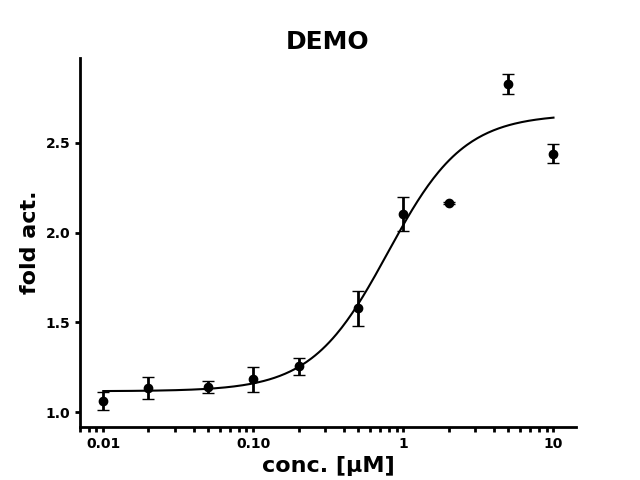
- A logarithmic dose-response plot of the fitted curce with standard error bars
- A csv file with the fitted parameters, their SD and the lower and upper bounds of the CI
Usage
- Install DRC
pip install dose-response
- Provide your data results in a CSV file without headers (Mark values to exclude with an * as suffix).
| 0.0100 | 0.9648 | 0.9071* | 1.1355 | 1.0846 |
| 0.0200 | 1.0410 | 1.2995 | 1.0521 | 1.1535 |
| 0.0500 | 1.0967 | 1.1554 | 1.0780 | 1.2259 |
| 0.0100 | 1.2117 | 1.2174 | 1.3170 | 0.9917 |
| 0.0200 | 1.1644 | 1.6411* | 1.3084 | 1.2987 |
| 0.0500 | 1.4881 | 1.7500 | 1.7305 | 1.3465 |
| 1.0000 | 2.0601 | 2.2339 | 2.2620 | 1.8493 |
| 2.0000 | 1.7824* | 2.4520* | 2.1712 | 2.1571 |
| 5.0000 | 2.7854 | 2.6934 | 2.8719 | 2.9488 |
| 10.0000 | 3.1894* | 2.4637 | 2.3380 | 2.5128 |
-
Execute DRC
file: CSV file with data -d, --dose-col: Column index of doses: [Default: 0] -r, --response-cols: start and end index of response columns: [Default: every other column] -o, --out Output directory [Default: current working directory] drc DataFile -d DoseColumnIndex -r ResponseStartIndex ResponseEndIndex -o OutputDir drc demo/demo.csv -d 0 -r 1 4 -o demo -
Plot is stored in OutputDirectory/DataFileBase_plot.png
demo/demo_plot.png
-
Parameters are stored in OutputDirectory/DataFileBase_params.csv
demo/demo_params.csv
| Parameter | Mean | SD | CI_Lower | CI_Upper |
|---|---|---|---|---|
| Hill Slope | 1.7123 | 0.3933 | 0.9101 | 2.5144 |
| Top | 2.6591 | 0.0494 | 2.5582 | 2.7599 |
| Bottom | 1.1178 | 0.0855 | 0.9433 | 1.2922 |
| EC50 | 0.7874 | 0.1028 | 0.5778 | 0.9969 |
| LogEC50 | -0.1038 | -0.2382 | -0.0013 |
Test
-
Create test data
drc-test TestDataFile -
Execute DRC
drc TestDataFile
Acknowledgments
Thanks to yannabraham (https://gist.github.com/yannabraham/5f210fed773785d8b638)
1 maintainer

Download files
Download the file for your platform. If you're not sure which to choose, learn more about installing packages.
Source Distribution
Built Distribution
Filter files by name, interpreter, ABI, and platform.
If you're not sure about the file name format, learn more about wheel file names.
Copy a direct link to the current filters
File details
Details for the file dose_response-0.0.3.tar.gz.
File metadata
- Download URL: dose_response-0.0.3.tar.gz
- Upload date:
- Size: 33.2 kB
- Tags: Source
- Uploaded using Trusted Publishing? Yes
- Uploaded via:
twine/7.0.0 CPython/3.13.14
File hashes
| Algorithm | Hash digest | |
|---|---|---|
| SHA256 |
f36ca3b734e537aed01ed0f7be93a5d984272806b30207c8229d86b4e5511c85
|
|
| MD5 |
50b1b2608df7bda0ada0f4b9efea3c2f
|
|
| BLAKE2b-256 |
9770e7b3313bf743d94f5e89eebfb10785eac5715976df21eef464868f6bb429
|
Provenance
The following attestation bundles were made for dose_response-0.0.3.tar.gz:
Publisher:
release.yml on audivir/dose-response
-
Statement:
-
Statement type:
https://in-toto.io/Statement/v1 -
Predicate type:
https://docs.pypi.org/attestations/publish/v1 -
Subject name:
dose_response-0.0.3.tar.gz -
Subject digest:
f36ca3b734e537aed01ed0f7be93a5d984272806b30207c8229d86b4e5511c85 - Sigstore transparency entry: 2582961426
- Sigstore integration time:
-
Permalink:
audivir/dose-response@16550cda856f0547fafd8e3120c3c98a969b5c73 -
Branch / Tag:
refs/tags/v0.0.3 - Owner: https://github.com/audivir
-
Access:
public
-
Token Issuer:
https://token.actions.githubusercontent.com -
Runner Environment:
github-hosted -
Publication workflow:
release.yml@16550cda856f0547fafd8e3120c3c98a969b5c73 -
Trigger Event:
release
-
Statement type:
File details
Details for the file dose_response-0.0.3-py3-none-any.whl.
File metadata
- Download URL: dose_response-0.0.3-py3-none-any.whl
- Upload date:
- Size: 10.6 kB
- Tags: Python 3
- Uploaded using Trusted Publishing? Yes
- Uploaded via:
twine/7.0.0 CPython/3.13.14
File hashes
| Algorithm | Hash digest | |
|---|---|---|
| SHA256 |
e6602c4962dd6d3c02f88f13d3a5c03181a5aef23a40edd562fe5eb6052cb2f0
|
|
| MD5 |
76d7a5a8c760b764e938a12966f379c5
|
|
| BLAKE2b-256 |
fd859661b8f529f65741e4e7ef5dfab9da52800236f20e1269a505467bf8ce38
|
Provenance
The following attestation bundles were made for dose_response-0.0.3-py3-none-any.whl:
Publisher:
release.yml on audivir/dose-response
-
Statement:
-
Statement type:
https://in-toto.io/Statement/v1 -
Predicate type:
https://docs.pypi.org/attestations/publish/v1 -
Subject name:
dose_response-0.0.3-py3-none-any.whl -
Subject digest:
e6602c4962dd6d3c02f88f13d3a5c03181a5aef23a40edd562fe5eb6052cb2f0 - Sigstore transparency entry: 2582961430
- Sigstore integration time:
-
Permalink:
audivir/dose-response@16550cda856f0547fafd8e3120c3c98a969b5c73 -
Branch / Tag:
refs/tags/v0.0.3 - Owner: https://github.com/audivir
-
Access:
public
-
Token Issuer:
https://token.actions.githubusercontent.com -
Runner Environment:
github-hosted -
Publication workflow:
release.yml@16550cda856f0547fafd8e3120c3c98a969b5c73 -
Trigger Event:
release
-
Statement type:














