




Quick Start • Install • AI Agent Integration • Example Project • DeepWiki
dot-tasks is a simple CLI for managing project-level tasks in a local .tasks/ directory, using human- and agent-readable files.
It started as a personal workflow tool: keep task specs in files, let agents work from those specs, and keep progress updates in the repo instead of chat history. It is shared here in case the same approach is useful to others.
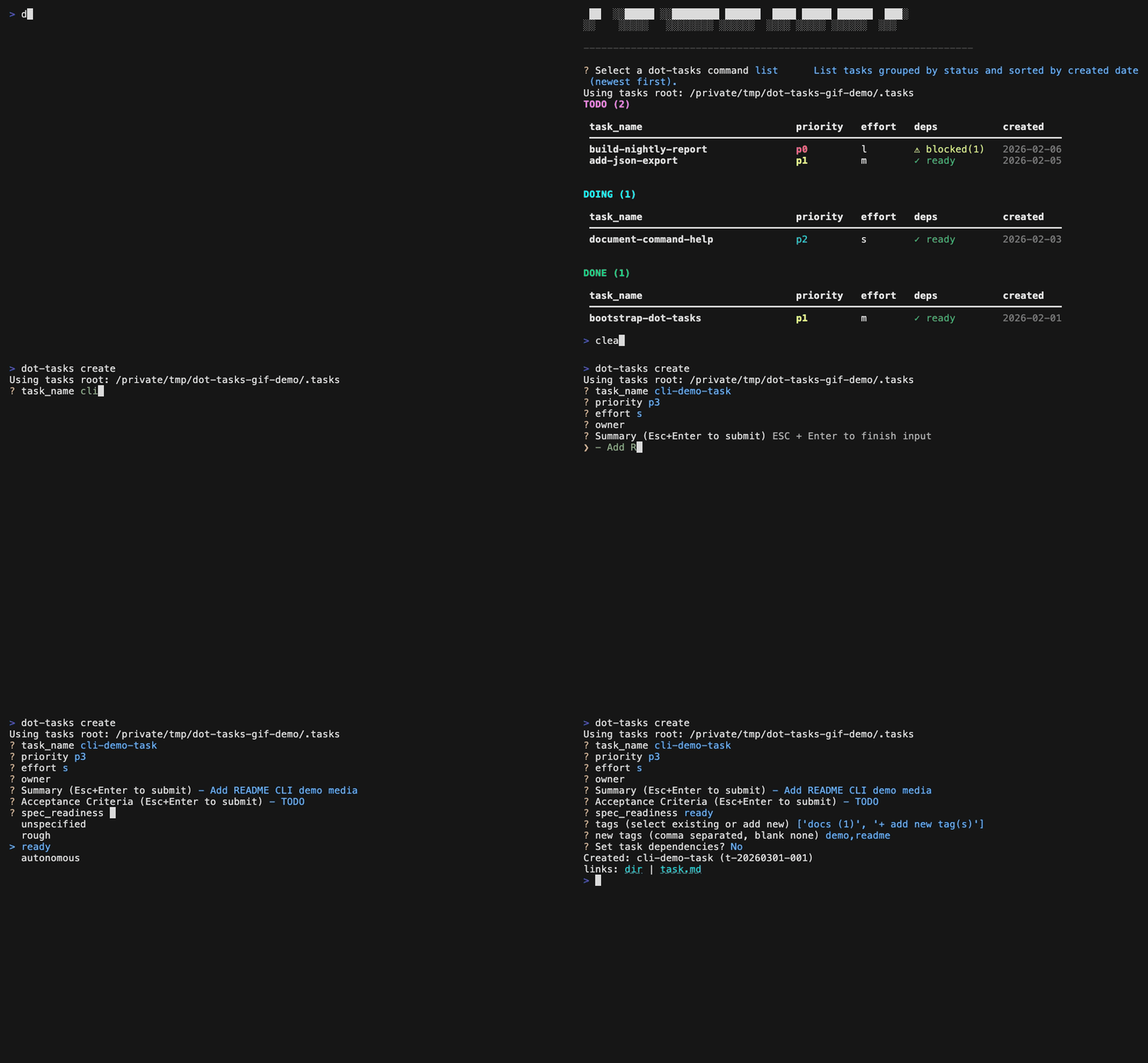
Quick Start
Quick start commands:
# Initialize .tasks/ dir in the current project
dot-tasks init
# Create a new todo task with an initial summary.
dot-tasks create rename-variables-for-vibes --summary "Refactor variable names for maximum vibes"
# Move the task from todo/ to doing/ and create its plan.md.
dot-tasks start rename-variables-for-vibes
# Append a progress note while work is in progress.
dot-tasks log-activity rename-variables-for-vibes --note "Replaced cryptic names with vibes-based naming"
# Mark the task complete and move it to done/.
dot-tasks complete rename-variables-for-vibes
Task directory layout
.tasks/
  todo/
  doing/
  done/
  trash/
Each task lives in .tasks/<status-bucket>/<created-date>-<task_name>/ and contains:
task.md(canonical metadata frontmatter + task body)activity.md(append-only audit log)plan.md(created when the task is started)
Typical workflow:
| Step | What happens | Command(s) | Files touched |
|---|---|---|---|
| Make note of new to-do | Write down the task spec. Often I have an agent draft a spec from a rough note. | dot-tasks create |
Creates task dir .tasks/todo/<created-date>-<task_name>/ with task.md, activity.md |
| Choose task to work on | Scan what is in todo/doing and pick the next task to start. |
dot-tasks list |
read-only inspection of .tasks/ |
| Start active work | Move the task to active status when implementation begins. | dot-tasks start |
Move task from .tasks/todo/ to .tasks/doing/; plan.md created |
| Work loop | Log notable progress updates so humans and agents share context. | dot-tasks log-activity |
activity.md |
| Finish and archive state | Mark done when acceptance criteria are met, preserving full history in files. | dot-tasks complete |
task directory moves to .tasks/done/ |
Installation
Install via pip (PyPI)
pip install dot-tasks
Quick check:
dot-tasks --help
Install Latest from GitHub
Install the latest from GitHub:
pip install "git+https://github.com/Awni00/dot-tasks.git"
Development Install (with uv)
git clone https://github.com/Awni00/dot-tasks.git
cd dot-tasks
uv sync --dev
uv run dot-tasks --help
Editable install:
uv pip install -e ".[dev]"
Commands
| Command | Purpose | Typical usage |
|---|---|---|
init |
Create .tasks/ and write/update managed config settings; can also append workflow guidance section AGENTS.md and install the skill via npx skills. |
dot-tasks init |
install-skill |
Install the canonical dot-tasks skill via npx skills. |
dot-tasks install-skill [--yes] |
add-agents-snippet |
Add or update the canonical dot-tasks section in AGENTS policy markdown. |
dot-tasks add-agents-snippet [--agents-file <path>] [--yes] |
create |
Add a new task to todo/, optionally with a date-only due date. |
`dot-tasks create <task_name> [--due-date YYYY-MM-DD] [--spec-readiness unspecified |
start |
Move a task to doing/ and create plan.md. |
dot-tasks start <task_name> |
complete |
Move a task to done/. |
dot-tasks complete <task_name> |
list |
List tasks by status and optional tag filters (rich/plain/JSON depending on context). | `dot-tasks list [todo |
tags |
Show task counts by tag with optional status filter (rich/plain/JSON depending on context). | `dot-tasks tags [todo |
view |
Show full details for one task, including clickable file links for task.md, activity.md, plan.md, and any extra files. |
dot-tasks view <task_name> [--json] |
graph |
Visualize task dependencies as a DAG in terminal output (tree or layers modes). |
`dot-tasks graph [--mode tree |
update |
Update metadata, dependencies, tags, owner, effort, priority, spec readiness, or due date. | `dot-tasks update <task_name> [--due-date YYYY-MM-DD |
log-activity |
Append a manual activity note with optional actor override. | dot-tasks log-activity <task_name> --note "..." [--actor agent] |
rename |
Rename a task. | dot-tasks rename <task_name> <new_task_name> |
delete |
Move a task to trash/, or delete permanently with --hard. |
dot-tasks delete <task_name> [--hard] |
Interactive create and interactive update use a single tag selector flow with an optional + add new tag(s) path.
Status filter supports todo|doing style multi-select and all. Default is todo|doing.
Optional due dates
Due dates are stored in task frontmatter as an optional ISO due_date: YYYY-MM-DD.
They contain no time or timezone. Explicit create --due-date, update --due-date,
and update --clear-due-date options remain available for scripts regardless of
the interactive feature setting.
Due dates are enabled by default. Their interactive prompts and human-readable output can be disabled:
settings:
  due_dates:
    enabled: true
  list_table:
    columns:
      - name: task_name
        width: 32
      - name: due_date
        width: 10
When due dates are enabled, init offers due_date in the list-column
selector and selects it by default; users may unselect it. When due dates are
disabled, the column is omitted from the selector and suppressed from list
output. In Rich terminal output, dates before today render in red and dates due
today render in orange for todo and doing tasks. Completed tasks are not
highlighted.
The interactive date picker starts at today after choosing to set a date. Use left/right to select year, month, or day; up/down to adjust it; type digits to replace a segment; and press Enter to accept.
Tag examples:
dot-tasks list --tag bug
dot-tasks list todo|doing --tag backend --tag api --all-tags
dot-tasks list all
dot-tasks tags
dot-tasks tags todo --sort name
AI Agent Integration
dot-tasks is designed so humans and agents can work from the same file-based task state in .tasks/ instead of relying on chat context.
Typical agent workflow:
- Capture or refine a task spec with
dot-tasks create. - If asked what to work on, check
dot-tasks list(defaults totodo|doing) and propose the top few options with a short rationale. - Move selected work into active state with
dot-tasks start. - Log meaningful progress with
dot-tasks log-activity --note ...as work evolves. - Close the loop with
dot-tasks completewhen acceptance criteria are met.
You can set up agent integration pieces either during dot-tasks init or with standalone commands:
- During
dot-tasks init(interactive flow),dot-taskscan optionally append the AGENTS section and install the skill. - Standalone commands:
dot-tasks install-skill
dot-tasks install-skill --yes
dot-tasks add-agents-snippet
dot-tasks add-agents-snippet --agents-file TEAM_AGENTS.md --yes
Example Project
For a full demo of the workflow, see examples/basic-demo/ and the walkthrough in examples/basic-demo/README.md.
1 maintainer

Release files for dot-tasks 0.1.9
For a detailed explanation of source distributions (sdists) and built distributions (wheels), please see the package formats documentation.
Source distribution (sdist)
| File | Size | Uploaded | |
|---|---|---|---|
| dot_tasks-0.1.9.tar.gz | 72.4 kB | Details |
Built distribution (wheel)
| File | Interpreter | ABI | Platform | Reset |
|---|---|---|---|---|
| dot_tasks-0.1.9-py3-none-any.whl | Python 3 | none | any | Details |
Total release size: 116.3 kB
Release files / dot_tasks-0.1.9.tar.gz
| Download URL | dot_tasks-0.1.9.tar.gz |
|---|---|
| Size | 72.4 kB |
| Tags | Source |
|
SHA-256 checksum How to use checksums |
7d0567e96da76799c6990eeb4846514ec555a4cffdc272c880f6d6e9b4a87c20
|
|
BLAKE2b-256 checksum How to use checksums |
eea3c676401969fd499b18878db5a4336ebdd2bd5bbc3e1d90c304a037195863
|
| Upload date | |
|
Uploaded using Trusted Publishing? What is trusted publishing? |
Yes |
| Uploaded via |
twine/7.0.0 CPython/3.13.14
|
Provenance
Provenance describes where a file came from. On PyPI, provenance is shared via attestations, which provide a verifiable record of the build or publishing details. View details, limitations and caveats.


PyPI Publish Attestation
PyPI verified that this artifact, at this checksum, originated from the publisher listed below.
Signed by GitHub Actions, verified by PyPI on Jul 30, 2026.
Transparency logRelease files / dot_tasks-0.1.9-py3-none-any.whl
| Download URL | dot_tasks-0.1.9-py3-none-any.whl |
|---|---|
| Size | 43.9 kB |
| Tags | Python 3 |
|
SHA-256 checksum How to use checksums |
9459174e8536149e3d4a6724541a64484b1a98158c702a46c9ac0c76f5087d3c
|
|
BLAKE2b-256 checksum How to use checksums |
344c3f6f3a02e480d2df659c8ef850a0b2c86af21fca47e957d55ecdf06bcd2c
|
| Upload date | |
|
Uploaded using Trusted Publishing? What is trusted publishing? |
Yes |
| Uploaded via |
twine/7.0.0 CPython/3.13.14
|
Provenance
Provenance describes where a file came from. On PyPI, provenance is shared via attestations, which provide a verifiable record of the build or publishing details. View details, limitations and caveats.
PyPI Publish Attestation
PyPI verified that this artifact, at this checksum, originated from the publisher listed below.
Signed by GitHub Actions, verified by PyPI on Jul 30, 2026.
Transparency log













