
Keep updated binaries in your dotfiles
Verified details
These details have been verified by PyPIProject links
GitHub Statistics
Maintainers

Project description
dotbins 🧰







dotbins manages CLI tool binaries in your dotfiles repository, offering:
- ✅ Cross-platform binary management (macOS, Linux, Windows)
- ✅ No admin privileges required
- ✅ Version-controlled CLI tools
- ✅ Downloads from GitHub releases
- ✅ Perfect for dotfiles synchronization
No package manager, no sudo, no problem.
[ToC] 📚
:zap: Quick Start
Using the amazing uv package manager:
# Install directly to ~/.local/bin
uvx dotbins get junegunn/fzf

# Set up multiple tools with a config file
uvx dotbins update

# Bootstrap a collection of tools from a remote config
uvx dotbins get https://raw.githubusercontent.com/username/dotbins-config/main/tools.yaml
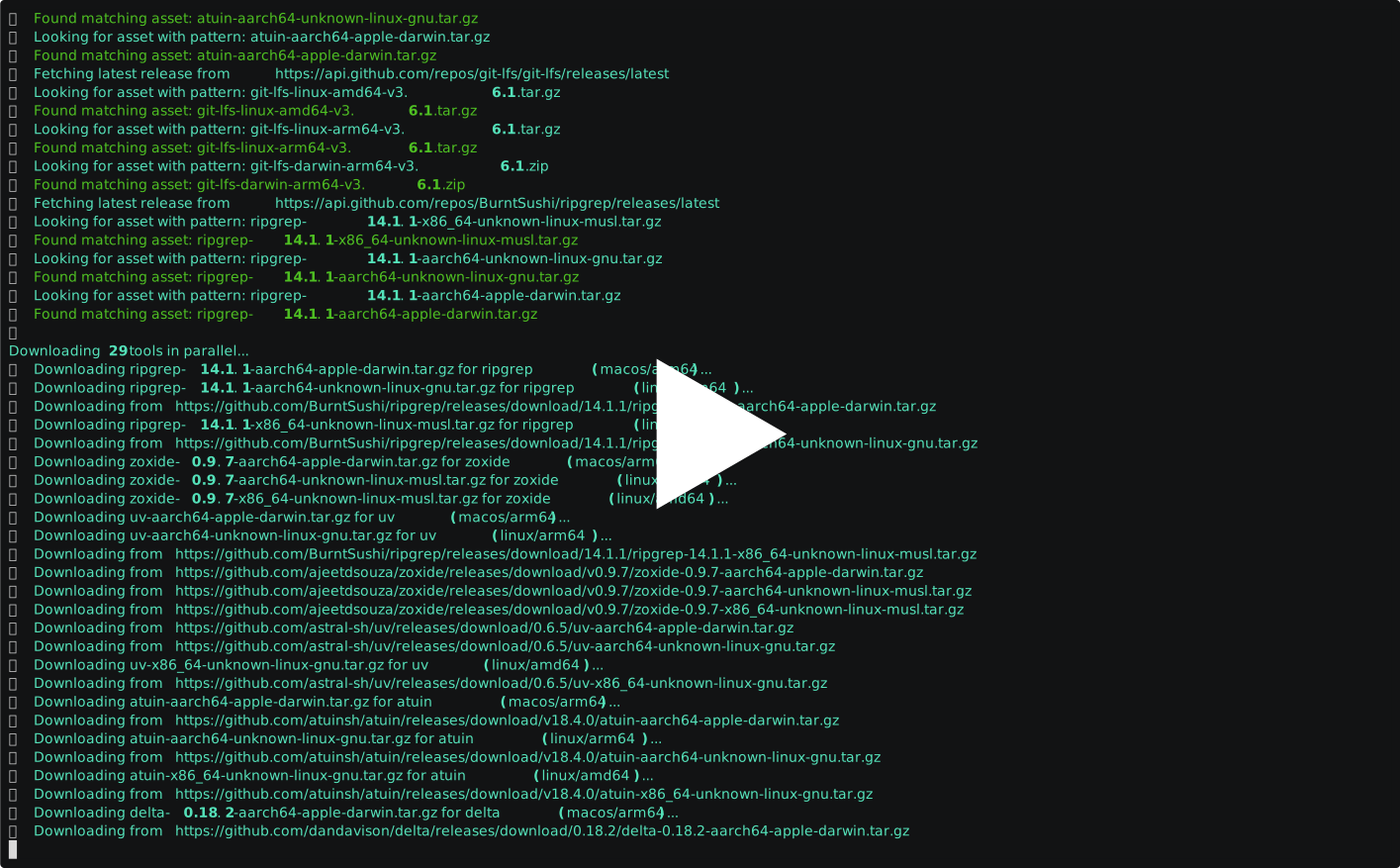
See it in action:
:star2: Features
- 🌐 Supports multiple platforms (macOS, Linux, etc.) and architectures (amd64, arm64, etc.)
- 📦 Downloads and organizes binaries from GitHub releases
- 🔄 Updates tools to their latest versions with a single command
- 📊 Tracks installed versions and update timestamps for all tools
- 🧩 Extracts binaries from various archive formats (zip, tar.gz)
- 📂 Organizes tools by platform and architecture for easy access
- 🐙 Easy integration with your dotfiles repository for version control
:bulb: Why I Created dotbins
I frequently works across multiple environments where I clone my dotfiles repository with all my preferred configurations.
I faced a common frustration: some of my favorite tools (fzf, bat, zoxide, etc.) were not available on the new system and installing them with a package manager is too much work or even not possible.
dotbins was born out of this frustration.
It allows me to:
- Track pre-compiled binaries in a separate Git repository (using Git LFS for efficient storage)
- Include this repository as a submodule in my dotfiles
- Ensure all my essential tools are immediately available after cloning, regardless of system permissions
Now when I clone my dotfiles on any new system, I get not just my configurations but also all the CLI tools I depend on for productivity.
No package manager, no sudo, no problem!
:books: Usage
[!TIP] Use
uvx dotbinsand create a~/.config/dotbins/config.yamlfile to store your configuration.
To use dotbins, you'll need to familiarize yourself with its commands:
dotbins --help
Usage: dotbins [-h] [-v] [--tools-dir TOOLS_DIR] [--config-file CONFIG_FILE]
               {list,update,init,version,versions,readme,get} ...

dotbins - Manage CLI tool binaries in your dotfiles repository

Positional Arguments:
  {list,update,init,version,versions,readme,get}
                        Command to execute
    list                List available tools
    update              Update tools
    init                Initialize directory structure
    version             Print version information
    versions            Show installed tool versions and their last update
                        times
    readme              Generate README.md file with tool information
    get                 Download and install a tool directly from GitHub or
                        from a remote configuration

Options:
  -h, --help            show this help message and exit
  -v, --verbose         Enable verbose output
  --tools-dir TOOLS_DIR
                        Tools directory
  --config-file CONFIG_FILE
                        Path to configuration file
Commands
- update - Download or update tools
- get - Download and install a tool directly without using a configuration file
- init - Initialize the tools directory structure
- list - List available tools defined in your configuration
- version - Print version information
- versions - Show detailed information about installed tool versions
Quick Install with dotbins get
The get command allows you to quickly download and install tools directly from GitHub or from a remote configuration file:
# Install fzf to the default location (~/.local/bin)
dotbins get junegunn/fzf

# Install ripgrep with a custom binary name
dotbins get BurntSushi/ripgrep --name rg

# Install bat to a specific location
dotbins get sharkdp/bat --dest ~/bin

# Install multiple tools from a remote config URL
dotbins get https://example.com/my-tools.yaml --dest ~/.local/bin
This is perfect for:
- Quickly installing tools on a new system
- One-off installations without needing a configuration file
- Adding tools to PATH in standard locations like
~/.local/bin - Bootstrapping with a pre-configured set of tools using a remote configuration URL
The get command automatically detects whether you're providing a GitHub repository or a configuration URL.
When using a URL, it will download all tools defined in the configuration for your current platform and architecture.
:hammer_and_wrench: Installation
We highly recommend to use uv to run dotbins:
uvx dotbins
or install as a global command:
uv tool install dotbins
Otherwise, simply use pip:
pip install dotbins
You'll also need to create or update your dotbins.yaml configuration file either in the same directory as the script or at a custom location specified with --tools-dir.
:gear: Configuration
dotbins uses a YAML configuration file to define the tools and settings. The configuration file is searched in the following locations (in order):
- Explicitly provided path (using
--config-fileoption) ./dotbins.yaml(current directory)~/.config/dotbins/config.yaml(XDG config directory)~/.config/dotbins.yaml(XDG config directory, flat)~/.dotbins.yaml(home directory)~/.dotbins/dotbins.yaml(default dotfiles location)
The first valid configuration file found will be used. If no configuration file is found, default settings will be used.
Basic Configuration
# Basic settings
tools_dir: ~/.dotbins

# Target platforms and architectures
platforms:
  linux:
    - amd64
    - arm64
  macos:
    - arm64  # Only arm64 for macOS

# Tool definitions
tools:
  # Tool configuration entries
Tool Configuration
Each tool must be configured with at least a GitHub repository. Many other fields are optional and can be auto-detected:
tool-name:
  repo: owner/repo                 # Required: GitHub repository
  extract_binary: true             # Optional: Whether to extract from archive (true) or direct download (false) (auto-detected if not specified)
  binary_name: executable-name     # Optional: Name of the resulting binary(ies) (defaults to tool-name)
  binary_path: path/to/binary      # Optional: Path to the binary within the archive (auto-detected if not specified)

  # Asset patterns - Optional with auto-detection
  # Option 1: Platform-specific patterns
  asset_patterns:                  # Optional: Asset patterns for each platform
    linux: pattern-for-linux.tar.gz
    macos: pattern-for-macos.tar.gz
  # Option 2: Single pattern for all platforms
  asset_patterns: pattern-for-all-platforms.tar.gz  # Global pattern for all platforms
  # Option 3: Explicit platform patterns for different architectures
  asset_patterns:
    linux:
      amd64: pattern-for-linux-amd64.tar.gz
      arm64: pattern-for-linux-arm64.tar.gz
    macos:
      amd64: pattern-for-macos-amd64.tar.gz
      arm64: pattern-for-macos-arm64.tar.gz
If you don't specify binary_path or asset_patterns, dotbins will attempt to auto-detect the appropriate values for you. This often works well for standard tool releases.
Platform and Architecture Mapping
If the tool uses different naming for platforms or architectures:
tool-name:
  # Basic fields...
  platform_map:                    # Optional: Platform name mapping
    macos: darwin                  # Converts "macos" to "darwin" in patterns
  arch_map:                        # Optional: Architecture name mapping
    amd64: x86_64                  # Converts "amd64" to "x86_64" in patterns
    arm64: aarch64                 # Converts "arm64" to "aarch64" in patterns
Pattern Variables
In asset patterns, you can use these variables:
{version}- Release version (without 'v' prefix){platform}- Platform name (after applying platform_map){arch}- Architecture name (after applying arch_map)
Multiple Binaries
For tools that provide multiple binaries:
tool-name:
  # Other fields...
  binary_name: [main-binary, additional-binary]
  binary_path: [path/to/main, path/to/additional]
Configuration Examples
Minimal Tool Configuration
ripgrep:
  repo: BurntSushi/ripgrep
  binary_name: rg  # Only specify if different from tool name
Standard Tool
atuin:
  repo: atuinsh/atuin
  arch_map:
    amd64: x86_64
    arm64: aarch64
  asset_patterns:
    linux: atuin-{arch}-unknown-linux-gnu.tar.gz
    macos: atuin-{arch}-apple-darwin.tar.gz
Tool with Multiple Binaries
uv:
  repo: astral-sh/uv
  binary_name: [uv, uvx]
  binary_path: [uv-*/uv, uv-*/uvx]
Platform-Specific Tool
eza:
  repo: eza-community/eza
  arch_map:
    amd64: x86_64
    arm64: aarch64
  asset_patterns:
    linux: eza_{arch}-unknown-linux-gnu.tar.gz
    macos: null  # No macOS version available
Full Configuration Example
This is the author's configuration file:
# Configuration
tools_dir: ~/.dotbins

platforms:
  linux:
    - amd64
    - arm64
  macos:
    - arm64

# Tool definitions
tools:
  bat: sharkdp/bat
  delta: dandavison/delta
  direnv: direnv/direnv
  duf: muesli/duf
  fd: sharkdp/fd
  fzf: junegunn/fzf
  git-lfs: git-lfs/git-lfs
  lazygit: jesseduffield/lazygit
  yazi: sxyazi/yazi
  zoxide: ajeetdsouza/zoxide

  ripgrep:
    repo: BurntSushi/ripgrep
    binary_name: rg

  eza:
    repo: eza-community/eza
    arch_map:
      amd64: x86_64
      arm64: aarch64
    asset_patterns:
      linux: eza_{arch}-unknown-linux-gnu.tar.gz
      macos: null  # No macOS binaries available as of now

  uv:
    repo: astral-sh/uv
    binary_name: [uv, uvx]
    binary_path: [uv-*/uv, uv-*/uvx]

  micromamba:
    repo: mamba-org/micromamba-releases
    extract_binary: false
    binary_path: bin/micromamba
    arch_map:
      amd64: 64
      arm64: aarch64
    asset_patterns:
      linux: micromamba-linux-{arch}
      macos: micromamba-osx-arm64

  atuin:
    repo: atuinsh/atuin
    arch_map:
      amd64: x86_64
      arm64: aarch64
    asset_patterns:
      linux: atuin-{arch}-unknown-linux-gnu.tar.gz
      macos: atuin-{arch}-apple-darwin.tar.gz
:bulb: Examples
List available tools:
dotbins list
Update all tools for all platforms:
dotbins update
Update specific tools only:
dotbins update fzf bat
Update tools for a specific platform/architecture:
dotbins update -p macos -a arm64
Install tools from a remote configuration:
dotbins get https://raw.githubusercontent.com/username/dotbins-config/main/tools.yaml --dest ~/bin
:books: Examples with 50+ Tools
See the examples/dotbins.yaml file for a list of >50 tools that require no configuration.
tools_dir: ~/.dotbins-examples

# List of tools that require no configuration

tools:
  bandwhich: imsnif/bandwhich     # Terminal bandwidth utilization tool
  bat: sharkdp/bat                # Cat clone with syntax highlighting and Git integration
  bottom: ClementTsang/bottom     # Graphical system monitor
  btop: aristocratos/btop         # Resource monitor and process viewer
  caddy: caddyserver/caddy        # Web server with automatic HTTPS
  choose: theryangeary/choose     # Cut alternative with a simpler syntax
  choose: theryangeary/choose     # Cut alternative with a simpler syntax
  croc: schollz/croc              # File transfer tool with end-to-end encryption
  ctop: bcicen/ctop               # Container metrics and monitoring
  curlie: rs/curlie               # Curl wrapper with httpie-like syntax
  delta: dandavison/delta         # Syntax-highlighting pager for git and diff output
  difftastic: Wilfred/difftastic  # Structural diff tool that understands syntax
  direnv: direnv/direnv           # Environment switcher for the shell
  dog: ogham/dog                  # Command-line DNS client like dig
  duf: muesli/duf                 # Disk usage analyzer with pretty output
  dust: bootandy/dust             # More intuitive version of du (disk usage)
  eget: zyedidia/eget             # Go single file downloader (similar to Dotbins)
  fd: sharkdp/fd                  # Simple, fast alternative to find
  fzf: junegunn/fzf               # Command-line fuzzy finder
  git-lfs: git-lfs/git-lfs        # Git extension for versioning large files
  glow: charmbracelet/glow        # Markdown renderer for the terminal
  gping: orf/gping                # Ping with a graph
  grex: pemistahl/grex            # Command-line tool for generating regular expressions from user-provided examples
  gron: tomnomnom/gron            # Make JSON greppable
  helix: helix-editor/helix       # Modern text editor
  hexyl: sharkdp/hexyl            # Command-line hex viewer
  hyperfine: sharkdp/hyperfine    # Command-line benchmarking tool
  jc: kellyjonbrazil/jc           # JSON CLI output converter
  jless: PaulJuliusMartinez/jless # Command-line JSON viewer
  jq: jqlang/jq                   # Lightweight JSON processor
  just: casey/just                # Command runner alternative to make
  k9s: derailed/k9s               # Kubernetes CLI to manage clusters
  lazygit: jesseduffield/lazygit  # Simple terminal UI for git commands
  lnav: tstack/lnav               # Log file navigator
  lsd: lsd-rs/lsd                 # Next-gen ls command with icons and colors
  mcfly: cantino/mcfly            # Fly through your shell history
  micro: zyedidia/micro           # Modern and intuitive terminal-based text editor
  navi: denisidoro/navi           # Interactive cheatsheet tool for the CLI
  neovim: neovim/neovim           # Modern text editor
  nushell: nushell/nushell        # Modern shell for the GitHub era
  pastel: sharkdp/pastel          # A command-line tool to generate, convert and manipulate colors
  procs: dalance/procs            # Modern replacement for ps
  rg: BurntSushi/ripgrep          # Fast grep alternative
  rip: MilesCranmer/rip2          # A safe and ergonomic alternative to rm
  sd: chmln/sd                    # Find & replace CLI
  skim: sk-rs/skim                # Fuzzy finder for the terminal in Rust (similar to fzf)
  starship: starship/starship     # Minimal, fast, customizable prompt for any shell
  tealdeer: tealdeer-rs/tealdeer  # Fast tldr client in Rust
  topgrade: topgrade-rs/topgrade  # Upgrade all your tools at once
  tre: dduan/tre                  # Tree command with git awareness
  xh: ducaale/xh                  # Friendly and fast tool for sending HTTP requests
  xplr: sayanarijit/xplr          # Hackable, minimal, fast TUI file explorer
  yazi: sxyazi/yazi               # Terminal file manager with image preview
  yq: mikefarah/yq                # YAML/XML/TOML processor similar to jq
  zellij: zellij-org/zellij       # Terminal multiplexer
  zoxide: ajeetdsouza/zoxide      # Smarter cd command with learning

platforms:
  linux:
    - amd64
    - arm64
  macos:
    - arm64
:computer: Shell Integration
Add this to your shell configuration file (e.g., .bashrc, .zshrc) to use the platform-specific binaries:
dotbins init
✅ Loading configuration from: /home/runner/work/dotbins/dotbins/dotbins.yaml
🛠️ dotbins initialized tools directory structure in `tools_dir=~/.dotbins`
📝 Generated shell scripts in ~/.dotbins/shell/
🔍 Add this to your shell config:
👉   Bash:    source $HOME/.dotbins/shell/bash.sh
👉   Zsh:     source $HOME/.dotbins/shell/zsh.sh
👉   Fish:    source $HOME/.dotbins/shell/fish.fish
👉   Nushell: source $HOME/.dotbins/shell/nushell.nu
📝 Generated README at ~/.dotbins/README.md
:heart: Support and Contributions
We appreciate your feedback and contributions! If you encounter any issues or have suggestions for improvements, please file an issue on the GitHub repository. We also welcome pull requests for bug fixes or new features.
Happy tooling! 🧰🛠️🎉
Project details
Verified details
These details have been verified by PyPIProject links
GitHub Statistics
Maintainers
Release history Release notifications | RSS feed


Download files
Download the file for your platform. If you're not sure which to choose, learn more about installing packages.
Source Distribution
Built Distribution
Filter files by name, interpreter, ABI, and platform.
If you're not sure about the file name format, learn more about wheel file names.
Copy a direct link to the current filters
File details
Details for the file dotbins-0.21.0.tar.gz.
File metadata
- Download URL: dotbins-0.21.0.tar.gz
- Upload date:
- Size: 64.3 kB
- Tags: Source
- Uploaded using Trusted Publishing? Yes
- Uploaded via: twine/6.1.0 CPython/3.12.9
File hashes
| Algorithm | Hash digest | |
|---|---|---|
| SHA256 |
234b432b45c36f956923246bd408c4de94a9e0a9bd76ad8b8add632e442bf543
|
|
| MD5 |
3f4f7de139ec670cdc61f8baf2e4503a
|
|
| BLAKE2b-256 |
63fe0f190828e2212d8572e1c9055dc6ed0a301002627b2bc2f3882f92006eba
|
Provenance
The following attestation bundles were made for dotbins-0.21.0.tar.gz:
Publisher:
release.yml on basnijholt/dotbins
-
Statement:
-
Statement type:
https://in-toto.io/Statement/v1 -
Predicate type:
https://docs.pypi.org/attestations/publish/v1 -
Subject name:
dotbins-0.21.0.tar.gz -
Subject digest:
234b432b45c36f956923246bd408c4de94a9e0a9bd76ad8b8add632e442bf543 - Sigstore transparency entry: 186140201
- Sigstore integration time:
-
Permalink:
basnijholt/dotbins@7d62001153e84914d216171fdd1d1065d820d15e -
Branch / Tag:
refs/tags/v0.21.0 - Owner: https://github.com/basnijholt
-
Access:
public
-
Token Issuer:
https://token.actions.githubusercontent.com -
Runner Environment:
github-hosted -
Publication workflow:
release.yml@7d62001153e84914d216171fdd1d1065d820d15e -
Trigger Event:
release
-
Statement type:
File details
Details for the file dotbins-0.21.0-py3-none-any.whl.
File metadata
- Download URL: dotbins-0.21.0-py3-none-any.whl
- Upload date:
- Size: 39.7 kB
- Tags: Python 3
- Uploaded using Trusted Publishing? Yes
- Uploaded via: twine/6.1.0 CPython/3.12.9
File hashes
| Algorithm | Hash digest | |
|---|---|---|
| SHA256 |
b300a671ef9b5cba2260dc3203749fe5498c0068264a240970295d1578382230
|
|
| MD5 |
58aa9d756276095b7bdb32dcb41ed228
|
|
| BLAKE2b-256 |
de42af8a1bea3f31abcc63c1c8463bda1560acbe234601ee28ae060e397887d9
|
Provenance
The following attestation bundles were made for dotbins-0.21.0-py3-none-any.whl:
Publisher:
release.yml on basnijholt/dotbins
-
Statement:
-
Statement type:
https://in-toto.io/Statement/v1 -
Predicate type:
https://docs.pypi.org/attestations/publish/v1 -
Subject name:
dotbins-0.21.0-py3-none-any.whl -
Subject digest:
b300a671ef9b5cba2260dc3203749fe5498c0068264a240970295d1578382230 - Sigstore transparency entry: 186140206
- Sigstore integration time:
-
Permalink:
basnijholt/dotbins@7d62001153e84914d216171fdd1d1065d820d15e -
Branch / Tag:
refs/tags/v0.21.0 - Owner: https://github.com/basnijholt
-
Access:
public
-
Token Issuer:
https://token.actions.githubusercontent.com -
Runner Environment:
github-hosted -
Publication workflow:
release.yml@7d62001153e84914d216171fdd1d1065d820d15e -
Trigger Event:
release
-
Statement type:






