
dotgarden
Manage dotfiles by moving them into a git-tracked repo and pointing $HOME at
the repo-managed copies. dotfile register relocates a live config into the
repo and leaves a symlink behind; dotfile bootstrap replays those symlinks
(plus OS/profile variants) on any machine. Ships the dotfile CLI.
Install
uv tool install dotgarden
# or
pipx install dotgarden
# or
pip install dotgarden
Quick start
Clone the dotgarden-template
repo — a working dotfiles layout that exercises every dotfile feature.
git clone https://github.com/andrewlook/dotgarden-template.git ~/dotfiles
cd ~/dotfiles
dotfile bootstrap --os macos        # or --os linux
What's in the template
dotfiles/
├── .gitconfig                      root dotfile → ~/.gitconfig
├── .macos.gitconfig                OS variant, sourced via ~/.gitconfig.local
├── .linux.gitconfig
├── .zprofile
├── .macos.zprofile
├── .tmux.conf
├── .config/                        auto-symlinked 1:1 into ~/.config/
│   ├── fish/
│   │   ├── config.fish
│   │   └── config.macos.fish       nested variant (BASE.MOD.EXT)
│   └── ghostty/
│       └── config
├── _cursor/                        registered: target lives outside ~/.config/
│   ├── settings.json
│   └── keybindings.json
├── __registry__.yaml
└── bootstrap.sh                    curl-pipe-sh installer for new machines
Everything at the repo root (.gitconfig, .zprofile, …) and every
top-level child of .config/ is placed by convention. The registry handles
the rest — here, just Cursor, whose real target path is nowhere near
~/.config/:
# __registry__.yaml
os: [macos, linux]
profiles: [work, home]

cursor:
  macos:
  - _cursor/settings.json: ~/Library/Application Support/Cursor/User/settings.json
  - _cursor/keybindings.json: ~/Library/Application Support/Cursor/User/keybindings.json
What bootstrap produces
$ dotfile bootstrap --os macos
  common
    ✓ ~/.gitconfig        ->  ~/dotfiles/.gitconfig
    ✓ ~/.macos.gitconfig  ->  ~/dotfiles/.macos.gitconfig
    ✓ ~/.zprofile         ->  ~/dotfiles/.zprofile
    ✓ ~/.config/fish      ->  ~/dotfiles/.config/fish
    ✓ ~/.config/ghostty   ->  ~/dotfiles/.config/ghostty

  registered
    ✓ ~/Library/Application\ Support/Cursor/User/settings.json
        ->  ~/dotfiles/_cursor/settings.json

  local
    ✓ ~/.gitconfig.local
    ✓ ~/.config/fish/config.fish.local

✓ Bootstrap complete (8 created)
$HOME is now a set of symlinks pointing back at the repo, plus a few
generated .local files that source the right OS/profile variants:
$ ls -l ~/.gitconfig ~/.config/ghostty
~/.gitconfig       -> ~/dotfiles/.gitconfig
~/.config/ghostty  -> ~/dotfiles/.config/ghostty

$ cat ~/.gitconfig.local
# Auto-generated by dotfile bootstrap. Do not edit.
[include]
  path = ~/.macos.gitconfig
Edits in either location track together — they're the same inode. See GUIDE.md for the hands-on walkthrough.
Commands
| Command | Description |
|---|---|
dotfile bootstrap |
Link files in $HOME to the repo-managed versions and generate .local include files |
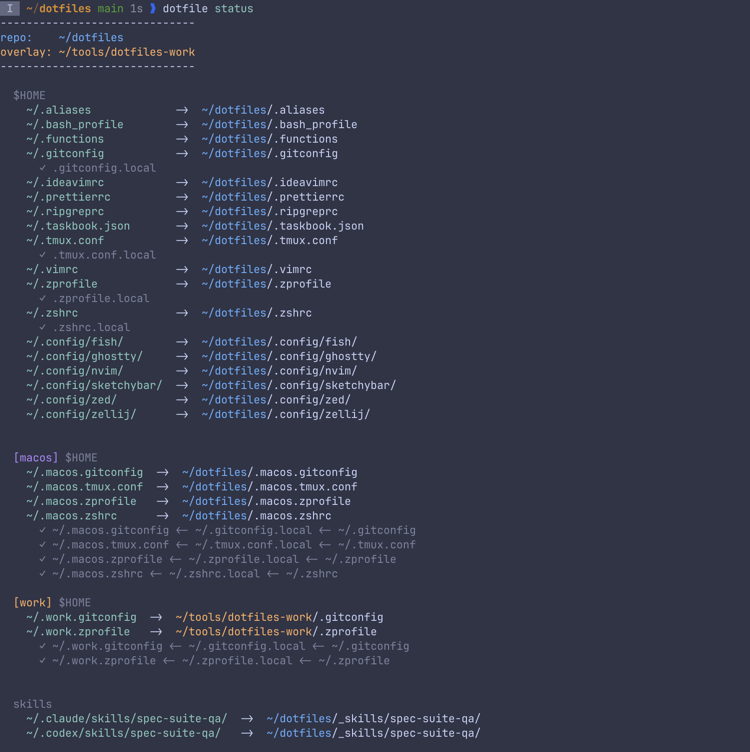
dotfile status |
Check health of all managed symlinks |
dotfile register |
Move a config into the repo and symlink it back |
dotfile unregister |
Remove a config from management |
dotfile specialize |
Scaffold OS/profile variant files and wire their .local include |
dotfile list |
List all managed files |
dotfile doctor |
Find and remove stale symlinks |
dotfile env |
Show current OS, profile, and overlay |
dotfile ids |
Print entry IDs (for scripting) |
dotfile bootstrap
dotfile bootstrap --os <macos|linux> [--profile <name>] [--overlay <dir>] [--dry-run]
Runs every symlink and .local generator from a clean slate. Safe to re-run.
--os— required on first run; remembered in~/.dotfiles_envafter.--profile— activates a profile's variant files and registry entries.--overlay— layers a second repo on top (see GUIDE.md § Overlay).--dry-run— print the plan without touching the filesystem.--skip-registry— only handle root +.config/*conventions, skip registered entries.--skip-unsupported— silently skip.localgeneration for tool types with no known include syntax.
Existing non-symlink files at a link location are preserved as <path>.bak
before being replaced.
dotfile register
dotfile register <path> [--category <name>] [--os <os>] [--profile <name>] [--name <file>] [--overlay <dir>] [--force] [--dry-run] [-y]
Moves <path> into the repo (under _<category>/ or the repo root) and
creates a symlink back. Errors if the destination already exists unless you
pass --force.
--category— target subdirectory in the repo (auto-detected from the source path if omitted).--os/--profile— scope the entry so bootstrap only links it on matching machines.--name— rename the file inside the repo.--overlay— write into an overlay repo instead of the main one.--force— overwrite an existing registration or repo file.-y— skip the confirmation prompt.
dotfile specialize
dotfile specialize <os|profile> <dotfile> [--dry-run]
Scaffolds variant files for an existing base dotfile and appends the .local
include line so bootstrap can generate the override file.
Works on root paths (.gitconfig) and nested paths under .config/<tool>/
(e.g. .config/fish/config.fish). Variant names come from the os: and
profiles: lists in __registry__.yaml. Idempotent — safe to re-run.
Documentation
- GUIDE.md — hands-on walkthrough: starting a repo, registering your first files, specializing for OS/profile, setting up an overlay
- Starter template — clone this to begin a new dotfiles repo
- Source and issue tracker: https://github.com/andrewlook/dotgarden
- SECURITY.md — supported versions and how to report a vulnerability
Verifying release attestations
Releases from v0.3.0 onward ship PEP 740
artifact attestations — Sigstore-signed by GitHub Actions OIDC and
stored on PyPI alongside the artifact. To confirm a wheel or sdist came
from this repo's publish workflow, use
pypi-attestations:
uvx pypi-attestations verify pypi \
  --repository https://github.com/andrewlook/dotgarden \
  pypi:dotgarden-<VERSION>-py3-none-any.whl
A successful run prints OK: dotgarden-<VERSION>-py3-none-any.whl,
confirming the artifact was built by andrewlook/dotgarden's publish
workflow at the tag commit and signed via PyPI Trusted Publishing.
Note:
gh attestation verifydoes not work here — it checks GitHub's attestation API (used byactions/attest-build-provenance), while PyPI attestations live on PyPI's integrity endpoint.
Development
See CONTRIBUTING.md for setup, testing (mise run test,
./test-docker), and the publish flow. The package layout, entry point
(dotgarden.cli:main), and test harness all live in this repo — edits
happen here directly.
The examples/starter/ directory is mirrored to
andrewlook/dotgarden-template
as the clone-ready starting point documented in Quick start above.
License
MIT — see LICENSE.
1 maintainer

Release files for dotgarden 0.3.1
For a detailed explanation of source distributions (sdists) and built distributions (wheels), please see the package formats documentation.
Source distribution (sdist)
| File | Size | Uploaded | |
|---|---|---|---|
| dotgarden-0.3.1.tar.gz | 86.0 kB | Details |
Built distribution (wheel)
| File | Interpreter | ABI | Platform | Reset |
|---|---|---|---|---|
| dotgarden-0.3.1-py3-none-any.whl | Python 3 | none | any | Details |
Total release size: 139.1 kB
Release files / dotgarden-0.3.1.tar.gz
| Download URL | dotgarden-0.3.1.tar.gz |
|---|---|
| Size | 86.0 kB |
| Tags | Source |
|
SHA-256 checksum How to use checksums |
94b90c4dd50496985f968bce672c0542ef0b317c72efc683ff237b6da64e3323
|
|
BLAKE2b-256 checksum How to use checksums |
4e85f6ead2f57c4822fef9bdc7e1fca7b282114426d6a099d21eb66a5256f8a8
|
| Upload date | |
|
Uploaded using Trusted Publishing? What is trusted publishing? |
Yes |
| Uploaded via |
twine/6.1.0 CPython/3.13.13
|
Provenance
Provenance describes where a file came from. On PyPI, provenance is shared via attestations, which provide a verifiable record of the build or publishing details. View details, limitations and caveats.


PyPI Publish Attestation
PyPI verified that this artifact, at this checksum, originated from the publisher listed below.
Signed by GitHub Actions, verified by PyPI on Apr 27, 2026.
Transparency logRelease files / dotgarden-0.3.1-py3-none-any.whl
| Download URL | dotgarden-0.3.1-py3-none-any.whl |
|---|---|
| Size | 53.1 kB |
| Tags | Python 3 |
|
SHA-256 checksum How to use checksums |
0629f19518491bfca5ec718aa6bfd4ab967190c3a538b56360c51375d5ab4c59
|
|
BLAKE2b-256 checksum How to use checksums |
c8c4cf25a42def4f0300297c9d38ea7a18bfc89a6f86edc7b2f2a812fe14cab6
|
| Upload date | |
|
Uploaded using Trusted Publishing? What is trusted publishing? |
Yes |
| Uploaded via |
twine/6.1.0 CPython/3.13.13
|
Provenance
Provenance describes where a file came from. On PyPI, provenance is shared via attestations, which provide a verifiable record of the build or publishing details. View details, limitations and caveats.
PyPI Publish Attestation
PyPI verified that this artifact, at this checksum, originated from the publisher listed below.
Signed by GitHub Actions, verified by PyPI on Apr 27, 2026.
Transparency log













