
CRISPRWorks Count
CRISPR guide counts and assignment QC from FASTQ reads.
CRISPRWorks is a family of open-source tools for pooled CRISPR screen analysis.
CRISPRWorks Count is its guide-counting component, powered by DotMatch.
Install it as dotmatch and use the existing dotmatch commands.
DotMatch turns FASTQ reads and a known guide library into count tables and assignment QC. Use it for CRISPR guide counting, fixed-position barcode demultiplexing, and other short-DNA assays with known targets. It runs locally on Linux and macOS and writes MAGeCK-compatible counts.



Start counting guides · Check a library in your browser · Documentation · Methods and results
Benchmark spotlight: faster one-mismatch counting, identical counts.
The benchmarked source checkout's
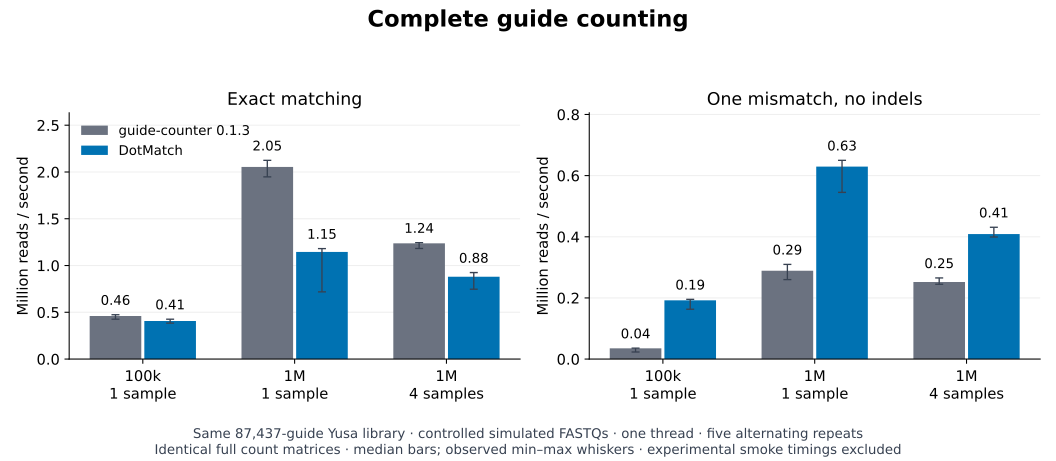
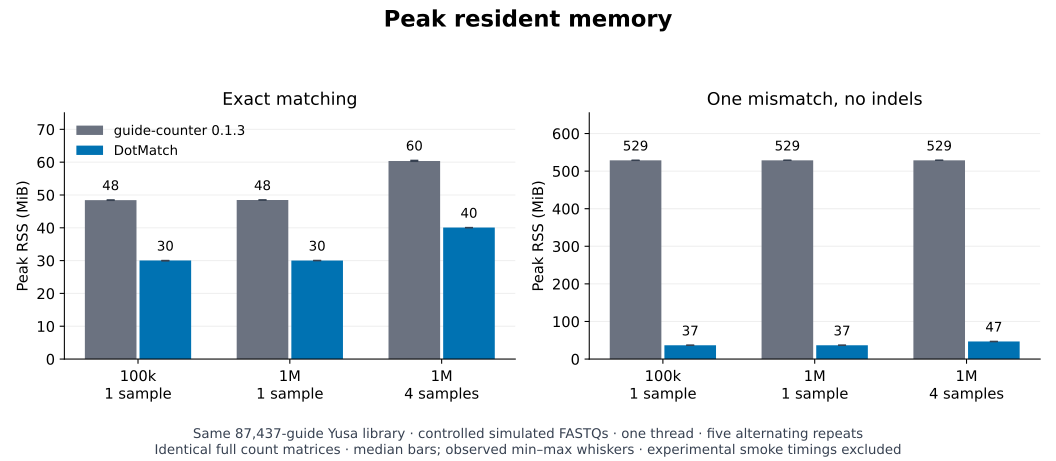
dotmatch guide-counter countis 1.6–5.5× faster with 11.3–14.4× lower peak memory than unmodified guide-counter 0.1.3 in the tested one-mismatch workflows. Every paired run produced identical full guide/sample count matrices.Measured on controlled 100k/1M-read FASTQs against the public 87,437-guide Yusa library, using one CPU thread and five paired repeats. Guide-counter is faster in the tested exact-mode million-read cases. Full experimental-screen performance and biological accuracy require separate validation. See the throughput and memory graphs, protocol and raw results.
The CRISPRWorks family
| Component | Purpose | Availability |
|---|---|---|
| Count | Count guides and inspect read assignments | Available through the DotMatch CLI and Python package |
| Fit | Fit gene effects, learn guide efficacy across screens and calibrate control-gene tails | Experimental alpha available from source |
| Review | Review QC, comparisons and screen results | Existing DotMatch reports cover counts and assignment QC; a broader Review tool is planned |
Start with Count using the commands below. Read the family overview for component status and scientific scope. For gene-level analysis, follow From counts to gene effects. Fit is a separate source install and has no published package release. The broader Review tool is planned.
What the counts mean
An assigned-read percentage cannot tell you which targets gained counts, which reads fit several targets, or whether a more permissive matching rule changed the result. DotMatch keeps those decisions inspectable.
Read outcomes are unique, ambiguous, none (unmatched), or invalid (the requested window could not be extracted). Only unique calls contribute to a target count. Choose the matching policy deliberately; a unique call is not proof of biological origin.
Keep downstream screen statistics in the workflow you already use. DotMatch is not a genome aligner, basecaller, cell/UMI pipeline or gene-level hit-calling package.
Install
Release 0.7.0 is the local release candidate; it is not published yet.
Release 0.6.4 remains the latest verified DotMatch release. It includes the six dotmatch agent tools
described below:
python3 -m pip install dotmatch==0.6.4
dotmatch --version
Conda and container routes:
conda create -n dotmatch -c conda-forge -c bioconda dotmatch
conda activate dotmatch

# Or use the pinned release container:
docker run --rm ghcr.io/dnncha/dotmatch:v0.6.4 --version
Bioconda and its generated BioContainers images can lag PyPI/GHCR. When a
newly tagged version has not reached Bioconda yet, use PyPI or the source build.
Check the installed version. The Bioconda recipe includes osx-arm64 for Apple Silicon.
Review the packaging details
for platform and container verification. See the installation guide
for platform details, source builds and the third-party Homebrew tap. The desktop Workbench is developed separately as dotmatch-community; the
commands below use the core CLI.
Try a checked first run
The packaged fixture checks expected native assignment counts without using study data or making network requests:
dotmatch demo --out-dir first-run/
Open first-run/index.html for the local review bundle. To compare existing
raw-count tables, use dotmatch compare-counts.
Count a CRISPR screen
You need a guide CSV/TSV with target sequences and the FASTQ files from your screen. The first-run tutorial explains the library columns and provides a small example. Keep biological sample names distinct from sequencing filenames when preparing the library and sample configuration.
Start a new assay project:
dotmatch crispr quickstart \
  --library guides.csv \
  --fastq 'fastqs/*.fastq.gz' \
  --out crispr_screen/
This creates a draft project. Review crispr_screen/inference_report.json and
assay.toml: confirm the guide window, orientation, library and sample files.
After confirming the settings, change the top-level status = "draft" to
status = "ready" in assay.toml, then run and review:
dotmatch assay start crispr_screen/assay.toml

# After reviewing a completed run:
dotmatch assay handoff crispr_screen/assay.toml
The handoff carries configuration, QC, methods and checksums without copying raw FASTQs. Follow the complete CRISPR tutorial for inputs, direct CLI options and count-table outputs.
Understand the effect of mismatch correction
The dotmatch sensitivity command, introduced in 0.5.0, compares exact, radius-one and
best-distance Hamming assignment using the same windows in one FASTQ pass.
It produces three count matrices, per-guide deltas, read-state transitions,
checksums and a self-contained HTML report. It never selects a policy for you.
Run the included synthetic example from a checkout of the v0.6.4 release:
python3 -m pip install dotmatch==0.6.4
dotmatch sensitivity \
  --targets examples/assignment_sensitivity/targets.tsv \
  --reads examples/assignment_sensitivity/reads.fastq \
  --target-start 0 --target-length 20 \
  --write-read-changes --out-dir sensitivity-example
The nine-read synthetic example shows why equal assigned totals can hide different per-guide counts. Read the output contract. This is sensitivity analysis, not an estimate of biological accuracy.
Explore the interactive review example
without installing anything. The example uses the public nine-read synthetic fixture.
The interactive assignment review is published on the DotMatch 0.6.4 site.
The installed dotmatch sensitivity command continues to write its static
report. The synthetic fixture demonstrates software behavior, not biological
accuracy.
Choose by task
| Task | Entry point | Workflow |
|---|---|---|
| CRISPR guide counting | dotmatch crispr-count |
First run |
| Inline barcode demultiplexing | dotmatch demux |
Getting started |
| High unmatched or ambiguous barcode rate | dotmatch barcode autopsy |
Barcode diagnostics |
| Target-library collisions | dotmatch audit |
Browser checker |
| Barcode panel design | dotmatch panel design |
Panel documentation |
| Paired target counting | dotmatch pair-count |
Command reference |
| Cell-by-feature matrix from extracted observations | dotmatch feature matrix |
scverse handoff |
Feature matrices require upstream cell identifiers and extracted feature windows. They do not perform cell calling, UMI deduplication or perturbation-effect analysis.
Research and reproducibility
Cheerful Duck Research publishes our bioinformatics software investigations, reproducible examples, and follow-up corrections. For DotMatch-specific methods and measurements, use the reports below and record the release and assignment policy used in your own run.
Reproduce a comparison
The benchmark reports include commands, hardware and assignment rules. Those reports cover the tested workloads; they are not universal speed or biological-accuracy guarantees.
The guide-counter comparison records complete-command throughput and peak memory with identical full counts. The figures below show exact and one-mismatch modes, with median bars and the observed range across five runs. They cover the benchmarked source checkout and controlled 100k/1M-read FASTQs against the Yusa library.
The current source engine's Hamming improvement report
records 5.2–5.7× faster complete k=3 counting against the previous engine on
30,000 simulated reads and the real Yusa guide library, with identical counts.
It also documents a corrected false-tie bug in Hamming queries containing
literal unknown bytes and 136,096 independent oracle checks.
Public CRISPR comparisons record Yusa and Brunello inputs, methods, count differences, runtime and memory. Exact, Hamming and Levenshtein results use different semantics and should be compared separately. A comparison that completed successfully is not necessarily an identical count matrix or biological validation.
The GSE146194 direct-guide-capture case study separates discovery and evaluation reads and checks per-read assignments against independent reference implementations. It does not establish guide-per-cell or perturbation-effect accuracy.
For an installation-free synthetic smoke demo, use Binder or Google Colab. For a shareable or de-identified workflow evaluation, see the public validation invitation. Do not post private reads or unpublished guide libraries.
Pipelines, Python and local agents
DotMatch provides a Python streaming API, output schemas, and workflow examples. The ecosystem status ledger distinguishes local examples from accepted upstream integrations.
The six structured agent tools are included in release 0.5.0:
dotmatch capabilities --json
dotmatch agent tools --json
dotmatch agent export-skill --target ./dotmatch-agent
They prepare, preflight, run, review and hand off local assays without accepting free-form shell commands or uploading research data. Start with the Agent guide, CRISPR agent route, or Perturb-seq agent route. Machine-readable discovery: agent-capabilities.json, agent-tools.json, and the checked contract fixture.
Citation and contributing
DotMatch is Apache-2.0 licensed.
Use dotmatch citation and CITATION.cff
to record the actual software version. Use the methods and citation guide
to cite the actual release and configuration used. Improvements, discrepancy
fixtures and reproducible bug reports are welcome: contributing guide.
1 maintainer

Metadata
1 maintainer
Release files for dotmatch 0.7.0
For a detailed explanation of source distributions (sdists) and built distributions (wheels), please see the package formats documentation.
Source distribution (sdist)
| File | Size | Uploaded | |
|---|---|---|---|
| dotmatch-0.7.0.tar.gz | 334.0 kB | Details |
Built distributions (wheels)
| File | Reset | |||
|---|---|---|---|---|
| dotmatch-0.7.0-py3-none-musllinux_1_2_x86_64.whl | Python 3 | none | Linux musl 1.2+ x86-64 | Details |
| dotmatch-0.7.0-py3-none-musllinux_1_2_aarch64.whl | Python 3 | none | Linux musl 1.2+ ARM64 | Details |
| dotmatch-0.7.0-py3-none-manylinux2014_x86_64.manylinux_2_17_x86_64.manylinux_2_28_x86_64.whl | Python 3 | none | Linux glibc 2.28+ x86-64, Linux glibc 2.17+ x86-64 | Details |
| dotmatch-0.7.0-py3-none-manylinux2014_aarch64.manylinux_2_17_aarch64.manylinux_2_28_aarch64.whl | Python 3 | none | Linux glibc 2.28+ ARM64, Linux glibc 2.17+ ARM64 | Details |
| dotmatch-0.7.0-py3-none-macosx_11_0_universal2.whl | Python 3 | none | macOS 11.0+ universal2 (ARM64, x86-64) | Details |
Total release size: 2.5 MB
Release files / dotmatch-0.7.0.tar.gz
| Download URL | dotmatch-0.7.0.tar.gz |
|---|---|
| Size | 334.0 kB |
| Tags | Source |
|
SHA-256 checksum How to use checksums |
c4c43d22ae2763dc9a1ee498a690b0422b8569ed8f7c8c1553d847986fae9d9f
|
|
BLAKE2b-256 checksum How to use checksums |
5d8308c66455dda958561f75e26ecaf22a2b1d226023616b45bc3f4eb68c3779
|
| Upload date | |
|
Uploaded using Trusted Publishing? What is trusted publishing? |
Yes |
| Uploaded via |
twine/7.0.0 CPython/3.13.14
|
Provenance
Provenance describes where a file came from. On PyPI, provenance is shared via attestations, which provide a verifiable record of the build or publishing details. View details, limitations and caveats.


PyPI Publish Attestation
PyPI verified that this artifact, at this checksum, originated from the publisher listed below.
Signed by GitHub Actions, verified by PyPI on Oct 3, 2026.
Transparency logRelease files / dotmatch-0.7.0-py3-none-musllinux_1_2_x86_64.whl
| Download URL | dotmatch-0.7.0-py3-none-musllinux_1_2_x86_64.whl |
|---|---|
| Size | 415.5 kB |
| Tags | Linux musl 1.2+ x86-64 Python 3 |
|
SHA-256 checksum How to use checksums |
e0e965ecd9cf3d945e716468d0d832f0beae5407f18c6f4a7fb9ec44f628710c
|
|
BLAKE2b-256 checksum How to use checksums |
f24d10b69df68a79d60a425a425b5ce61eb3aaa97f18799799dff168e805c57c
|
| Upload date | |
|
Uploaded using Trusted Publishing? What is trusted publishing? |
Yes |
| Uploaded via |
twine/7.0.0 CPython/3.13.14
|
Provenance
Provenance describes where a file came from. On PyPI, provenance is shared via attestations, which provide a verifiable record of the build or publishing details. View details, limitations and caveats.
PyPI Publish Attestation
PyPI verified that this artifact, at this checksum, originated from the publisher listed below.
Signed by GitHub Actions, verified by PyPI on Oct 3, 2026.
Transparency logRelease files / dotmatch-0.7.0-py3-none-musllinux_1_2_aarch64.whl
| Download URL | dotmatch-0.7.0-py3-none-musllinux_1_2_aarch64.whl |
|---|---|
| Size | 416.9 kB |
| Tags | Linux musl 1.2+ ARM64 Python 3 |
|
SHA-256 checksum How to use checksums |
4893fd2430f2ae4ce2c5207d8515529cbdd320753212f875b4055124e1f2f180
|
|
BLAKE2b-256 checksum How to use checksums |
3f33b4dfe3d546067c947f1de1f41601e596a30f5af1bdb1c758394a526e2847
|
| Upload date | |
|
Uploaded using Trusted Publishing? What is trusted publishing? |
Yes |
| Uploaded via |
twine/7.0.0 CPython/3.13.14
|
Provenance
Provenance describes where a file came from. On PyPI, provenance is shared via attestations, which provide a verifiable record of the build or publishing details. View details, limitations and caveats.
PyPI Publish Attestation
PyPI verified that this artifact, at this checksum, originated from the publisher listed below.
Signed by GitHub Actions, verified by PyPI on Oct 3, 2026.
Transparency logRelease files / dotmatch-0.7.0-py3-none-manylinux2014_x86_64.manylinux_2_17_x86_64.manylinux_2_28_x86_64.whl
| Download URL | dotmatch-0.7.0-py3-none-manylinux2014_x86_64.manylinux_2_17_x86_64.manylinux_2_28_x86_64.whl |
|---|---|
| Size | 410.5 kB |
| Tags | Linux glibc 2.17+ x86-64 Linux glibc 2.28+ x86-64 Python 3 |
|
SHA-256 checksum How to use checksums |
42766732885d90520a32961c0f4d4c896669f575af832bfa15bcd997a8b83c6d
|
|
BLAKE2b-256 checksum How to use checksums |
ceb07b6b52debdb094689518b9b83078d0e6e2fb5e5c55798580b0b98d00183c
|
| Upload date | |
|
Uploaded using Trusted Publishing? What is trusted publishing? |
Yes |
| Uploaded via |
twine/7.0.0 CPython/3.13.14
|
Provenance
Provenance describes where a file came from. On PyPI, provenance is shared via attestations, which provide a verifiable record of the build or publishing details. View details, limitations and caveats.
PyPI Publish Attestation
PyPI verified that this artifact, at this checksum, originated from the publisher listed below.
Signed by GitHub Actions, verified by PyPI on Oct 3, 2026.
Transparency logRelease files / dotmatch-0.7.0-py3-none-manylinux2014_aarch64.manylinux_2_17_aarch64.manylinux_2_28_aarch64.whl
| Download URL | dotmatch-0.7.0-py3-none-manylinux2014_aarch64.manylinux_2_17_aarch64.manylinux_2_28_aarch64.whl |
|---|---|
| Size | 414.7 kB |
| Tags | Linux glibc 2.17+ ARM64 Linux glibc 2.28+ ARM64 Python 3 |
|
SHA-256 checksum How to use checksums |
be1fbdb1f616d180436ab3781533c804c24471750949d2ae52f54bca4814b1e1
|
|
BLAKE2b-256 checksum How to use checksums |
6504eda829f386b0d18ae8e78ff68cfba724b3412f5508ef5505c75179740708
|
| Upload date | |
|
Uploaded using Trusted Publishing? What is trusted publishing? |
Yes |
| Uploaded via |
twine/7.0.0 CPython/3.13.14
|
Provenance
Provenance describes where a file came from. On PyPI, provenance is shared via attestations, which provide a verifiable record of the build or publishing details. View details, limitations and caveats.
PyPI Publish Attestation
PyPI verified that this artifact, at this checksum, originated from the publisher listed below.
Signed by GitHub Actions, verified by PyPI on Oct 3, 2026.
Transparency logRelease files / dotmatch-0.7.0-py3-none-macosx_11_0_universal2.whl
| Download URL | dotmatch-0.7.0-py3-none-macosx_11_0_universal2.whl |
|---|---|
| Size | 536.6 kB |
| Tags | Python 3 macOS 11.0+ universal2 (ARM64, x86-64) |
|
SHA-256 checksum How to use checksums |
39b7a5c044b867b2c9d473f11c05957a9b21af2045e537ee306b9a03574a274e
|
|
BLAKE2b-256 checksum How to use checksums |
225752cd911ca2bee30b8a00765cad1254abfbd484e9517b7d83fb31d70f8edf
|
| Upload date | |
|
Uploaded using Trusted Publishing? What is trusted publishing? |
Yes |
| Uploaded via |
twine/7.0.0 CPython/3.13.14
|
Provenance
Provenance describes where a file came from. On PyPI, provenance is shared via attestations, which provide a verifiable record of the build or publishing details. View details, limitations and caveats.
PyPI Publish Attestation
PyPI verified that this artifact, at this checksum, originated from the publisher listed below.
Signed by GitHub Actions, verified by PyPI on Oct 3, 2026.
Transparency log













