
dotmatrix-unlocked

Turn a cheap iDotMatrix-compatible 32×32 Bluetooth LED panel into a desk companion, run from your computer with a local web UI.
Features
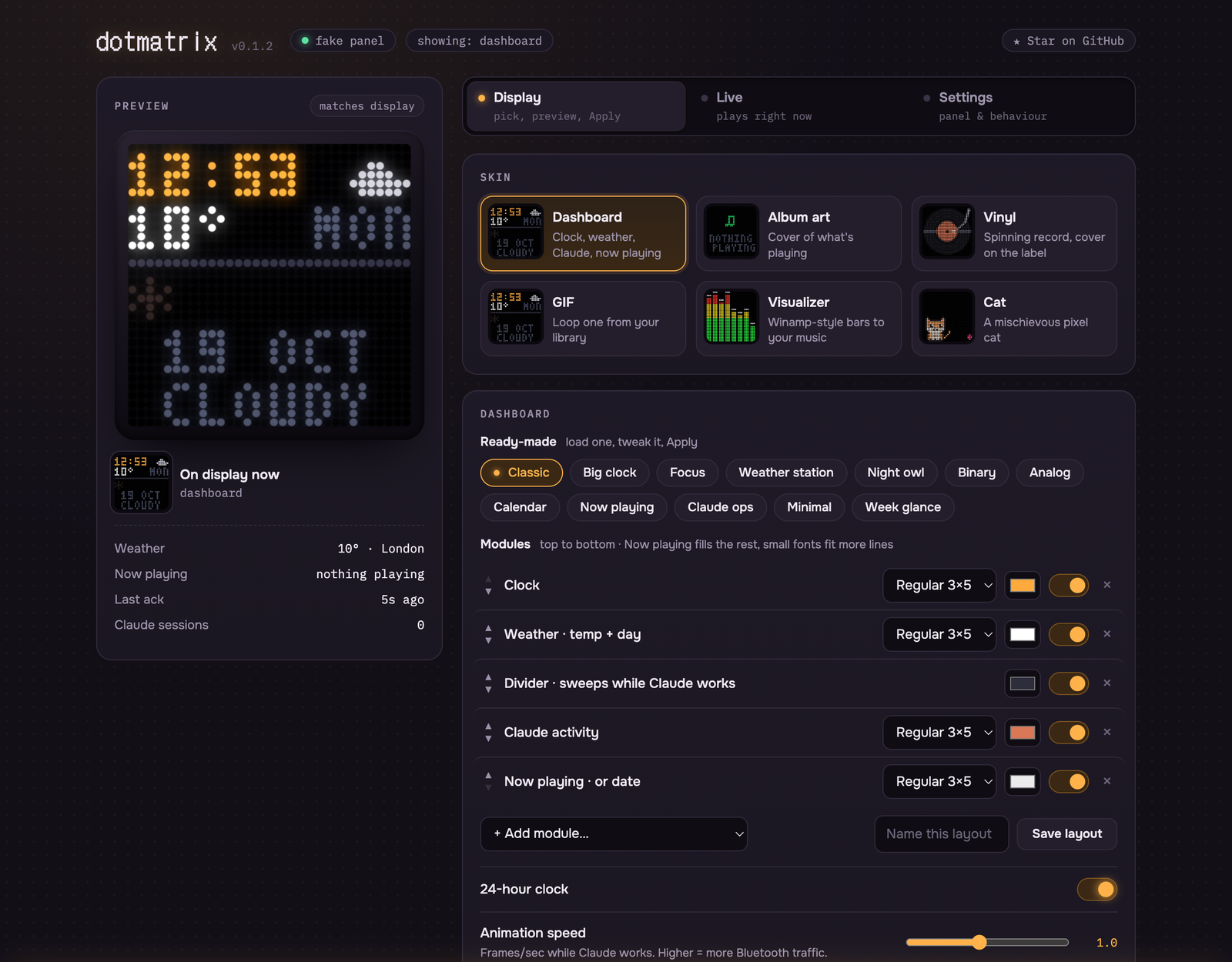
Display: pick it, preview it, Apply. Nothing reaches the panel until you press Apply.
- Dashboard with 16 modules: clock (big, analog or binary), weather, 8-hour forecast, sunrise/sunset, moon phase, week, month, day progress, now playing, and live Claude Code activity.
- 12 ready-made screens (Classic, Big clock, Weather station, Night owl, Calendar, Claude ops…). Reorder modules, pick fonts and colours, then save your own layouts.
- Skins: album art, a spinning vinyl, GIFs, a Winamp-style visualizer (7 styles), and a mischievous pixel cat.
- GIF library: 16 built-in animations, GIPHY search, or upload your own. GIFs are re-tuned for LEDs, with sharper shrinking, a contrast stretch and no dither noise.
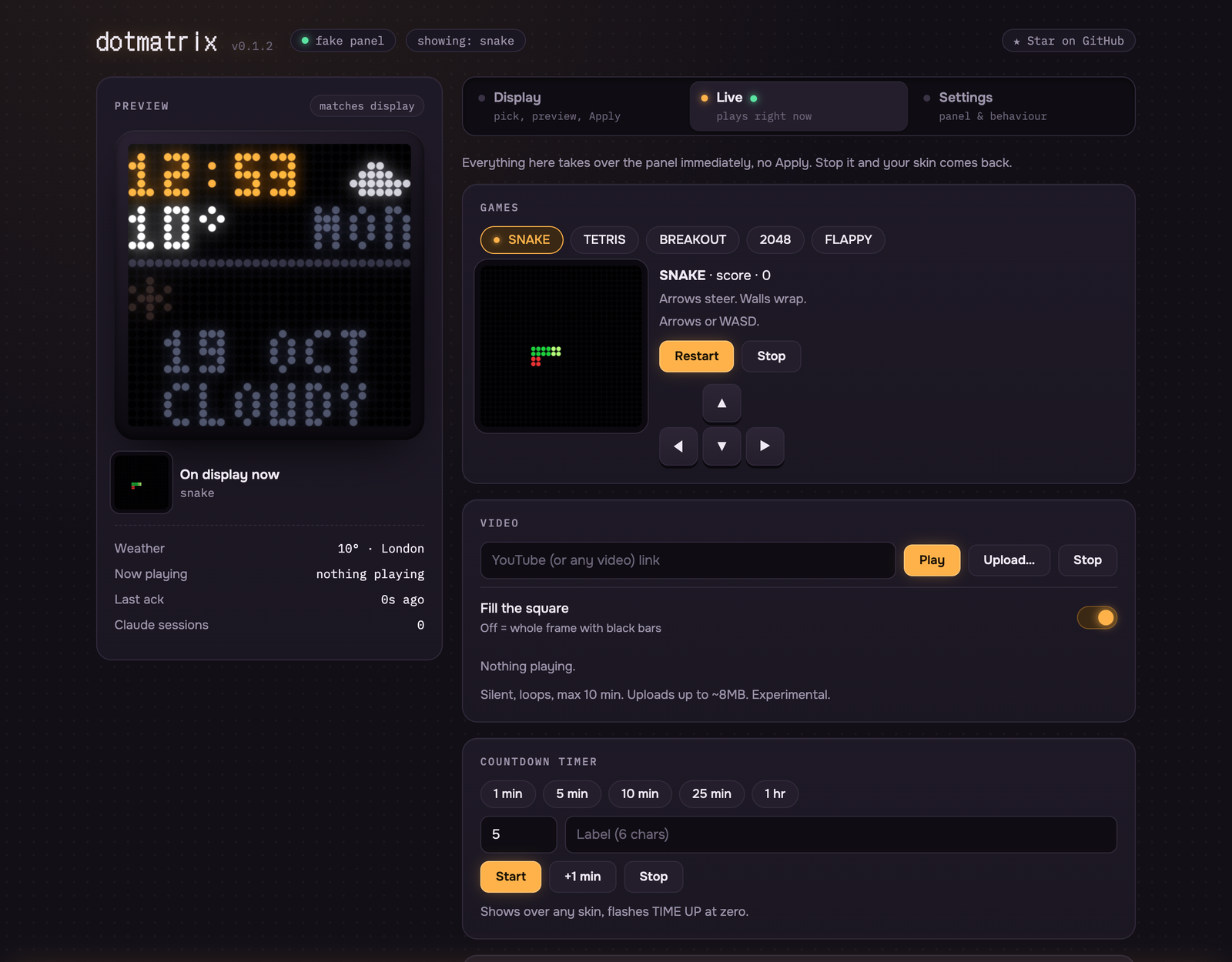
Live: takes over the panel right away. Stop it and your skin comes back.
- Games: Snake, Tetris, Breakout, 2048 and Flappy, played with the keyboard or on-screen buttons.
- Video: YouTube links or uploaded clips (experimental).
- Countdown timer that shows over any skin, plus quick text or image messages.
It reacts to you
- The cat naps when you're idle, waves when Claude Code needs your input, and dances to your music. Ask it to do a flip, feed it, or have it catch a fish.
- The microphone (off by default, runs in your browser) drives the visualizer, and a clap startles the cat.
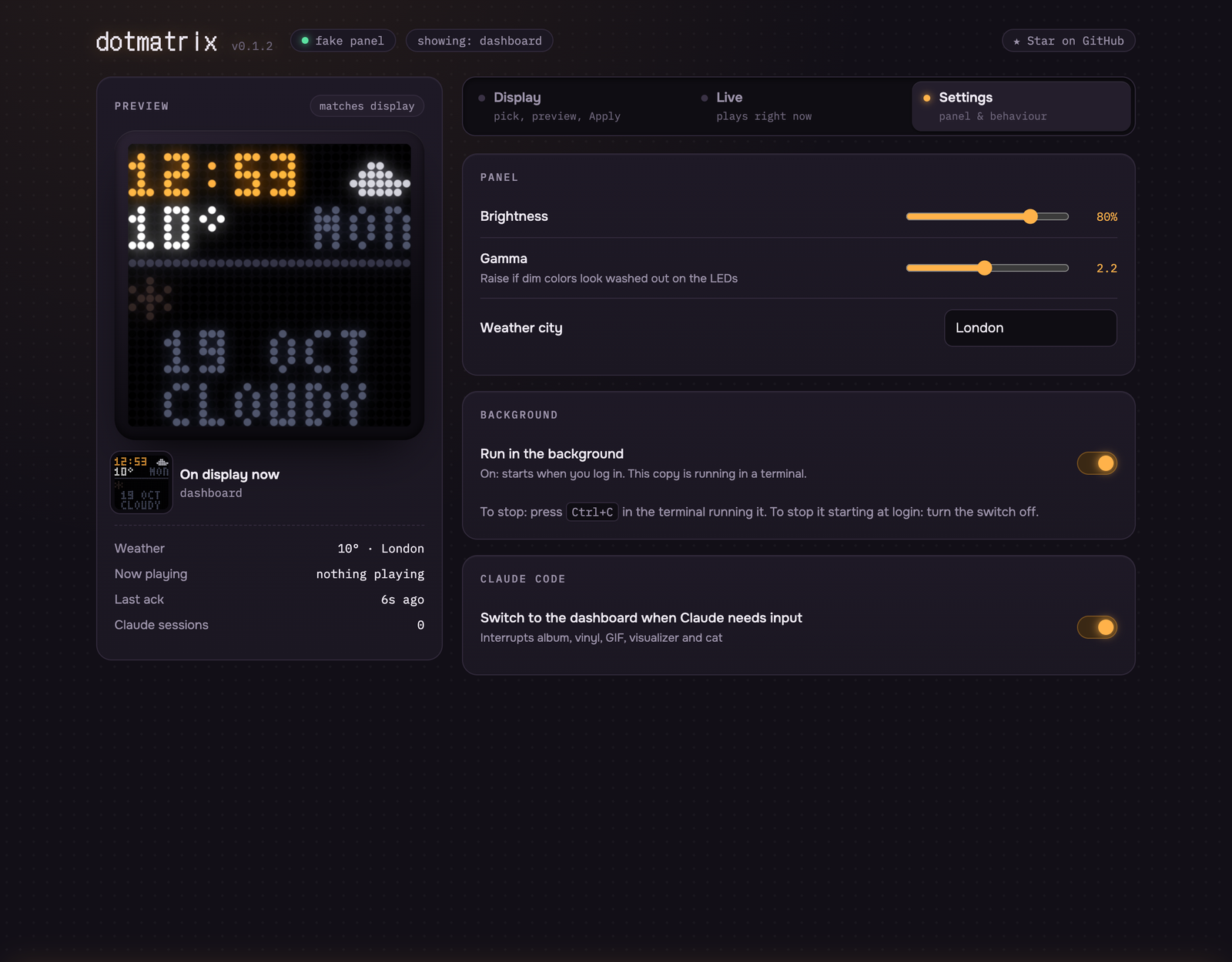
- Claude Code hooks show when sessions are working or waiting on you, and can pull the dashboard up when Claude needs input.
Settings
- Brightness, gamma (to calibrate your LEDs), weather city.
- Run in the background: start at login and restart after a crash, with a switch to turn it off.
| Live | Settings |
|---|---|
 |
 |
Not affiliated with iDotMatrix. Tested on a 32×32
IDM-*panel; other sizes aren't supported yet.
Install
Needs Python 3.12+ and Bluetooth.
uv tool install dotmatrix-unlocked     # or: pipx install dotmatrix-unlocked
dotmatrix                              # opens http://127.0.0.1:7766; offers to keep running in the background
Don't have uv? See docs.astral.sh/uv, or use pipx.
In the web UI, click Find my panel. Turn the panel on first and close its phone app: the panel accepts only one Bluetooth connection.
No panel? dotmatrix run --fake runs everything with the browser preview standing in for the display.
Then, optionally:
dotmatrix service install   # run in the background: start at login, restart if it crashes (also in Settings)
dotmatrix hooks install     # show Claude Code activity (edits ~/.claude/settings.json, keeps a .bak)
dotmatrix doctor            # checks everything and prints the fix for anything missing
To stop the background copy: turn off Run in the background in Settings, or dotmatrix service uninstall.
Platforms
| macOS | Linux (incl. Raspberry Pi) | Windows | |
|---|---|---|---|
| Panel over Bluetooth | ✓ | ✓ (BlueZ) | ✓ |
| Start at login | launchd | systemd user service | Task Scheduler |
| Now playing | media-control |
playerctl (any MPRIS player) |
built in (no album art yet) |
| Idle detection (the cat naps) | ✓ | X11 with xprintidle |
✓ |
| Video | ffmpeg + yt-dlp |
same | same |
Windows support is new and less tested. Reports are welcome.
macOS: the first connection asks for Bluetooth permission for Python. If it was denied, enable it in
System Settings › Privacy & Security › Bluetooth.
Raspberry Pi / headless Linux: after dotmatrix service install, run loginctl enable-linger $USER so the
service starts without anyone logging in.
Privacy
- The web UI and API listen on
127.0.0.1only. Requests must come from that host and be JSON, so other websites can't drive your panel. - The microphone (visualizer, clap-to-startle the cat) is off by default. It runs inside your browser, and only 16 loudness levels are sent to the local service; no audio leaves the browser.
- Network calls: Open-Meteo for weather (only once you set a city), GIPHY if you add a key, and video links you paste.
Command line
dotmatrix                     start + open the web UI
dotmatrix run [--fake]        foreground
dotmatrix scene "HELLO" --ttl 10 --color 255,200,0
dotmatrix status
dotmatrix scan | hello | test | image PATH | brightness PCT   # direct to the panel, service stopped
The local HTTP API (POST /scene, /event, /game, /timer, /cat…) is what the web UI uses. Anything on
your machine can push to the panel with a curl.
Development
git clone https://github.com/anishsrinivasan/dotmatrix-unlocked && cd dotmatrix-unlocked
uv sync --group dev
uv run pytest            # runs every module's self-check + the app end to end in --fake mode
uv run dotmatrix run --fake
- Add a game: subclass
Gameingame.pyand add it toGAMES. - Add a dashboard module: write a draw function and add it to
MODULESinrender.py. - Add a visualizer style (
skins.py) or a cat trick (cat.py): same idea.
The web UI picks all of these up automatically.
License
GPL-3.0-or-later. It builds on python3-idotmatrix-library, which is also GPL-3.0.
1 maintainer

Metadata
1 maintainer
Release files for dotmatrix-unlocked 0.1.3
For a detailed explanation of source distributions (sdists) and built distributions (wheels), please see the package formats documentation.
Source distribution (sdist)
| File | Size | Uploaded | Provenance | |
|---|---|---|---|---|
| dotmatrix_unlocked-0.1.3.tar.gz | 125.1 kB | Without provenance | Details |
Built distribution (wheel)
| File | Interpreter | ABI | Platform | Reset |
|---|---|---|---|---|
| dotmatrix_unlocked-0.1.3-py3-none-any.whl | Python 3 | none | any | Details |
Total release size: 214.3 kB
Release files / dotmatrix_unlocked-0.1.3.tar.gz
| Download URL | dotmatrix_unlocked-0.1.3.tar.gz |
|---|---|
| Size | 125.1 kB |
| Tags | Source |
|
SHA-256 checksum How to use checksums |
43a3c99de79326156861b451fcfc0d31670e0aa72c884a2565785a13be084f5e
|
|
BLAKE2b-256 checksum How to use checksums |
0fa8e11c3da1458cb946734bd452cc0a672d0ab8eb5b3e42b0925e6899ecd187
|
| Upload date | |
|
Uploaded using Trusted Publishing? What is trusted publishing? |
Yes |
| Uploaded via |
uv/0.13.1 {"installer":{"name":"uv","version":"0.13.1","subcommand":["publish"]},"python":null,"implementation":{"name":null,"version":null},"distro":{"name":"Ubuntu","version":"24.04","id":"noble","libc":null},"system":{"name":null,"release":null},"cpu":null,"openssl_version":null,"setuptools_version":null,"rustc_version":null,"ci":true}
|
Release files / dotmatrix_unlocked-0.1.3-py3-none-any.whl
| Download URL | dotmatrix_unlocked-0.1.3-py3-none-any.whl |
|---|---|
| Size | 89.2 kB |
| Tags | Python 3 |
|
SHA-256 checksum How to use checksums |
8b02841c590f98b1104c183a5065f616c78cfa73834f16483b660f9a07e81ec6
|
|
BLAKE2b-256 checksum How to use checksums |
2c936bbfe1d546e2f25dc94422d4e4250a35830d3176a3716ada930fc7b17a03
|
| Upload date | |
|
Uploaded using Trusted Publishing? What is trusted publishing? |
Yes |
| Uploaded via |
uv/0.13.1 {"installer":{"name":"uv","version":"0.13.1","subcommand":["publish"]},"python":null,"implementation":{"name":null,"version":null},"distro":{"name":"Ubuntu","version":"24.04","id":"noble","libc":null},"system":{"name":null,"release":null},"cpu":null,"openssl_version":null,"setuptools_version":null,"rustc_version":null,"ci":true}
|
Security for dotmatrix-unlocked 0.1.3
Provenance
Provenance describes where a file came from. On PyPI, provenance is shared via attestations, which provide a verifiable record of the build or publishing details. View details, limitations and caveats.
No provenance found
None of the files in this release were uploaded with provenance metadata.
A note on package security
PyPI is a repository for distributing packages, not a service for auditing them. While third-party security researchers and our staff do their best to detect and remove malicious packages, PyPI cannot guarantee the quality, security or suitability of any given package.














