
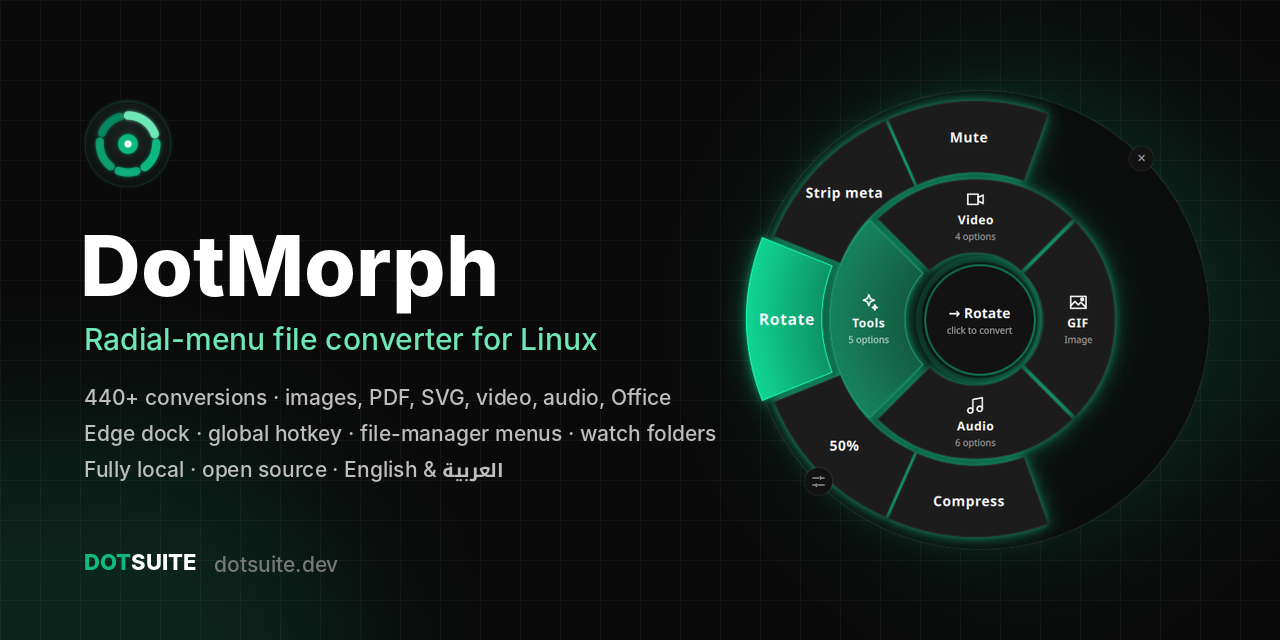
DotMorph: the radial-menu file converter for Linux
Convert any file in two clicks. Images, PDF, SVG, video, audio, Office documents and Markdown, with 440+ conversions from one animated wheel. Open it from your file manager, a hotkey, a screen-edge dock or the terminal.





Website · DotSuite · Changelog · Roadmap · All my tools
Why DotMorph?
Converting a file on Linux usually means hunting for the right ffmpeg, convert,
pdftoppm or soffice command, or uploading private files to an online converter.
DotMorph puts every converter you already have behind one wheel:
- Select files (or copy them, or drop them on the wheel).
- Open the wheel: right-click → DotMorph,
Super+Shift+M, the screen-edge tab, ordotmorph FILE. - Pick the format. Done, with live progress and a notification that opens the folder.
- Fast: the daemon opens the wheel in about 0.1 s. Same-codec video container swaps are stream copies that take seconds.
- Private: everything runs locally. No uploads, no accounts, no telemetry.
- Native to Linux: Nautilus, Thunar, Dolphin and Nemo menus, GNOME and Xfce hotkeys, X11 and Wayland, systemd user services, freedesktop notifications.
- Honest: it detects the tools you have installed and only shows conversions that will
work.
dotmorph doctortells you what to install for the rest. - Free and open source: Apache 2.0, part of the DotSuite family.

Features
| 🎯 Two-ring radial menu | Categories on the inner ring, formats blooming outward in a fan. Drawn on the GPU, with glow, fly-out, a progress arc, a success burst and a failure shake. |
| 🧲 Edge dock | Drag the wheel to a screen edge and it becomes a slim tab. Hover it, click it or drag files over it, and a half wheel opens out of the edge. |
| ⚡ Instant open | A background daemon keeps the wheel ready, so dotmorph FILE takes about 0.1 s. |
| 🖱️ Everywhere you work | File-manager right-click with quick actions, "Open with", a global hotkey for copied files, watch folders, and a full CLI. |
| 🔄 440+ conversions | 53 formats on 8 engines: Pillow, librsvg, poppler, Ghostscript, ImageMagick, ffmpeg, LibreOffice and pandoc. |
| 🛠️ Tools | Compress (never bigger than the original), resize, rotate, strip metadata, mute video, merge into one PDF. |
| 🎛️ Options | Quality, resolution, size and metadata, from the wheel's options panel or CLI flags and presets. |
| ⚙️ Settings window | Theme, language, notifications, output folder, your own format order, the shortcut, integrations, watch folders and engine status, all in one place. |
| 🌍 English & العربية | Full Arabic interface with right-to-left layout and a proper Arabic font, chosen automatically from your system language. |
| 🎨 Themes | Dark, light and glass in the DotSuite style. Reduced motion for anyone who prefers no animation. |
| 🧪 Reliable | 94 tests, safe temporary files, cancel at any time, and existing files are never overwritten. |
Supported conversions
DotMorph probes what is installed and offers only what really works on your machine. With the usual Linux tools installed that is 440+ conversions:
| Category | From | To | Engine |
|---|---|---|---|
| Images | PNG, JPG, WebP, AVIF, GIF, BMP, TIFF, ICO, TGA | each other, PDF (animation kept) | Pillow |
| SVG | SVG | PNG, JPG, WebP, AVIF, … (original size by default), vector PDF | librsvg (the GNOME renderer) |
| Pro images | PSD, XCF, HEIC/HEIF, JPEG XL | PNG, JPG, WebP, AVIF, PDF, … | ImageMagick |
| PNG, JPG, WebP (one per page), TXT | poppler | ||
| PDF tools | PDF, PostScript | compressed PDF, merged PDF, PDF | Ghostscript |
| Video | MP4, MKV, WebM, MOV, AVI, M4V, FLV, WMV, MPEG, TS, 3GP | MP4, MKV, WebM, MOV, AVI, GIF, MP3, M4A, OGG, Opus, FLAC, WAV | ffmpeg |
| Audio | MP3, WAV, FLAC, OGG, Opus, M4A, AAC, WMA | each other | ffmpeg |
| Office | DOCX, DOC, ODT, RTF, TXT, HTML, PPTX, PPT, ODP, XLSX, XLS, ODS, CSV | PDF, DOCX, ODT, PPTX, ODP, XLSX, ODS, CSV, TXT | LibreOffice |
| Markup & e-books | Markdown, HTML, reST, Org, EPUB, DOCX, ODT | HTML, Markdown, DOCX, ODT, EPUB, PDF, TXT | pandoc |
Popular conversions: PDF to PNG/JPG · HEIC to JPG · SVG to PNG · SVG to PDF (vector) · PNG to WebP/AVIF · MOV to MP4 · MP4 to GIF · MKV to MP4 (no re-encode) · video to MP3 · FLAC to MP3 · DOCX to PDF · PPTX to PDF · XLSX to CSV · Markdown to PDF/DOCX/HTML · compress PDF · merge images into one PDF · remove EXIF/GPS from photos.
Tools keep the format and change the file:
| Tool | Works on | Output |
|---|---|---|
compress |
JPG, PNG, WebP, AVIF, PDF, MP4/MKV/MOV/WebM | name-compressed.ext, never bigger than the original |
resize-50 |
images, videos | name-resized.ext |
rotate-90 |
images, videos | name-rotated.ext (clockwise) |
strip |
images, videos, audio | name-clean.ext, metadata removed (JPEG keeps its tables: no quality loss) |
mute |
videos | name-muted.ext |
merge-pdf |
several images and/or PDFs | one first-merged.pdf |
Install
Pick one. Every package installs the same app, the dotmorph command, and the "DotMorph" and
"DotMorph Settings" launchers.
| Method | Command | Best for |
|---|---|---|
| pipx (PyPI) | pipx install 'dotmorph[gui]' |
any distro, per user, easy updates |
| AppImage | download DotMorph-2.0.2-x86_64.AppImage from Releases, chmod +x, run |
no install at all, one file |
| Debian / Kali / Ubuntu | sudo apt install ./dotmorph_2.0.2-1_all.deb from Releases |
system package with apt dependencies |
| Arch / Manjaro (AUR) | yay -S dotmorph (or paru -S dotmorph) |
Arch-based systems |
| From source | see below | development |
Then install the conversion tools you want. dotmorph doctor lists what is missing, with
the exact command for apt, dnf, pacman or zypper:
sudo apt install poppler-utils ghostscript imagemagick ffmpeg pandoc   # pick what you need
sudo apt install libreoffice          # optional: Office documents
sudo apt install wl-clipboard         # optional: hotkey on Wayland reads your copied files
dotmorph doctor                       # what works now, and what to install for the rest
Notes per method:
- pipx: add
,heic('dotmorph[gui,heic]') for iPhone photos through Pillow. OnlyPySide6-Essentialsis pulled in (about 250 MB, not the full 700 MB PySide6). - AppImage: it bundles Python and Qt, so only the conversion tools come from your
system. Qt needs
libxcb-cursor0on X11/XWayland (sudo apt install libxcb-cursor0). If it won't start because of FUSE, installlibfuse2(libfuse2t64on Ubuntu 24.04+) or run it with--appimage-extract-and-run. Run./DotMorph-2.0.2-x86_64.AppImage integrateonce to get menus and the launcher; desktop integration remembers the AppImage's path, so keep it in one place (e.g.~/Applications). - .deb: it uses your distribution's Qt 6 and PySide6 (
python3-pyside6.*,qml6-module-*, 6.6 or newer), so it only installs on releases that ship them (see below). - AUR: it depends on
pyside6,qt6-declarativeandlibrsvg; the conversion tools are optional dependencies. - Flatpak: none, on purpose. DotMorph works by running the converters already on your system and by adding itself to your file manager, hotkeys, autostart and systemd. A Flatpak sandbox blocks all of that, so it would only be a lesser copy of the AppImage.
Supported systems
Which install works on my distribution?
| Distribution | pipx | AppImage | .deb | AUR |
|---|---|---|---|---|
| Ubuntu 26.04 LTS, 25.10, 25.04 | ✅ | ✅ | ✅ | |
| Ubuntu 24.04 LTS, 22.04 LTS (and Linux Mint 21 / 22, Pop!_OS, Zorin) | ✅ | ✅ | ❌ ¹ | |
| Ubuntu 20.04 LTS | ⚠️ ² | ✅ | ❌ ¹ | |
| Debian 13 (trixie) and newer | ✅ | ✅ | ✅ | |
| Debian 12 (bookworm) | ✅ | ✅ | ❌ ¹ | |
| Debian 11 (bullseye) | ⚠️ ² | ✅ | ❌ ¹ | |
| Kali Linux (rolling) | ✅ | ✅ | ✅ | |
| Fedora 36 and newer | ✅ | ✅ | ||
| RHEL / AlmaLinux / Rocky 9 | ✅ ³ | ✅ | ||
| RHEL / AlmaLinux / Rocky 8 | ⚠️ ² | ✅ | ||
| openSUSE Tumbleweed | ✅ | ✅ | ||
| Arch, Manjaro, EndeavourOS | ✅ | ✅ | ✅ |
¹ The release has no PySide6 package, or its Qt is older than 6.6. Use pipx or the AppImage.
² The default Python is older than 3.10. Install a newer Python (e.g. python3.11), then
pipx install --python python3.11 'dotmorph[gui]'. pip then picks PySide6 6.9, which
still supports glibc 2.28.
³ With the python3.11 package: pipx install --python python3.11 'dotmorph[gui]'.
Minimum versions
| Component | Minimum | Why | Tested with |
|---|---|---|---|
| Linux, x86_64 | glibc 2.28 | PySide6 6.6–6.9 wheels; the AppImage ships PySide6 6.9 | glibc 2.43 |
| ↳ with Python 3.14 | glibc 2.34 | only PySide6 6.11+ supports Python 3.14, and those wheels need glibc 2.34 | |
| ↳ ARM64 (aarch64), pipx only | glibc 2.39 | PySide6's ARM wheels | not tested |
| Python | 3.10 | 3.13, 3.14 (CI: 3.10, 3.12, 3.13) | |
| Qt 6 / PySide6 | 6.6 | the wheel's curve renderer and glow effect | 6.9.0, 6.12.0 |
| Pillow | 10.0 | AVIF needs Pillow 11.2+; older versions simply don't offer it | 10.4, 13.0 |
| librsvg (SVG) | 2.52 | older versions: SVG falls back to ImageMagick | 2.62 |
The whole test suite passes on both tested combinations: PySide6 6.9 with Python 3.13 and Pillow 10.4, and PySide6 6.12 with Python 3.14 and Pillow 13.
Conversion tools have no fixed minimum. DotMorph detects what is installed and only offers
what works (dotmorph doctor). Versions used for testing: ffmpeg 9.0, poppler 26.07,
Ghostscript 10.08, ImageMagick 7.1 (ImageMagick 6 also works), pandoc 3.11,
LibreOffice 26.8.
Desktops
| Feature | Works on |
|---|---|
| The wheel, edge dock, settings | X11, and Wayland through XWayland (installed by default on GNOME and KDE). Tested on GNOME 50, Wayland |
| Global hotkey, set up automatically | GNOME and Xfce. Elsewhere dotmorph hotkey prints the command to bind in your desktop's keyboard settings |
| Right-click menus | Nautilus (any version), Thunar, Nemo, Dolphin with KDE Frameworks 5.85+ (Plasma 5.23+) |
| Notifications | any notification daemon; the Open folder button needs a notify-send that supports --action |
| Copied files for the hotkey | wl-clipboard on Wayland, xclip or xsel on X11 |
| Watch folders as a service | systemd user sessions |
| Arabic interface | a Noto Arabic font (Noto Kufi, Noto Sans or Noto Naskh Arabic) for the best look |
Verify your download
Every GitHub release has a SHA256SUMS file, a detached GPG signature (.asc) for every file,
and the public key (dotmorph-signing-key.asc):
sha256sum -c SHA256SUMS --ignore-missing                  # checks the files you downloaded
gpg --import dotmorph-signing-key.asc
gpg --verify SHA256SUMS.asc SHA256SUMS                    # the checksums are really from us
gpg --verify DotMorph-2.0.2-x86_64.AppImage.asc DotMorph-2.0.2-x86_64.AppImage
Releases are signed by FreeRave <kareem209907@gmail.com>, with this key fingerprint:
0F04 6781 3146 DE68 272E DC82 145D 3459 56DE 18D2
Check it after importing: gpg --fingerprint kareem209907@gmail.com. Good signature from
that key means the file is exactly what the release workflow built. Packages from
PyPI carry PyPI's own attestations instead.
On Arch you can also install the ready-built package from the release without the AUR:
sudo pacman -U dotmorph-2.0.2-1-any.pkg.tar.zst.
From source
git clone https://github.com/kareem2099/DotMorph && cd DotMorph
python3 -m venv .venv && . .venv/bin/activate
pip install -e '.[gui]'
Requirements:
- Python 3.10+. Only Pillow is required; every other tool unlocks more formats.
- PySide6 6.6+ (
PySide6-Essentialsis enough) for the wheel. - Arabic: the interface uses Noto Kufi Arabic, or another Noto Arabic font, when one is installed.
- librsvg for SVG, which every GNOME/GTK desktop already has.
You can run DotMorph without activating the venv: ~/DotMorph/.venv/bin/dotmorph. Desktop
integration writes that absolute path, so menus and the hotkey work without PATH changes.
Then set it up on your desktop (per user, no root, all undoable):
dotmorph daemon --install     # instant open; the edge dock comes back at every login
dotmorph integrate            # right-click menus: Nautilus, Thunar, Dolphin, Nemo + "Open with"
dotmorph hotkey               # Super+Shift+M opens the wheel with the files you copied
dotmorph completions zsh --install    # or bash / fish: tab completion for formats and flags
Usage
The wheel
dotmorph photo.png                 # open the wheel for this file
dotmorph a.pdf b.pdf               # several files at once
dotmorph                           # open empty, then drag files onto it
dotmorph --clipboard               # the files you copied in the file manager (Ctrl+C)
dotmorph --theme glass photo.png   # dark (default), light or glass
dotmorph --reduce-motion photo.png # no animations
dotmorph --no-daemon photo.png     # a separate window even when the daemon runs
Moving around the wheel:
- Rings: the inner ring holds the categories (Image, Video, Audio, Docs, Tools). Hover one and its formats bloom outward; click a format to convert. Files with only a few targets get one ring, and a category with a single option converts on click.
- Converting: the centre shows a progress arc with a percentage (or elapsed seconds when a tool can't report progress). Click the centre to cancel.
- Result: success draws a check mark with a particle burst. A failure shakes the wheel and shows the error underneath.
- Moving: drag the wheel anywhere to move it; it turns see-through while it moves. A drag is never a click.
- Options:
O, or the button on the rim. Quality, PDF/SVG resolution, size (75 / 50 / 25 %) and remove metadata, remembered between runs. All settings… opens the settings window. - Keyboard:
←→/Tabmove,Enter/↑open or convert,Backspace/↓go back,1–9jump straight to a sector,Esccloses.
The defaults can also be set once in your shell:
export DOTMORPH_THEME=light
export DOTMORPH_REDUCE_MOTION=1
Edge dock
Drag the wheel against the left or right edge of the screen and it docks there as a slim glowing tab, out of your way, like Android's edge panels.
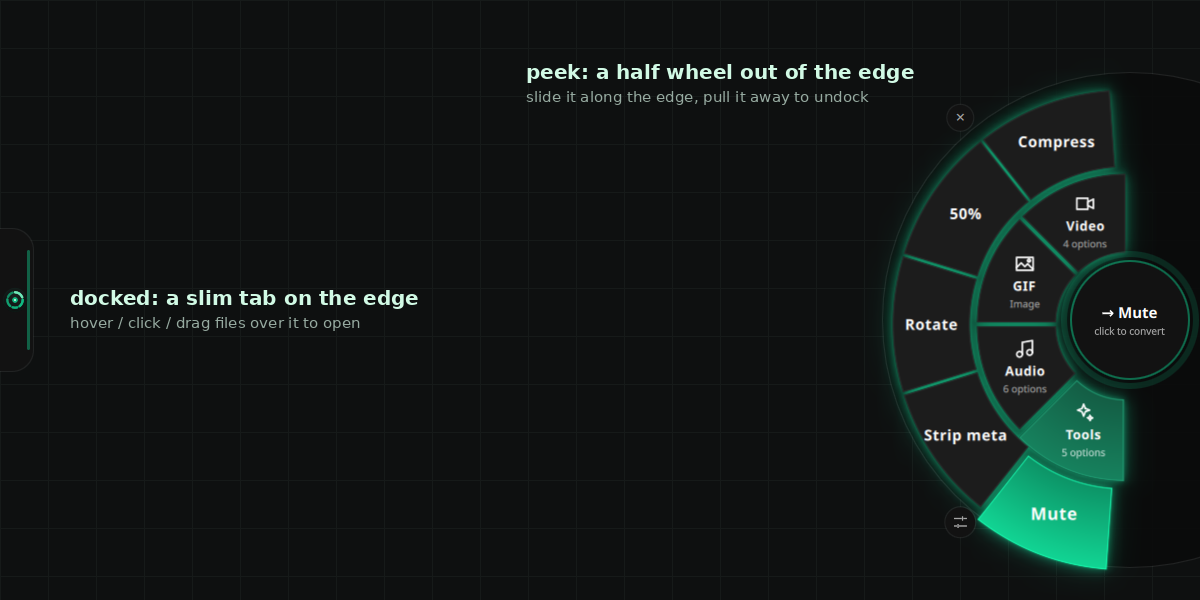
- Open: hover the tab for a moment, or click it, and a half wheel opens out of the edge. Dragging files from your file manager over the tab opens it too.
- Fold: it folds back by itself when the pointer leaves, after a conversion, or on
Esc/ ✕. - Move: drag the tab up and down to slide it along the edge. Pull it away to get the full wheel back.
- Hide: right-click the tab to hide it.
- Remembered: the side and height are saved. With the daemon installed, the tab comes back after every login.
Settings
dotmorph settings # also in your app menu as "DotMorph Settings"
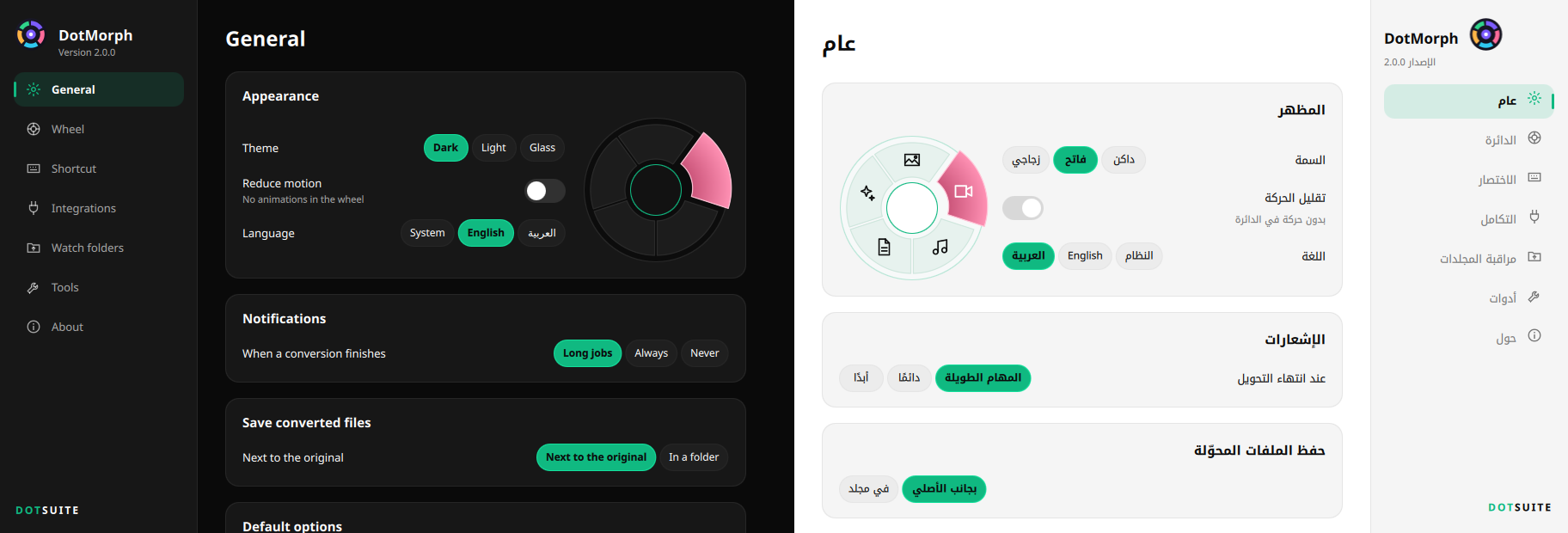
| Page | What you can change |
|---|---|
| General | Theme (live preview), reduced motion, language (System / English / العربية), when to notify, where converted files go, and default quality, resolution, size and metadata |
| Wheel | Your formats: click once to pin a format (it comes first), twice to hide it, again to reset |
| Shortcut | Record a new global shortcut by pressing it. Keys that are already taken are refused, and you can remove it |
| Integrations | Background daemon, file-manager menus (and which quick actions they show), edge dock, shell completion |
| Watch folders | Add a folder with a folder picker, pick the target format, and see which watchers are active; remove them |
| Tools | Every conversion engine, ready or missing, with a one-click "copy install command" |
| About | Version, links, and the settings file |
Every change is saved at once to ~/.config/dotmorph/settings.json, and a running daemon
picks it up immediately. A --theme flag or DOTMORPH_THEME still overrides the saved
theme for one run.
Command line
dotmorph convert report.pdf --to png --dpi 200 # PDF default 150 dpi
dotmorph convert logo.svg --to png             # original size (96 dpi); --dpi 192 = 2x
dotmorph convert logo.svg --to pdf             # stays vector
dotmorph convert IMG_*.HEIC --to jpg --strip   # iPhone photos, GPS removed
dotmorph convert *.png --to webp --quality 85 --resize 1920x1080 -o out/
dotmorph convert holiday.mov --to mp4          # live progress bar, Ctrl-C cancels cleanly
dotmorph convert clip.mp4 --to gif --resize 480
dotmorph convert scan1.jpg scan2.jpg notes.pdf --to merge-pdf
dotmorph convert photos/*.jpg --to strip -j 8  # 8 files in parallel
dotmorph convert report.docx --to pdf --notify # notification with "Open folder" when done
dotmorph convert shots/*.png --preset web      # WebP, fits 1920 px, q80, no metadata
dotmorph convert *.mov --to mp4 --dry-run      # show what would happen, write nothing
dotmorph formats                               # everything this machine can convert
dotmorph formats song.flac                     # targets for one file
dotmorph formats --missing                     # what installing more tools would add
dotmorph doctor                                # tools, extras, desktop integration status
Existing files are never overwritten unless you pass --overwrite (you get name (1).ext).
More options:
| Option | Meaning |
|---|---|
-o DIR |
output folder |
--quality 1-100 |
image quality |
--resize SPEC |
50%, 1920x1080 (fit inside), or 1280 (width) |
--timeout SECONDS |
give up on one file after this long |
-q |
no progress bar |
Exit codes: 0 everything converted, 1 something failed, 130 cancelled.
Presets (--preset NAME; explicit flags still win):
| Preset | Does |
|---|---|
web |
WebP, fits 1920×1920, quality 80, no metadata |
email |
JPG, fits 1280×1280, quality 75, no metadata |
thumb |
WebP thumbnail, fits 320×320 |
print |
PDF/SVG rendered at 300 dpi, quality 95 |
share |
compress in the same format, no metadata |
Linux desktop integration
| Command | What you get |
|---|---|
dotmorph daemon --install |
The wheel stays loaded, so dotmorph FILE hands files over a Unix socket and the wheel appears in about 0.1 s instead of the ~1 s it takes to start Qt. Starts at login. Also --status, --stop, --uninstall. |
dotmorph integrate |
A DotMorph submenu in Nautilus (Scripts), Thunar, Dolphin and Nemo, with the wheel plus quick actions (To PNG / JPG / WebP / PDF / MP4 / MP3 / GIF, Compress), each shown only for files it can handle. Quick actions run without a window and notify you with an Open folder button that selects the new files. Also adds "Open with DotMorph". --remove takes it all out and keeps your other Thunar actions. |
dotmorph hotkey |
Super+Shift+M, registered with GNOME (works on Wayland) or Xfce, next to your own shortcuts. Copy files with Ctrl+C, press it, pick a format. Keys that are already taken are refused (GNOME uses Super+M itself). --key '<Control><Alt>c' picks another; --remove removes it. |
dotmorph watch ~/Downloads --from heic --to jpg |
Converts new files as they land, with inotify and no polling. Handles browsers' .part downloads and never re-converts its own output. --install runs it as a systemd user service; --list and --uninstall manage the services. |
dotmorph doctor |
Shows which tools, extras and integrations are set up, with the install command for anything missing. |
Wayland: the wheel runs through XWayland so it can stay on top. It opens in the middle of the screen, because Wayland doesn't tell apps where the pointer is.
Uninstall the desktop integration
dotmorph integrate --remove
dotmorph hotkey --remove
dotmorph daemon --uninstall
dotmorph watch --list              # then: dotmorph watch --uninstall NAME
FAQ
How do I convert HEIC (iPhone) photos to JPG on Linux?
Install ImageMagick, or pip install 'dotmorph[heic]'. Then right-click the photos →
DotMorph → To JPG, or run dotmorph convert *.HEIC --to jpg. Add --strip to remove GPS
and other metadata.
How do I convert SVG to PNG or PDF without breaking text?
DotMorph renders SVG with librsvg, the renderer GNOME uses, so fonts, letter-spacing and
strokes come out right. PNG keeps the SVG's original size by default (--dpi 192 for 2×).
PDF stays vector, with real, selectable text.
Does DotMorph upload my files anywhere?
No. Every conversion runs locally with tools on your machine. DotMorph itself never goes online: there is no account and no telemetry.
Does it work on Wayland and GNOME?
Yes. The wheel runs through XWayland and the hotkey is a GNOME (or Xfce) custom shortcut, so both work on Wayland. A native layer-shell surface is on the roadmap.
How do I add "Convert" to the Nautilus / Thunar / Dolphin right-click menu?
Run dotmorph integrate. In Nautilus it appears under Scripts → DotMorph. Thunar needs
one restart (thunar -q).
Can it convert MKV to MP4 without re-encoding?
Yes. When the codecs fit the new container, DotMorph does a stream copy, which takes seconds and loses no quality. It falls back to a transcode only when needed.
Does DotMorph support Arabic?
Yes. Pick العربية in dotmorph settings, or keep System on an Arabic desktop. The
wheel, the settings window and notifications switch to Arabic with a right-to-left layout.
Commands and format names stay in English.
Is DotMorph free?
Yes. It is open source under Apache 2.0, like the rest of DotSuite.
Part of DotSuite
DotMorph is one of the developer and desktop tools in DotSuite by FreeRave:
- DotScramble: image privacy studio (faces, plates, text).
- DotGhostBoard: encrypted clipboard manager for Linux.
- DotShare: share your code journey from VS Code.
- …and everything else at universe.dotsuite.dev.
Develop
pip install -e '.[gui,dev]'
pytest          # 94 tests; those for tools that aren't installed are skipped
ruff check .
- GUI tests load the real QML offscreen (
QT_QPA_PLATFORM=offscreen). - Isolation: all tests redirect the XDG folders into a temp dir, and the hotkey tests fake gsettings, so they never touch your settings.
- Screenshots: they are rendered from the real QML, offscreen and frame by frame (no screen recording), so they can be regenerated after UI changes.
src/dotmorph/
  core/            conversion engine (no Qt)
    formats.py       catalog: extensions, categories, tools, menu order
    registry.py      builds the live matrix from installed tools
    converter.py     convert / convert_many (progress, cancel, parallel, dry run)
    common.py        options, safe temp files, subprocess runner
    presets.py       --preset web / email / thumb / print / share
    system.py        distro detection for install hints
    backends/        pillow, svg (librsvg), poppler, ghostscript, magick, ffmpeg,
                     office, pandoc
  ui/              the wheel
    window.py        Qt app + QML engine (one-shot and daemon)
    settings_window.py   `dotmorph settings`: the settings window and its backend
    i18n_qt.py       translations, right-to-left and Arabic font for QML
    dock.py          edge dock: snap, tab, half wheel, slide, undock
    bridge.py        Python <-> QML, jobs on a thread pool
    qml/             main.qml, Wheel.qml, RingSector.qml, Hub.qml, Theme.qml,
                     OptionsPanel.qml, EdgeTab.qml, CategoryIcon.qml,
                     SettingsWindow.qml (+ SetCard, SetRow, Seg, Toggle, Btn, SetSlider)
    icons/           dotmorph.svg
  linux/           desktop integration (no Qt at import time)
    daemon.py, ipc.py      instant-open daemon + Unix socket protocol
    integrate.py           file-manager menus, .desktop, icon
    hotkey.py              GNOME / Xfce shortcuts
    watch.py               inotify watcher + systemd user units
    notify.py, clipboard.py, paths.py
  settings.py      everything remembered between runs (settings.json)
  i18n.py          English / Arabic text
  completions.py   bash / zsh / fish completion scripts
  cli.py           subcommands
  app.py           entry point: CLI, or the wheel (through the daemon if running)
packaging/
  build.py         assets, check, notes, deb, appimage, aur (see docs/RELEASING.md)
  linux/           generated: .desktop, AppStream metainfo, man page, icons, completions
tests/
docs/              ROADMAP.md, PLAN.md, RELEASING.md, screenshots/
CHANGELOG.md
Issues and pull requests are welcome on GitHub. Start with CONTRIBUTING.md. It covers setup, where things live, how to add a backend or a translation, and the checks a pull request needs. Please follow the Code of Conduct, and report security problems privately as described in SECURITY.md.
If DotMorph saves you time, you can support it through GitHub Sponsors, Ko-fi or Buy Me a Coffee.
License
Apache 2.0 © FreeRave (Kareem). Part of DotSuite.
1 maintainer

Metadata
1 maintainer
Release files for dotmorph 2.0.2
For a detailed explanation of source distributions (sdists) and built distributions (wheels), please see the package formats documentation.
Source distribution (sdist)
| File | Size | Uploaded | Provenance | |
|---|---|---|---|---|
| dotmorph-2.0.2.tar.gz | 342.3 kB | With provenance | Details |
Built distribution (wheel)
| File | Interpreter | ABI | Platform | Reset |
|---|---|---|---|---|
| dotmorph-2.0.2-py3-none-any.whl | Python 3 | none | any | Details |
Total release size: 469.7 kB
Release files / dotmorph-2.0.2.tar.gz
| Download URL | dotmorph-2.0.2.tar.gz |
|---|---|
| Size | 342.3 kB |
| Tags | Source |
|
SHA-256 checksum How to use checksums |
8c0c3bb755fcbb3a6bf3e6ee1cf07631798c0e5955ad5c58bfa0a49f955ced9c
|
|
BLAKE2b-256 checksum How to use checksums |
08198343873d866e2992ab55591cd5850f271f32d82306ae447cf095585abad7
|
| Upload date | |
|
Uploaded using Trusted Publishing? What is trusted publishing? |
Yes |
| Uploaded via |
twine/7.0.0 CPython/3.13.16
|
Provenance
Provenance describes where a file came from. On PyPI, provenance is shared via attestations, which provide a verifiable record of the build or publishing details. View details, limitations and caveats.


PyPI Publish Attestation
PyPI verified that this artifact, at this checksum, originated from the publisher listed below.
Signed by GitHub Actions, verified by PyPI on Oct 23, 2026.
Transparency logRelease files / dotmorph-2.0.2-py3-none-any.whl
| Download URL | dotmorph-2.0.2-py3-none-any.whl |
|---|---|
| Size | 127.4 kB |
| Tags | Python 3 |
|
SHA-256 checksum How to use checksums |
dfb87c0df23bc3f4f89729243638c041011df3b3e434e60928285c4b94bbad84
|
|
BLAKE2b-256 checksum How to use checksums |
49fc5dbfe971b53a970970ee33c7e4bc1c1c5dd20991ba2d9c8ac46b990d9ac8
|
| Upload date | |
|
Uploaded using Trusted Publishing? What is trusted publishing? |
Yes |
| Uploaded via |
twine/7.0.0 CPython/3.13.16
|
Provenance
Provenance describes where a file came from. On PyPI, provenance is shared via attestations, which provide a verifiable record of the build or publishing details. View details, limitations and caveats.
PyPI Publish Attestation
PyPI verified that this artifact, at this checksum, originated from the publisher listed below.
Signed by GitHub Actions, verified by PyPI on Oct 23, 2026.
Transparency logSecurity for dotmorph 2.0.2
Provenance
Provenance describes where a file came from. On PyPI, provenance is shared via attestations, which provide a verifiable record of the build or publishing details. View details, limitations and caveats.
Full provenance
All 2 files in this release have been uploaded with provenance metadata.
Attestation for dotmorph-2.0.2.tar.gz
PyPI Publish Attestation
PyPI verified that this artifact, at this checksum, originated from the publisher listed below.
Signed by GitHub Actions, verified by PyPI on Oct 23, 2026.
Transparency logA note on package security
PyPI is a repository for distributing packages, not a service for auditing them. While third-party security researchers and our staff do their best to detect and remove malicious packages, PyPI cannot guarantee the quality, security or suitability of any given package.
To learn more about protecting yourself from malicious actors, visit our package security documentation.














