
dotomata
AI pixel art sprite generator for 2D games. dotomata (dot + automata) is an agent pipeline that takes a character from concept art to a validated, game-ready animated pixel sprite sheet: idle, attack, hit, guard and down animations, a sprite sheet PNG and a motion JSON any engine can read. It runs as a Claude Code plugin or a Python CLI, with image generation through the Codex CLI.

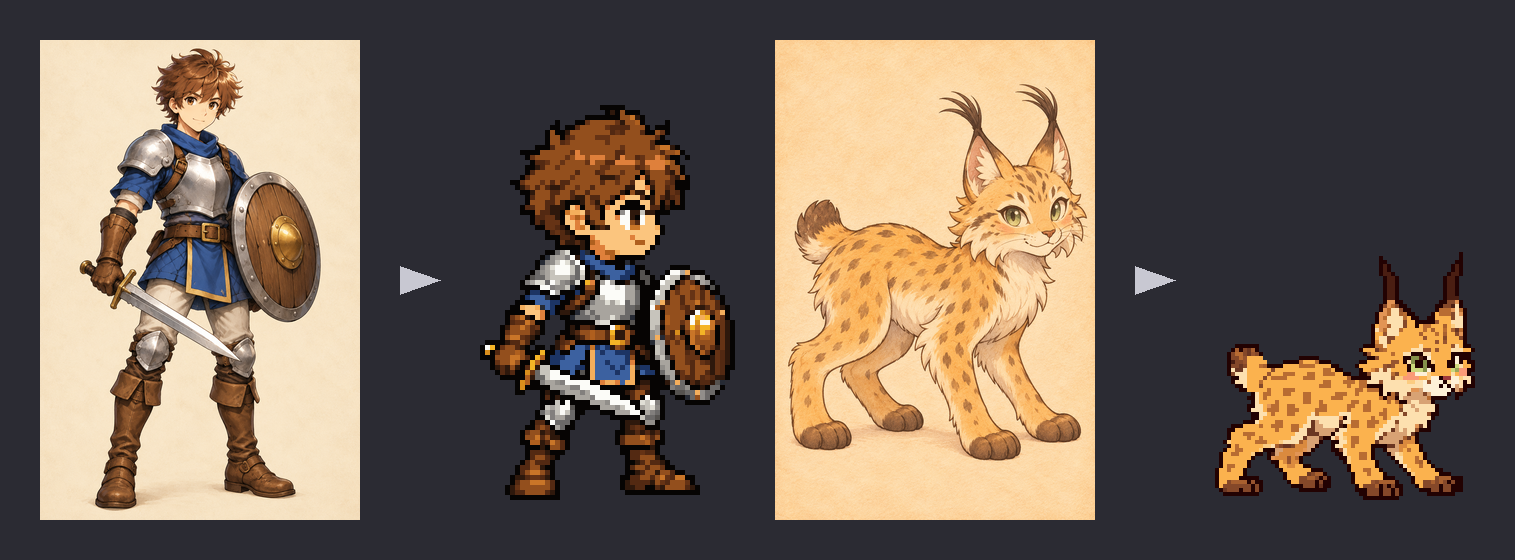
What makes it different
- Every build is checked. A sheet is written only if the figure is the target height, its feet sit on the foot row in every standing frame, it stays within the palette cap, it has no semi-transparent pixels, nothing touches the cell border, and every required action has its exact frame count.
- Reproducible rebuilds. Every output is rebuilt from committed sources (the generated image, the grid, the hand-fix list, the part data). Outputs carry no dates, paths or tool versions, and the dependencies are pinned, so the same sources give the same pixels.
dotomata verifyrebuilds everything and compares it with what is on disk. - Provenance for every generated image. Each run records its prompt, references, model, generation count and the image's sha256. The image is read from the run's own Codex session, never from a file the model saved, and a duplicate of any recorded image is refused.
- Human checkpoints. The person adopts the candidate and approves the final animation. Every decision is recorded with its reason. The plugin starts each segment only once the previous checkpoint is on file, and the CLI refuses to record checkpoint 2 or 3 before the one before it is approved. Generation has a hard cap per character.
- Rigged motions, not generated frames. The image model draws one standing pose. Parts (head, torso, arms, legs, weapon, shield...) are split on a shared rig, and motion templates move them by whole pixels, so every frame stays on the same grid and palette, and a new character reuses every animation.
How it works
- Concept art (optional): a card illustration of the character, which the sprite is then drawn from.
- Base pose: the Codex CLI draws one standing pose on magenta. A size pass shrinks the chosen design to the target height in code and has the model clean it up on that grid.
- Pixel grid and palette: the background is keyed out, the model's pixel grid is found and colours are reduced to a small palette.
- Hand fixes: cell-level edits in a list (from an agent, or painted by you), counted per category.
- Parts and rig: each cell is assigned to a part; joints, hidden cells and alternative drawings are added.
- Motions: idle, attack, hit, guard and down are assembled from templates.
- Output: sheet, mask, motion JSON and previews, after every check passes.
Requirements
- uv. It installs the pinned Python 3.12, Pillow and numpy on first run.
- The Codex CLI, logged in, with image generation available. Image generation in Codex needs a ChatGPT plan that includes it. Only the generate commands use Codex; converting, building and verifying work without it.
Install as a Claude Code plugin
/plugin marketplace add zeikar/dotomata
/plugin install dotomata@dotomata
The plugin adds two skills and an agent:
/dotomata:sprite <unit>: makes an animated sprite through three segments, stopping for you to adopt a candidate and to approve the final GIF./dotomata:card-art <unit>or/dotomata:card-art backgrounds/<id>: card art (2:3 portrait and bust) or a 16:9 background, from one batch you pick from.sprite-artist: the agent the sprite skill dispatches for each segment.
The skills check the prerequisites on first use and offer to create dotomata.json in your project.
Use the CLI without Claude Code
uvx dotomata --help            # run without installing
uv tool install dotomata       # or install it (pipx: pipx install --python 3.12 dotomata)
dotomata pins its Python, Pillow and numpy versions exactly so rebuilds stay identical, so install it as a tool in its own environment rather than into a project's environment. Or clone the repository and run it from your project root:
git clone https://github.com/zeikar/dotomata
uv run --project /path/to/dotomata dotomata --help
Every path in the config is relative to the directory you run it from (or --root).
Quick start
In your project (dotomata stands for either command above):
dotomata init # writes dotomata.json and sprites/.gitignore
Describe a character in sprites/source/knight/unit.json:
{
  "id": "knight",
  "kind": "humanoid",
  "name": "Knight",
  "colors": ["#3f5a8c", "#c9cdd4", "#8c2f2f"],
  "equipment": ["shield", "weapon"],
  "design": "A stocky young knight with short copper hair, a dented steel breastplate over a navy tunic and a red scarf. He carries a round wooden shield with a white star, his signature item, and a short sword.",
  "actions": {"idle": "humanoid_idle", "attack": "shield_bash", "hit": "humanoid_hit", "guard": "guard_raise", "down": "humanoid_down"}
}
Then, in Claude Code, run /dotomata:sprite knight. Without Claude Code, follow Your first unit: generate, reduce, checkpoint, convert, fix, parts, assemble, build, verify.
Outputs
dotomata build knight writes to build/sprites/knight/ (configurable):
| File | Content |
|---|---|
knight_sheet.png |
Transparent sprite sheet: one row per action, one cell per frame. |
knight_mask.png |
White silhouette of the same layout, for hit flashes and tints. |
knight_motion.json |
Cell size, foot point, and per action the frame positions, frame time and strike frame. |
knight_preview.gif, knight_zoom.png |
Previews. |
knight_report.json |
Height, colours, hand-fixed and newly drawn cells, generations used, check results. |
The sheet and the motion JSON are all an engine needs; nothing is tied to a particular engine. Card art builds a full portrait and a square bust PNG; a background builds one PNG at the configured size.
Docs
- Sprites: the workflow, file formats, rigs and templates, commands, checks, guardrails and reproduction.
- Card art and backgrounds
- Configuration: every key of
dotomata.json.
License
The code and docs are MIT. The example art in docs/images/ shows characters from the author's own game in development and is not covered by the MIT license.
1 maintainer

Metadata
1 maintainer
Release files for dotomata 0.1.1
For a detailed explanation of source distributions (sdists) and built distributions (wheels), please see the package formats documentation.
Source distribution (sdist)
| File | Size | Uploaded | Provenance | Actions |
|---|---|---|---|---|
| dotomata-0.1.1.tar.gz | 169.1 kB | Without provenance | Details for dotomata-0.1.1.tar.gz |
Built distribution (wheel)
| File | Interpreter | ABI | Platform | Actions Reset |
|---|---|---|---|---|
| dotomata-0.1.1-py3-none-any.whl | Python 3 | none | any | Details for dotomata-0.1.1-py3-none-any.whl |
Total release size: 331.2 kB
Release files / dotomata-0.1.1.tar.gz
| Download URL | dotomata-0.1.1.tar.gz |
|---|---|
| Size | 169.1 kB |
| Tags | Source |
|
SHA-256 checksum How to use checksums |
3e9346e4056b884849973910279e044f4af834bf430dfb02be2ad63c97f9444c
|
|
BLAKE2b-256 checksum How to use checksums |
f70c9199b7b9d8f76d646cf1315a6a0148ef07fdde7c32cb0fec59d86e609328
|
| Upload date | |
|
Uploaded using Trusted Publishing? What is trusted publishing? |
Yes |
| Uploaded via |
uv/0.13.9 {"installer":{"name":"uv","version":"0.13.9","subcommand":["publish"]},"python":null,"implementation":{"name":null,"version":null},"distro":{"name":"Ubuntu","version":"26.04","id":"resolute","libc":null},"system":{"name":null,"release":null},"cpu":null,"openssl_version":null,"setuptools_version":null,"rustc_version":null,"ci":true}
|
Release files / dotomata-0.1.1-py3-none-any.whl
| Download URL | dotomata-0.1.1-py3-none-any.whl |
|---|---|
| Size | 162.2 kB |
| Tags | Python 3 |
|
SHA-256 checksum How to use checksums |
d75931522b6d8de7c19204156dd696ed71c8583714bd52f43ef2050f29e105d4
|
|
BLAKE2b-256 checksum How to use checksums |
a53b034027caab3946dd543e80c836e39dd80a55b194d2fa01d59431e96777d8
|
| Upload date | |
|
Uploaded using Trusted Publishing? What is trusted publishing? |
Yes |
| Uploaded via |
uv/0.13.9 {"installer":{"name":"uv","version":"0.13.9","subcommand":["publish"]},"python":null,"implementation":{"name":null,"version":null},"distro":{"name":"Ubuntu","version":"26.04","id":"resolute","libc":null},"system":{"name":null,"release":null},"cpu":null,"openssl_version":null,"setuptools_version":null,"rustc_version":null,"ci":true}
|
Security for dotomata 0.1.1
Provenance
Provenance describes where a file came from. On PyPI, provenance is shared via attestations, which provide a verifiable record of the build or publishing details. View details, limitations and caveats.
No provenance found
None of the files in this release were uploaded with provenance metadata.
A note on package security
PyPI is a repository for distributing packages, not a service for auditing them. While third-party security researchers and our staff do their best to detect and remove malicious packages, PyPI cannot guarantee the quality, security or suitability of any given package.
To learn more about protecting yourself from malicious actors, visit our package security documentation.













