
DOTP
Dank One Time Password - A CLI and TUI application for secure TOTP/Authenticator storage.


Features
- Encrypted vault storage with password protection
- CLI commands for managing TOTP entries
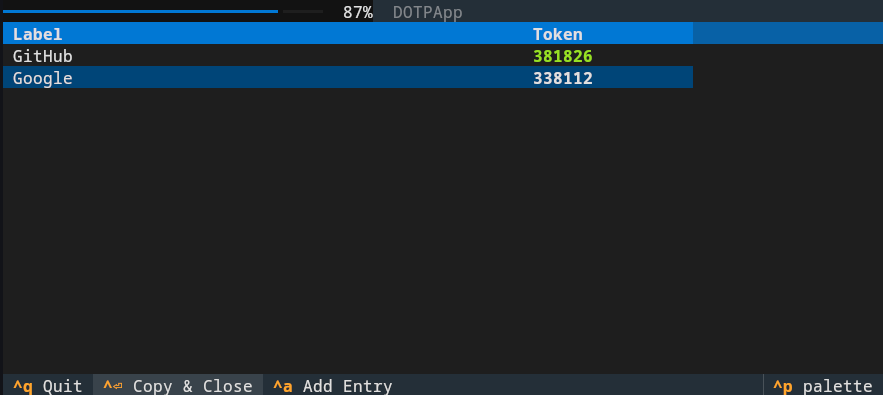
- Interactive TUI for quick access
- Import/Export support for Aegis and otpauth URI formats
- Real-time token generation with auto-refresh
- Search and filter capabilities with fuzzy matching
- Clipboard integration
- Clean, modern terminal UI with progress indicators
Installation
Using uvx (Recommended)
Run DOTP without installation:
uvx dotp --help
Global install
uv tool install dotp
Pip install
pip install dotp
Using uv (for development)
git clone https://github.com/rochacbruno/dotp.git
cd dotp
uv sync
uv run dotp --help
Quick Start
Initialize a vault
uvx dotp init
This creates an encrypted vault at ~/.config/dotp/.vault.dotp (or $XDG_CONFIG_HOME/dotp/.vault.dotp).
Add an entry
uvx dotp add --label GitHub --secret YOURBASE32SECRET
Or interactively:
uvx dotp add --label GitHub
# You'll be prompted for the secret
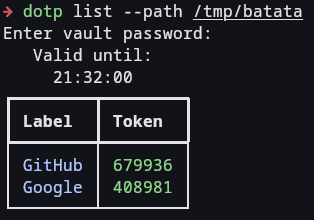
List all entries
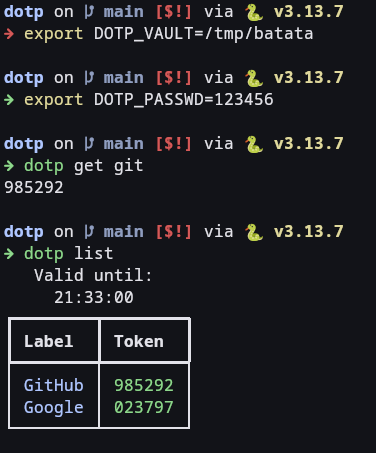
uvx dotp list
Get a specific token
uvx dotp get GitHub
For scripting (clean output):
DOTP_PASSWD=123456 uvx dotp get GitHub | wl-copy
Scripting tip
~/.local/bin/o
#!/usr/bin/bash
DOTP_PASSWD=1234 uvx dotp get $@ | wl-copy
Then you can simply run on terminal
o Google
and get the code copied to clipboard.
If you are running on DMS, you can add the command runner plugin
and then open the launcher and do >o dropbox -> run in bg.
Import from file
DOTP supports importing from various formats. See the sample files in the repository:
otpauth_sample.txt- Example otpauth URI formataegis_sample.json- Example Aegis export format
# From otpauth URI format
uvx dotp import otpauth_sample.txt

# From Aegis JSON format
uvx dotp import aegis.json --aegis
Export to file
# To otpauth URI format
uvx dotp export backup.txt

# To Aegis JSON format
uvx dotp export backup.json --aegis
TUI Mode
Launch the interactive TUI by running dotp without arguments:
uvx dotp
# or with password from environment
DOTP_PASSWD=123456 uvx dotp
# or with custom vault path
uvx dotp --path /tmp/my-vault.dotp
# or with environment variable
DOTP_VAULT=/tmp/my-vault.dotp uvx dotp
TUI Features
- Type to search: Start typing to filter entries in real-time
- Enter in search: Focus results to navigate with arrow keys
- Enter on item: Copy selected token to clipboard
- Ctrl+Enter: Copy token and close application
- Ctrl+A: Add a new entry
- Ctrl+Q: Quit
- Escape: Clear search
- Backspace: Return to search when navigating results
Configuration
Create a config file at ~/.config/dotp/config.toml:
# Path to your vault file (optional)
vault_path = "/path/to/.vault.dotp"

# Close TUI immediately after copying (default: false)
close_on_copy = true

# Clipboard command to use (default: wl-copy)
clipboard_command = "wl-copy"
Environment Variables
DOTP_PASSWD: Set vault password (useful for scripting)DOTP_VAULT: Set vault file path (alternative to--pathor config file)
Vault Location Priority
DOTP looks for the vault in this order:
--pathargumentDOTP_VAULTenvironment variablevault_pathin config file.vault.dotpin current directory~/.config/dotp/.vault.dotp
Security
- Vault is encrypted using Fernet (symmetric encryption)
- Password is derived using PBKDF2HMAC with SHA256
- 480,000 iterations (OWASP recommended minimum)
- 16-byte random salt per vault
Development
Running tests
uv sync --extra dev
uv run pytest
Running with coverage
uv run pytest --cov=src/dotp --cov-report=html
Linting
uvx ruff check src/
uvx ruff format src/
Stack
- UV - Package management
- pyotp - TOTP generation
- cyclopts - CLI framework
- Rich - Terminal formatting
- Textual - TUI framework
- cryptography - Encryption
- xdg-base-dirs - XDG Base Directory support
License
AGPL License - See LICENSE file for details
1 maintainer

Release files for dotp 0.1.4
For a detailed explanation of source distributions (sdists) and built distributions (wheels), please see the package formats documentation.
Source distribution (sdist)
| File | Size | Uploaded | |
|---|---|---|---|
| dotp-0.1.4.tar.gz | 13.6 kB | Details |
Built distribution (wheel)
| File | Interpreter | ABI | Platform | Reset |
|---|---|---|---|---|
| dotp-0.1.4-py3-none-any.whl | Python 3 | none | any | Details |
Total release size: 30.4 kB
Release files / dotp-0.1.4.tar.gz
| Download URL | dotp-0.1.4.tar.gz |
|---|---|
| Size | 13.6 kB |
| Tags | Source |
|
SHA-256 checksum How to use checksums |
5c9b60543d0c470d9cd927bdde5a12b24a6e0805822bc223c0c8aee10c580219
|
|
BLAKE2b-256 checksum How to use checksums |
4b86b028b5e2a8045b467faa841937bae283a0e83220de8f4eedf3eedc807457
|
| Upload date | |
|
Uploaded using Trusted Publishing? What is trusted publishing? |
No |
| Uploaded via |
uv/0.9.2
|
Release files / dotp-0.1.4-py3-none-any.whl
| Download URL | dotp-0.1.4-py3-none-any.whl |
|---|---|
| Size | 16.9 kB |
| Tags | Python 3 |
|
SHA-256 checksum How to use checksums |
dba54d3cfa9475ba8d8c116010329a9b6ceafa37a983ee6ca4cb9948ef5e0a7e
|
|
BLAKE2b-256 checksum How to use checksums |
5f9ec8fd89c5b8415db8ab209ee7b1dbe1622c9f0b231952d8a7b1155561ffad
|
| Upload date | |
|
Uploaded using Trusted Publishing? What is trusted publishing? |
No |
| Uploaded via |
uv/0.9.2
|














