
dotshow
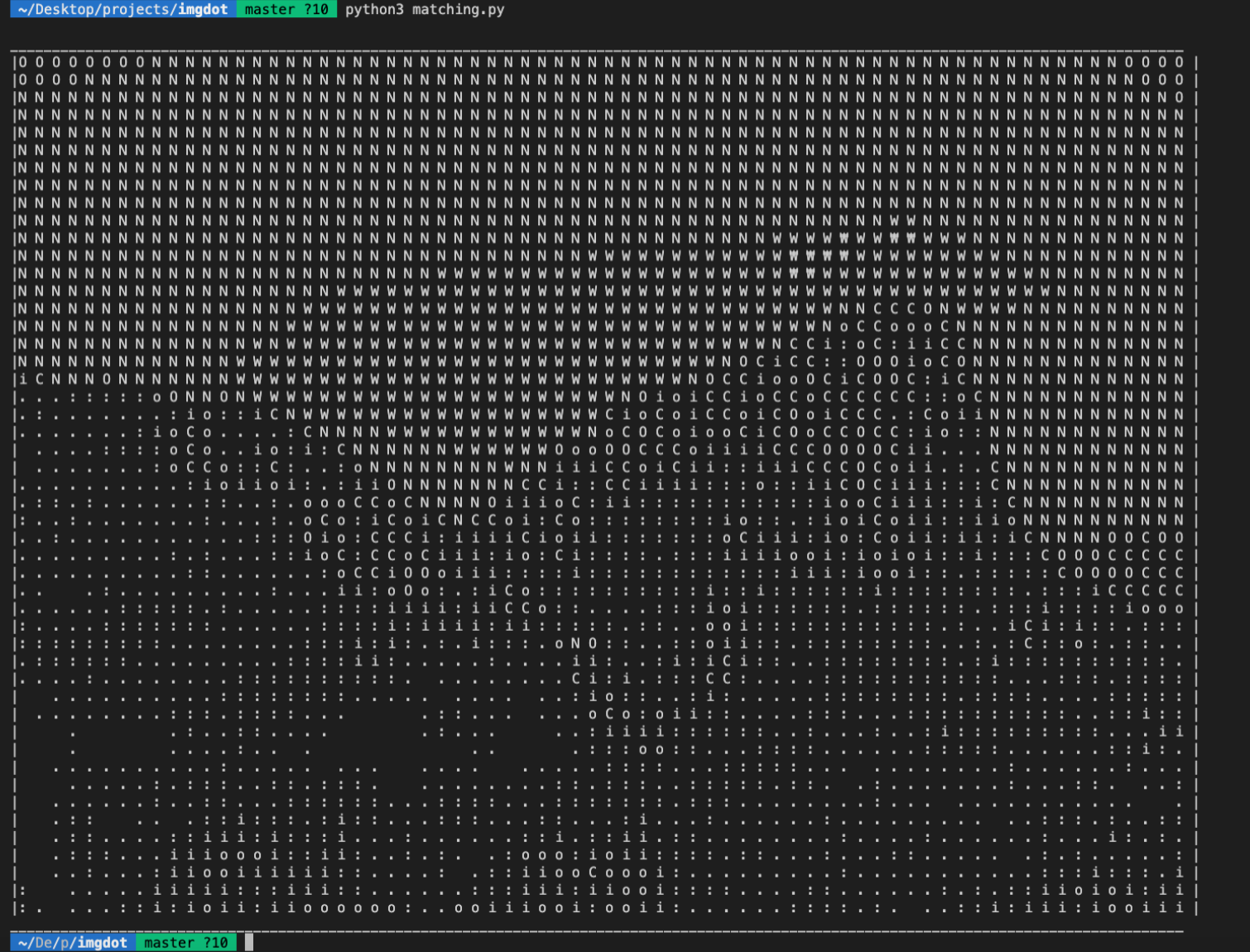
We generate image to text on terminal
It is made for terminal (CLI) to show image.
When we want to see image on python  linux server,
we have to save image or use jupyter notebook.
To overcome those problem, I made this package.

To see thumnail of the image, we can use cv2.imshow in local environment.
However, it is impossible for server ssh terminal.
It is simple thumnail printer using python.
Example
We can print images like down below.
원본 이미지

dotshow
colorshow

How to use
Git cloning on your repository
pip install dotshow
import package on python
Draw image on terminal by putting path
from dotshow import loadshow
loadshow(<img-path>) # run the code (drawing a color image, default=color)
loadshow(<img-path>, color=False) # run the code (drawing a gray image)
Draw image on terminal by OpenCV2 array
import cv2
from dotshow import dotshow, colorshow
img = cv2.imread(<img-path>)
dotshow(img) # run the code (drawing a gray image)
colorshow(img) # run the code (drawing a color image)
Draw image on terminal by PIL Image
import numpy as np
from PIL import Image
from dotshow import dotshow, colorshow
img = np.array(Image.open(<img-path>))
dotshow(img) # run the code (drawing a gray image)
colorshow(img) # run the code (drawing a color image)
Parameters
loadshow(
    gray = True[default / bool]
    size = 7 [default / 0 ~ 10]
)
dotshow(
    gray = True[default]
    size = 7 [default / 0 ~ 10]
)
colorshow(
    size = 7 [default / 0 ~ 10]
)

gray - if your image is not interpretable, give gray parater False
size - if your image is too big in your terminal, reduce size using this parameter
- If you use low size parameter, image will undersampled too much and it will decrease image quality.
- If you use big size parameter, the terminal cannot describe image because the terminal is too small.
1 maintainer

Metadata
1 maintainer
Release files for dotshow 1.2.5
For a detailed explanation of source distributions (sdists) and built distributions (wheels), please see the package formats documentation.
Source distribution (sdist)
| File | Size | Uploaded | Provenance | |
|---|---|---|---|---|
| dotshow-1.2.5.tar.gz | 4.2 kB | Without provenance | Details |
Built distribution (wheel)
| File | Interpreter | ABI | Platform | Reset |
|---|---|---|---|---|
| dotshow-1.2.5-py3-none-any.whl | Python 3 | none | any | Details |
Total release size: 8.8 kB
Release files / dotshow-1.2.5.tar.gz
| Download URL | dotshow-1.2.5.tar.gz |
|---|---|
| Size | 4.2 kB |
| Tags | Source |
|
SHA-256 checksum How to use checksums |
3fa93287647485ade71ec4fa502c672bc56d9799e3377cafd7b4aa4d2b926165
|
|
BLAKE2b-256 checksum How to use checksums |
9ce0a4a68fc3a73e314a1c26dc8bb93c7f46b72b5154aea82c548277fd287174
|
| Upload date | |
|
Uploaded using Trusted Publishing? What is trusted publishing? |
No |
| Uploaded via |
twine/3.8.0 pkginfo/1.8.3 readme-renderer/34.0 requests/2.27.1 requests-toolbelt/0.10.1 urllib3/1.26.12 tqdm/4.64.1 importlib-metadata/4.8.3 keyring/23.4.1 rfc3986/1.5.0 colorama/0.4.5 CPython/3.6.9
|
Release files / dotshow-1.2.5-py3-none-any.whl
| Download URL | dotshow-1.2.5-py3-none-any.whl |
|---|---|
| Size | 4.6 kB |
| Tags | Python 3 |
|
SHA-256 checksum How to use checksums |
497312b0c32aea138b17b332b2739e3150c09d294354499b5815a21c8b8ee4bf
|
|
BLAKE2b-256 checksum How to use checksums |
b876ade6340f8324c11d2aeb3950807467d42d2760e4a2ec99ffb5f240ac3e19
|
| Upload date | |
|
Uploaded using Trusted Publishing? What is trusted publishing? |
No |
| Uploaded via |
twine/3.8.0 pkginfo/1.8.3 readme-renderer/34.0 requests/2.27.1 requests-toolbelt/0.10.1 urllib3/1.26.12 tqdm/4.64.1 importlib-metadata/4.8.3 keyring/23.4.1 rfc3986/1.5.0 colorama/0.4.5 CPython/3.6.9
|
Security for dotshow 1.2.5
Provenance
Provenance describes where a file came from. On PyPI, provenance is shared via attestations, which provide a verifiable record of the build or publishing details. View details, limitations and caveats.
No provenance found
None of the files in this release were uploaded with provenance metadata.
A note on package security
PyPI is a repository for distributing packages, not a service for auditing them. While third-party security researchers and our staff do their best to detect and remove malicious packages, PyPI cannot guarantee the quality, security or suitability of any given package.
To learn more about protecting yourself from malicious actors, visit our package security documentation.














