
🧠 What ?
Pinpoint vulnerabilities with AI-enhanced precision.
isn't just another web scanner—it's your intelligent security wingman, combining rigorous traditional scanning logic with the cognitive speed of AI, doesn't just find vulnerabilities; it helps you understand them :)
❓ Why ?
not to scan, to Hunt
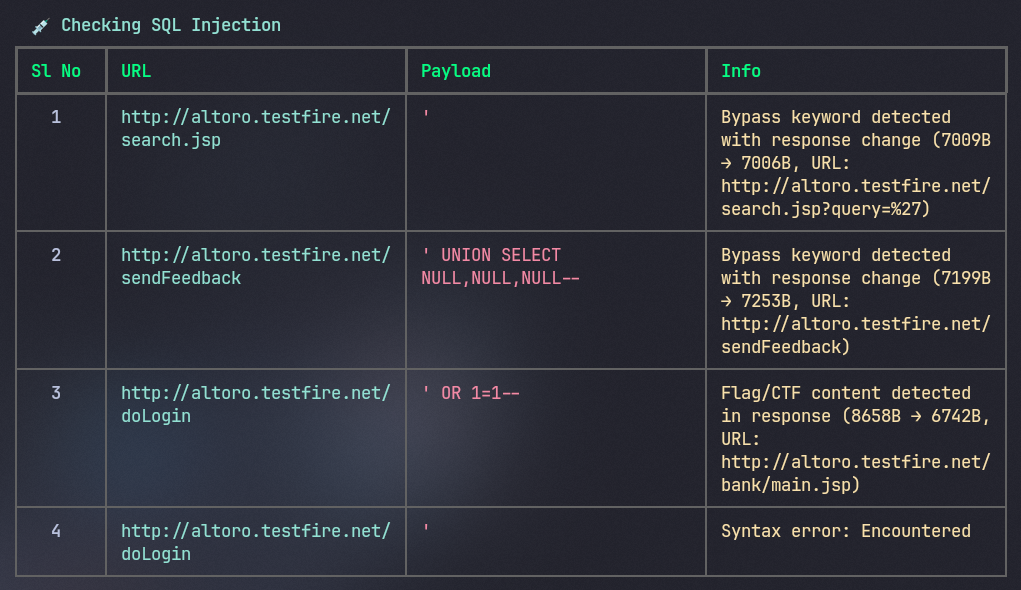
1. SQL Injection (SQLi)
| Detection |
|---|
 |
| Prevention |
|---|
 |
2. Server-Side Template Injection (SSTI)
| Detection |
|---|
 |
| Prevention |
|---|
 |
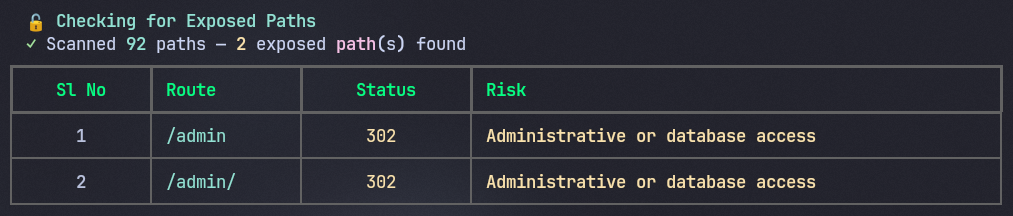
3. Exposed Path Discovery
| Detection |
|---|
 |
| Prevention |
|---|
 |
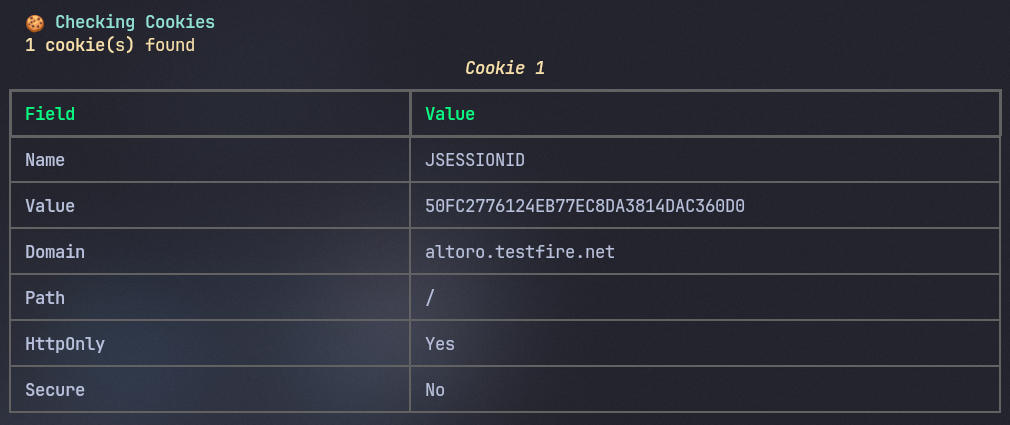
4. Cookie Security Analysis
| Detection |
|---|
 |
| Prevention |
|---|
 |
 |
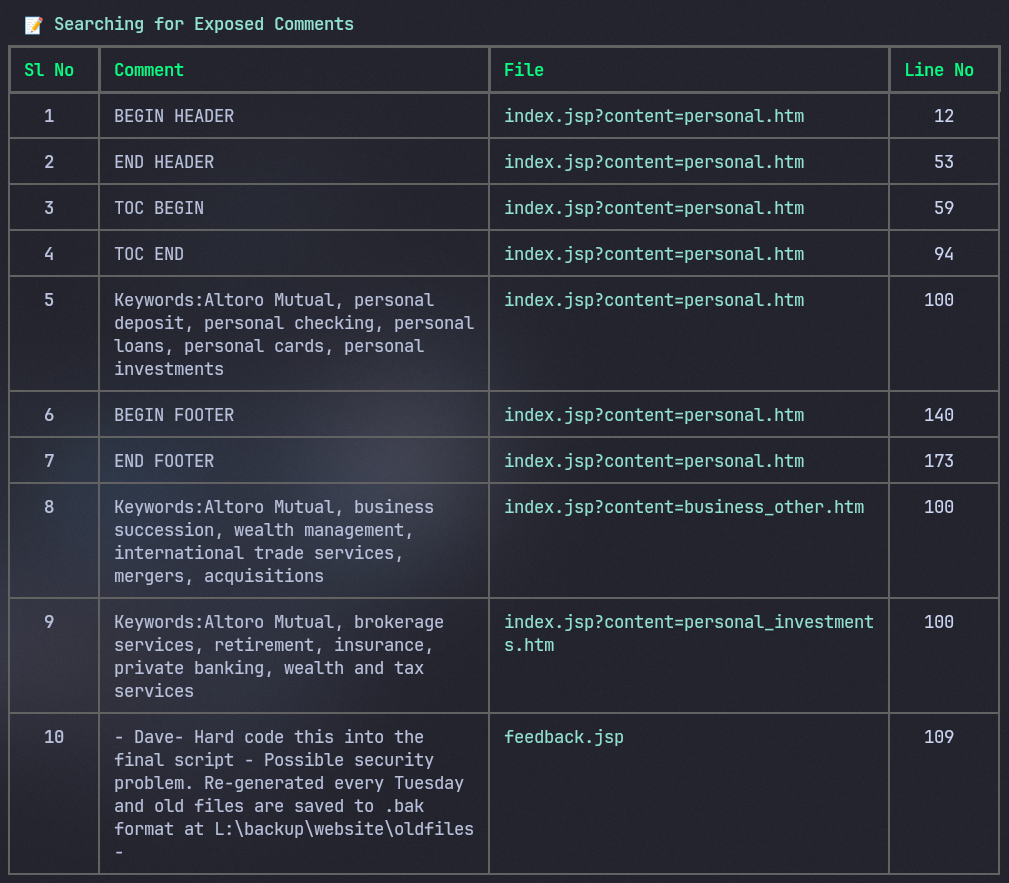
5. Comment Leakage
| Exposed Comments |
|---|
 |
6. Surface Script Analysis
7. Pattern Decoding
8. AI-Powered Analysis
Installation
pip install dotspot
Usage
Scan a target URL
dotspot scan <target-url>
You'll be prompted to choose between vulnerability scanning or flag hunting mode.
Analyze scan results with AI
dotspot analyze <scan-report.json>
Optionally pass --api-key YOUR_KEY or set the GROQ_API_KEY environment variable.
Show help
dotspot help
Configuration
Environment Variables
| Variable | Required | Default | Description |
|---|---|---|---|
GROQ_API_KEY |
✅ Yes | — | Your Groq API key for AI-powered analysis |
DEFAULT_MODEL |
❌ No | llama-3.3-70b-versatile |
Groq model to use |
Note: If
GROQ_API_KEYis not set, dotSpot will skip the AI Overview phase but all other scans will work normally.
Setting up your API key
Get a free API key from console.groq.com, then:
Linux / macOS:
export GROQ_API_KEY=gsk_your_key_here

# Optional: use a different model
export DEFAULT_MODEL=llama-3.1-8b-instant
To make it permanent, add the above lines to your ~/.bashrc or ~/.zshrc.
Windows (CMD):
set GROQ_API_KEY=gsk_your_key_here
set DEFAULT_MODEL=llama-3.1-8b-instant
Windows (PowerShell):
$env:GROQ_API_KEY="gsk_your_key_here"
$env:DEFAULT_MODEL="llama-3.1-8b-instant"
Available Models
You can set DEFAULT_MODEL to any model supported by Groq. Some popular options:
| Model | Description |
|---|---|
llama-3.3-70b-versatile |
Default — best quality |
llama-3.1-8b-instant |
Faster, lighter |
openai/gpt-oss-120b |
Good balance of speed and quality |
See the full list at console.groq.com/docs/models.
Requirements
- Python 3.9+
License
MIT License — see LICENSE for details.
1 maintainer

Metadata
1 maintainer
Release files for dotspot 0.0.3
For a detailed explanation of source distributions (sdists) and built distributions (wheels), please see the package formats documentation.
Source distribution (sdist)
| File | Size | Uploaded | |
|---|---|---|---|
| dotspot-0.0.3.tar.gz | 38.2 kB | Details |
Built distribution (wheel)
| File | Interpreter | ABI | Platform | Reset |
|---|---|---|---|---|
| dotspot-0.0.3-py3-none-any.whl | Python 3 | none | any | Details |
Total release size: 81.5 kB
Release files / dotspot-0.0.3.tar.gz
| Download URL | dotspot-0.0.3.tar.gz |
|---|---|
| Size | 38.2 kB |
| Tags | Source |
|
SHA-256 checksum How to use checksums |
3fd5f17373353c89f5882ea7983d48ce4e774243ca86fbdd54584c537c1d9c9e
|
|
BLAKE2b-256 checksum How to use checksums |
563aef2e0076d6ee4fe95381c54703742ac5f63de04222de317d5298e1357422
|
| Upload date | |
|
Uploaded using Trusted Publishing? What is trusted publishing? |
No |
| Uploaded via |
twine/6.2.0 CPython/3.14.2
|
Release files / dotspot-0.0.3-py3-none-any.whl
| Download URL | dotspot-0.0.3-py3-none-any.whl |
|---|---|
| Size | 43.3 kB |
| Tags | Python 3 |
|
SHA-256 checksum How to use checksums |
bfd58a52779a52f610228e43b608c8be10204af5ee741ddcd1ea8bb427f76ec5
|
|
BLAKE2b-256 checksum How to use checksums |
04d7466763c1e164f167a203031e7d4bae75096fb08915a3008d63e6d910a5d3
|
| Upload date | |
|
Uploaded using Trusted Publishing? What is trusted publishing? |
No |
| Uploaded via |
twine/6.2.0 CPython/3.14.2
|














