
DoubleTap


A command-line tool that helps you build Magic: The Gathering decks. Tell it what cards you have, and it suggests what to add next — learned from thousands of real decks built by other players, not a game simulator.
What it does:
- Imports your cards from a photo, a text file, or a spreadsheet export
- Suggests cards that work well with what you already have
- Checks your deck against the official rules for your format
- Shows your deck's power level using the Commander Brackets system
- Analyzes whether your deck can actually function and win (mana curve, color balance, ramp, draw, removal speed, win conditions)
- Shows what your deck costs in real money, and can keep suggestions under a budget
- Automatically fills out a partial deck to completion
What it does not do: simulate games or manage your collection.
Status: personal hobby project, actively developed. Issues and ideas welcome; no support promises.
This README is a guided introduction. For the complete reference — every command and option, maintenance procedures, and failure recovery — see the operating manual.
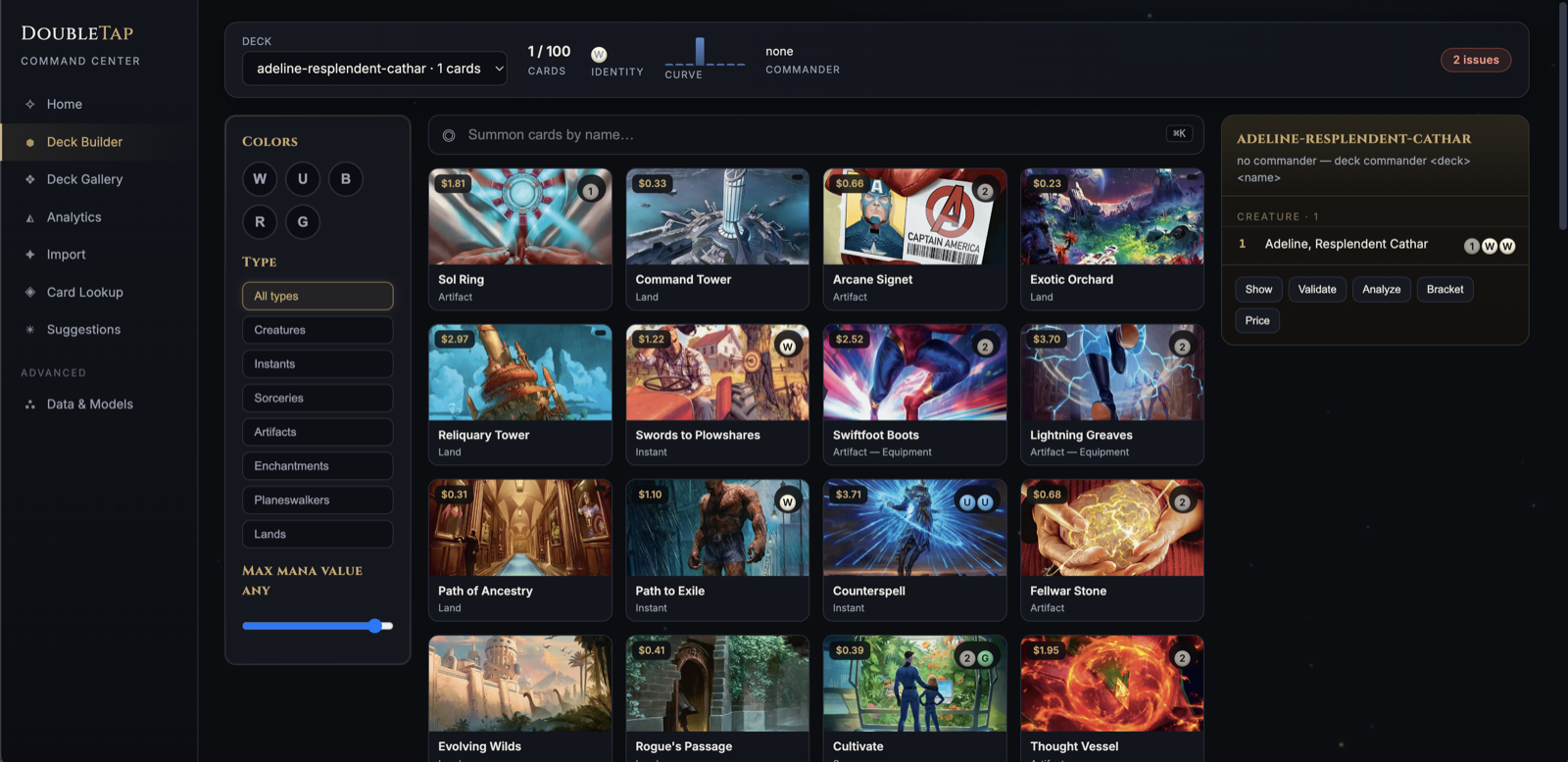
Prefer a browser? doubletap web serves a local web UI at
http://127.0.0.1:8787 with every command available as a form — deck
browser, import, card lookup, analysis, suggestions, and model training.
It runs the exact same code as the CLI and never leaves your machine.
Import takes a file picker (CSV, decklist, or card photo) and, when a name
is ambiguous, shows a chooser so you can pick the intended card — or type
the right name for a line nothing matched, like a misread photo — and retry
instead of failing. The Deck Builder lists a deck's rule issues on click,
filters the card grid by oracle text, rarity, and price, and can rename or
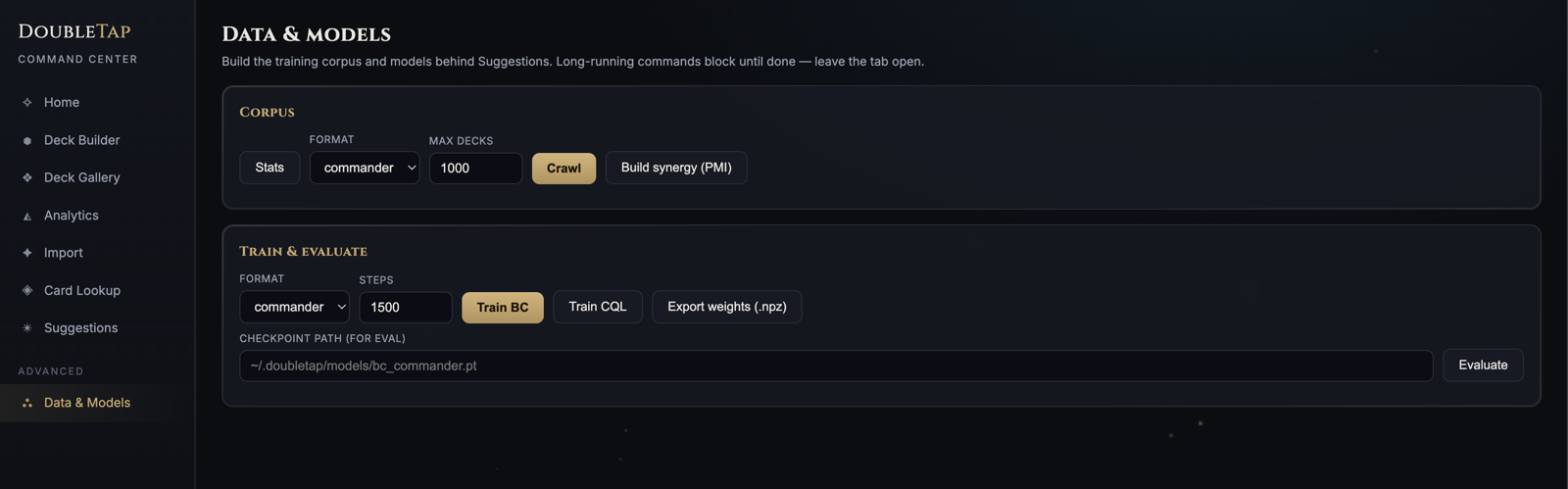
duplicate decks. The Data & Models tab shows which checkpoint serves each
format with its recorded accuracy, and asks before a training run
overwrites it (or lets you train into a scratch directory instead).
Supported formats: Commander (exactly 100 cards, one of each, including partner-commander and companion decks) and Modern (60-card minimum, up to 4 copies of a card, companions supported). Other formats aren't supported yet; any deck you import is treated as one of these two.
Getting started
1. Install
Just want to use it? DoubleTap is on PyPI:
uv tool install doubletap
doubletap web
That's the whole install — no Python knowledge needed beyond having
uv (curl -LsSf https://astral.sh/uv/install.sh | sh).
Suggestions run on lightweight numpy weights, so no PyTorch required.
Developing or training models? Work from a clone — uv reads the repo's
.python-version (3.11) and uv.lock, so one command builds the right
environment every time:
uv sync --extra dev --extra ocr --extra ml
Prefer plain pip? Use python3.11 specifically (your system python3 may
be newer, and PyTorch on Intel Macs requires 3.11). macOS/Linux:
python3.11 -m venv .venv
.venv/bin/pip install -e ".[dev,ocr]"
.venv/bin/pip install -e ".[ml]"
Windows (PowerShell):
py -3.11 -m venv .venv
.venv\Scripts\pip install -e ".[dev]"
.venv\Scripts\pip install -e ".[ml]"
(the ocr extra is macOS-only — skip it on Windows)
Then activate the environment so you can type doubletap directly.
macOS/Linux: source .venv/bin/activate. Windows (PowerShell):
.venv\Scripts\Activate.ps1; Windows (cmd): .venv\Scripts\activate.bat.
Note: PyTorch is only needed for training your own model. Suggestions run on lightweight numpy weights, so you can skip the
mlextra entirely if you use a pre-trained model. On Intel Macs themlextra automatically pins the last compatible torch (2.2.2, Python 3.11).
2. Download the card database
DoubleTap needs a local copy of every Magic card to look up names and rules. This downloads about 180 MB from Scryfall (the free Magic card database) and only re-downloads when new cards are released:
doubletap cards sync
You're ready to use all commands after this step.
Everyday use
Starting a deck from scratch
doubletap deck new my-deck --format commander
Creates an empty deck at ~/.doubletap/decks/my-deck.json. Add a commander
right away with --commander "Card Name", or set one later with
deck commander. In the web UI, click + New in the Deck Builder, then
open any legendary creature in the card grid and click Set commander.
Importing cards
You can add cards from a photo of a physical card, a screenshot of a decklist, a plain-text list, or a CSV export from Moxfield or Archidekt.
From a photo of a physical card (iPhone/camera):
doubletap deck import /path/to/photo.HEIC
DoubleTap reads the card name from the photo using Apple's built-in text
recognition. Works with .HEIC, .jpg, .png, and other common image
formats. The saved file is named after the card, not the photo — a photo of
Sol Ring becomes sol-ring.json (a second photo of the same card becomes
sol-ring-2.json, so nothing is overwritten).
From a plain-text list:
doubletap deck import decklist.txt --format commander
--format (or -f) accepts commander or modern and defaults to
commander if omitted. Each line should be a card name with an optional
quantity, like:
1 Sol Ring
1 Atraxa, Praetors' Voice *CMDR*
4 Lightning Bolt
Swamp
Lines starting with a quantity are treated as that many copies. A line marked
*CMDR* or under a Commander: section header is set as your commander.
Decks with two commanders are supported: if both cards have the "Partner"
ability, mark both lines *CMDR* (or list both under Commander:). Cards in
the deck may use the colors of either commander.
Companions are supported too: list the card under a Companion: section
header (or pass --companion "Card Name"). The companion sits outside the
deck — it doesn't count toward the 60 or 100 cards — and deck validate
checks that your deck actually meets its deckbuilding restriction (for
example, Lurrus requires every permanent to cost 2 or less).
From a Moxfield or Archidekt CSV export:
doubletap deck import export.csv --format modern
Every import is saved automatically to ~/.doubletap/decks/. Use -o to save
somewhere else:
doubletap deck import photo.HEIC -o ~/my-decks/atraxa.json
If a card name is unclear (blurry photo, typo), DoubleTap will show the closest match and ask you to confirm before saving.
Viewing and combining your decks
Add or remove a card:
doubletap deck add    ~/.doubletap/decks/my-deck.json "Sol Ring"
doubletap deck remove ~/.doubletap/decks/my-deck.json "Sol Ring"
Use -n 4 to add or remove several copies at once. Card names must match
exactly — a typo gets suggestions instead of a wrong card. Adding warns
immediately if the card breaks a rule (a duplicate in Commander, outside your
commander's colors) but still saves, so you can fix things in any order.
Removing the commander, partner, or companion by name clears that slot.
Set or change a deck's commander:
doubletap deck commander ~/.doubletap/decks/my-deck.json "Atraxa, Praetors' Voice"
Works on any saved deck. If the card is already in the main deck it's moved
to the commander slot; a previous commander moves back into the main deck, so
the card count doesn't change. For partner commanders add
--partner "Second Commander". It warns right away about any cards outside
the new commander's colors. Omit the card name to just see the current
commander:
doubletap deck commander ~/.doubletap/decks/my-deck.json
Rename or duplicate a deck:
doubletap deck rename my-deck my-deck-v2
doubletap deck copy   my-deck my-deck-budget
Both take a saved deck name (or a path) and a new name, and refuse to overwrite an existing deck. In the web UI these are the Rename and Duplicate buttons in the Deck Builder's shelf.
See every card in a deck:
doubletap deck show my-deck
Prints the commander, partner, and companion (when set), then each card with
its quantity, mana cost, and type, alphabetically. A bare name looks in
~/.doubletap/decks/; an explicit path works too, .json optional.
List all saved decks:
doubletap deck list
Shows each deck's file name, format, card count, and commander. For small commander-less files (like single-card photo imports) it shows the card names instead, so you can tell what's inside at a glance.
Combine individual card imports into one deck:
When you photograph cards one at a time, each import creates a separate file. Merge them into one deck like this:
doubletap deck merge ~/.doubletap/decks/sol-ring.json \
                     ~/.doubletap/decks/negate.json \
                     ~/.doubletap/decks/adeline-resplendent-cathar.json \
                  -o ~/.doubletap/decks/my-commander-deck.json
Use --format if you want to assign a different format than the one used
during import:
doubletap deck merge ~/.doubletap/decks/*.json --format modern -o modern.json
Checking your deck's power level (Commander Brackets)
Commander Brackets is an official system from Wizards of the Coast that helps players find games at a matching power level. There are five brackets:
| Bracket | Name | What it means |
|---|---|---|
| 1 | Exhibition | Ultra-casual, theme decks, unusual builds |
| 2 | Core | Average preconstructed deck power |
| 3 | Upgraded | Stronger than precon, not tournament-ready |
| 4 | Optimized | High-powered, combos allowed |
| 5 | cEDH | Competitive tournament play |
To see which bracket your deck falls into:
doubletap deck bracket ~/.doubletap/decks/my-deck.json
The bracket is determined by how many "Game Changers" are in your deck — a
WotC-curated list of cards (powerful tutors, fast mana, win-condition
engines) identified as having an outsized effect on games; this tool ships
with the core of that list in formats.py and it's easy to extend when WotC
revises it. Zero Game Changers puts you at Bracket 1 or 2; 1–3 puts you at
Bracket 3; 4 or more puts you at Bracket 4.
The tool lists exactly which Game Changers are in your deck so you can decide whether to swap them out for a lower-bracket game.
How you win a game — and what that means for your deck
If you're new to Magic, here is the short version of how games end. You win by doing any one of these:
- Reduce every opponent's life to 0. They start at 40 in Commander, 20 in Modern. This is how most games end — usually by attacking with creatures.
- Commander damage (Commander only): if any single commander deals 21 or more combat damage to a player over the course of the game, that player loses.
- Poison: a player with 10 or more poison counters loses. Cards with "infect" or "toxic" give these.
- Decking: a player who must draw a card from an empty library loses. Decks built around this are called "mill" decks.
- "You win the game" cards: a small number of cards simply end the game when their condition is met (for example, Thassa's Oracle).
A deck that can win needs more than just a win condition, though. If you spend all your mana on threats, you'll be behind on resources; if you only draw and ramp, you'll never close a game. Experienced Commander players aim for a rough balance in a 100-card deck:
| Role | What it is | Rough target |
|---|---|---|
| Lands | Your mana every turn | ~36 |
| Ramp | Cards that give extra mana (Sol Ring, Cultivate) | ~10 |
| Card draw | Cards that refill your hand | ~10 |
| Removal | Answers to opposing threats (Swords to Plowshares, Negate) | ~10 |
| Board wipes | Reset buttons when you're behind (Wrath of God) | ~3 |
| Win conditions | Big creatures, combos, or "you win" cards | a clear plan |
DoubleTap can check your deck against these targets:
doubletap deck analyze ~/.doubletap/decks/my-deck.json
It reads each card's rules text and reports:
- Role counts vs the targets above, plus tutors (cards that search your library for what you need — key to consistency in a 100-card deck).
- Interaction speed — how much of your removal works at instant speed. Instant-speed answers can be held up during opponents' turns; sorceries can't respond to anything.
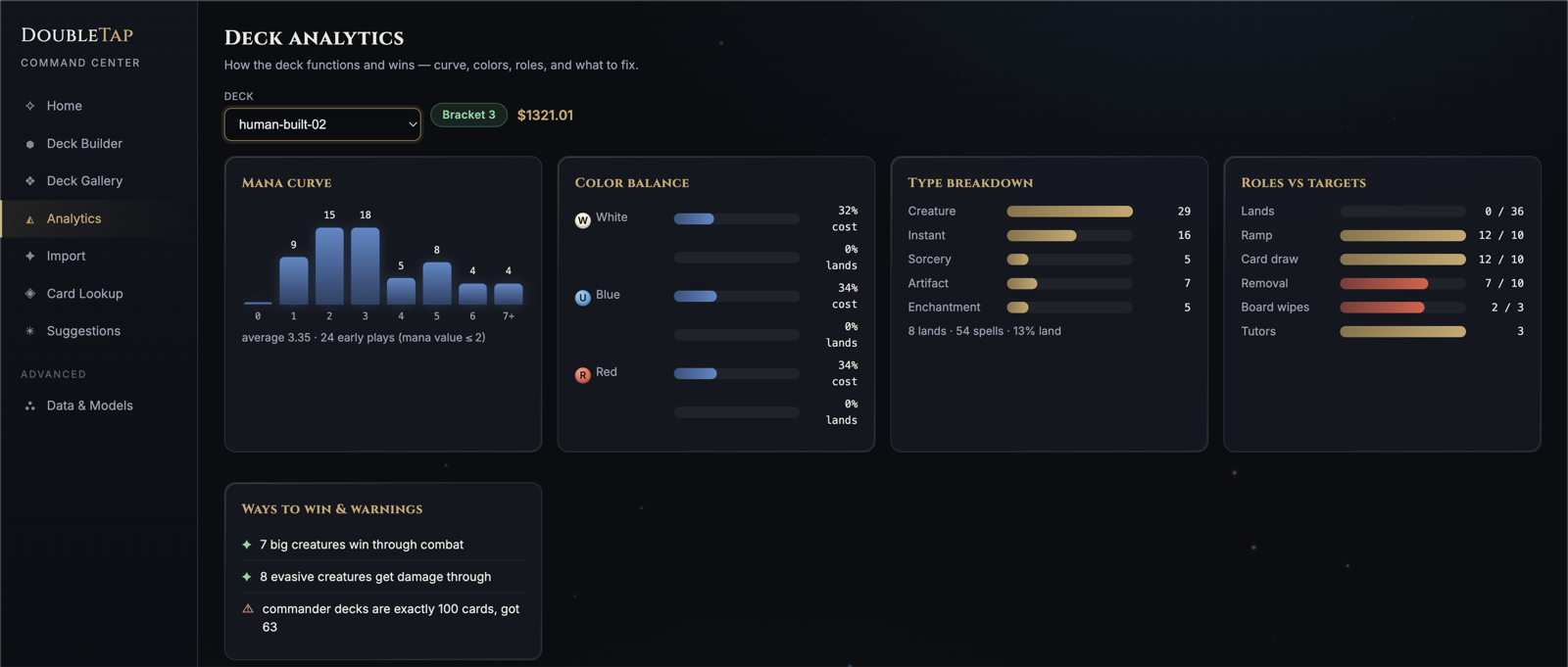
- Mana curve — your nonland cards grouped by cost, average cost, and how many you can cast in the first two turns. A deck that does nothing until turn 5 loses to one acting on turns 1–3, whatever the cards.
- Color balance — the colored mana symbols your spells need vs the colors your lands actually make. It flags a color your lands can't support (e.g. black-heavy costs over a mostly-red mana base means uncastable hands).
- Ways to win — direct "you win" cards, big creatures, creatures with evasion (flying/trample/menace get damage past blockers), poison, and mill.
- Total market price.
The detection is heuristic — a card with unusual wording may be missed — so
treat it as a gap-spotter, not a grade. The full gameplay-knowledge audit
behind these checks lives in docs/gameplay-blindspots.md.
The web UI (doubletap web) shows the same analysis as live charts:
Swaps and mana bases
Two commands act on the analysis instead of just reporting it:
doubletap deck swaps my-deck          # what to cut, what to add, and why
doubletap deck manabase my-deck       # a complete land package, Karsten math
deck swaps pairs your worst-fitting cards (by the model's own scoring,
synergy with the deck, and role surpluses) with the best additions, each
pair valued by the measured improvement delta — only strict upgrades are
offered. deck manabase builds a full land package from Karsten's land
count and colored-source requirements, then goldfishes it against an
all-basics baseline to prove the nonbasics earn their slots. Both are in
the Builder too (⇄ Swaps and Manabase buttons).
Goldfishing: how does the deck actually play?
doubletap deck goldfish ~/.doubletap/decks/my-deck.json
This deals your deck hundreds of solitaire games — shuffle, mulligan, play lands, cast what the mana allows — and reports how it functions: how much of your mana you actually use, how often you curve out, how often you sit on dead turns, and whether your commander comes down on time. The simulation's math is calibrated against Frank Karsten's published research.
A deck without lands can't goldfish, but complete --goldfish will finish
a partial deck with the model and simulate it with a basic mana base split
to match the deck's colored pips:
doubletap complete --deck my-deck.json --goldfish
What your deck costs — and building on a budget
Card prices come from Scryfall's market data and are already in your local
card database after doubletap cards sync (refresh with --force for current
prices).
See what a deck costs:
doubletap deck price ~/.doubletap/decks/my-deck.json
Shows the total in USD and the most expensive cards — useful for spotting where the money is if you want a cheaper version.
Keep suggestions within a budget: add --max-card-price to recommend or
complete and DoubleTap will only suggest cards at or under that price:
doubletap recommend --deck my-deck.json -k 20 --max-card-price 1.00
doubletap complete --deck my-deck.json --max-card-price 5.00 -o budget.json
This is per card, not per deck — a $1 cap builds a deck where every suggested card costs $1 or less.
Restrict complete to a specific color identity with --colors, useful
before a commander is set or to explore a narrower identity than your
commander allows:
doubletap complete --deck my-deck.json --colors WU -o azorius.json
In the web UI, both Recommend additions and Auto-complete a deck on the Suggestions page have a color-identity picker that defaults to your selected deck's commander (or partner) colors — click a color to add or remove it from the restriction.
Checking if a deck is legal
This checks your deck against the official format rules:
doubletap deck validate ~/.doubletap/decks/my-deck.json
It always starts with the deck's identity — format, card count, commander (with combined color identity for partners), and companion — even when the deck is incomplete, then lists every rule problem found. It will tell you about:
- Banned cards
- Wrong number of cards (Commander needs exactly 100; Modern needs at least 60)
- Too many copies of a card (Commander allows only 1 of each; Modern allows 4)
- Cards outside your commander's color identity (Commander only)
- A companion whose deckbuilding restriction your deck doesn't meet (all ten companions' rules are checked)
Looking up a card by name
If you're not sure how a card name is spelled, DoubleTap will find it:
doubletap cards lookup "lightning blot"
It handles typos, accented characters, and split card names. The score shown (0–100) is how closely your search matched — 100 is an exact match. It has nothing to do with how powerful the card is.
Each match also shows the card's color identity in brackets, like
[WUBG (white, blue, black, green)] — useful for checking whether a card
fits your commander's colors before adding it. doubletap deck commander <deck.json> (with no card name) shows your commander's identity the same way.
Getting card suggestions (requires a trained model)
This is the main feature: given your partial deck, DoubleTap suggests the cards most likely to fit based on patterns from thousands of real decks.
Before you can get suggestions, you need a trained model. This is a one-time setup that requires downloading public decklists and running a training process. See Training a model below.
Once you have a model:
Get the top 20 suggestions for your deck:
doubletap recommend --deck ~/.doubletap/decks/my-deck.json -k 20
Each suggestion shows a score and the cards already in your deck that pair well with it. For example:
  1. Heroic Intervention                     2.341  with Atraxa (8.2), Sol Ring (4.1)
  2. Cyclonic Rift                            2.187  with Atraxa (7.9)
Lands are not suggested — the tool focuses on nonland cards, and a structural note at the end tells you how many lands you still need to add.
Auto-complete a partial deck:
doubletap complete --deck ~/.doubletap/decks/my-deck.json -o finished.json
This fills all remaining nonland slots with the model's top picks, re-scoring after each addition. When it's done it tells you how many lands to add to finish the deck.
By default the result stays at Commander Bracket 3 — the completed deck
will hold at most three Game Changers, counting any already in it. Change the
target with --bracket: 1 or 2 adds no Game Changers at all, 4 or 5 removes
the restriction:
doubletap complete --deck my-deck.json --bracket 2 -o casual.json
Adjust suggestions to your specific deck style with --personalize
(default is 0.3, range 0–1). Higher values weight cards that appear in decks
most similar to yours; lower values rely more on the model's general knowledge:
doubletap recommend --deck my-deck.json -k 20 --personalize 0.5
Suggestions are already weighted toward cards that synergize with what's in
your deck via --synergy-weight (default 0.3, works on recommend and
complete; validated on Commander — a 200-deck holdout check showed +3.8 to
+4.2 recovery@50 over no blend). This uses the same card-pairing signal
already shown in each suggestion's rationale, but applies it to the ranking
itself, not just the explanation. Set it to 0 to turn it off:
doubletap recommend --deck my-deck.json -k 20 --synergy-weight 0
Training a model (advanced)
The suggestion engine learns from real public decklists. You only need to do this once (or redo it after a big card set release). Every step below is also available in the web UI's Data & Models tab:
Step 1 — Download public decklists
This crawls Archidekt (a free public deckbuilding site) at a polite rate of
about one request per second. It will take several hours for a large corpus.
Keep your Mac awake with caffeinate:
caffeinate -is doubletap corpus crawl --format commander --max 20000
Check progress at any time:
doubletap corpus stats
The stats show how many decks were downloaded (parsed), skipped because they
had errors or illegal cards (rejected), or deleted since they were queued
(gone). Commander typically rejects about half of downloaded decks — most
public decks have missing cards, the wrong deck size, or rule violations that
disqualify them from training. Partner-commander decks are accepted.
Step 2 — Build the synergy table
This analyzes which cards tend to appear together across all downloaded decks:
doubletap corpus pmi --format commander
Step 3 — Train
doubletap train bc --format commander
doubletap train cql --format commander
The first command trains the baseline model; the second trains the
reinforcement-learning model that recommend prefers when available (each
takes a few minutes to half an hour depending on corpus size). Both are
saved to ~/.doubletap/models/ and picked up automatically.
Training overwrites the model that serves suggestions. By default
train bc and train cql write straight into ~/.doubletap/models/, which
is where recommend/complete load from — so a finished run replaces the
serving model immediately. To experiment without that, train into a scratch
directory:
doubletap train bc -f commander --out ~/scratch-models
The web UI's Train buttons ask for confirmation before overwriting, or take a "Save to" directory to do the same thing.
When a scratch-trained checkpoint turns out better, promote it — this shows its recorded accuracy next to the current serving model's before copying:
doubletap train promote ~/scratch-models/cql_commander.pt --dry-run   # compare only
doubletap train promote ~/scratch-models/cql_commander.pt             # make it live
In the web UI, a finished training run pre-fills the Evaluate and Promote fields with the new checkpoint, and Promote… shows the same comparison before asking.
Evaluating model quality
doubletap eval --model ~/.doubletap/models/bc_commander.pt
This hides some cards from test decks and measures how often the model ranks them highly. Higher numbers mean better suggestions.
Troubleshooting
command not found: doubletap
The virtual environment isn't active. macOS/Linux: run
source .venv/bin/activate first, or prefix every command with
.venv/bin/doubletap. Windows: run .venv\Scripts\Activate.ps1 (PowerShell)
or .venv\Scripts\activate.bat (cmd) first, or prefix every command with
.venv\Scripts\doubletap.
Photo import reads the wrong text The tool works best on screenshots of printed decklists. For physical card photos, point it at the card face straight-on with the name clearly visible.
Suggestions seem generic or obvious
The model learns from popular public decks, so widely-played cards rank
highly. Use --personalize 0.5 or higher to shift weight toward cards that
appear in decks similar to yours.
A card name isn't found
Run doubletap cards sync to refresh the card database — it may be a newly
released card.
No module named 'torch' when running recommend or complete
The doubletap launcher is pointing at a Python without torch installed
(this can happen when the venv holds more than one Python version). Reinstall
the launcher from the interpreter that has torch. macOS/Linux:
.venv/bin/python -m pip install -e . --no-deps --force-reinstall. Windows:
.venv\Scripts\python -m pip install -e . --no-deps --force-reinstall
Development
# run all tests (no network required):
.venv/bin/pytest          # Windows: .venv\Scripts\pytest
# photo OCR smoke test (requires a real image, macOS only):
.venv/bin/pytest -m macos_ocr
Source layout:
src/doubletap/
├── cli.py          # all commands
├── db.py           # local database
├── scryfall.py     # card data download
├── names.py        # name lookup and fuzzy matching
├── decks.py        # deck import, parsing, merging
├── ocr.py          # photo text recognition (Apple Vision)
├── formats.py      # format rules, validation, Commander Brackets
├── analysis.py     # card roles, mana curve, color balance, market prices
├── archidekt.py    # public decklist crawler
├── web.py          # local web UI server (runs the CLI in-process)
├── static/         # the web UI single-page app
└── ml/             # suggestion engine (training and inference)

docs/
├── operating-manual.md     # complete command/maintenance/recovery reference
└── gameplay-blindspots.md  # gameplay-knowledge audit behind deck analyze
Known limitations
- Partner commanders and companions are supported; MDFC commanders are not.
- Photo import works on decklist photos and screenshots. Spread-of-cards-on-a-table photos are not supported.
- The suggestion engine does not recommend lands. Add those yourself based on the land count gap reported at the end of
recommendandcomplete. - Very rare cards may get generic suggestions because the model has seen them in few real decks.
1 maintainer

Metadata
1 maintainer
Release files for doubletap 0.1.12
For a detailed explanation of source distributions (sdists) and built distributions (wheels), please see the package formats documentation.
Source distribution (sdist)
| File | Size | Uploaded | |
|---|---|---|---|
| doubletap-0.1.12.tar.gz | 1.8 MB | Details |
Built distribution (wheel)
| File | Interpreter | ABI | Platform | Reset |
|---|---|---|---|---|
| doubletap-0.1.12-py3-none-any.whl | Python 3 | none | any | Details |
Total release size: 1.9 MB
Release files / doubletap-0.1.12.tar.gz
| Download URL | doubletap-0.1.12.tar.gz |
|---|---|
| Size | 1.8 MB |
| Tags | Source |
|
SHA-256 checksum How to use checksums |
7eca5685e443b3b5aa6d008c8c86bda49a22f95c13b806eb567cf6d186035f6f
|
|
BLAKE2b-256 checksum How to use checksums |
54ec68fad1e1d6c104496e7b36673c363251580a9407b91d7c4986d15548a631
|
| Upload date | |
|
Uploaded using Trusted Publishing? What is trusted publishing? |
Yes |
| Uploaded via |
uv/0.12.17 {"installer":{"name":"uv","version":"0.12.17","subcommand":["publish"]},"python":null,"implementation":{"name":null,"version":null},"distro":{"name":"Ubuntu","version":"24.04","id":"noble","libc":null},"system":{"name":null,"release":null},"cpu":null,"openssl_version":null,"setuptools_version":null,"rustc_version":null,"ci":true}
|
Release files / doubletap-0.1.12-py3-none-any.whl
| Download URL | doubletap-0.1.12-py3-none-any.whl |
|---|---|
| Size | 111.9 kB |
| Tags | Python 3 |
|
SHA-256 checksum How to use checksums |
2a275ea5613db08e3ba5bdf53ec6a4ea7dbd5c39a9c1e6c85fc31562269f5919
|
|
BLAKE2b-256 checksum How to use checksums |
23ece19942d9c08948bf2f3ca6e1df1ea99a81847a15bd6a1e5864129d4b32cd
|
| Upload date | |
|
Uploaded using Trusted Publishing? What is trusted publishing? |
Yes |
| Uploaded via |
uv/0.12.17 {"installer":{"name":"uv","version":"0.12.17","subcommand":["publish"]},"python":null,"implementation":{"name":null,"version":null},"distro":{"name":"Ubuntu","version":"24.04","id":"noble","libc":null},"system":{"name":null,"release":null},"cpu":null,"openssl_version":null,"setuptools_version":null,"rustc_version":null,"ci":true}
|














