
downwards
You want to read a wikipedia page right from your terminal, right? RIGHT?
I know because I wanted it.
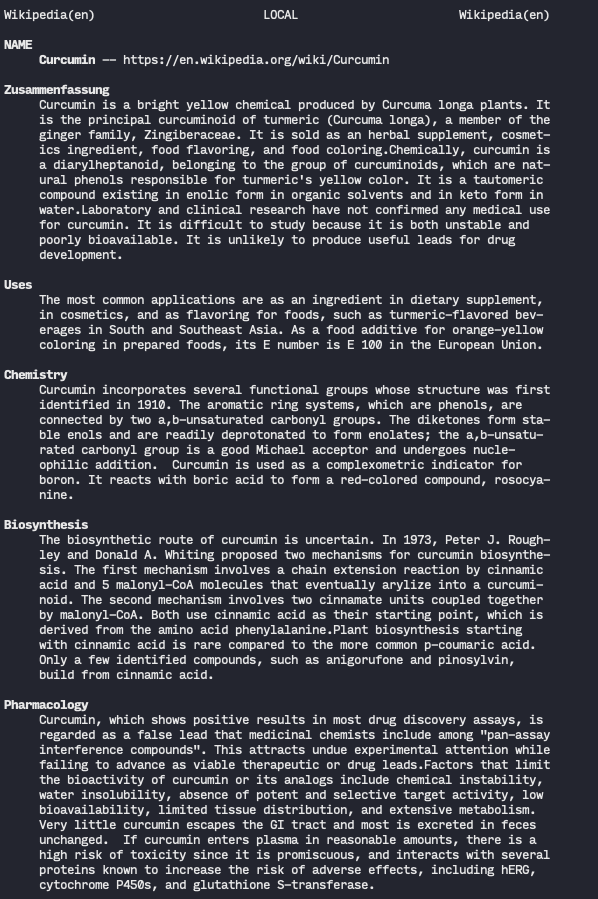
downwards is downloading the article you want, converts it to mdoc and
displays it using your local man binary.
$ downwards OpenBSD
$ downwards 'Theo de Raadt'
$ downwards 'Python (Programming Langauge)'
$ downwards --help
Usage: downwards [OPTIONS] ARTICLE

  downwards lets you read a wikipedia page on command line as a manpage.

Options:
  -l, --language TEXT  Language for wikipedia
  -s, --stdout         Print to stdout
  --help               Show this message and exit.
I found it very helpful to set export MANWIDTH=80 for nicely readable
documents.
Installation
Installation
pip3 install downwards
Development
pip3 install --upgrade .
Background
I wanted to play around with OpenBSDs mandoc and learn how mdoc works.
Then I played around with Wikipedia and put both things together.
However, once I got a first prototype up and running, I started liking it. It feels like a "reader"-feature from your browser, but only from your terminal right at hand.
Bugs and Known Issues
There are always some things in automatically generated mdoc documents that
throw warnings. Since you cannot make man ignoring them, I need to press
ctrl+l to reset those warnings.
man is really not made to display a wide range of special utf8 characters
(neither on OpenBSD, Linux nor macOS). I've done what I can to strip those
away or replace german umlauts with ae for example.
1 maintainer

Metadata
1 maintainer
Release files for downwards 1.3.1
For a detailed explanation of source distributions (sdists) and built distributions (wheels), please see the package formats documentation.
Source distribution (sdist)
| File | Size | Uploaded | Provenance | |
|---|---|---|---|---|
| downwards-1.3.1.tar.gz | 6.3 kB | Without provenance | Details |
Release files / downwards-1.3.1.tar.gz
| Download URL | downwards-1.3.1.tar.gz |
|---|---|
| Size | 6.3 kB |
| Tags | Source |
|
SHA-256 checksum How to use checksums |
b35deca0c99fb3c9503841b3e0241a9be5a6fcf0632880fff353dfbf6c12a385
|
|
BLAKE2b-256 checksum How to use checksums |
6492f8b00acc0035d75ef4a9993bda942d4235330efc8a61d887f98d9297667d
|
| Upload date | |
|
Uploaded using Trusted Publishing? What is trusted publishing? |
No |
| Uploaded via |
twine/3.3.0 pkginfo/1.7.0 requests/2.25.1 setuptools/57.0.0 requests-toolbelt/0.9.1 tqdm/4.56.0 CPython/3.9.6
|
Security for downwards 1.3.1
Provenance
Provenance describes where a file came from. On PyPI, provenance is shared via attestations, which provide a verifiable record of the build or publishing details. View details, limitations and caveats.
No provenance found
None of the files in this release were uploaded with provenance metadata.
A note on package security
PyPI is a repository for distributing packages, not a service for auditing them. While third-party security researchers and our staff do their best to detect and remove malicious packages, PyPI cannot guarantee the quality, security or suitability of any given package.
To learn more about protecting yourself from malicious actors, visit our package security documentation.














