



Deep Q-Network (DQN) for Atari Space Invaders
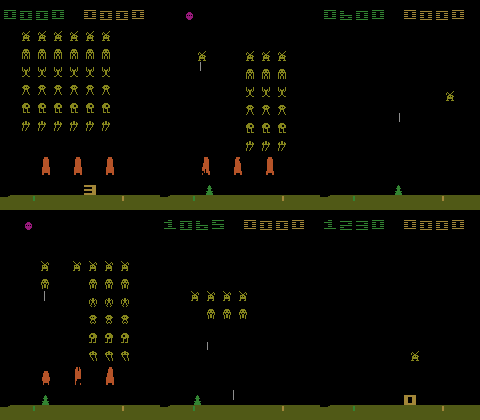
A PyTorch implementation of Deep Q-Learning Network (DQN) trained to play Atari Space Invaders using the Arcade Learning Environment (ALE).
Features
- Vanilla DQN and Dueling DQN architectures.
- Double DQN support for improved stability.
- Replay Buffer for experience replay.
- Epsilon-greedy exploration with annealing (i.e., linear decay).
- TensorBoard integration for training visualisation.
- Hugging Face Hub integration for model sharing.
- Video recording of agent gameplay.
Installation
You can install the package from PyPI or clone the repository and install the required dependencies using Poetry or pip. This project requires Python 3.13.
PyPI
pip install dqn-ale-spaceinvaders
Source
Using Poetry (Recommended)
# 1. Clone the repository
git clone https://github.com/giansimone/dqn-ale-spaceinvaders.git
cd dqn-ale-spaceinvaders

# 2. Initialize environment and install dependencies
poetry env use python3.13
poetry install

# 3. Activate the virtual environment
eval $(poetry env activate)
Using pip
# 1. Clone the repository
git clone https://github.com/giansimone/dqn-ale-spaceinvaders.git
cd dqn-ale-spaceinvaders

# 2. Create and activate a virtual environment
python3.13 -m venv venv
source venv/bin/activate

# 3. Install package in editable mode
pip install -e .
Project Structure
dqn-ale-spaceinvaders/
├── dqn_ale_spaceinvaders/
│    ├── agent.py           # DQN agent implementation
│    ├── buffer.py          # Experience replay buffer
│    ├── config.yaml        # Agent configuration
│    ├── environment.py     # Environment setup and wrappers
│    ├── model.py           # Deep learning architectures
│    ├── train.py           # Training script
│    ├── enjoy.py           # Play with trained agent
│    ├── export.py          # Export model to Hugging Face Hub
│    └── utils.py           # Utility functions
├── .gitignore
├── LICENSE
├── README.md
└── pyproject.toml
Usage
Training
Train a DQN agent with the default configuration.
python -m dqn_ale_spaceinvaders.train
The training script will:
- Create a timestamped run directory in
runs/. - Save the configuration, checkpoints, and TensorBoard logs.
- Periodically evaluate the agent and save the best model.
Configuration
Edit config.yaml to customize training parameters.
# Environment
env_id: ALE/SpaceInvaders-v5
frame_skip: 5
frame_stack: 4
resized_frame: 84

# Training
training_steps: 10000000
n_eval_episodes: 10

# Exploration
warmup_steps: 100000
epsilon_start: 1.0
epsilon_end: 0.1
anneal_steps: 1000000

# Replay Buffer
buffer_size: 200000
batch_size: 32

# Learning
gamma: 0.99
lr: 0.00025
update_every: 25000
target_update_every: 10000

# DQN Variants
double_dqn: False    # Enable Double DQN
dueling: False       # Enable Dueling DQN
clip_rewards: False  # Clip rewards to [-1, 1]
Monitoring Training
View training progress with TensorBoard:
tensorboard --logdir runs/dqn_YYYY-MM-DD_HHhMMmSSs/
Testing a Trained Agent
Watch your trained agent play:
python -m dqn_ale_spaceinvaders.enjoy --artifact runs/dqn_YYYY-MM-DD_HHhMMmSSs/final_model.pt --num-episodes 5
Exporting to Hugging Face Hub
Share your trained model:
python -m export \
    --username YOUR_HF_USERNAME \
    --repo-name dqn-spaceinvaders \
    --artifact-path runs/dqn_YYYY-MM-DD_HHhMMmSSs/final_model.pt \
    --movie-fps 12
This will:
- Create a repository on Hugging Face Hub.
- Upload the model weights, configuration, and evaluation results.
- Generate and upload a replay movie.
- Create a model card with usage instructions.
Algorithm Details
DQN Architecture
The network consists of:
- 3 convolutional layers for feature extraction.
- 2 fully connected layers for Q-value estimation.
- Input: 4 stacked 84×84 grayscale frames.
- Output: Q-values for each action.
Dueling DQN Architecture
Separates state value and action advantages:
- Shared convolutional backbone.
- Value stream: estimates state value V(s).
- Advantage stream: estimates action advantages A(s,a).
- Q(s,a) = V(s) + (A(s,a) - mean(A(s,a))).
Training Process
- Warmup: Random exploration for initial experiences.
- Epsilon Annealing: Gradual reduction from exploration to exploitation.
- Experience Replay: Sample random mini-batches from replay buffer.
- Target Network: Separate network updated periodically for stability.
- Double DQN (optional): Reduces overestimation by decoupling action selection and evaluation.
License
This project is available under the MIT License.
1 maintainer

Metadata
1 maintainer
Release files for dqn-ale-spaceinvaders 0.1.2
For a detailed explanation of source distributions (sdists) and built distributions (wheels), please see the package formats documentation.
Source distribution (sdist)
| File | Size | Uploaded | |
|---|---|---|---|
| dqn_ale_spaceinvaders-0.1.2.tar.gz | 11.9 kB | Details |
Built distribution (wheel)
| File | Interpreter | ABI | Platform | Reset |
|---|---|---|---|---|
| dqn_ale_spaceinvaders-0.1.2-py3-none-any.whl | Python 3 | none | any | Details |
Total release size: 27.3 kB
Release files / dqn_ale_spaceinvaders-0.1.2.tar.gz
| Download URL | dqn_ale_spaceinvaders-0.1.2.tar.gz |
|---|---|
| Size | 11.9 kB |
| Tags | Source |
|
SHA-256 checksum How to use checksums |
0ab761b77661b19b23df551c68b270b4c5ea8f3f8a16b17485178f8cb79ceac8
|
|
BLAKE2b-256 checksum How to use checksums |
555608df23c66f86cc0409edd8e8a22c89c51ffe0365787049e45b2173c23754
|
| Upload date | |
|
Uploaded using Trusted Publishing? What is trusted publishing? |
No |
| Uploaded via |
poetry/2.2.1 CPython/3.14.0 Darwin/25.1.0
|
Release files / dqn_ale_spaceinvaders-0.1.2-py3-none-any.whl
| Download URL | dqn_ale_spaceinvaders-0.1.2-py3-none-any.whl |
|---|---|
| Size | 15.5 kB |
| Tags | Python 3 |
|
SHA-256 checksum How to use checksums |
0e1f7af11fd4b8a6ddb263caf4348f95de84467186dc16c8946e984255458391
|
|
BLAKE2b-256 checksum How to use checksums |
d6044e0aae63ff9b33427e7ea5c648f6c2a0912e29f38a5868655ef74596830d
|
| Upload date | |
|
Uploaded using Trusted Publishing? What is trusted publishing? |
No |
| Uploaded via |
poetry/2.2.1 CPython/3.14.0 Darwin/25.1.0
|














