

DataRobot Execution Environment Builder
Homepage · PyPI · Documentation · Support


Build Codespace-ready execution environment Docker contexts for DataRobot App Framework recipes. Uses a customer-buildable Wolfi base with Python 3.11 and pre-warmed shared uv, npm, and Go dependency caches.
Note Early development. The generated Dockerfile and the CLI flags may change between releases. Released under DataRobot's open-source program; it does not carry an official support SLA. See SECURITY.md.
How this relates to DataRobot custom environments
The built-in environments in DataRobot Registry are the supported default, and the stock
[DataRobot] Python 3.11 GenAI Agents environment is the right choice for most projects. This tool
covers the air-gapped case: it produces an environment with every dependency cache baked in, so the
image runs with no network access. Its output is uploaded through the same custom execution
environment flow as any other image.
Prerequisites
curl https://cli.datarobot.com/install | sh
# or: brew install datarobot-oss/taps/dr-cli
Lockfile validation runs each ecosystem's own tool, so a recipe may also need
Node.js for a package.json, Go for a
go.mod, or Task for an environment hook.
Install
uv tool install dr-environment
Make an execution environment
- Generate the Docker context from your App Framework recipe:
dr environment recipe --recipe-path datarobot-agent-application
This writes docker_context/ in the current working directory (and docker_context.tar.gz unless you pass --no-tarball).
- Change into the generated context:
cd docker_context
- Build the image for linux/amd64 (required for DataRobot notebook kernels):
docker build --platform linux/amd64 -t exec-env .
On Apple Silicon, always pass --platform linux/amd64. An arm64 image fails at runtime with exec format error on start_server.sh.
- Export the image to a tarball:
docker image save exec-env -o image.tar
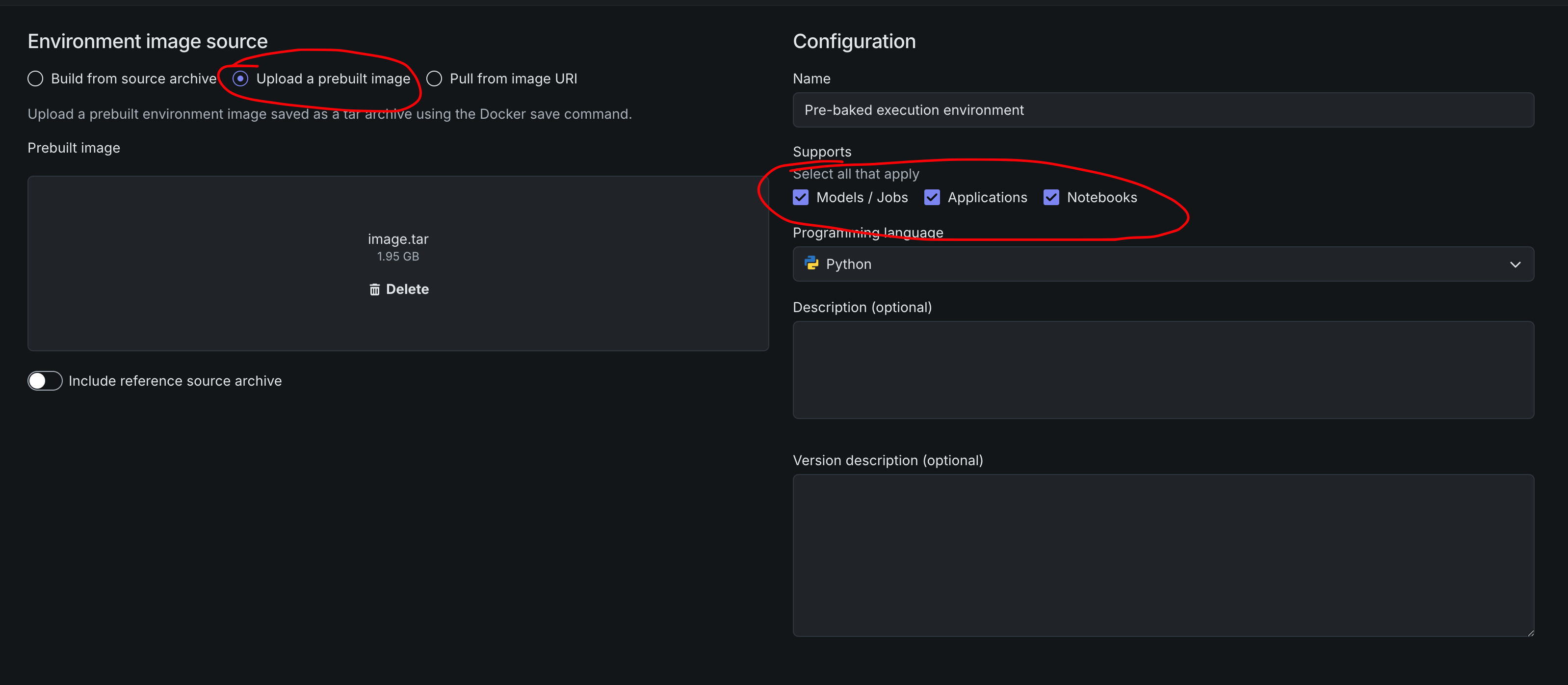
- Upload
image.taras a custom execution environment in DataRobot:
Usage reference
dr environment recipe --recipe-path /path/to/datarobot-agent-application
Defaults:
- Output:
docker_context/in the current working directory (override with--target) - Archive:
docker_context.tar.gzin the current working directory - Versions:
.datarobot/cli/versions.yaml
Options
dr environment recipe --recipe-path . --no-tarball
What it produces
docker_context/
├── Dockerfile                 # assembled from dockerfile.d/*
├── dockerfile.d/              # one fragment per build stage
├── build-deps/                # build-time manifests
├── kernel/                    # kernel deps, entrypoints, Jupyter assets
│   ├── requirements.txt       # kernel-only deps
│   ├── setup-caches.sh        # offline cache paths for login shells
│   ├── start_server_*.sh      # Codespaces and deployed-model entrypoints
│   └── agent/, extensions/    # kernel assets
└── components/<name>/         # per-component manifests
Lockfile policy
Build fails if a component has:
pyproject.tomlwithoutuv.lock(fix:uv lock)package.jsonwithoutpackage-lock.json(fix:npm install)go.modwithoutgo.sum(fix:go mod tidy)- Stale lockfiles (
uv lock --check,npm ci --dry-run, orgo mod verifyfailure)
Runtime cache behavior
The Dockerfile sets tool-native env vars:
UV_CACHE_DIR=/opt/cache/uvNPM_CONFIG_CACHE=/opt/cache/npmNPM_CONFIG_PREFER_OFFLINE=trueGOMODCACHE/GOCACHE
Per-component cache stages run uv sync --frozen --no-install-project against each uv.lock so runtime uv sync --offline can resolve lockfile wheels (including platform-specific builds like litellm).
The Dockerfile always sets strict offline env vars (UV_OFFLINE=1, NPM_CONFIG_OFFLINE=true, GOPROXY=off) in addition to shared cache paths. NOTEBOOKS_AIR_GAP=1 in setup-caches.sh applies the same overrides for login shells.
This is deliberate and always-on, not a toggle for the platform to opt out of. Without UV_OFFLINE=1, a cache miss makes uv fall through to whatever UV_INDEX_URL/mirror is configured in the environment — in an air-gapped install that host can be unreachable, or have no access to a certain library. So instead of a fast, clear "not found in the cache" error, the install hangs until the request times out or fails. Keeping this image strictly offline trades "install anything, sometimes slowly or not at all" for "install only what's baked, fail fast and clearly otherwise." A platform that needs to install extra, non-baked packages from its own reachable mirror should do so outside this image (e.g. in a derived image or a separate step), not by unsetting these vars here.
Component hooks
If a component Taskfile defines an environment task, dr environment recipe runs it with:
| Variable | Purpose |
|---|---|
DOCKER_CONTEXT |
Output docker context path |
COMPONENT_DIR |
Source component directory |
COMPONENT_NAME |
Component name |
DOCKERFILE_FRAGMENT |
Path to append cache stage fragment |
COMPONENT_DEST |
components/<name>/ in docker context |
Development
uv pip install -e ".[dev]"
pytest
dr-environment --dr-plugin-manifest
See PLUGIN_TESTING.md and CONTRIBUTING.md.
License
Apache 2.0. See LICENSE and NOTICE.
That grant covers this repository's own code. It does not extend to the components the generated image fetches at build time, which keep their own terms, including Wolfi apk packages under GPL-2.0 and GPL-3.0, and the DataRobot Python SDK under the DataRobot Tool and Utility Agreement.
1 maintainer

Metadata
1 maintainer
Release files for dr-environment 0.1.10
For a detailed explanation of source distributions (sdists) and built distributions (wheels), please see the package formats documentation.
Source distribution (sdist)
| File | Size | Uploaded | |
|---|---|---|---|
| dr_environment-0.1.10.tar.gz | 287.5 kB | Details |
Built distribution (wheel)
| File | Interpreter | ABI | Platform | Reset |
|---|---|---|---|---|
| dr_environment-0.1.10-py3-none-any.whl | Python 3 | none | any | Details |
Total release size: 352.2 kB
Release files / dr_environment-0.1.10.tar.gz
| Download URL | dr_environment-0.1.10.tar.gz |
|---|---|
| Size | 287.5 kB |
| Tags | Source |
|
SHA-256 checksum How to use checksums |
e9a1a6f8aefab7dd56a923d90beabc0be9e7f73c5f0aca1d4843ba5b6b93b552
|
|
BLAKE2b-256 checksum How to use checksums |
5c291befa8eb20dc2705a679b32a92f0ed4ff55263aee55f59d3788e00dc34c1
|
| Upload date | |
|
Uploaded using Trusted Publishing? What is trusted publishing? |
Yes |
| Uploaded via |
uv/0.12.21 {"installer":{"name":"uv","version":"0.12.21","subcommand":["publish"]},"python":null,"implementation":{"name":null,"version":null},"distro":{"name":"Ubuntu","version":"24.04","id":"noble","libc":null},"system":{"name":null,"release":null},"cpu":null,"openssl_version":null,"setuptools_version":null,"rustc_version":null,"ci":true}
|
Release files / dr_environment-0.1.10-py3-none-any.whl
| Download URL | dr_environment-0.1.10-py3-none-any.whl |
|---|---|
| Size | 64.7 kB |
| Tags | Python 3 |
|
SHA-256 checksum How to use checksums |
66f832d412a291caff4cc1d610591154d8a35d2857644dd9b4a5b6b95219b9b8
|
|
BLAKE2b-256 checksum How to use checksums |
44bb5b0bd6d622b0625b39fd86c8311a9b2341f918cae45d875bf03169a9d044
|
| Upload date | |
|
Uploaded using Trusted Publishing? What is trusted publishing? |
Yes |
| Uploaded via |
uv/0.12.21 {"installer":{"name":"uv","version":"0.12.21","subcommand":["publish"]},"python":null,"implementation":{"name":null,"version":null},"distro":{"name":"Ubuntu","version":"24.04","id":"noble","libc":null},"system":{"name":null,"release":null},"cpu":null,"openssl_version":null,"setuptools_version":null,"rustc_version":null,"ci":true}
|














