





English · 简体中文
DrPanda MCP
A read-only MCP service for production troubleshooting (current 1.13.0).
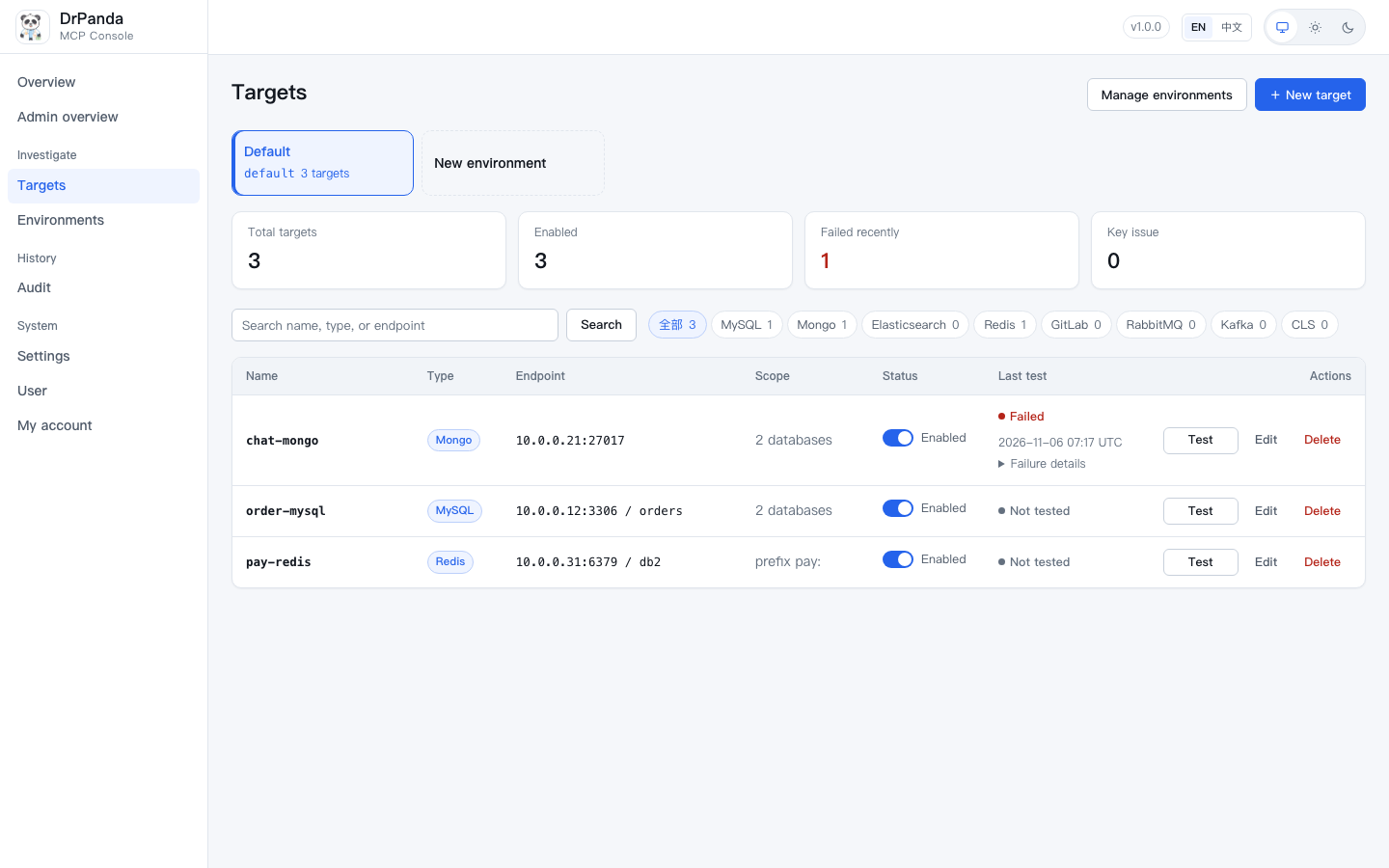
Register 10 component types (MySQL, MongoDB, Elasticsearch, Redis, GitLab, RabbitMQ, Kafka, CLS, Nacos, Jenkins) — addresses, credentials and allowed scope — in a web console. MCP clients such as Cursor, Codex and DeepSeek Harness call /mcp over Streamable HTTP; models only use read-only tools by environment + target name.
The model never supplies hosts, accounts, or passwords itself.
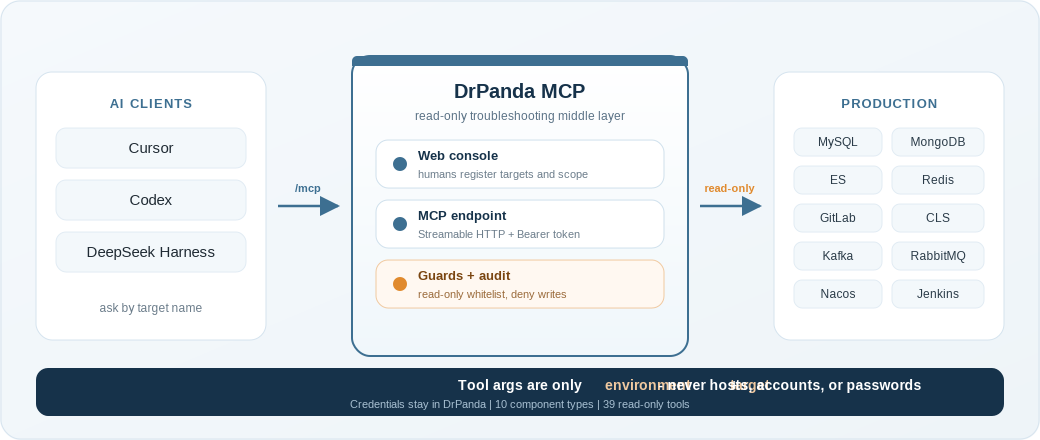
Where it sits: AI clients → DrPanda (console + MCP + guards) → production targets
Web console preview
Contents
| You want… | Go to |
|---|---|
| Run it in 5 minutes | Quick start |
| Wire Cursor / an MCP client | Client setup |
| Give an agent a playbook | Agent skill |
| See tools and how to pass args | Targets and tools |
| Help the AI avoid dead ends | Tips for troubleshooting AIs |
| Understand read-only + audit | Security model |
| Upgrades / changes | CHANGELOG.md |
Why DrPanda MCP
Production troubleshooting often requires looking at logs, code, databases, caches and message queues at the same time. Giving production credentials directly to a model is risky; read-only proxies, ad-hoc screenshots and manual lookups are hard to reproduce and audit.
DrPanda MCP narrows "what can be queried" into three boundaries:
- Connection boundary: only targets registered in the web console are reachable;
- Operation boundary: only a read-only whitelist is executed; admin commands and high-cost queries are rejected before connecting;
- Identity boundary: web login and MCP bearer tokens are independent, and every call is audited under the real administrator.
Status
- Tools: 39 (10 component types +
systems_status) - Quality gate: GitHub Actions (pytest / ruff / docs link check); see the CI badge above
- Default listen:
127.0.0.1:8111 - Default languages: English (UI, MCP, CLI); Chinese docs live under
docs/zh-CN/ - Config store: SQLite / MySQL / PostgreSQL
Real integration: MySQL / Mongo / ES / Redis / RabbitMQ / Nacos / Jenkins have Docker or live verification notes; see docs/verify/ and docs/zh-CN/verify/.
Quick start
Requirements
- Python
>= 3.11 - uv
- SQLite is used by default; no extra database is required for the first run
From source (recommended for development):
git clone https://github.com/linyu19872008/dr-panda-mcp.git
cd dr-panda-mcp
uv sync
cp .env.example .env   # optional; defaults are used otherwise
uv run dr-panda-mcp    # automatically loads ./.env from the current directory
Or install as a command-line tool from PyPI:
uv tool install dr-panda-mcp
# Optional config-store drivers:
# uv tool install 'dr-panda-mcp[mysql]'
# uv tool install 'dr-panda-mcp[postgres]'
dr-panda-mcp
A PyPI install uses data/ in the current working directory; start it from a dedicated directory.
Open:
http://127.0.0.1:8111/
On the first run, the setup wizard asks you to:
- set an administrator password (at least 8 characters);
- choose a config store: SQLite (recommended locally) / MySQL / PostgreSQL;
- test the connection (the finish button unlocks only after a successful test);
- finish setup and save the MCP token shown on the completion page.
When registering a target, a new target must pass a connection test before it can be saved. When editing, if host, account, secret, TLS and timeout are unchanged, scope and runtime limits can be saved directly. The server only re-probes after connection fields change; failures are never persisted.
Health check:
curl -fsS http://127.0.0.1:8111/healthz
# {"ok":true,"version":"1.13.0","db":"ok"}
Optional dependencies
uv sync --extra <name> trims the environment to "default dependencies + this one extra"; other installed clients are removed. Add --inexact when adding a single extra. Use --all-extras to install everything. Run these commands in the project directory used by uv run dr-panda-mcp.
When the console shows "client not installed", click Install. The service runs the command with --inexact in the current project and retests immediately; no restart is needed after a new client is installed.
# Config stores
uv sync --extra mysql --inexact       # asyncmy
uv sync --extra postgres --inexact    # asyncpg

# Troubleshooting components (GitLab and RabbitMQ need no extra)
uv sync --extra mongo --inexact
uv sync --extra redis --inexact
uv sync --extra kafka --inexact
uv sync --extra cls --inexact

# Everything at once
uv sync --all-extras
Deployment helper
For a new machine, use scripts/setup.sh instead of running the manual steps above:
./scripts/setup.sh check
./scripts/setup.sh install --method source --extras mysql,redis
sudo ./scripts/setup.sh service --dir /opt/dr-panda-mcp
./scripts/setup.sh start --dir /opt/dr-panda-mcp
It also supports PyPI installation (--method pypi --version 1.13.0), health checks, upgrades and a dedicated drpanda systemd user. See docs/deployment.md for details.
Files created by the first-run setup
After setup, data/ contains:
| File | Purpose | If lost |
|---|---|---|
install.json |
encrypted config-store URL | restore from backup; the service cannot find the store automatically |
install.key |
decrypts install.json |
installation state cannot be recovered |
session.key |
web session signing key | all web sessions become invalid; log in again |
secret.key |
encrypts target secrets | registered secrets cannot be recovered |
dr-panda.sqlite |
default SQLite config store | targets, audit and settings are lost |
- Installation files are created with
0600permissions. - Back up
secret.key,install.json,install.keyandsession.keytogether with the config store. - Never commit
data/to Git.
Client setup
Configure the MCP URL and a bearer token in every client:
{
  "mcpServers": {
    "drpanda": {
      "url": "http://127.0.0.1:8111/mcp",
      "headers": {
        "Authorization": "Bearer <MCP token created on the My account page>"
      }
    }
  }
}
Cursor
Put the mcpServers block above into Cursor's MCP configuration file.
Codex
[mcp_servers.drpanda]
url = "http://127.0.0.1:8111/mcp"

[mcp_servers.drpanda.headers]
Authorization = "Bearer <token>"
DeepSeek Harness
Recommended: install the carrier plugin dsh-dr-panda-mcp from the plugin market or via CLI:
dsh plugin --profile web add github:linyu19872008/dsh-dr-panda-mcp
Restart DSH, open Plugins → dsh-dr-panda-mcp (or Settings → DrPanda MCP), save the MCP URL and a Bearer token from My account, then call mcp__drpanda__systems_status. Use drpanda_mcp_doctor if the bridge fails. For CI/headless, DR_PANDA_MCP_URL / DR_PANDA_MCP_TOKEN env vars still work.
Manual patch (without the plugin) still works: use serverName = drpanda; model-side tool names look like:
mcp__drpanda__mysql_query
mcp__drpanda__cls_search
mcp__drpanda__systems_status
Notes:
/mcpreturns401without a valid bearer token;- a web login session cannot replace an MCP token;
- only token hashes are stored; the full value is shown once at creation and cannot be recovered (delete and create a new one if lost);
- if you change the port, update client URLs accordingly.
Agent skill
The repository ships a portable, read-only investigation playbook for agents
that use DrPanda:
skills/dr-panda-mcp/SKILL.md. It is the decision
layer between "the host can call tools" and "the model knows which tool to call
next", not a second copy of this README or the tool schema. The canonical bundle
lives at .dsh/skills/dr-panda-mcp/.
What it contains
| File | What it answers |
|---|---|
SKILL.md |
When to use it, discovery, symptom → tool routing, hard stops, report format |
references/playbooks.md |
Ten incident flows: error spike, slow SQL, cache, Kafka, RabbitMQ, Jenkins, Nacos, Elasticsearch, MongoDB, GitLab |
references/connectors.md |
Scope names and per-connector rules for the ten component types |
references/errors.md |
Error code → next action, including when not to retry |
references/results.md |
The result envelope, truncation, paging and CLS analysis rows |
references/security.md |
Read-only rules, credentials and untrusted operator_notes |
references/examples.md |
Three short transcripts with expected evidence |
A typical first sequence is systems_status() →
systems_status(environment="prod") → mysql_tables → mysql_describe →
mysql_query. The skill tells the agent to stop and ask when the environment or
target is ambiguous, and to report truncation instead of filling gaps.
Host loading
| Host | Entry point |
|---|---|
| DeepSeek Harness | canonical bundle at .dsh/skills/dr-panda-mcp/; it appears in the skill catalog when this repository is the project root |
| Claude Code | copy or symlink the bundle to ~/.claude/skills/dr-panda-mcp/ |
| Cursor | .cursor/rules/dr-panda-mcp.mdc points the agent at the playbook |
| Codex / other clients | AGENTS.md and docs/agent-skill.md provide the short form |
Contract
- Runtime
systems_status,scope,capabilitiesand guard errors always win over any text in the skill. - The skill contains no target names, hosts, credentials or selectors; examples
use placeholders such as
<env>,<target>and<logsetId>/<topicId>. - It never adds permissions:
SCOPE_DENIEDandDANGEROUS_OPERATIONremain stop signals. uv run python scripts/check_skill.pyvalidates tool names, references, secrets, README/Cursor links and skill size in CI and pre-commit.
The always-on server instructions remain the safety contract; the skill adds the on-demand workflow and per-connector details. See docs/agent-skill.md for loading, evaluation and maintenance rules.
Targets and tools
A target belongs to an environment. Environments have a display title and a key. The title can change; the key is immutable and must be passed when troubleshooting. Different environments may contain targets with the same name; within one environment, multiple targets of the same type are distinguished by name and never selected automatically.
With a single environment, tools may omit environment; the migration creates default with the title Default. After adding more environments, every call must pass environment. Call systems_status without arguments to list environments, then pass the key to list targets in that environment. The web console switches targets by environment; disabled environments cannot be queried but their configuration is retained.
Tool calls only accept environment and target names — never hosts, accounts or passwords.
| Type | Tools |
|---|---|
mysql |
mysql_tables, mysql_describe, mysql_query, mysql_explain, mysql_processlist |
mongo |
mongo_collections, mongo_find, mongo_aggregate, mongo_stats |
elasticsearch |
es_mapping, es_search, es_health, es_index_stats |
redis |
redis_get, redis_scan, redis_info, redis_slowlog |
gitlab |
gitlab_search_code, gitlab_get_file, gitlab_blame |
cls |
cls_search, cls_context |
rabbitmq |
rabbit_queues, rabbit_queue |
kafka |
kafka_lag, kafka_offsets, kafka_peek |
nacos |
nacos_configs, nacos_config, nacos_services, nacos_instances |
jenkins |
jenkins_jobs, jenkins_job, jenkins_builds, jenkins_build, jenkins_console, jenkins_nodes, jenkins_queue |
| global | systems_status |
There is also an investigate_error prompt that organizes a troubleshooting path starting from an error symptom.
Target scope can only narrow the readable boundary:
- MySQL: databases / tables;
- MongoDB: databases / collections;
- Elasticsearch: indices;
- Redis: key prefixes / command scope;
- GitLab: projects / branches;
- RabbitMQ: vhosts / queues;
- Kafka: topics / partitions;
- CLS: log topics and time range;
- Nacos: namespaces/groups plus
data_scope/service_scope(all or selected); - Jenkins: jobs, nodes and optional console logs. Nacos 1.x/2.x use v1 OpenAPI and Nacos 3.x uses the v3 client API; the version is auto-detected.
Target names allow lowercase letters, digits and hyphens only, and are immutable. Secrets are stored encrypted and never echoed in lists.
Each target may include an optional operator_notes field (up to 512 characters). It is returned in full by systems_status and in target-specific tool results as advisory troubleshooting guidance for the model. It never changes authorization scope, read-only rules, or guard decisions; do not store passwords, tokens, or private keys in it.
Tips for troubleshooting AIs
Reading this first avoids many useless retries:
- Start with
systems_status: confirm theenvironmentkey, target names, and each target'sscope/capabilities/operator_notes. - Honor
capabilities: only call tools withenabled: true; disabled tools stay in the MCP schema but are rejected. - Use only selectors from scope: CLS topics must be
logsetId/topicIdUUIDs — do not invent container names or Chinese topic titles. - Discover before querying: MySQL
mysql_tables→mysql_describe→mysql_query(do not queryinformation_schema); Mongo stats viamongo_stats, not$collStats/$countthrough aggregate. - Nacos: pass
namespace/groupwhen several are authorized; on byte-limit errors shrinkpage_size(1–20) or raise the targetmax_bytes(new Nacos/Jenkins targets default to 1MB). - Jenkins: use
jenkins_job'slast_failed_build/last_successful_build; node listing respectsallowed_nodes(empty means node reads are denied). - Actionable errors: Scope / missing-arg failures include
allowed: …and a hint — change the args, do not repeat the same call.
Security model
Absolutely read-only
- Every tool across the registered components (including the web console's connection test) is read-only;
- accounts with write permissions are never used for writes;
- beyond the read-only whitelist, absolute dangerous rules reject:
- admin/DDL/change commands;
- unbounded scans, large aggregations, deep pagination, script execution, etc.;
- dangerous checks run before connecting; the rejection code is
DANGEROUS_OPERATION; - every call is bounded by timeout, row, byte and per-target concurrency limits; truncation is always marked.
Authentication and request protection
- Web login: administrator password plus an HMAC-signed session cookie;
- Forms: CSRF double-submit validation;
/mcp: independent bearer tokens, stored as SHA-256 hashes;- Host/Origin validation rejects unexpected origins;
- listens on loopback by default; changing to
0.0.0.0or a specific interface IP exposes it, so an HTTPS reverse proxy is recommended; - config-store changes are audited under the real administrator.
Frontend
- Jinja2 server-side rendering;
- core flows work without JavaScript;
- only small self-hosted, dependency-free scripts:
app.js: native<dialog>and form loading states;copy-token.js: copy tokens;
- no frontend framework, Node build chain or third-party CDN;
- without JavaScript, dedicated form/confirmation pages or manual copy hints are shown — no fake buttons.
See Security and Verification for the full policy and boundaries.
System settings
Sign in and open /settings. Settings live in the config store with range validation; only actually changed values are written to audit and settings_history.
| Key | Default | Range | Description |
|---|---|---|---|
default_target_timeout_s |
15 s | 1–120 | default timeout for new targets |
default_target_max_rows |
100 rows | 1–1000 | default row limit for new targets |
default_target_max_bytes |
102400 B | 4096–1048576 | default byte limit for new targets |
target_max_concurrency |
10 | 1–50 | per-target concurrency |
global_max_concurrent_calls |
0 | 0–200 | process-wide concurrency (0 = unlimited) |
audit_retention_days |
90 d | 1–3650 | audit retention |
audit_cleanup_interval_minutes |
60 | 5–1440 | audit cleanup interval |
audit_cleanup_batch_size |
1000 | 100–5000 | audit rows deleted per batch |
audit_cleanup_max_seconds |
300 | 10–3600 | max seconds per cleanup round |
catalog_max_clients |
32 | 4–128 | connector client cache limit |
catalog_idle_seconds |
0 | 0–3600 | connector idle reclamation (0 = off) |
session_ttl_minutes |
720 | 30–10080 | web session lifetime |
login_max_attempts |
5 | 1–50 | failed logins allowed per source IP |
login_lockout_minutes |
5 | 1–1440 | lockout duration after the limit |
mcp_token_max_per_user |
5 | 1–50 | tokens kept per account |
mcp_token_ttl_days |
0 | 0–3650 | token lifetime in days (0 = no expiry) |
backup_keep_count |
20 | 1–100 | SQLite backups kept before migrations |
Settings can only adjust runtime policy; they cannot relax read-only rules, dangerous-operation rules, secret handling or target scope.
Environment variables
| Variable | Default | Description |
|---|---|---|
DR_PANDA_HOST |
127.0.0.1 |
listen address |
DR_PANDA_PORT |
8111 |
port shared by the web console and /mcp |
DR_PANDA_DATABASE_URL |
unused | current version does not use it for the actual store: the setup wizard selects the store, then data/install.json wins; setting it only affects startup validation |
DR_PANDA_SECRET_KEY |
unset | base64-encoded 32-byte key; falls back to data/secret.key |
DR_PANDA_LOG_LEVEL |
INFO |
log level |
DR_PANDA_PUBLIC_URL |
unset | display-only base URL for pages/copied MCP addresses; not used for security decisions |
DR_PANDA_COOKIE_SECURE |
auto |
Cookie Secure policy: auto (request scheme) / always / never |
DR_PANDA_TRUSTED_HOSTS |
unset | /mcp Host allowlist (comma-separated); otherwise FastMCP defaults apply |
The repository ships .env.example with all defaults commented out; no configuration is required to start locally.
The service automatically loads ./.env from the current working directory; when the file is absent it falls back to environment variables and code defaults. To override defaults:
cp .env.example .env
# edit .env as needed (.env is ignored by git — do not commit it)
uv run dr-panda-mcp
Rules:
- precedence: real environment variables >
.env> code defaults (systemd/Docker/CI variables always win); - only the current directory's
.envis read — no parent or home-directory lookup; - overly open permissions (e.g.
0644), a non-regular file, or malformed lines abort startup, so secrets are not silently readable and configuration does not silently fail; - there is no "disable auto-load" switch; simply do not mount
.envin Docker/systemd.
Changing the listen address/port/public URL requires a process restart. Do not configure the config store through environment variables (see above).
Remote deployment:
- prefer an HTTPS reverse proxy;
DR_PANDA_PUBLIC_URLonly affects the displayed/copied address, not security policy; - do not expose the console directly to the public internet; the first installation must still be completed on loopback;
- set
DR_PANDA_TRUSTED_HOSTS(e.g.mcp.example.com) if you want an explicit/mcpHost allowlist; - the real TLS setup behind the proxy still needs environment-specific validation.
Operations
Reset the administrator password
Run locally:
uv run dr-panda-mcp-admin reset-password
The reset increments auth_version, invalidating all existing web sessions; MCP tokens are unaffected.
SQLite backups
- automatic backups happen only when a pending Alembic migration exists;
- backups are written to
data/backup/; - retention is controlled by
backup_keep_count; - manual backups must include the config store and the four key/installation files.
Audit
- every tool call, target change and settings change is written to
audit, including the environment; - the web console's Audit page filters by time, action, environment and object; records cannot be deleted from the UI;
- audit retention defaults to 90 days and is checked hourly;
- cleanup only writes logs, never audit rows (to avoid self-amplification).
Development and testing
uv sync --all-extras --dev
uv run ruff check .
uv run pytest -q
uv run python scripts/smoke.py
uv run python scripts/check_docs_links.py
- tests use temporary SQLite databases and temporary keys, never real production systems;
- Docker integration scripts live under
scripts/integration/; - exact test counts are intentionally not hard-coded here; use the CI badge and your local run.
Project layout
src/dr_panda_mcp/
  __init__.py         process entrypoint
  cli.py              console entrypoints (loads ./.env)
  config.py           environment variables and runtime config
  setup.py            first-run setup wizard
  admin.py            local admin maintenance commands
  auth.py             passwords, sessions, CSRF, MCP tokens
  server.py           FastMCP, /mcp and web app assembly
  runtime.py          engine, migrations, secrets, ConfigStore
  settings.py         system settings defaults/ranges/groups
  connectors/         ten upstream connectors
  guards/             read-only whitelist and dangerous-operation rules
  tools/              MCP tool implementations and audit
  prompts.py          investigate_error
  web/                routes/templates/static/rendering
  store/              SQLAlchemy models, repository, Alembic migrations
tests/                unit, contract, web, tool and migration tests
docs/                 English documentation (default)
docs/zh-CN/           Chinese design and verification documents
scripts/              smoke tests, integration scripts and docs link check
Verified and unverified
Verified
- SQLite / MySQL / PostgreSQL config-store setup;
- creating, copying, deleting and paginating multiple MCP tokens;
- login, session, CSRF, logout and password change;
- target create/update/delete, enable/disable, connection test (test must pass before saving), secret encryption;
- same-origin async interactions: inline test/toggle, save gates, settings/login/password/setup feedback, with non-JS fallbacks;
- system settings save, per-item/global reset and history;
- light/dark themes, English/Chinese, 1440/390 responsive layouts;
- MySQL / Mongo / ES / Redis / RabbitMQ against real Docker upstreams;
- read-only guards, dangerous-command rejection, timeout/row/byte limits.
Unverified / boundaries
- Kafka end-to-end against a real upstream (image unavailable);
- CLS and GitLab end-to-end with real credentials;
- real HTTPS/TLS setup behind a reverse proxy;
- multi-user RBAC, OAuth/OIDC, MFA;
- password recovery page (only a local CLI reset exists);
- automatic recovery when
install.json/install.key/secret.keyare lost.
Unverified capabilities are never treated as available just because other components pass.
Documentation
English documentation:
- docs/README.md: English documentation index
- docs/architecture.md: components, request flow, data model and deployment
- docs/security.md: security model, authentication, secrets and remote access
- docs/ui-design.md: web console design system and page behavior
- docs/verification.md: testing strategy, verified and unverified capabilities
- docs/deployment.md: setup helper, systemd and first-install flow
The Chinese README links the Chinese design and verification docs.
Contributing, security and license
- CONTRIBUTING.md: development setup, tests, pull-request rules and bilingual docs sync
- SECURITY.md: how to report vulnerabilities and scope
- CODE_OF_CONDUCT.md: community expectations
- CHANGELOG.md: release history
- LICENSE: MIT
English is the default for code, comments, error codes and repository governance files. The UI and product docs also support Chinese; issues and pull requests may be written in English or Chinese.
If this project helps you, a star is appreciated.
1 maintainer

Metadata
1 maintainer
Release files for dr-panda-mcp 1.13.0
For a detailed explanation of source distributions (sdists) and built distributions (wheels), please see the package formats documentation.
Source distribution (sdist)
| File | Size | Uploaded | Provenance | Actions |
|---|---|---|---|---|
| dr_panda_mcp-1.13.0.tar.gz | 460.2 kB | With provenance | Details for dr_panda_mcp-1.13.0.tar.gz |
Built distribution (wheel)
| File | Interpreter | ABI | Platform | Actions Reset |
|---|---|---|---|---|
| dr_panda_mcp-1.13.0-py3-none-any.whl | Python 3 | none | any | Details for dr_panda_mcp-1.13.0-py3-none-any.whl |
Total release size: 977.5 kB
Release files / dr_panda_mcp-1.13.0.tar.gz
| Download URL | dr_panda_mcp-1.13.0.tar.gz |
|---|---|
| Size | 460.2 kB |
| Tags | Source |
|
SHA-256 checksum How to use checksums |
b563b3094862e817096c72fe7713b1fcb4d21b426ac83f97267855a0d7bfc345
|
|
BLAKE2b-256 checksum How to use checksums |
768fc702528c0e280d66a4e85062c3eae8c43f9773298c233632a2582683e551
|
| Upload date | |
|
Uploaded using Trusted Publishing? What is trusted publishing? |
Yes |
| Uploaded via |
twine/7.0.0 CPython/3.13.16
|
Provenance
Provenance describes where a file came from. On PyPI, provenance is shared via attestations, which provide a verifiable record of the build or publishing details. View details, limitations and caveats.


PyPI Publish Attestation
PyPI verified that this artifact, at this checksum, originated from the publisher listed below.
Signed by GitHub Actions, verified by PyPI on Nov 23, 2026.
Transparency logRelease files / dr_panda_mcp-1.13.0-py3-none-any.whl
| Download URL | dr_panda_mcp-1.13.0-py3-none-any.whl |
|---|---|
| Size | 517.4 kB |
| Tags | Python 3 |
|
SHA-256 checksum How to use checksums |
5b64a57568552b5fe3200ff312cb2ea2a8154b6555927ef3568f209dcd809b58
|
|
BLAKE2b-256 checksum How to use checksums |
0fe63dc28614eb805efdf181a08e89f7ba541e20aa98ab1d8531f25f7f6d2c8b
|
| Upload date | |
|
Uploaded using Trusted Publishing? What is trusted publishing? |
Yes |
| Uploaded via |
twine/7.0.0 CPython/3.13.16
|
Provenance
Provenance describes where a file came from. On PyPI, provenance is shared via attestations, which provide a verifiable record of the build or publishing details. View details, limitations and caveats.
PyPI Publish Attestation
PyPI verified that this artifact, at this checksum, originated from the publisher listed below.
Signed by GitHub Actions, verified by PyPI on Nov 23, 2026.
Transparency logSecurity for dr-panda-mcp 1.13.0
Provenance
Provenance describes where a file came from. On PyPI, provenance is shared via attestations, which provide a verifiable record of the build or publishing details. View details, limitations and caveats.
Full provenance
Both files in this release have been uploaded with provenance metadata.
Attestation for dr_panda_mcp-1.13.0.tar.gz
PyPI Publish Attestation
PyPI verified that this artifact, at this checksum, originated from the publisher listed below.
Signed by GitHub Actions, verified by PyPI on Nov 23, 2026.
Transparency logA note on package security
PyPI is a repository for distributing packages, not a service for auditing them. While third-party security researchers and our staff do their best to detect and remove malicious packages, PyPI cannot guarantee the quality, security or suitability of any given package.
To learn more about protecting yourself from malicious actors, visit our package security documentation.














