
Proxima ✨








Check out the Docs! ✨ https://in03.github.io/proxima/
Proxima makes queuing proxies from DaVinci Resolve a breeze.
Launch the worker on as many computers as you have free and it'll pool all the free CPU threads together to encode multiple proxies at once. Only have the one computer? Encoding runs entirely on the CPU, leaving GPU-heavy Resolve with plenty of resources to continue editing while you pump out proxies. Once they're finished, they're automatically linked.

Why make proxies?
DaVinci Resolve's greatly benefits from having all-intra media, like ProRes or DNxHD. If you shoot in h.264 or h.265 like many do, you're likely to see great performance improvements using proxies. This application makes queuing, encoding and linking them quick and easy.
Features
- Resolve 18 + legacy Resolve 17 support
- Distributed encoding on multiple machines
- Utilizes all CPU threads for encoding
- Queue only used proxies straight from a DaVinci Resolve timeline
- Automatically link proxies after encoding
- Flexible queuer/worker arrangement allows background encoding on same machine
- Version constrain prevents incompatabilities between different machines
- Easy YAML based user configuration
- Advanced configuration validation
- Automatically checks for updates
- Control Celery with Celery commands from CLI, even when installed with pipx
- Multi progress-bar #190
- Faster config parsing and validation with TOML #258
- Manage configuration from CLI #258
Roadmap
- Better Apple silicon support
- Interactive timeline selection #161
- Better resource-utilization with encode-chunking
- Multiple, customizable proxy-presets with rule-based matching #201
- Easier cross-platform paths via path-mapping
- Pre-flight checks - encoding settings validation
- UI improvements
- Monitor Web App
What about Blackmagic's Proxy Generator?
I started this for the company I work for, well before BPG was on the scene. If BPG works better for you, go for it! As it stands BPG won't do any all-intra codecs on Windows, which is a dealbreaker for us. It also works on a watch-folder basis with no filename whitelisting or path-filtering rules. That means EVERY video file becomes a proxy, whether you need it or not. Our workflow often sees the shooter doing a rough assembly of chosen takes as an exported timeline. We simply import this timeline and queue proxies from it. If you work with chronic-overshooters, you'll save a heap of disk space and encoding time queuing proxies from a roughly-organised timeline.
Ooh, I want it!
Prerequisites
- One or more editing computers with DaVinci Resolve Studio installed and scripting enabled
- An always on computer to run the broker (e.g. server, NAS, primary-desktop, Raspberry Pi)
- Worker computers (decent resources, can overlap with editing computers)
- all above machines on LAN and able to access same files via same filepath.
Note
Only Davinci Resolve 18 is supported
Please check out the "resolve-17" branch if you need Resolve 17 support. Prior versions are untested, but may work depending on Resolve's API feature set for that version.
Installation
Proxima is composed of three major parts:
- the 'queuer' responsible for interfacing with DaVinci Resolve and sending tasks to the broker
- the 'broker' (Redis) that distributes jobs to the workers
- the 'worker' one of potentially many workers responsible for doing the actual encoding
CLI
The 'queuer' and 'worker' are bundled together in the CLI app. They are both installed from the same source, called from the same command and share the same configuration file. As such, any computer that has the CLI app installed can both queue proxies (so long as Resolve is set-up) and run workers. Install it with pipx:
pipx install git+https://github.com/in03/proxima
Broker
The broker is best installed on an always-on computer or server. If it's not running neither queuers nor workers can communicate. Very little configuration is required. Just make sure it's accessible over LAN. Redis and RabbitMQ are Celery's best supported broker backends. Only Redis has been tested extensively with Proxima.
Install Redis with docker:
docker run -d --name some-redis -p 6379:6379 redis-server --append-only yes
Monitor
An in-house web-app monitor for Proxima jobs is coming and will include some really helpful, specific features. Until it's ready, if you want to monitor your jobs, it's a good idea to install Flower - an official monitor for Celery tasks and workers. Install it with docker alongside your broker:
docker run --name flower -e $CELERY_BROKER_URL=redis://192.168.1.171:6379/0 -e FLOWER_PURGE_OFFLINE_WORKERS=300 -d flower
Set the IP address and port to the same as your broker container. Don't forget the Redis protocol redis://.
Consider setting FLOWER_PURGE_OFFLINE_WORKERS if you don't have a well-defined set of computers to run the workers, or there's potential to change worker hostnames. 300 for example, would clear the list of offline workers every 5 minutes. This just keeps things tidy.
How do I use it?
Usage: proxima [OPTIONS] COMMAND [ARGS]...

Options:
  --install-completion  Install completion for the current shell.
  --show-completion     Show completion for the current shell, to copy it or
                        customize the installation.

  --help                Show this message and exit.

Commands:
  link   Manually link proxies from directory to source media in open...
  mon    Launch Flower Celery monitor in default browser new window
  purge  Purge all proxy jobs from all queues
  queue  Queue proxies from the currently open DaVinci Resolve timeline
  work   Prompt to start Celery workers on local machine
  celery Inject Celery commands to control tasks and workers
Configuration
On first run, you'll be prompted to alter your settings. The app will copy the default settings to the OS user configuration folder.
- Linux/Mac:
$XDG_HOME_CONFIG/proxima/user_settings.yml(may not open settings automatically) - Windows:
%homepath%/proxima/user_settings.yml
Some Key Settings
proxy_path_root
All proxies will be encoded to this directory. They'll retain the source media's directory structure:
paths:
  proxy_path_root: R:/ProxyMedia
celery
Celery runs all queuer/worker/broker communications. Make sure you set all of the below addresses as per your environment!
broker:
  url:  redis://192.168.1.19:6379/0
  job_expires: 3600 # 1 hour (cleared if not received by worker)
  result_expires: 86400 # 1 day (Needed for webapp monitor)
Warning
Make sure you set
result_expires!to a reasonable value otherwise Redis may run out of memory! If you need persistent results, consider configuring Redis for persistence.
worker
worker:
  loglevel: INFO
  terminal_args: [] # use alternate shell? Recommend windows terminal ("wt") on Windows.
  celery_args: [-l, INFO, -P, solo, --without-mingle, --without-gossip]
Queuer and worker have separate loglevels to make debugging a little easier if you've got just one worker playing up.
A Note on Concurrency
Some pretty dangerous concurrency settings were moved out of the configuration settings to prevent accidents. Windows doesn't support pre-forking for concurrency. Actually, Celery doesn't officially support Windows anymore at all. Mac and Linux can pre-fork, but the worker launcher invoked with the proxima work command gets around this by launching separate processes with workers named worker1@host, worker2@host, etc. We're going for the lowest common denominator here. This works fine with Mac and Linux too. It makes monitoring easier and cross-platform behaviour more consistent. For those concerned about the extra overhead who would like to squeeze out every last bit of performance on Mac or Linux, consider injecting the celery multi command with proxima celery. See Celery daemonization
How can I contribute?
Hey! Thanks! Any help is appreciated. Please check the Contribution Guide.
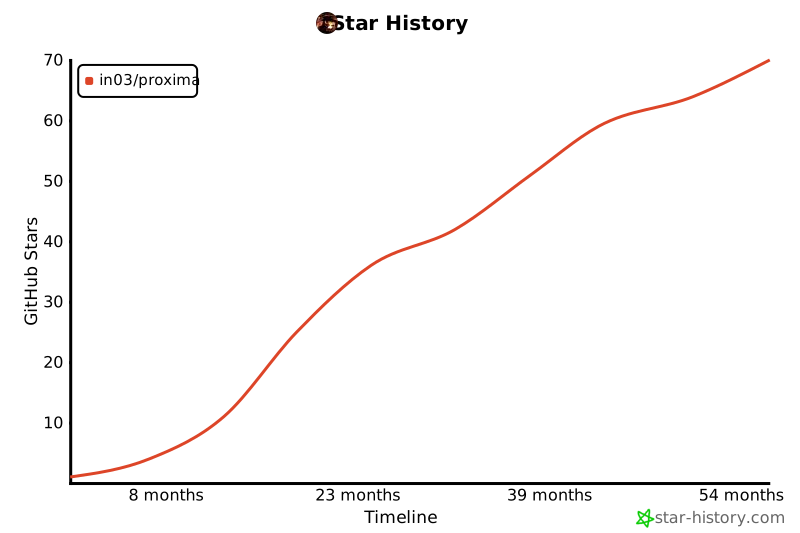
Star History
Thanks for your interest! Every star helps :)
1 maintainer

Metadata
1 maintainer
Release files for dr-proxima 1.0.7
For a detailed explanation of source distributions (sdists) and built distributions (wheels), please see the package formats documentation.
Source distribution (sdist)
| File | Size | Uploaded | |
|---|---|---|---|
| dr_proxima-1.0.7.tar.gz | 39.5 kB | Details |
Built distribution (wheel)
| File | Interpreter | ABI | Platform | Reset |
|---|---|---|---|---|
| dr_proxima-1.0.7-py3-none-any.whl | Python 3 | none | any | Details |
Total release size: 85.3 kB
Release files / dr_proxima-1.0.7.tar.gz
| Download URL | dr_proxima-1.0.7.tar.gz |
|---|---|
| Size | 39.5 kB |
| Tags | Source |
|
SHA-256 checksum How to use checksums |
ff3d136f9088730fdad7d54156abb42f04b1f47c67f06a4e65b5a3c8465cf3cd
|
|
BLAKE2b-256 checksum How to use checksums |
4d4e6964f345e8a5ca2206fdaf1db294ab37dd5c21d19c9f6c0ab6b7a35148ca
|
| Upload date | |
|
Uploaded using Trusted Publishing? What is trusted publishing? |
No |
| Uploaded via |
poetry/1.4.2 CPython/3.11.3 Darwin/22.4.0
|
Release files / dr_proxima-1.0.7-py3-none-any.whl
| Download URL | dr_proxima-1.0.7-py3-none-any.whl |
|---|---|
| Size | 45.7 kB |
| Tags | Python 3 |
|
SHA-256 checksum How to use checksums |
90a1a73e97f5dd70b98f5f5c63401842ce8490df4cf7fecf9a423d0505c9348a
|
|
BLAKE2b-256 checksum How to use checksums |
e1382d02d4729c95f247de5e9f9d7e8db21931338acc315534908bb0a767322e
|
| Upload date | |
|
Uploaded using Trusted Publishing? What is trusted publishing? |
No |
| Uploaded via |
poetry/1.4.2 CPython/3.11.3 Darwin/22.4.0
|














