
Draft Omen
Draft Omen is an unofficial desktop draft assistant for MTG Arena Quick Drafts. Its PySide6/QML application reads Arena's local Player.log, recognizes each pack and pick, and ranks the available cards while you draft. When the draft is complete, it also suggests a 40-card deck from your pool. A terminal interface with the same draft behavior is available as draftomen-tui.
Draft Omen is read-only: it does not write to, inject into, or automate MTG Arena. Card details come from Scryfall and draft statistics come from 17Lands.
Screenshots
Live Draft GUI — pick recommendations
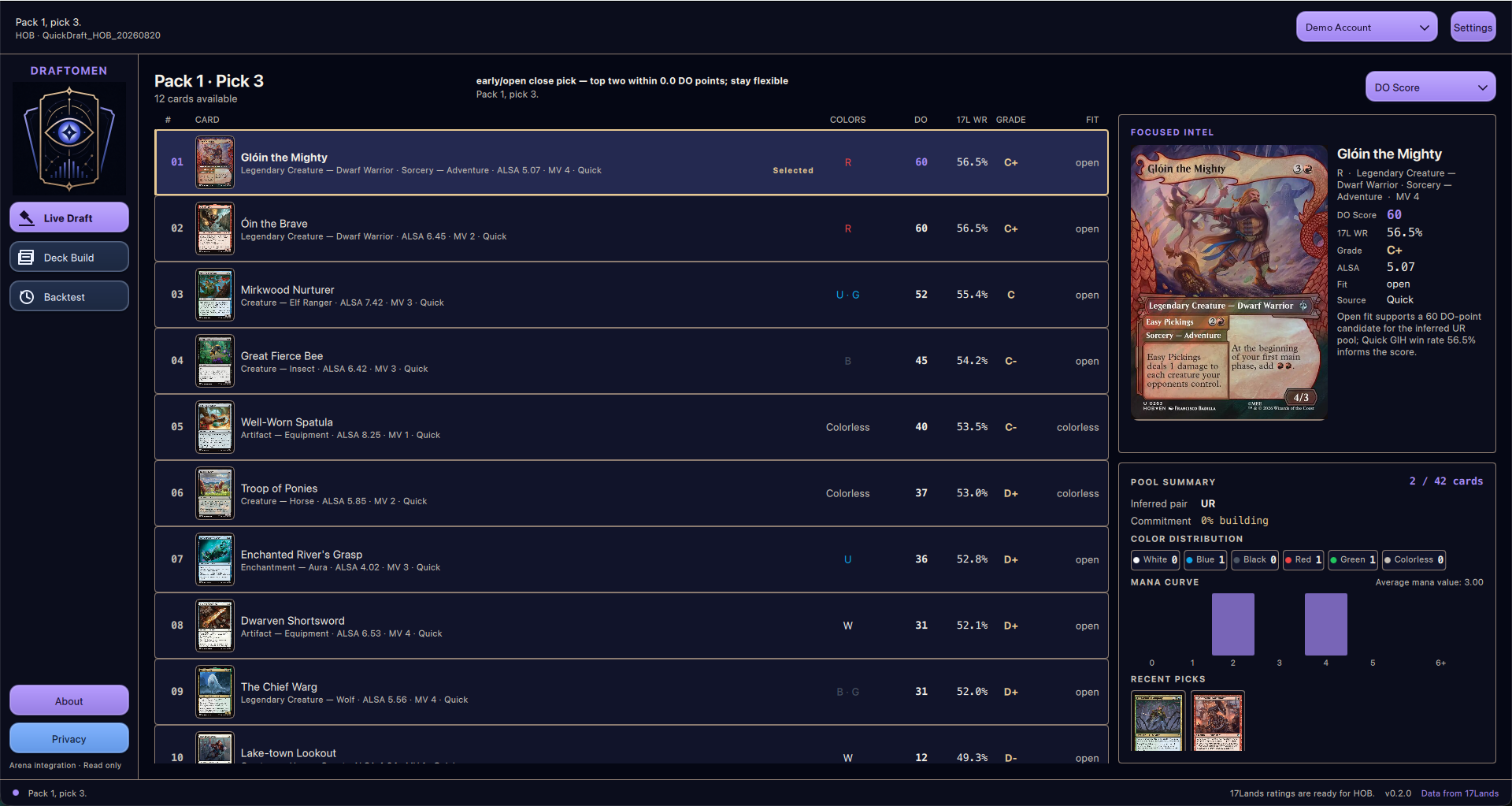
The Live Draft view shows Pack 1, Pick 3 with 12 cards available and Glóin the Mighty selected. Its DO Score, 17Lands win rate, grade, and color fit appear alongside focused-card details and a pool summary.
Suggested deck GUI
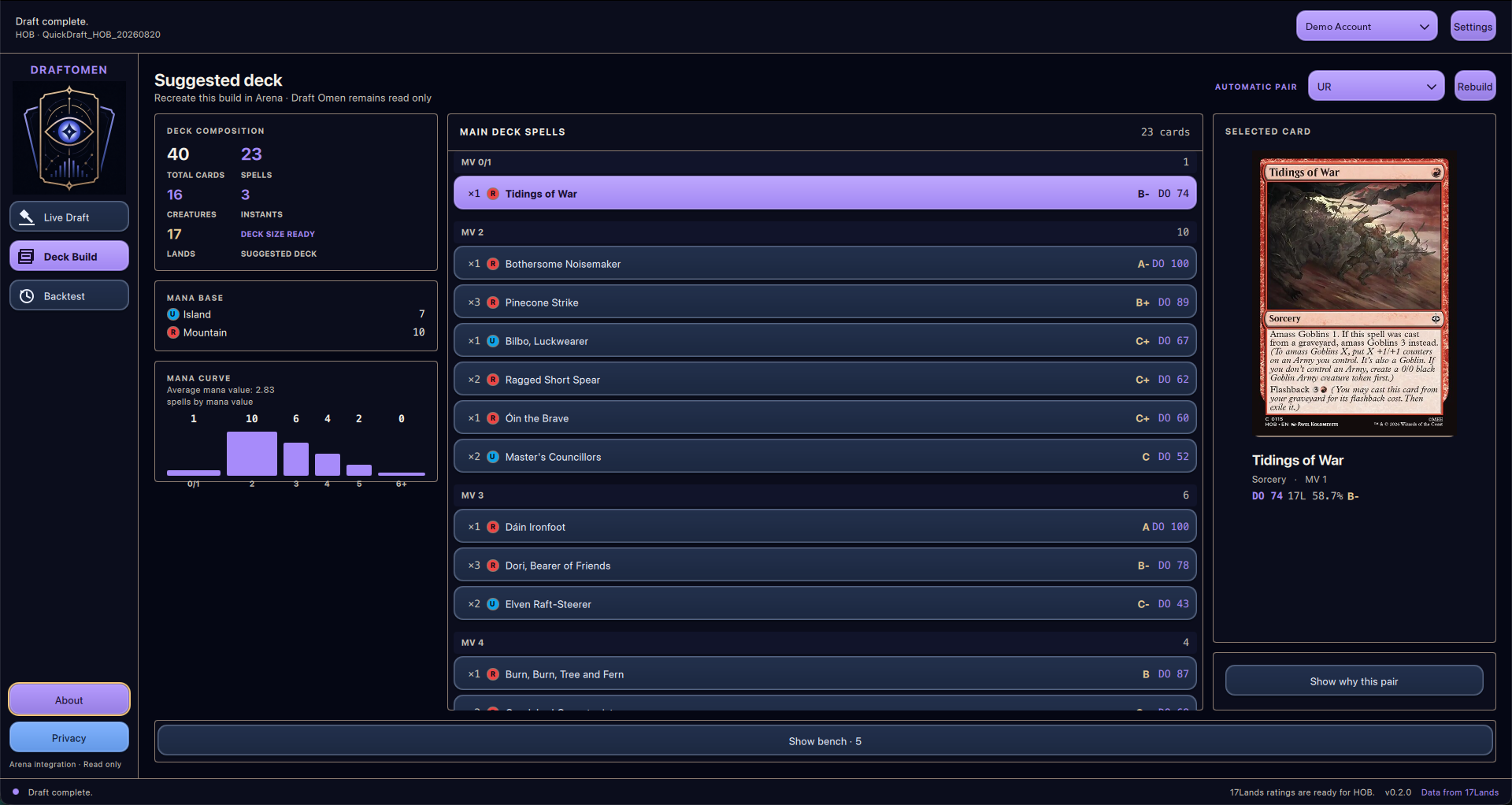
After the draft, the Suggested deck view shows an automatic UR pair and a 40-card build with 23 spells, 17 lands, a mana base and curve, grouped main-deck spells, and selected-card details.
How recommendations work
Draft Omen keeps the data behind every recommendation visible instead of presenting a black-box pick order:
- 17Lands ratings: each card shows its Games-in-Hand win rate (
17L WR) and a 17Lands-style grade. Quick Draft data is preferred; Premier Draft data is used as a fallback when Quick Draft samples are missing or too small. - DO Score: the default 0-100 ranking normalizes 17Lands win rates across the set. A card without a reliable sample starts from a neutral score of 50, adjusted by its Average Last Seen At (
ALSA) when available. The five freely available basic lands instead score 0 and rank after draftable cards. - Color fit: early picks stay open. From pick 6 onward, scores gradually favor the colors supported by the drafted pool; from pick 16, on-color cards receive the full bonus and off-color cards the full penalty. Strong picks influence the inferred color pair more than filler.
- Close early picks: when two cards have similar scores, set- and format-specific 17Lands color-pair win rates can break the tie without forcing an early commitment.
- Conservative splashing: an
A-range, single-pip card can be marked as a visible third-color splash when it is materially better than the on-color choices and the pool can support its mana. Draft Omen limits this to one extra color and two cards. - Transparent alternatives: press
sto compare rankings by DO Score, raw 17Lands win rate, ALSA, or mana value. The interface also identifies neutral-prior and Premier-fallback rows. - Deck suggestion: the builder evaluates two-color pairs using card quality and 17Lands pair performance, then chooses spells and lands while considering creatures, curve, colored mana requirements, and cached 17Lands deck-structure targets when available.
DO Score is the default because it performed better than raw 17Lands win rate in Draft Omen's offline pick benchmarks. It is still guidance rather than a perfect pick order: public statistics reflect the decks, players, and contexts in which cards were played.
For the complete methodology, see pick scoring, benchmarking, and the deck builder.
How to use it
1. Install
On macOS, install Draft Omen with Homebrew:
brew install andreagrandi/tap/draftomen
On other platforms, install uv and run:
uv tool install draftomen
2. Enable Arena logs
In MTG Arena, open Settings → Account, enable Detailed Logs (Plugin Support), and restart Arena.
3. Start Draft Omen
Start Draft Omen before entering a Quick Draft:
draftomen
The PySide6/QML desktop application loads card metadata when needed, watches Arena's standard log location, detects the set, and follows the draft automatically. Native and terminal live sessions use the shared set-profile lifecycle as their sole ratings authority. They load a validated local profile cache first, so a warm valid profile is active immediately while an allowed hosted-profile refresh proceeds. If the production manifest (or an explicit override) is absent, inaccessible, invalid, or has no profile for the set, the cached profile is retained; with no usable cache, deterministic fallback scoring remains active. Live sessions do not load ratings directly from 17Lands.
Native and terminal live commands use
https://www.draftomen.com/profiles/manifest.json by default. For the desktop
command, use --profile-manifest-url URL to select an explicit HTTPS manifest,
or --offline-profiles to select profile-only offline mode:
draftomen --profile-manifest-url "$PROFILE_MANIFEST_URL"
draftomen --offline-profiles
--offline-profiles selects ProfileNetworkPolicy.OFFLINE and takes
precedence over profile networking only. It does not disable Scryfall card
metadata, card images, or static card-data networking.
The TUI d action and the native ratings refresh control use the existing
shared profile-refresh command boundary. A newer validated profile reports an
updated outcome and changes recommendations in place; an equal result reports
unchanged and leaves the current ratings active. Failed, offline, or missing
refreshes retain the last usable cache when ratings exist; with no usable
profile, deterministic fallback scoring remains active. Repeated requests
coalesce, and watch --plain has no command UI.
Terminal interface
For a terminal workflow, use the stable draftomen-tui command. It provides
watch, replay, build, backtest, benchmark, data-refresh, export-set-data,
local generate-profile, and refresh-profile commands:
draftomen-tui
draftomen-tui watch
draftomen-tui watch --plain
draftomen-tui watch --offline-profiles
draftomen-tui watch --profile-manifest-url "$PROFILE_MANIFEST_URL"
Terminal watch and watch --plain use the production hosted manifest by
default. --profile-manifest-url selects an alternate HTTPS manifest, and
--offline-profiles disables only profile networking; Scryfall card data,
images, and other static data sources retain their own network/cache behavior.
To generate a deterministic set profile from pinned input files, use
generate-profile with explicit set, format, stage, timezone-aware timestamp,
card-database, and output paths. The producer and cache workflow, including
remote manifest fields, validation, refresh, recovery, and explicit provider
ingestion, is documented in set profiles.
Static set card data
The live card lookup uses one schema-versioned (schema version 1), canonical
Scryfall artifact per Arena set. Artifacts are published at
website/public/card-data/<lowercase-set-code>.json.gz and hosted at
https://www.draftomen.com/card-data/<lowercase-set-code>.json.gz.
Generate one set by exact code or full name, or discover every eligible set:
draftomen-tui export-set-data SET
draftomen-tui export-set-data
Discovery makes one 17Lands /data/expansions request and one Scryfall
default-cards bulk acquisition. No-argument discovery requires at least 200
distinct Arena card identities per set; paper-only, Cube, Chaos, and Remix
sets are excluded. --inventory-file PATH and --bulk-file PATH replace
those network sources for reproducible or offline runs. The all-set command
validates existing artifacts, publishes pending sets in code order, and can be
rerun to resume from the first pending set.
Sets manifest
website/public/sets/manifest.json, hosted at
https://www.draftomen.com/sets/manifest.json, lists every set with a
card-data file. Each entry records the set name, the card-data URL, byte size
and SHA-256, the published profile formats with their maturity, and the
augmented model metrics when one exists. export-set-data,
build-augmented-set and the Profile Refresh publication regenerate it from
the files under website/public, and a test fails when the committed file
no longer matches them.
In live mode, Draft Omen detects the set before loading its selected artifact.
The default cache path is the application-data card-data/<set-code>.json.gz
file (normally ~/.draftomen/card-data/<set-code>.json.gz); a valid cache is
reused without network access. Card metadata is automatically loaded at most
once per pre-draft detection lifecycle for a selected set; no card-data network
request is made after DraftStartedEvent.
Printed card fields and images come from Scryfall; 17Lands ratings and
statistics remain a separate data source and are not embedded in card-data
artifacts.
In the TUI, press r to retry a recoverable card-data error. Network repair is
available only before draft start; after DraftStartedEvent, retries use the
local cache only.
Hosted set profiles and profile-only offline mode
Native and terminal set-profile loading is local-first and hosted by default. A validated flat cache is used before any network refresh, so a warm valid cache remains active while the production manifest is checked. The default manifest for both live commands is:
https://www.draftomen.com/profiles/manifest.json
Override it for a different HTTPS manifest:
draftomen --profile-manifest-url "$PROFILE_MANIFEST_URL"
draftomen-tui watch --profile-manifest-url "$PROFILE_MANIFEST_URL"
draftomen-tui watch --plain --profile-manifest-url "$PROFILE_MANIFEST_URL"
Use --offline-profiles for profile-only offline operation:
draftomen --offline-profiles
draftomen-tui watch --offline-profiles
draftomen-tui watch --plain --offline-profiles
This flag selects ProfileNetworkPolicy.OFFLINE for set profiles only and
takes precedence over profile networking. It does not disable Scryfall card
metadata, card images, or static card-data networking; those sources retain
their own cache and network policies.
When a hosted manifest or artifact is missing, unreachable, invalid, or weaker
than the cached profile, the last-good cache remains authoritative. If there
is no usable cache, deterministic fallback scoring remains active; live
sessions do not load ratings directly from 17Lands. The TUI d action and the
native ratings refresh control request the same forced hosted-profile refresh.
A newer validated profile reports an updated outcome and changes
recommendations in place; an equal result reports unchanged and leaves
ratings active. Failed, offline, or missing refreshes retain the last usable
cache when ratings exist; with no usable profile, deterministic fallback
scoring remains active. Repeated requests coalesce, and watch --plain has
no command UI.
Manual refresh-profile remains an explicit producer/client operation:
draftomen-tui refresh-profile --set-code SET --format FORMAT \
  --manifest-url "$PROFILE_MANIFEST_URL"
Draft Omen does not bundle a hosted manifest. Producer generation, website publication, and Python/native release workflows remain independent of runtime profile consumption. Native applications may still carry a validated baseline profile resource for local fallback; hosted refresh never mutates that resource.
For development-only semantic analysis, use the reproducible card corpus workflow. It keeps pinned source bytes and locks outside tracked data and emits deterministic artifacts for offline consumers.
Use the arrow keys or j/k to browse cards, s to change the ranking,
b to open the current build, c to configure the view and optional splash
recommendations, d to refresh the hosted profile in the TUI, and q to quit.
Visual development
For deterministic visual development, launch the explicit forced-mock entry point:
draftomen-gui-mockup
For an automated, non-interactive GUI smoke check, use the default command with its mock provider and bounded smoke flag:
QT_QPA_PLATFORM=offscreen draftomen --provider mock --smoke-test
See the desktop GUI guide for live and mock launch options, selectable states, and responsive review targets. For reproducible unsigned development bundles, see the desktop bundle guide.
Draftmancer protocol development
The Draftmancer protocol smoke requires Node.js 22 and a sibling checkout; do not put the simulator in a tracked or vendored directory. From the parent directory of this repository:
git clone https://github.com/Senryoku/Draftmancer.git
cd Draftmancer
git checkout --detach df08e5ef647aae54e0b1c569e70b4b2aa5e0016c
npm ci
npm run build-server
DISABLE_PERSISTENCE=TRUE npm start
Download Scryfall's complete default-cards bulk source once through the development corpus cache; the smoke never performs per-card API requests:
uv run draftomen-tui corpus-build --selection explicit --set-code HOB
With the pinned server running, open a second terminal in Draft Omen and run:
uv run python scripts/draftmancer_smoke.py \
  --draftmancer-dir ../Draftmancer
The helper, rather than ordinary Draft Omen startup, owns the simulator connection. It chooses the first simulator card instance deterministically only to complete the protocol smoke; it does not apply recommendations or manage the Draftmancer service.
HOB is the default and required real-smoke target. The helper maps each
Draftmancer Scryfall printing ID through the local bulk file's oracle_id to
the canonical HOB Arena grpId. Missing, ambiguous, or unknown identities fail
before an offer reaches LiveSession. Pass --scryfall-bulk-file only when
the complete local JSONL bulk cache is stored somewhere other than
.draftomen/corpus-cache/sources/scryfall-default-cards.jsonl.gz.
The same pinned checkout and bulk source drive the headless test draft, which drafts a complete three-pack event through production recommendations and the normal deck builder:
uv run draftomen-tui test-draft \
  --draftmancer-dir ../Draftmancer
test-draft always drafts automatically: it confirms the first ranked
recommendation of every offered pack, prints one
Pack N pick M: <card> (grpId <id>) line per accepted pick, and finishes with
the ordinary deck-builder report. It reads the configured card-data cache and
set profiles from the normal application directory, keeps simulated draft state
and audit records in a private temporary directory, and neither reads nor
changes Arena draft history.
--set-code accepts any set present in both Draftmancer's MTGASets and the
local card-data cache (HOB by default); an unsupported set fails before any
pick, and a booster printing that cannot be resolved to one canonical Arena
grpId fails before that pack is submitted.
--server-url, --scryfall-bulk-file, and --timeout mirror the smoke
defaults, and --profile-manifest-url / --offline-profiles behave as in
watch. Startup, drafting, and deck-building failures report
test-draft failed: <reason> and exit nonzero; the command never starts,
stops, or configures the Draftmancer service.
The native application serves the same developer checkout itself. With the Mocked
Draft setting enabled the application starts the pinned checkout on a port it
picks, adopts a server that already answers the configured location, and stops
only the process it started when the draft is left or the application exits. The
three source values live in Settings → DEVELOPER next to the Mocked Draft switch —
the Draftmancer checkout directory, the Draftmancer server URL, and the Scryfall
bulk file — each prefilled with the application-data location, editable in the
running app, and still overridden by --draftmancer-dir, --test-draft-server-url,
and --scryfall-bulk-file.
Mocked Draft reads that Scryfall bulk file for printed card identities, and it does
not ship with the file. When the file is missing, the dialog offers Download
Scryfall data: the application fetches Scryfall's default_cards bulk JSONL (about
80 MB, gzip) from https://api.scryfall.com/bulk-data and installs it as
corpus-cache/sources/scryfall-default-cards.jsonl.gz under the application data
directory — the path the Scryfall bulk file setting shows. The download runs in the
background with progress, never installs a partial file over an existing one, and
leaves the dialog ready without a restart. Nothing is downloaded automatically.
The native app journeys need the enabled setting instead of a manually managed server:
uv run draftomen
The dialog offers the sets the pinned checkout and the local card-data cache both provide (HOB, the application's default test-draft set, whenever both have it) and lets the developer choose Manual or Auto. Manual mode confirms the selected recommendation with the Pick button in the ordinary live drafting view and leaves the run through the dialog's Leave test draft button, while Auto reuses the normal completed-draft and build surfaces. Without the enabled setting no Mocked Draft control is present, and the Pick button stays hidden during ordinary Arena drafting. The TUI/CLI commands and the compiled-bundle helper keep requiring the developer-managed server above.
The complete acceptance workflow is three developer-run commands. The headless and compiled-bundle commands run against the developer-managed pinned server above, while the interactive launch uses the enabled Mocked Draft setting and its self-served checkout:
A headless auto draft proves the production recommendation and deck-building path end to end against the real protocol:
uv run draftomen-tui test-draft \
  --draftmancer-dir ../Draftmancer
The compiled bundle proves both native journeys in one invocation. Auto drafts to the ordinary build result, and Manual confirms five picks through the real Test Draft controls. The helper requires each journey's summary line and proves the external server is still alive before and after:
uv run python tests/bundle_smoke.py --test-draft \
  --draftmancer-dir ../Draftmancer \
  --scryfall-bulk-file .draftomen/corpus-cache/sources/scryfall-default-cards.jsonl.gz \
  --app-dir <prepared-dir> \
  dist-native/macos-unsigned/Draftomen-unsigned-macos.app
An interactive launch proves a developer can start a simulated draft, confirm picks, and leave it by hand through those same controls:
uv run draftomen
To run the same pinned server through a compiled bundle instead of the source tree, see Native Test Draft smoke (manual) in the desktop bundle guide, which lists the prerequisites, the prepared app directory, and both journey summary lines.
Live recommendations currently support Quick Draft. Windows support is best-effort.
Local draft audit data
Live sessions started with draftomen-tui, including watch --plain, keep an
independent, append-only JSONL audit log for every draft under
~/.draftomen/audit/drafts/<account-id>/<draft-id>.jsonl. Each record includes
the offered pack, pool snapshot, ratings source, scoring configuration, complete
candidate calculations, splash eligibility and mana-source reasoning, all
supported rankings, the recommendation visible when the pick was made, and the
card actually chosen. Stable record IDs prevent
startup scans and log rotation from rewriting prior evidence.
Offline replay and backtest commands do not write audit records. For the schema
and retention details, see draft audit logging.
Branding and compliance
Draft Omen is not affiliated with, sponsored by, approved by, or endorsed by Wizards of the Coast, Scryfall, or 17Lands.
Draft Omen is unofficial Fan Content permitted under the Fan Content Policy. Not approved/endorsed by Wizards. Portions of the materials used are property of Wizards of the Coast. ©Wizards of the Coast LLC. Card data from Scryfall and 17Lands; neither service endorses this tool.
1 maintainer

Release files for draftomen 0.4.0
For a detailed explanation of source distributions (sdists) and built distributions (wheels), please see the package formats documentation.
Source distribution (sdist)
| File | Size | Uploaded | |
|---|---|---|---|
| draftomen-0.4.0.tar.gz | 3.7 MB | Details |
Built distribution (wheel)
| File | Interpreter | ABI | Platform | Reset |
|---|---|---|---|---|
| draftomen-0.4.0-py3-none-any.whl | Python 3 | none | any | Details |
Total release size: 6.9 MB
Release files / draftomen-0.4.0.tar.gz
| Download URL | draftomen-0.4.0.tar.gz |
|---|---|
| Size | 3.7 MB |
| Tags | Source |
|
SHA-256 checksum How to use checksums |
1c34b23ee38baf92f3c4ffffac1c9decd4d0ab70ad4a498ea83c1a9e8f2b6707
|
|
BLAKE2b-256 checksum How to use checksums |
5b803465893e53151f02c7eb11bce2a6990698accd77cf16835459639b0c1e13
|
| Upload date | |
|
Uploaded using Trusted Publishing? What is trusted publishing? |
Yes |
| Uploaded via |
uv/0.12.12 {"installer":{"name":"uv","version":"0.12.12","subcommand":["publish"]},"python":null,"implementation":{"name":null,"version":null},"distro":{"name":"Ubuntu","version":"24.04","id":"noble","libc":null},"system":{"name":null,"release":null},"cpu":null,"openssl_version":null,"setuptools_version":null,"rustc_version":null,"ci":true}
|
Release files / draftomen-0.4.0-py3-none-any.whl
| Download URL | draftomen-0.4.0-py3-none-any.whl |
|---|---|
| Size | 3.3 MB |
| Tags | Python 3 |
|
SHA-256 checksum How to use checksums |
66753807af66ab6433c53d96ce74cd7b9a48d01ca67bc9e001ef713d9a87fc8b
|
|
BLAKE2b-256 checksum How to use checksums |
8f49b7c8a437965b2b57d5b7d94e92df26473bfe0096af0648764414e8971a9c
|
| Upload date | |
|
Uploaded using Trusted Publishing? What is trusted publishing? |
Yes |
| Uploaded via |
uv/0.12.12 {"installer":{"name":"uv","version":"0.12.12","subcommand":["publish"]},"python":null,"implementation":{"name":null,"version":null},"distro":{"name":"Ubuntu","version":"24.04","id":"noble","libc":null},"system":{"name":null,"release":null},"cpu":null,"openssl_version":null,"setuptools_version":null,"rustc_version":null,"ci":true}
|














