
Draw compose
Render compose files with one command line!
This project needs graphviz installed.
Simple example
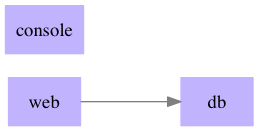
Simple example
Classic python example
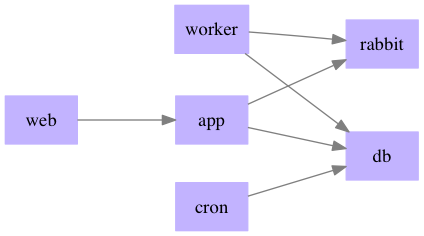
Python classic
Install
On OSX:
Install graphviz brew install graphviz and draw-compose:
$ pip install draw-compose
Use
Renders by default docker-compose.yml in the current folder.
$ draw-compose -o docker.png
Or a specific docker file can be rendered:
$ draw-compose -i fixtures/real.yml -o docker-specific.png
1 maintainer

Metadata
1 maintainer
Release files for draw-compose 0.0.3
For a detailed explanation of source distributions (sdists) and built distributions (wheels), please see the package formats documentation.
Source distribution (sdist)
| File | Size | Uploaded | |
|---|---|---|---|
| draw-compose-0.0.3.tar.gz | 3.1 kB | Details |
Built distribution (wheel)
| File | Interpreter | ABI | Platform | Reset |
|---|---|---|---|---|
| draw_compose-0.0.3-py2.py3-none-any.whl | Python 3, Python 2 | none | any | Details |
Total release size: 7.5 kB
Release files / draw-compose-0.0.3.tar.gz
| Download URL | draw-compose-0.0.3.tar.gz |
|---|---|
| Size | 3.1 kB |
| Tags | Source |
|
SHA-256 checksum How to use checksums |
dc637c1e9188bc8c005e2f5f1c7e05142740d95feef596719a7faace3b2b0234
|
|
BLAKE2b-256 checksum How to use checksums |
cd1edb84affbd317746593ad7d6f27c8e26bee4779345bfc612a1d7d48d40cf4
|
| Upload date | |
|
Uploaded using Trusted Publishing? What is trusted publishing? |
No |
Release files / draw_compose-0.0.3-py2.py3-none-any.whl
| Download URL | draw_compose-0.0.3-py2.py3-none-any.whl |
|---|---|
| Size | 4.5 kB |
| Tags | Python 2 Python 3 |
|
SHA-256 checksum How to use checksums |
23a21753eb098297a57c71fab8a3a669eef3642f55417601deb11697f8dba33c
|
|
BLAKE2b-256 checksum How to use checksums |
4c1fc5d937dc95d6ac67b983d83b4287dd47be19242b485bba675ad7a2b174f5
|
| Upload date | |
|
Uploaded using Trusted Publishing? What is trusted publishing? |
No |














