
drawdata
"Just draw some data and get on with your day."
This small Python library contains widgets that allow you to draw a dataset in a Python notebook. This should be very useful when teaching machine learning algorithms.
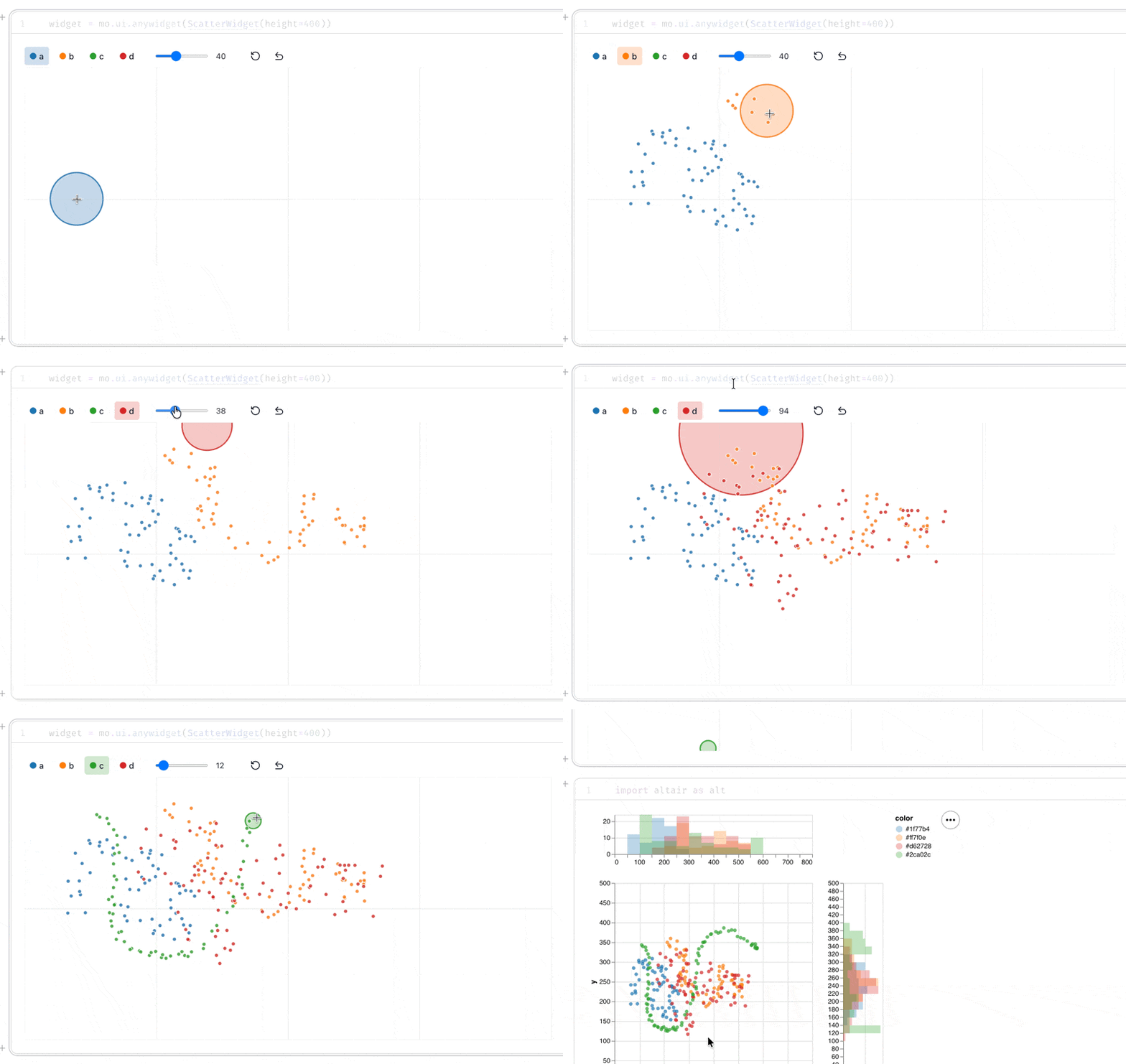
For a live demo without installing anything, check out the demo page.
You can really get creative with this in a notebook, so feel free to give it a spin!
Installation
Installation occurs via pip.
uv pip install drawdata
Usage:
You can load the scatter widget to start drawing immediately.
from drawdata import ScatterWidget

widget = ScatterWidget()
widget
If you want to be able to remove points with the brush, you can turn on the eraser. This adds an eraser toggle to the toolbar, and undo will also restore erased points.
widget = ScatterWidget(eraser=True)
If you want to use the dataset that you've just drawn you can do so via:
# Get the drawn data as a list of dictionaries
widget.data

# Get the drawn data as a dataframe
widget.data_as_pandas
widget.data_as_polars
If you're eager to do scikit-learn stuff with your drawn data you may appreciate this property instead:
X, y = widget.data_as_X_y
The assumption for this property is that if you've used multiple colors that you're interested in doing classification and if you've only drawn one color you're interested in regression. In the case of regression y will refer to the y-axis.
Usage: BarWidget
There's also a widget that lets you draw bar charts. You can draw one value per bin for each collection, which is useful for sketching profiles like hourly energy usage next to the expected sunshine.
from drawdata import BarWidget

widget = BarWidget(collection_names=["usage", "sunshine"], n_bins=24, y_max=10)
widget
You can also give every bin a label for the x-axis via x_labels. The number of bins follows the number of labels, and the widget only shows as many labels as fit. For example, half-hour buckets for an entire day:
half_hours = [f"{h:02d}:{m:02d}" for h in range(24) for m in (0, 30)]

widget = BarWidget(collection_names=["usage", "sunshine"], x_labels=half_hours)
widget
With many narrow bins it can help to see exactly which bin you're on. Pass tooltip=True to show the label and value of the bin under the cursor.
The drawn values are available in the same way, with one row per collection and bin (plus a label column when you pass x_labels):
widget.data
widget.data_as_pandas
widget.data_as_polars
Under the hood
The project uses anywidget under the hood so our tools should work in marimo, Jupyter, VSCode and Colab. You could use this to even interact with ipywidgets natively. Here is an example where updating a drawing triggers a new scikit-learn model to train (code).
1 maintainer

Metadata
1 maintainer
Release files for drawdata 0.5.3
For a detailed explanation of source distributions (sdists) and built distributions (wheels), please see the package formats documentation.
Source distribution (sdist)
| File | Size | Uploaded | Provenance | Actions |
|---|---|---|---|---|
| drawdata-0.5.3.tar.gz | 246.3 kB | Without provenance | Details for drawdata-0.5.3.tar.gz |
Built distribution (wheel)
| File | Interpreter | ABI | Platform | Actions Reset |
|---|---|---|---|---|
| drawdata-0.5.3-py3-none-any.whl | Python 3 | none | any | Details for drawdata-0.5.3-py3-none-any.whl |
Total release size: 492.2 kB
Release files / drawdata-0.5.3.tar.gz
| Download URL | drawdata-0.5.3.tar.gz |
|---|---|
| Size | 246.3 kB |
| Tags | Source |
|
SHA-256 checksum How to use checksums |
8d9aefd208f1e16359e525144eaad5d66950bbf847a8f8d0e47e7349f6d14d0d
|
|
BLAKE2b-256 checksum How to use checksums |
b518ff14f9f581c95b0b7b8a527b03c02df038bb9388f8a8952abd708f549c19
|
| Upload date | |
|
Uploaded using Trusted Publishing? What is trusted publishing? |
No |
| Uploaded via |
uv/0.13.3 {"installer":{"name":"uv","version":"0.13.3","subcommand":["publish"]},"python":null,"implementation":{"name":null,"version":null},"distro":{"name":"macOS","version":null,"id":null,"libc":null},"system":{"name":null,"release":null},"cpu":null,"openssl_version":null,"setuptools_version":null,"rustc_version":null,"ci":null}
|
Release files / drawdata-0.5.3-py3-none-any.whl
| Download URL | drawdata-0.5.3-py3-none-any.whl |
|---|---|
| Size | 245.9 kB |
| Tags | Python 3 |
|
SHA-256 checksum How to use checksums |
65c266dfe0f149e942bc9a6dfc198c513eb0d6e39c7ee89c4cee91e11aa59f02
|
|
BLAKE2b-256 checksum How to use checksums |
ddfd0fa7de55dcc3f8c49a902d6f50b54b0de454eeef75c130665cef0c3b83af
|
| Upload date | |
|
Uploaded using Trusted Publishing? What is trusted publishing? |
No |
| Uploaded via |
uv/0.13.3 {"installer":{"name":"uv","version":"0.13.3","subcommand":["publish"]},"python":null,"implementation":{"name":null,"version":null},"distro":{"name":"macOS","version":null,"id":null,"libc":null},"system":{"name":null,"release":null},"cpu":null,"openssl_version":null,"setuptools_version":null,"rustc_version":null,"ci":null}
|
Security for drawdata 0.5.3
Provenance
Provenance describes where a file came from. On PyPI, provenance is shared via attestations, which provide a verifiable record of the build or publishing details. View details, limitations and caveats.
No provenance found
None of the files in this release were uploaded with provenance metadata.
A note on package security
PyPI is a repository for distributing packages, not a service for auditing them. While third-party security researchers and our staff do their best to detect and remove malicious packages, PyPI cannot guarantee the quality, security or suitability of any given package.
To learn more about protecting yourself from malicious actors, visit our package security documentation.














