
Excalidraw-style system design sketching tool for the terminal

Project description


drawiterm
Excalidraw-style system design sketching tool for the terminal
Draw boxes, arrows, and labels directly in your terminal using keyboard and mouse. Diagrams are saved as plain JSON files. Works over SSH — no graphics extensions, no browser, no GUI framework required.
╭──────────╮        ╭──────────╮        ╭──────────╮
│   API    │───────►│  Cache   │───────►│    DB    │
╰──────────╯        ╰──────────╯        ╰──────────╯
Demo
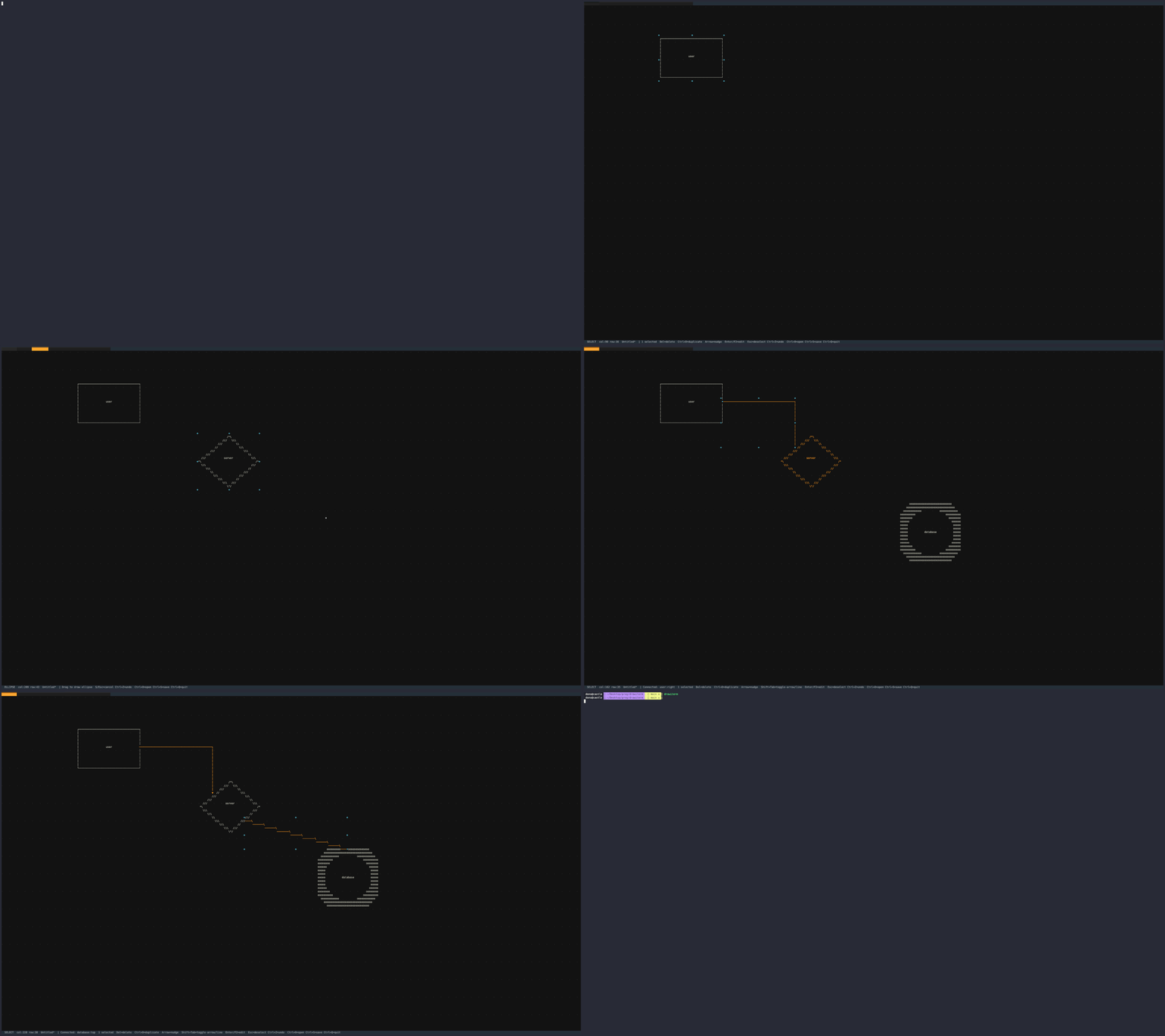
Requirements
- Python 3.12+
- Any ANSI/VT100-compatible terminal (xterm, kitty, alacritty, tmux, etc.)
Installation
With pipx (recommended)
pipx install drawiterm
With Nix
nix run github:dmille56/drawiterm
With pip
pip install drawiterm
Usage
drawiterm                       # new blank diagram
drawiterm mydiagram.drawiterm   # open existing file
Tools
| Key | Tool |
|---|---|
s / Escape |
Select |
r |
Rectangle |
e |
Ellipse |
d |
Diamond |
a |
Arrow |
l |
Line |
p |
Draw (freehand) |
x |
Eraser |
t |
Text |
Arrows and Lines are orthogonal by default; use Shift+Tab to toggle to straight. Use Draw (p) to sketch freehand paths by clicking and dragging. When tool lock is OFF, the app switches back to Select after using a tool; press Ctrl+L to toggle tool lock.
Key Bindings
| Key | Action |
|---|---|
Ctrl+S |
Save |
Ctrl+O |
Open file |
Ctrl+Z |
Undo |
Ctrl+Y / Ctrl+Shift+Z |
Redo |
Ctrl+A |
Select all |
Ctrl+D |
Duplicate selection |
Delete / Backspace |
Delete selected elements |
| Arrow keys | Nudge selected elements |
Tab |
Next tool |
Shift+Tab |
Toggle arrow/line style (straight/orthogonal) |
Ctrl+L |
Toggle tool lock (keep active tool after use) |
Ctrl+Arrow |
Pan canvas |
Ctrl+Left-drag |
Pan canvas |
Ctrl+Q |
Quit |
Double-click an element to edit its label. Press Escape to commit the edit.
File Format
Diagrams are saved as .drawiterm JSON files — human-readable and version-control friendly.
Development
Setup lorri (and use it)
- https://github.com/nix-community/lorri
- Make sure to run lorri daemon as a service
lorri init
direnv allow        # activate Nix shell (sets PYTHONPATH=src automatically)
--or-- Manually use nix development shell:
nix develop
export PYTHONPATH=src
Install pre-commit hooks (so that it runs ruff everytime when you commit to fix issues)
pre-commit install
Commands
python -m drawiterm # run from source

ruff check src/     # lint
ruff format src/    # format
pytest              # tests
See SPEC.md for the full requirements specification.
Release process
Automatically
python scripts/bump_version.py
--or-- Manually
- Bump the version in pyproject.toml and nix/drawiterm.nix (no leading "v" in the file values).
- Commit, then tag and push (tag must be v and match pyproject.toml):
git tag -a "v0.1.0b1" -m "v0.1.0b1"
git push origin v0.1.0b1
Other
The GitHub Actions "Release" workflow will lint, test, build, and create a GitHub Release. If you add a repository secret PYPI_API_TOKEN (from PyPI), it will also publish to PyPI.
Release history Release notifications | RSS feed


Download files
Download the file for your platform. If you're not sure which to choose, learn more about installing packages.
Source Distribution
Built Distribution
Filter files by name, interpreter, ABI, and platform.
If you're not sure about the file name format, learn more about wheel file names.
Copy a direct link to the current filters
File details
Details for the file drawiterm-0.1.7.tar.gz.
File metadata
- Download URL: drawiterm-0.1.7.tar.gz
- Upload date:
- Size: 35.9 kB
- Tags: Source
- Uploaded using Trusted Publishing? No
- Uploaded via: twine/6.1.0 CPython/3.13.7
File hashes
| Algorithm | Hash digest | |
|---|---|---|
| SHA256 |
237360272d0c28208c5f505451c038de983b667c46ad8097cf9d5617a16886b4
|
|
| MD5 |
4754ab80710cad7c86da90587e4e3f5b
|
|
| BLAKE2b-256 |
05b9db3ed2d3bb3f32dcc875daac7ef3d0038d22d402560aa61b628904d3791f
|
File details
Details for the file drawiterm-0.1.7-py3-none-any.whl.
File metadata
- Download URL: drawiterm-0.1.7-py3-none-any.whl
- Upload date:
- Size: 34.3 kB
- Tags: Python 3
- Uploaded using Trusted Publishing? No
- Uploaded via: twine/6.1.0 CPython/3.13.7
File hashes
| Algorithm | Hash digest | |
|---|---|---|
| SHA256 |
f4fe204dcd215fd1fb4be4a2091a9498f1f4317049ced1a4b4f5319f5cc529ef
|
|
| MD5 |
472a9d439ad2fb535b884915617ab815
|
|
| BLAKE2b-256 |
b0427358a8b184b76f90681171a9c538f591afc8cacd1187dc4dc5837256532a
|






