
Drawlib
Pure-Python Library for "Illustration as Code" & "Illustrated Documentation as Code"
Drawlib is a declarative Python drawing library and integrated documentation compiler designed for software engineers and autonomous AI coding agents. Instead of maintaining brittle diagrams in external GUI tools (draw.io, Visio, PowerPoint) and manually pasting exported images into wikis, Drawlib lets you author, version-control, and build architectural diagrams, data charts, technical documents, and presentation slide decks entirely from code in Git.
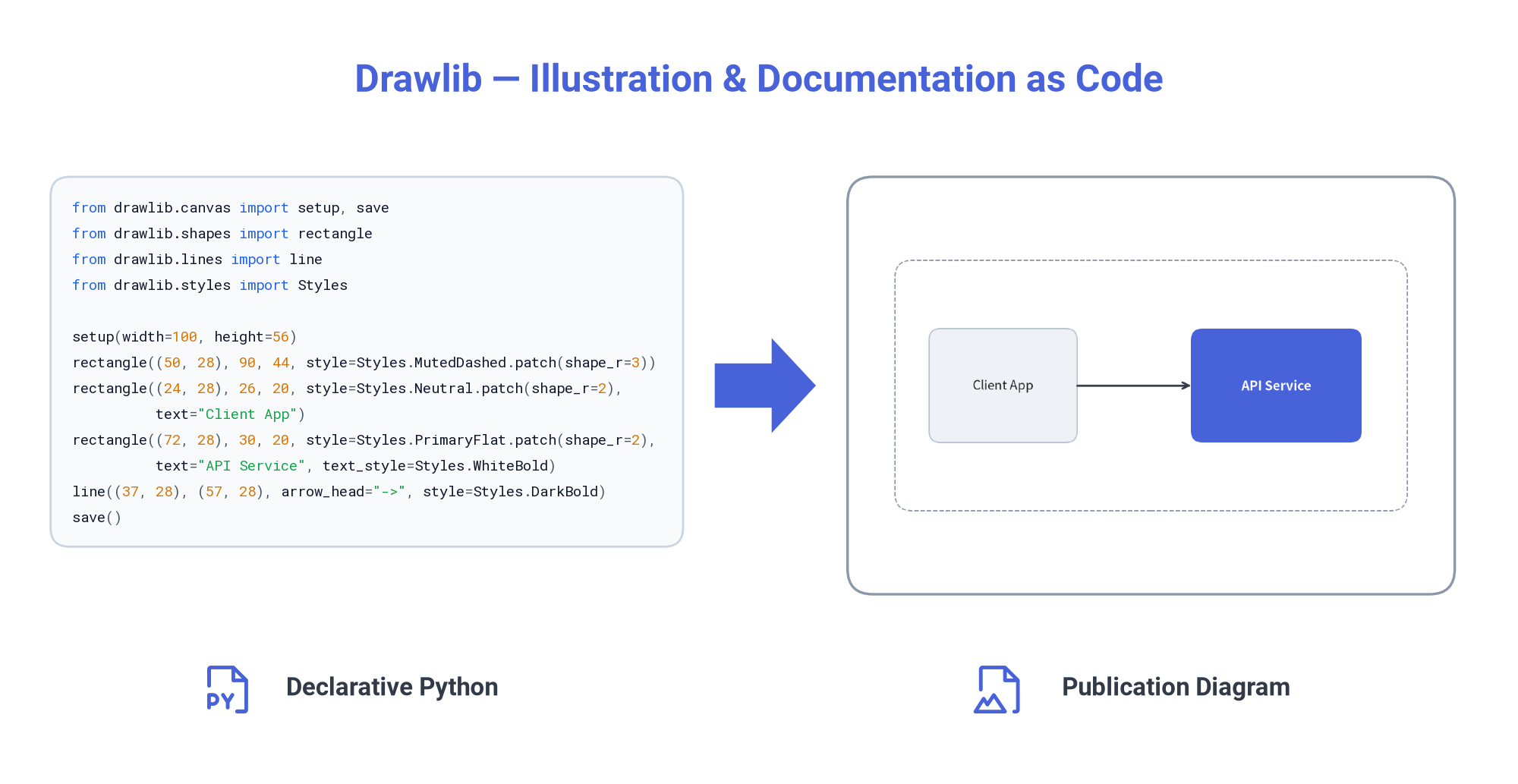
- Official Website & Documentation: https://www.drawlib.com/
- Repository Guides & Whitepapers:
Why Drawlib v0.3?
1. Cloud & Software Engineering Diagrams
Stop assembling complex architectures out of raw coordinates. Drawlib provides high-level diagramming engines (drawlib.diagrams, drawlib.graph) and standardized icon sets (drawlib.icons.gcp, phosphor, fontawesome):
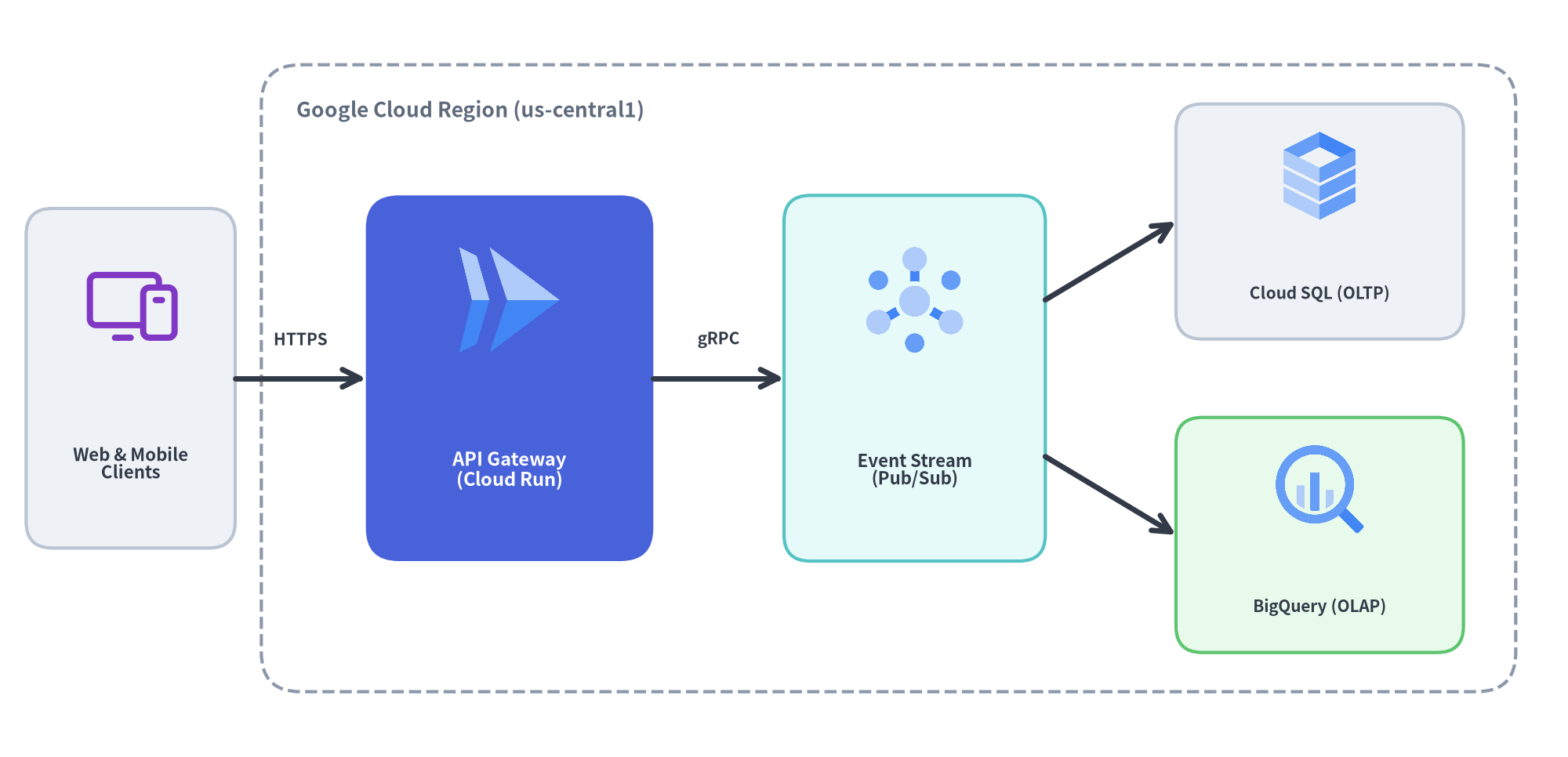
- Auto-Layout Graphs (
drawlib.graph): Declarative graph layout solvers (ArchitectureGraph,LayerGraph,TreeGraph,RadialGraph,GridGraph) that compute overlap-free coordinates (get_layout()), nested cluster bounds, andoffset()fine-tuning for rendering withdrawlib.diagramsanddrawlib.shapes. - Technical Diagrams (
drawlib.diagrams):- Cloud Architecture (
ArchitectureDiagram): VPC boundaries, subnets, tiers, and official cloud service icons. - Flowcharts (
FlowDiagram): Process stages, decision branches, and orthogonal connectors. - Sequence Diagrams (
SequenceDiagram): Client/server lifelines, synchronous/asynchronous messages, and activation bars. - UML Class, ER & State Diagrams (
ClassDiagram,ERDiagram,StateDiagram): Object-oriented models, database schemas, and state machines.
- Cloud Architecture (
2. Quantitative Charts & SmartArt Infographics
Compose presentation-ready infographics (drawlib.smartarts) and quantitative data plots (drawlib.charts) side by side on the same canvas:
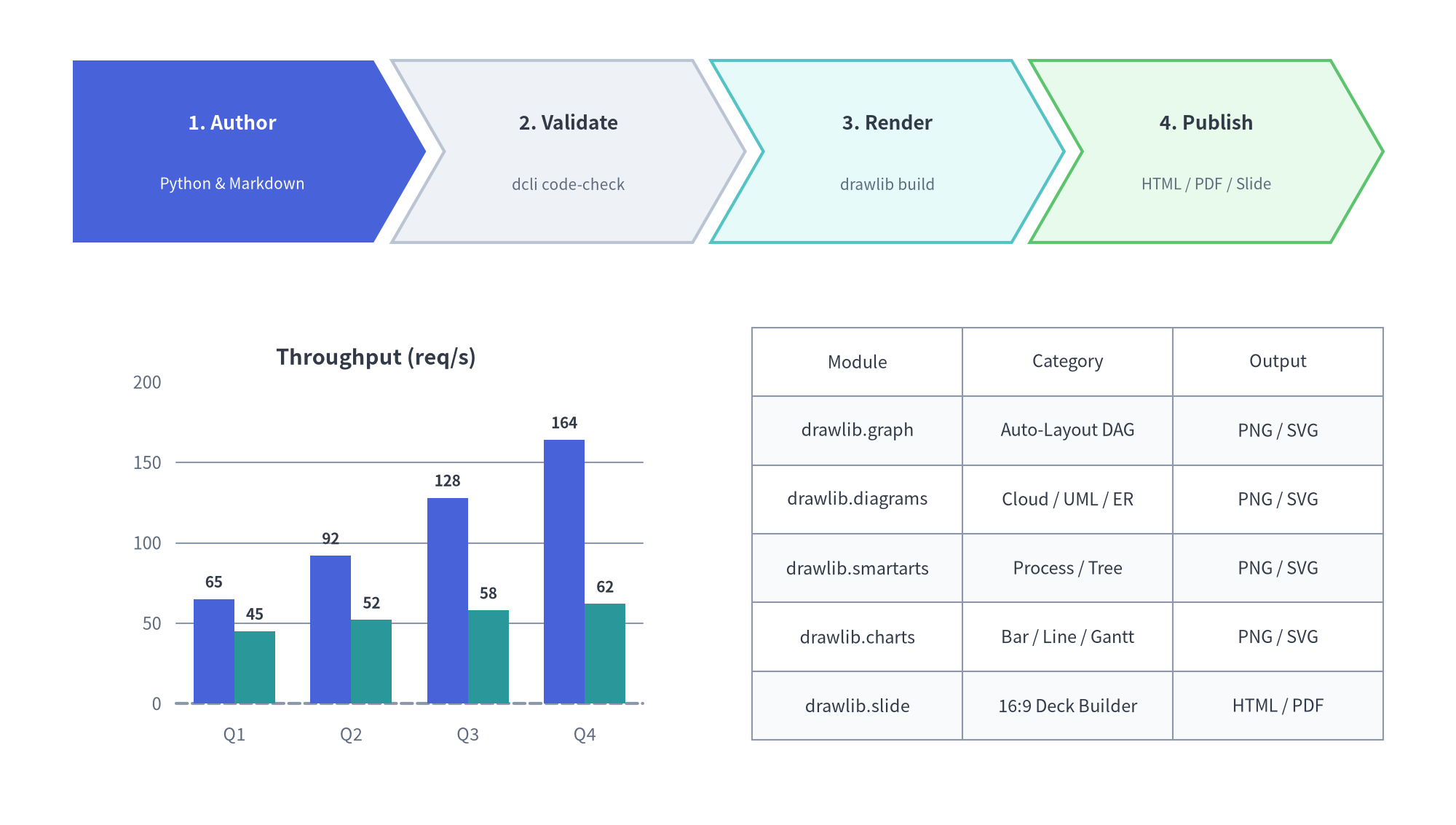
- SmartArts (
drawlib.smartarts):ChevronProcess,Cycle,Table,TreeNode,MindMapNode,Pyramid,BoxList,BulletPoints,GridLayout, and syntax-highlightedSourceCode. - Charts (
drawlib.charts): Pure-PythonBarChart,LineChart,AreaChart,PieChart,RadarChart,ScatterChart,GanttChart, andHeatmapChart/HeatmapOverlaystyled with the same design tokens as your diagrams.
3. Rich Primitives & Semantic Design System
At its foundation, Drawlib separates Content (geometry, coordinates, structure) from Style (colors, typography, borders, themes)—just like HTML and CSS:
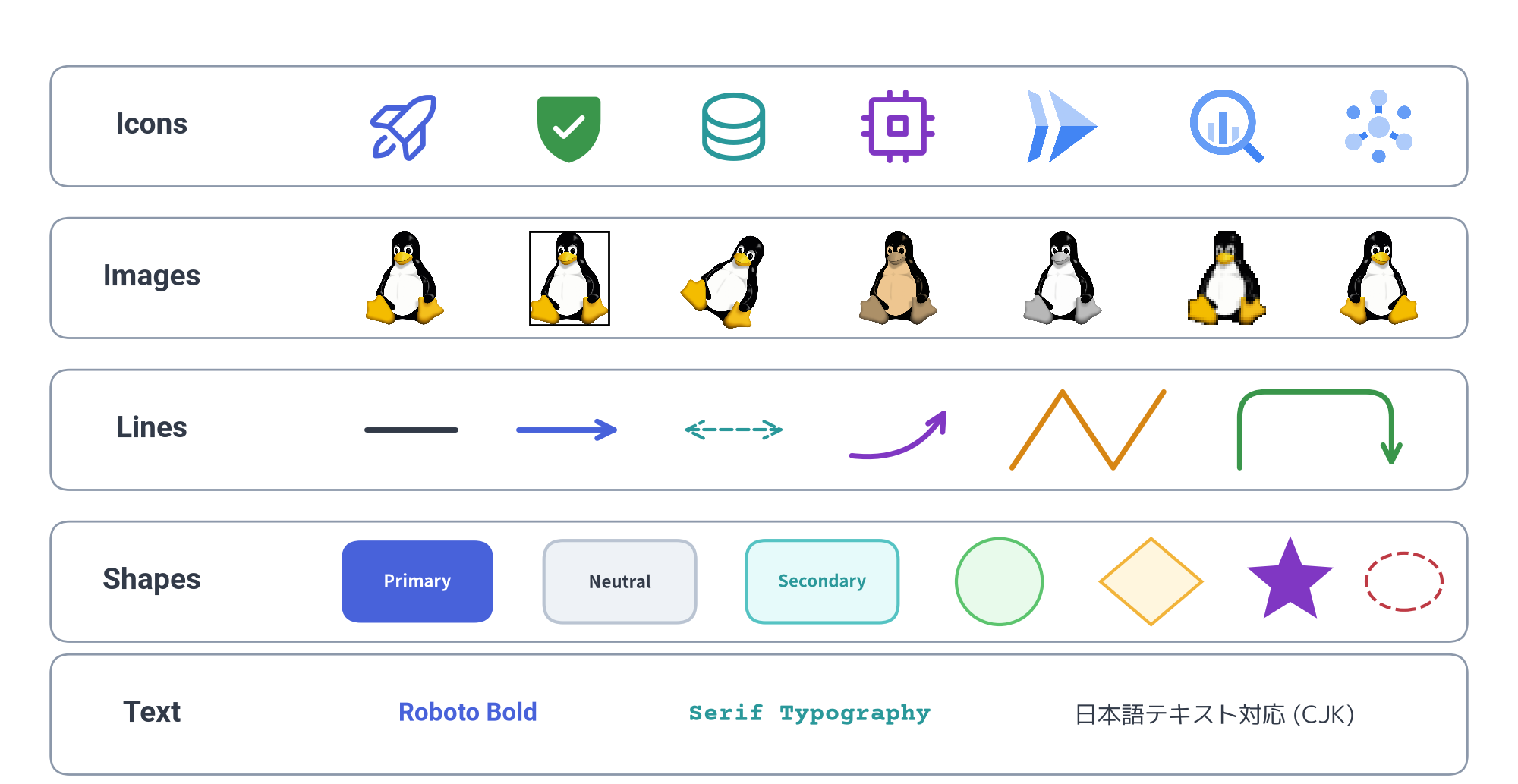
- 5 Core Primitive Categories:
- Icons (
drawlib.icons): 1,500+ Phosphor icons (5 weights), FontAwesome, and official Google Cloud (GCP) icons. - Images (
drawlib.images): Non-destructiveDimageprocessing pipeline (sepia(),grayscale(),mosaic(),mirror(),crop(), borders, rotation). - Lines (
drawlib.lines): Straight, curved (bend), quadratic/cubic Bezier, and rounded multi-point polylines with customizable arrowheads ("->","<-","<->"). - Shapes (
drawlib.shapes): 23 geometric primitives (rectangle,circle,ellipse,rhombus,star,arrow,chevron,bubblespeech,polygon, etc.). - Text (
drawlib.text,drawlib.fonts): Multilingual typography with automatic on-demand font caching (FontRoboto,FontSansSerif,FontSerif,FontSourceCode,FontJapanese,FontChinese,FontKorean,FontArabic, etc.).
- Icons (
- 7-Role Semantic Style System (
drawlib.styles):- Built-in presets (
default,google,essentials,monochrome,warm,cold) accessed viaStyles.<Token>(Styles.PrimaryFlat,Styles.Neutral,Styles.SecondaryNeutral,Styles.MutedDashed,Styles.SuccessNeutral,Styles.WarningNeutral,Styles.DangerNeutral).
- Built-in presets (
4. Illustrated Documentation & Slide as Code
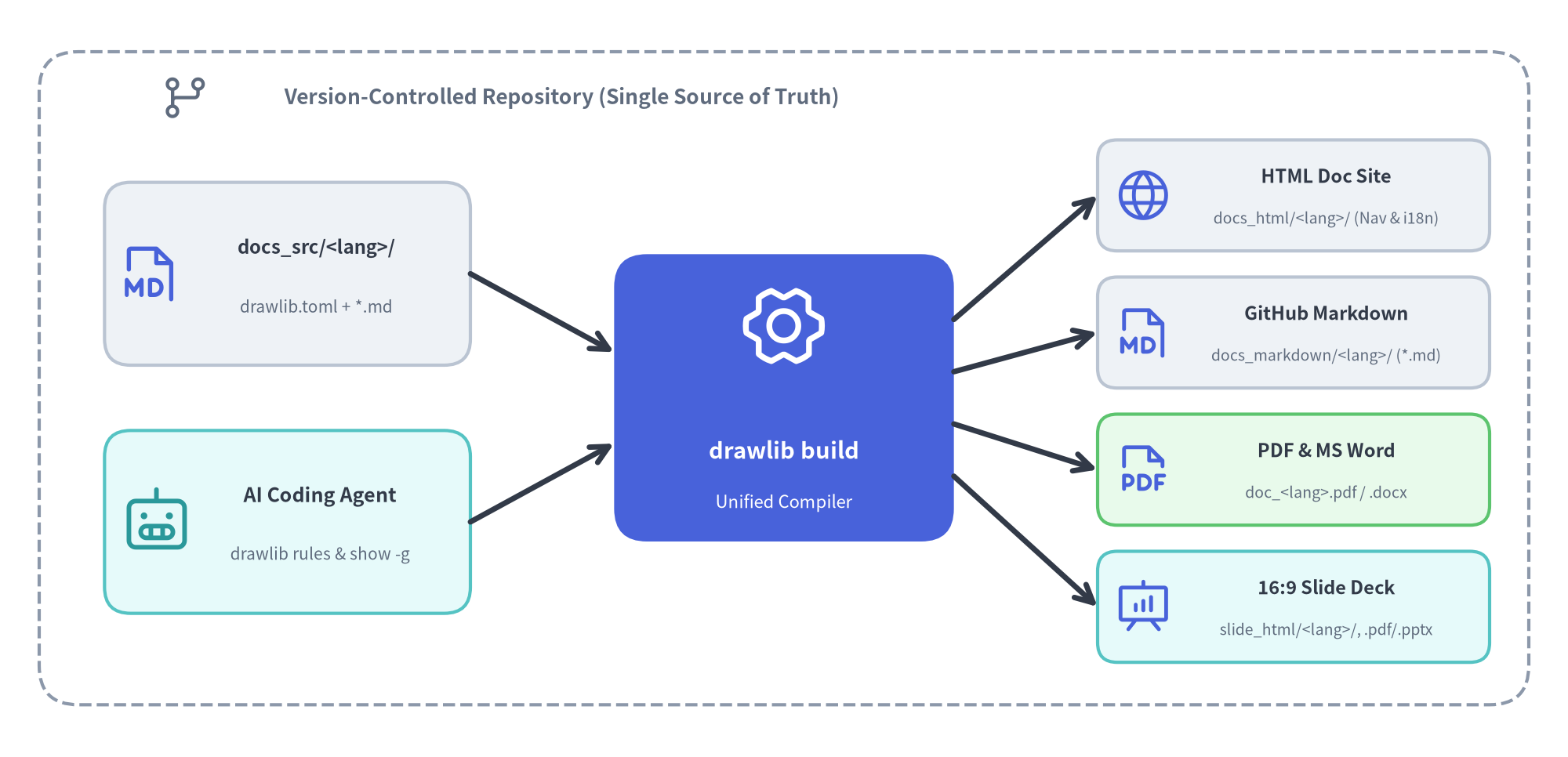
Write Markdown files with embedded ```drawlib code blocks. A single drawlib build command compiles your repository into multiple publication formats:
- 4 Project Scaffolds (
drawlib init <type>):drawlib init site: Multi-page documentation website (docs_html/) and GitHub Markdown (docs_markdown/) with built-in multi-locale (<lang>/) support.drawlib init doc: Linear technical specification / whitepaper (*_html/,*_markdown/,*_<lang>.pdf, plus on-demand editable MS Word*_<lang>.docxviadrawlib build docx).drawlib init slide: 16:9 presentation slide deck with native SVG text, Presenter View, multi-locale (<lang>/) support, and keyboard navigation (slide_html/,slide_<lang>.pdf, plus on-demand editable MS PowerPointslide_<lang>.pptxviadrawlib build pptx).drawlib init images: Standalone batch Python illustration scripts (images_src/->images/).
5. AI Inner Loop & Human Outer Loop
Drawlib is engineered from the ground up for AI-native documentation and diagram engineering (Claude Code, Cursor, Gemini, Codex), separating high-frequency visual self-correction from high-level human review:
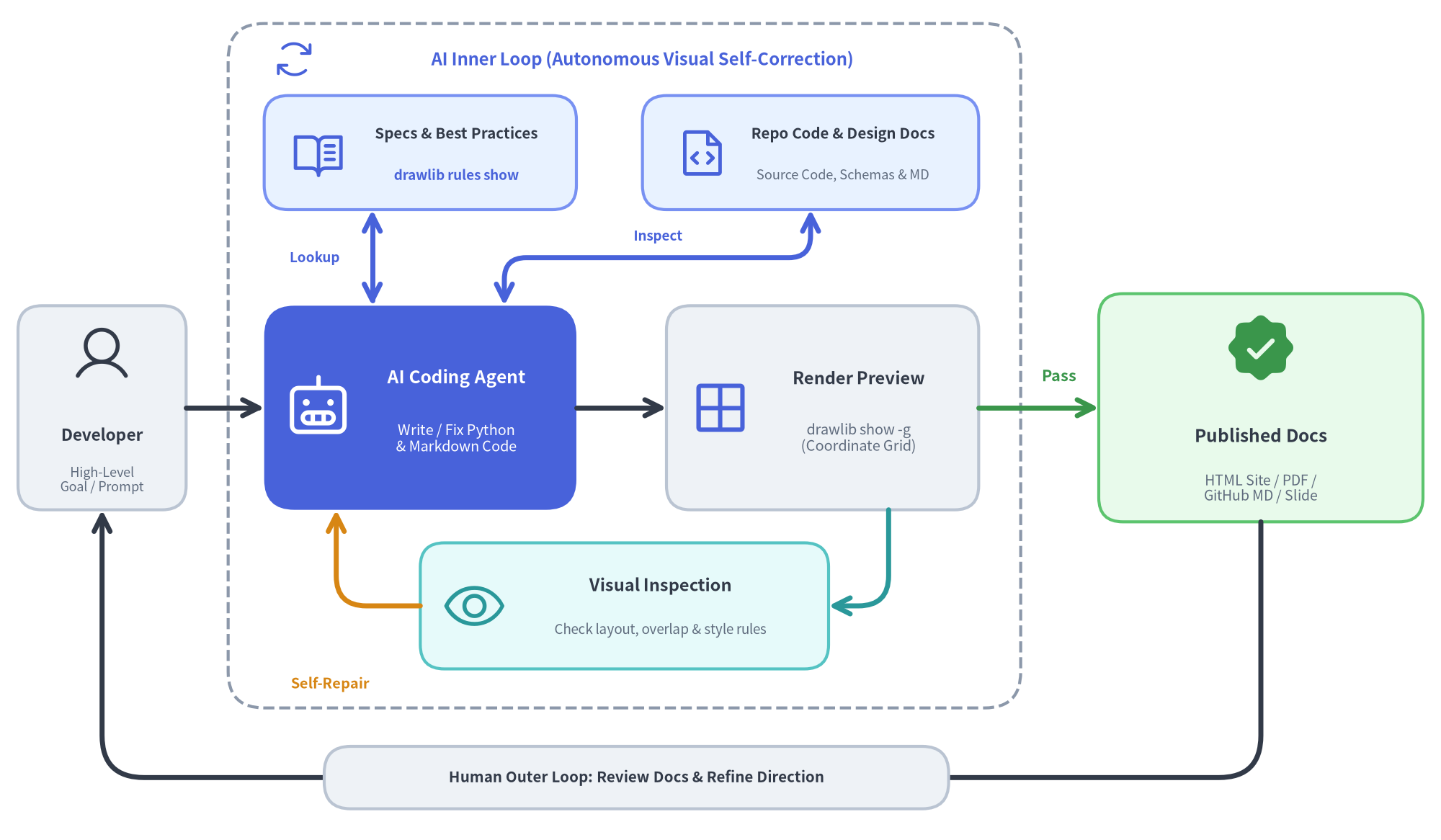
- AI Inner Loop (Autonomous Visual Self-Correction):
- On-Demand Spec & Codebase Lookup: The AI agent autonomously queries
drawlib rules show <topic>for detailed API specifications and design best practices, while directly inspecting repository source code, schemas, and design docs as the single source of truth. - Code Synthesis & Grid Preview (
drawlib show -g): The agent writes Python drawing blocks and Markdown prose, then renders a headless preview with a coordinate grid overlay. - Multimodal Inspection & Self-Repair: The agent visually inspects the rendered PNG for text clipping, overlapping labels, or style imbalances, repairing coordinates and styles autonomously until the diagram passes inspection.
- On-Demand Spec & Codebase Lookup: The AI agent autonomously queries
- Human Outer Loop (Intent & Review):
- The developer stays focused on high-level architecture and intent—providing initial goals, reviewing the compiled Published Docs (HTML / PDF / MS Word / GitHub MD / Slide / MS PowerPoint), and iterating on direction without ever nudging pixels in a GUI tool.
Installation
Install drawlib from PyPI using pip or uv:
pip install drawlib
# or: uv add drawlib
PDF, MS Word (.docx), and MS PowerPoint (.pptx) export work out of the box—playwright, python-docx, and python-pptx are standard dependencies, and headless Chromium (chromium-headless-shell) is downloaded automatically on your first drawlib build pdf or drawlib build pptx run.
- Offline / Air-Gapped / CI Environments: Pre-download all fonts, icons, maps, and headless Chromium ahead of time with
drawlib cache download --all(or headless Chromium only withdrawlib cache download --browser). - Minimal Linux Containers (e.g.,
python:3.12-slimlacking OS shared libraries such aslibnss3orlibgbm1): Install OS browser dependencies once viaplaywright install-deps chromium(orplaywright install --with-deps --only-shell chromium).
Verify the installation:
drawlib --version
Quick Start
1. Standalone Python Script
Create a file named architecture.py:
from drawlib.canvas import save, setup
from drawlib.lines import line
from drawlib.shapes import rectangle
from drawlib.styles import Styles
from drawlib.text import text

setup(width=120, height=50)

# 1. Structural Boundary (Muted)
rectangle((60, 25), width=112, height=42, r=3, style=Styles.MutedDashed)
text((22, 42.5), "Production VPC", style=Styles.MutedBold.patch(text_size=9))

# 2. Entrypoint & Hero Service
rectangle((22, 24), width=24, height=16, r=2, style=Styles.Neutral, text="Client App")
rectangle(
    (58, 24),
    width=26,
    height=16,
    r=2,
    style=Styles.PrimaryFlat,
    text="API Gateway",
    text_style=Styles.WhiteBold,
)

# 3. Downstream Services (Tinted Neutral Cards)
rectangle((96, 33), width=24, height=12, r=2, style=Styles.SecondaryNeutral, text="Auth Service")
rectangle((96, 15), width=24, height=12, r=2, style=Styles.SuccessNeutral, text="Audit Log DB")

# 4. Directional Connectors
line((34, 24), (45, 24), arrow_head="->", style=Styles.DarkBold)
line((71, 28), (84, 33), arrow_head="->", style=Styles.DarkBold)
line((71, 20), (84, 15), arrow_head="->", style=Styles.DarkBold)

save()
Run the script with Python or drawlib to generate architecture.png:
python architecture.py
Core Principles at a Glance
- Bottom-Left Origin
(0, 0):setup(width=120, height=50)defines a Cartesian coordinate canvas wherexspans0..120(left to right) andyspans0..50(bottom to top). - Center Alignment by Default: Shapes (
rectangle,circle,icon,image,text) are positioned by their center(x, y), making horizontal and vertical alignment effortless. - 50%+ Neutral Baseline: Ground supporting nodes in calm neutral styles (
Styles.Neutral,Styles.SecondaryNeutral,Styles.SuccessNeutral) and reserve saturated fills (Styles.PrimaryFlat) for primary focal points. - Style Patching (
.patch()): Customize any preset token non-destructively viaStyles.MutedBold.patch(text_size=9)orStyles.Primary.patch(shape_line_width=2).
2. Illustrated Documentation & Slide Deck Workflow
Scaffold a new documentation website, technical spec, or 16:9 slide deck in seconds:
# Initialize a multi-page documentation site in docs_src/ (with en/ locale tree)
drawlib init site

# Or initialize a 16:9 presentation slide deck in slide_src/ (supports -l en,ja too)
drawlib init slide
Inside your Markdown files (docs_src/en/index.md), embed Python drawing blocks using the ```drawlib fence:
# System Architecture

Below is our core request routing pipeline:

```drawlib align=center file=service_routing.png caption="Service Routing Pipeline"
from drawlib.canvas import setup
from drawlib.shapes import rectangle
from drawlib.lines import line
from drawlib.styles import Styles

setup(width=100, height=40)
rectangle((25, 20), width=30, height=16, r=2, style=Styles.Neutral, text="Ingress")
rectangle((75, 20), width=30, height=16, r=2, style=Styles.PrimaryFlat, text="Core API", text_style=Styles.WhiteBold)
line((40, 20), (60, 20), arrow_head="->", style=Styles.DarkBold)
```
Compile or preview with the drawlib CLI:
# Build HTML site, GitHub Markdown, or PDF
./docs_src/build.sh

# Optional on-demand export to editable MS Word (.docx) or MS PowerPoint (.pptx)
drawlib build docx doc_src/ -o spec.docx --generate-index   # -> spec_en.docx
drawlib build pptx slide_src/ -o deck.pptx                  # -> deck_en.pptx

# Launch local HTTP server with broken-link check at http://localhost:8000
drawlib serve docs_html/

# Render a single diagram with coordinate grid (-g) for layout inspection
drawlib show docs_src/en/index.md service_routing.png -g -o preview_grid.png
3. CLI Reference Summary
| Command | Description |
|---|---|
drawlib init <site|doc|slide|images> |
Scaffold a new documentation, slide deck, or image project |
drawlib build <html|markdown|pdf|docx|slide|pptx|image> |
Compile source files into HTML, Markdown, PDF, MS Word (.docx), HTML Slides, MS PowerPoint (.pptx), or PNG/WebP images |
drawlib serve <html_dir> [--check] |
Start a local HTTP server for built HTML docs/slides with pre-flight link checks |
drawlib show <file> [target] [-g] |
Render and inspect a single script or embedded Markdown diagram (with optional grid) |
drawlib rules show [topic] |
On-demand CLI reference for AI agents to look up detailed API specs & best practices (overview, style-guide, api, lib-*) |
drawlib cache <list|download|clear> |
Manage local font, icon, map, and headless Chromium caches (supports offline pre-caching via --all or --browser) |
Links & Resources
- Official Website & Documentation: https://www.drawlib.com/
- PyPI Package: https://pypi.org/project/drawlib/
- GitHub Repository: https://github.com/yuichi110/drawlib
- License: Apache License 2.0
1 maintainer

Metadata
1 maintainer
Release files for drawlib 0.3.3
For a detailed explanation of source distributions (sdists) and built distributions (wheels), please see the package formats documentation.
Source distribution (sdist)
| File | Size | Uploaded | Provenance | Actions |
|---|---|---|---|---|
| drawlib-0.3.3.tar.gz | 1.5 MB | Without provenance | Details for drawlib-0.3.3.tar.gz |
Built distribution (wheel)
| File | Interpreter | ABI | Platform | Actions Reset |
|---|---|---|---|---|
| drawlib-0.3.3-py3-none-any.whl | Python 3 | none | any | Details for drawlib-0.3.3-py3-none-any.whl |
Total release size: 3.4 MB
Release files / drawlib-0.3.3.tar.gz
| Download URL | drawlib-0.3.3.tar.gz |
|---|---|
| Size | 1.5 MB |
| Tags | Source |
|
SHA-256 checksum How to use checksums |
1afc643bc88146a44fff077755696076b9b22eb0fc65e33a38a9aafb9c49126e
|
|
BLAKE2b-256 checksum How to use checksums |
a2a2a2e431ded2b0c4c8ddfd0c5b66440cefae2aa45484158b0c87c2b39849a1
|
| Upload date | |
|
Uploaded using Trusted Publishing? What is trusted publishing? |
No |
| Uploaded via |
uv/0.9.21 {"installer":{"name":"uv","version":"0.9.21","subcommand":["publish"]},"python":null,"implementation":{"name":null,"version":null},"distro":{"name":"Debian GNU/Linux rodete","version":null,"id":"rodete","libc":null},"system":{"name":null,"release":null},"cpu":null,"openssl_version":null,"setuptools_version":null,"rustc_version":null,"ci":null}
|
Release files / drawlib-0.3.3-py3-none-any.whl
| Download URL | drawlib-0.3.3-py3-none-any.whl |
|---|---|
| Size | 1.9 MB |
| Tags | Python 3 |
|
SHA-256 checksum How to use checksums |
a34590cc4e72cbe3affefd72fc52c32e75ff71dc84da75d00a00708985bee30f
|
|
BLAKE2b-256 checksum How to use checksums |
4cd6a0fc24fddb2d478e858a673be8a3a35ed4404d5c62be37ad8ba679fdf734
|
| Upload date | |
|
Uploaded using Trusted Publishing? What is trusted publishing? |
No |
| Uploaded via |
uv/0.9.21 {"installer":{"name":"uv","version":"0.9.21","subcommand":["publish"]},"python":null,"implementation":{"name":null,"version":null},"distro":{"name":"Debian GNU/Linux rodete","version":null,"id":"rodete","libc":null},"system":{"name":null,"release":null},"cpu":null,"openssl_version":null,"setuptools_version":null,"rustc_version":null,"ci":null}
|
Security for drawlib 0.3.3
Provenance
Provenance describes where a file came from. On PyPI, provenance is shared via attestations, which provide a verifiable record of the build or publishing details. View details, limitations and caveats.
No provenance found
None of the files in this release were uploaded with provenance metadata.
A note on package security
PyPI is a repository for distributing packages, not a service for auditing them. While third-party security researchers and our staff do their best to detect and remove malicious packages, PyPI cannot guarantee the quality, security or suitability of any given package.
To learn more about protecting yourself from malicious actors, visit our package security documentation.














