
DrawSVG UI



This repository provides a graphical user interface designed to make it easier to create files with the drawsvg library.
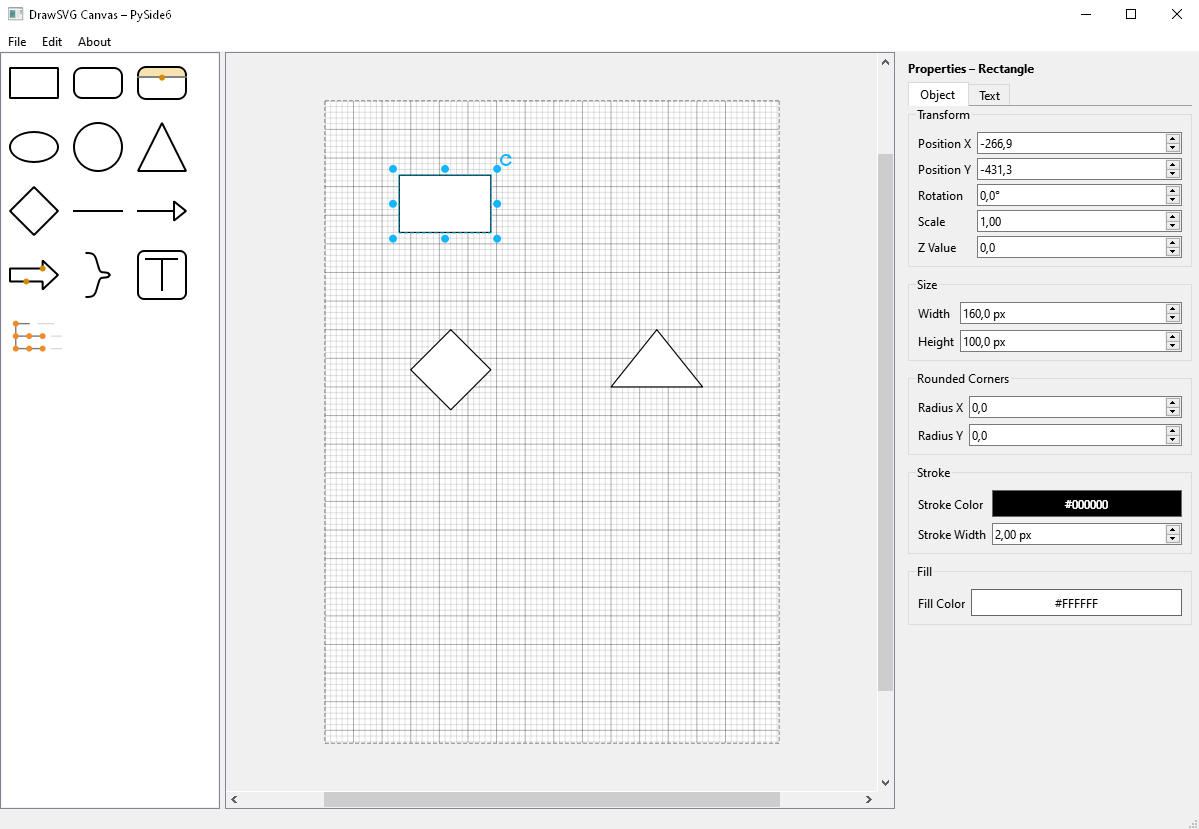
Instead of writing raw Python code by hand, you can visually place, move, and edit shapes on a canvas, then export your work as a ready-to-use drawsvg file. The UI runs on PySide6 and comes with a property inspector, snapping/grid helpers and a set of ready-made shapes.
The goal of this project is to help users quickly prototype and generate drawsvg code through an intuitive drag-and-drop UI.
Requirements
The application requires Python 3.10 or newer. Dependencies include:
- drawsvg
- PySide6
Install via PyPI
You can install the packaged app and launch it via the generated executable script:
python -m pip install --upgrade drawsvg-ui
drawsvg-ui  # on Windows this is available as drawsvg-ui.exe
Install all via dependencies with:
python -m pip install -r requirements.txt
Running the Application
After installing the dependencies, start the application with:
python src/main.py
UI Features
Canvas and navigation
- A4 canvas with grid/subgrid preview; toggle visibility via
Edit → Show grid. - Snap-to-grid movement and resizing; hold
Altto place/drag/resize freely. - Automatic extra A4 pages when objects cross page borders; empty pages are cleaned up again.
- Zoom with
Ctrl/Alt+ mouse wheel; pan with middle button or right-button drag (right click on empty space resets zoom). - Rotation handle above the selection; snaps to 5° steps, hold
Altfor smooth rotation with a live angle readout.
Shape palette
- Drag shapes from the palette or click to drop them at the view center.
- Shapes: rectangle, rounded rectangle, split rounded rectangle (adjustable header), ellipse/circle, triangle, diamond, line, arrow, block arrow, curvy right bracket, text box, and a folder-tree placeholder.
Editing and layout
- Rubber-band selection; add to selection with
Ctrl/Shiftclick; duplicate selection withCtrl+ drag. - Resize via handles; items snap while moving/resizing unless
Altis held. - Align multiple items (left/center/right, top/middle/bottom, snap to grid) from the context menu.
- Group selections (
Ctrl+G); ungroup an entire selection including nested groups (Ctrl+Shift+G); change z-order (bring forward/back). - Delete with the
Deletekey or clear everything viaEdit → Clear canvas. Full undo/redo stack (Ctrl+Z,Ctrl+Y/Ctrl+Shift+Z).
Styling, text, and labels
- Context menu or properties panel to edit fill/stroke color, opacity, stroke width, and line style (solid/dashed/dotted).
- Corner radius for rectangles; adjustable divider and separate top/bottom fills for split rounded rectangles.
- Arrowheads on lines/arrows with configurable width/height; block arrow head/shaft ratios; curvy bracket hook depth.
- Built-in labels for supported shapes: edit text inline or in the properties panel, set font family/size/color, and horizontal/vertical alignment.
- Text items support multi-line content, font and padding, alignment, and left-to-right or right-to-left direction.
Properties panel
- Live inspector synced to the current selection: position, rotation, scale, z-value, size, stroke/fill, and shape-specific options.
- Dedicated text tab for labels/text content including font, color, padding, alignment, and direction controls.
Import/Export
- Load or save scenes as ready-to-run
drawsvgPython files via theFilemenu.
Version 0.7.1
This release fixes grouped selection handles, arrow selection outlines, editing rotated arrows, recursive ungrouping and restoring group pivots during undo. PDF export preserves page-edge content and arrowhead contours; curved paths use tight export bounds. The public hover preview and aligned Python text export remain available.
Editor integration introduced in 0.7.0
This candidate integrates the editor development from UI_drawsvg into this repository.
It adds native .drawsvg project files, connectors, free paths, diagram shapes,
layers, clipboard operations, style presets, templates, guides and document
lifecycle support. SVG, PDF and configurable PNG export use the shared Qt renderer.
The existing canvas hover preview and aligned Python text export are retained.
See the integration report for validation of the original integration and the existing Python-export visual-parity limitation.
Development checks
python -m pip install -e ".[dev]"
python -m pytest -q
python -m ruff check .
python -m build
License
This project is licensed under the GNU General Public License version 2 or later (GPL-2.0-or-later); see LICENSE.
You may use, modify and distribute this software under the terms of the GPL. Any derivative work must also be distributed under the same license.
1 maintainer

Metadata
1 maintainer
Release files for drawsvg-ui 0.7.1
For a detailed explanation of source distributions (sdists) and built distributions (wheels), please see the package formats documentation.
Source distribution (sdist)
| File | Size | Uploaded | |
|---|---|---|---|
| drawsvg_ui-0.7.1.tar.gz | 239.5 kB | Details |
Built distribution (wheel)
| File | Interpreter | ABI | Platform | Reset |
|---|---|---|---|---|
| drawsvg_ui-0.7.1-py3-none-any.whl | Python 3 | none | any | Details |
Total release size: 420.8 kB
Release files / drawsvg_ui-0.7.1.tar.gz
| Download URL | drawsvg_ui-0.7.1.tar.gz |
|---|---|
| Size | 239.5 kB |
| Tags | Source |
|
SHA-256 checksum How to use checksums |
8aaba1968eb91a7dc4aa2f30a33891736f9164ae4fd676751d4105b462dd3dbc
|
|
BLAKE2b-256 checksum How to use checksums |
1b93dd1b8726ce16d49a8aa54283872c4e3fc2ca3143e8b2fd4ced8f54bfdcfc
|
| Upload date | |
|
Uploaded using Trusted Publishing? What is trusted publishing? |
No |
| Uploaded via |
twine/7.0.0 CPython/3.13.14
|
Release files / drawsvg_ui-0.7.1-py3-none-any.whl
| Download URL | drawsvg_ui-0.7.1-py3-none-any.whl |
|---|---|
| Size | 181.3 kB |
| Tags | Python 3 |
|
SHA-256 checksum How to use checksums |
eedbe1a49273d633ee9b5abb721bde157699ab3faff4494217eefa22d6d068e4
|
|
BLAKE2b-256 checksum How to use checksums |
116f7c68ebc8d0e61b2097f19ddca19cf863c3995a77f83f83ab836dfd4e98eb
|
| Upload date | |
|
Uploaded using Trusted Publishing? What is trusted publishing? |
No |
| Uploaded via |
twine/7.0.0 CPython/3.13.14
|














