
A zero-boilerplate canvas drawing framework for Python 3, based on Pygame.

Project description




Draw Zero
A zero-boilerplate canvas drawing framework for Python 3, based on Pygame.
Some examples
Here's some neat stuff you can do:
# import all
from drawzero import *

# simple shapes
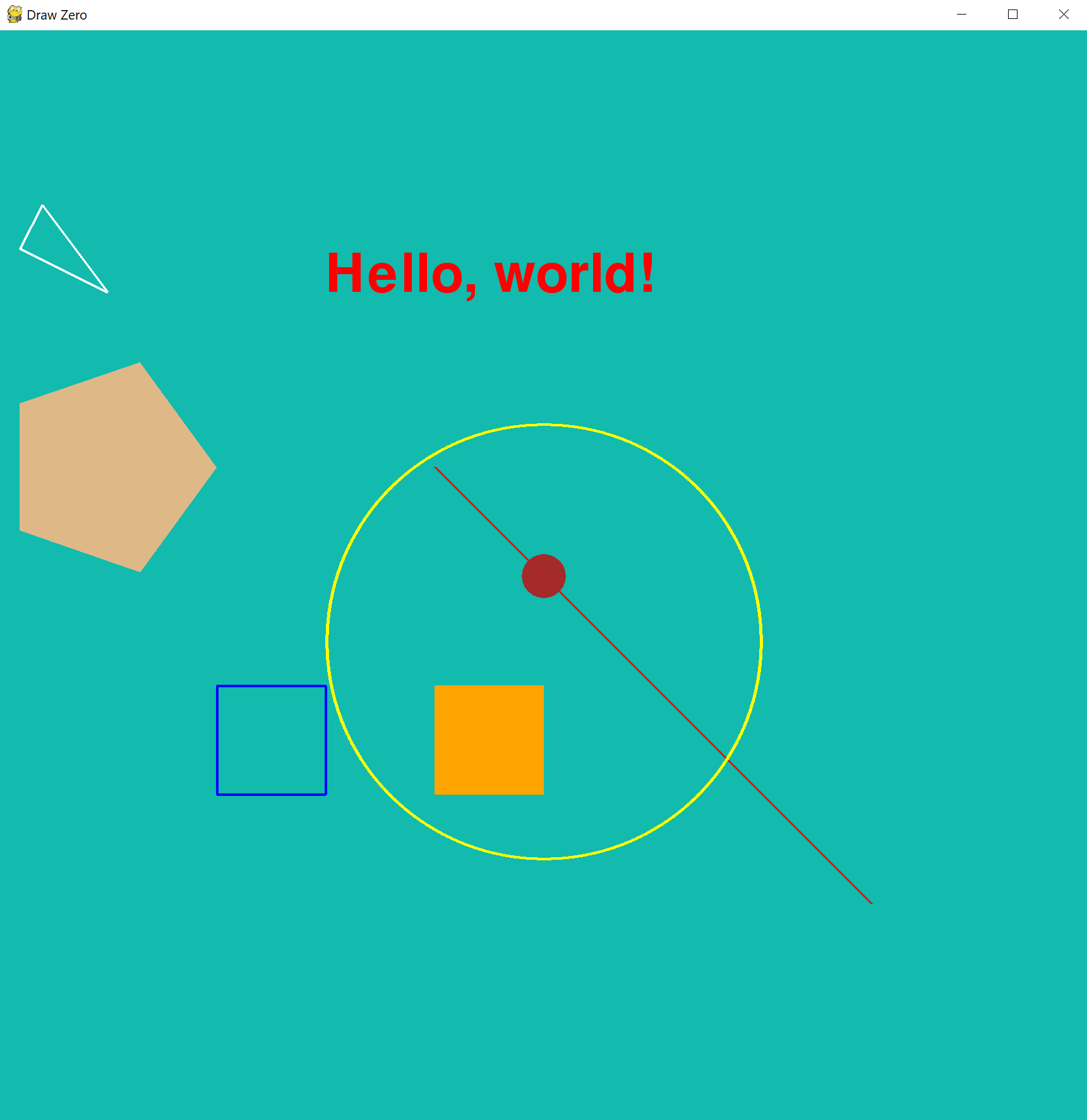
fill('#12bbae')
line('red', (400, 400), (800, 800))
circle('yellow', (500, 560), 200)
filled_circle('brown', (500, 500), 20)
text('red', 'Hello, world!', (300, 200), 72)
rect('blue', (200, 600), 100, 100)
filled_rect('orange', (400, 600), 100, 100)
polygon('white', [(20, 200), (100, 240), (40, 160)])
filled_polygon('burlywood', 200, 400, 130, 304, 20, 342, 20, 458, 130, 496, )
Animation
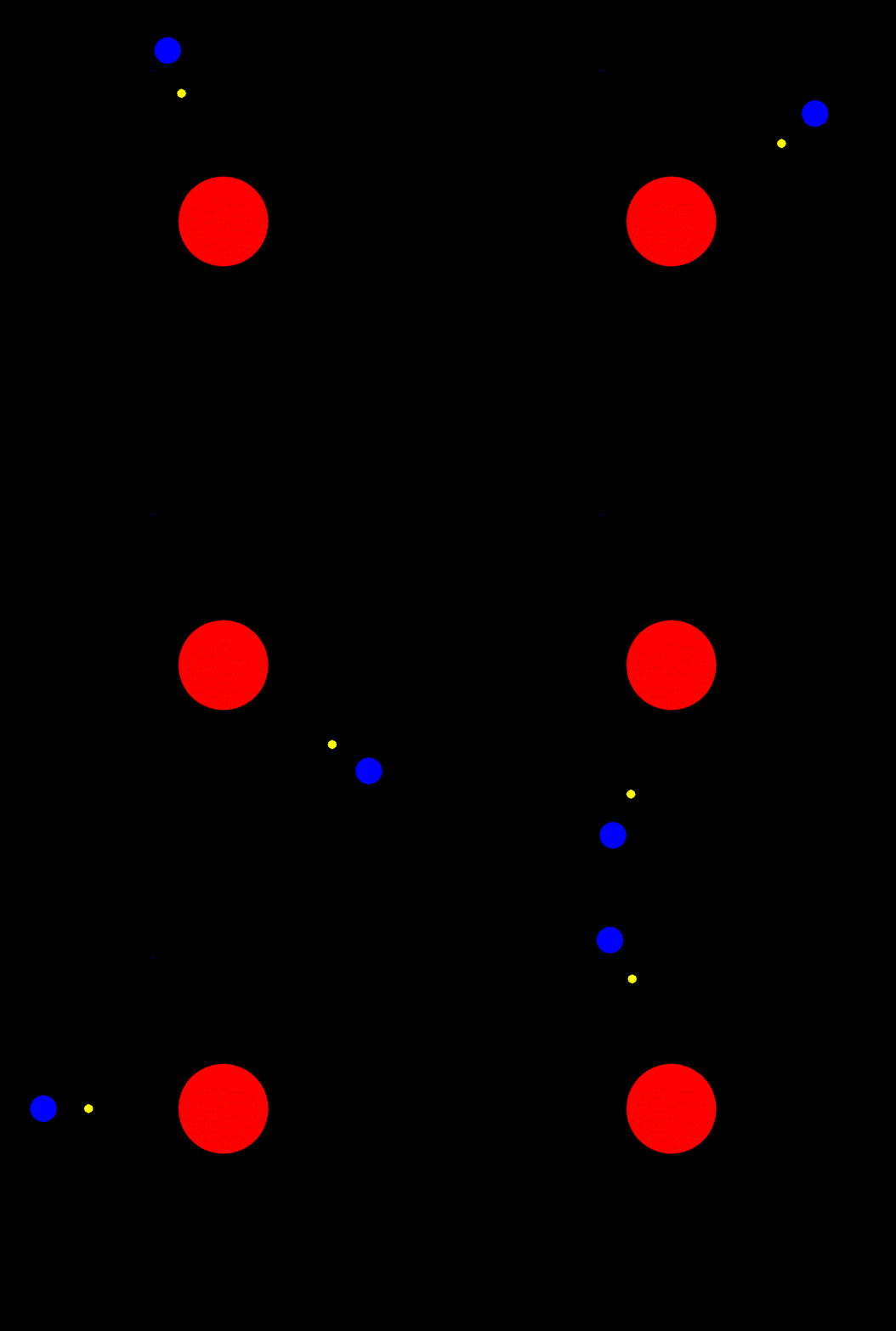
Animations are also straightforward:
from drawzero import *
from math import sin, cos, pi

earth_orbit = 400
earth_radius = 30
earth_rot_step = 2 * pi / 360
moon_orbit = 100
moon_radius = 10
moon_rot_step = 2 * pi / 60

i = 0
while True:
    i += 1
    e_x = 500 + earth_orbit * cos(earth_rot_step * i)
    e_y = 500 + earth_orbit * sin(earth_rot_step * i)
    m_x = e_x + moon_orbit * cos(moon_rot_step * i)
    m_y = e_y + moon_orbit * sin(moon_rot_step * i)

    clear()
    filled_circle(C.red, (500, 500), 100)
    filled_circle(C.blue, (e_x, e_y), earth_radius)
    filled_circle(C.yellow, (m_x, m_y), moon_radius)
    tick()
Point class which acts like 2-d vector and Turtle both
from drawzero import *

# just coordinates
A = Pt(100, 100)
B = Pt(300, 150)
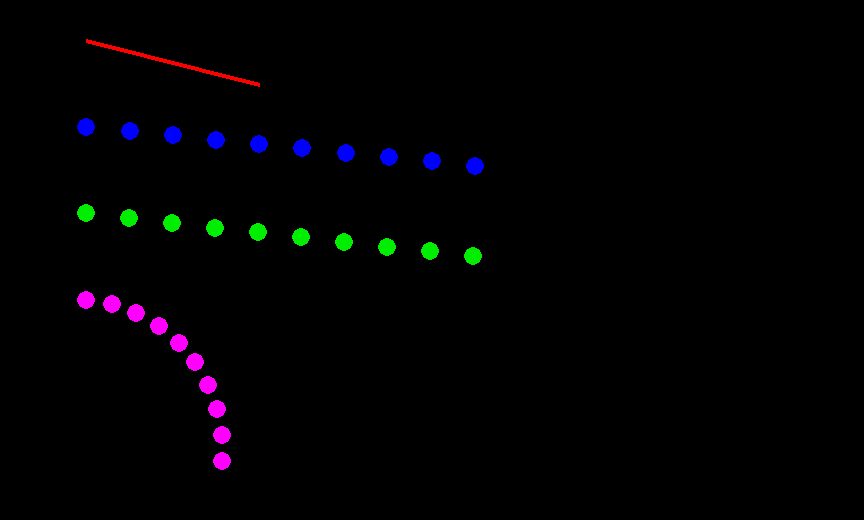
line(C.red, A, B)

# A point which acts as 2-d vector and as a Turtle
# Pt(x=0.0, y=0.0, *, heading=0.0)
#
# Provides (for a, b — points, k number):
#   * arithmetic
#     a+b — vector addition
#     a-b — vector subtraction
#     k*a and a*k — multiplication with scalar
#     abs  — absolute value of a
#     +a, -a

# arithmetic
A = Pt(100, 200)
dx = Pt(50, 5)
for i in range(10):
    filled_circle(C.blue, A + dx * i, radius=10)

#   * turtle-style movement
#     forward — Move the point forward by the specified distance.
#     backward — Move the point backward by distance.
#     right — Turn point right by angle degrees.
#     left — Turn point left by angle degrees.
#     goto — Move point to an absolute position.
#     rotate_around — Rotate around given point by angle degrees.
#     move_towards — Move towards the given point by the specified distance.
#     reset, home — Move point to the origin - coordinates (0,0), set heading=0
#     setx — Set the point's first coordinate to x
#     sety — Set the point's second coordinate to y
#     setheading — Set the point's heading

A = Pt(100, 300)
B = Pt(1000, 400)
for i in range(10):
    filled_circle(C.green2, A, radius=10)
    A.move_towards(50, B)

A = Pt(100, 400)
for i in range(10):
    filled_circle(C.magenta, A, radius=10)
    A.left(10).forward(30)

#   * information
#     position — Return the point's current location (x,y), as a tuple.
#     x, xcor — Return the point's x coordinate.
#     y, ycor — Return the point's y coordinate
#     heading — Return the point's heading
#     distance — Return the distance between points
#     towards — Return the angle towards point
#   * deep copy
#     copy — a clone of point
Transparency
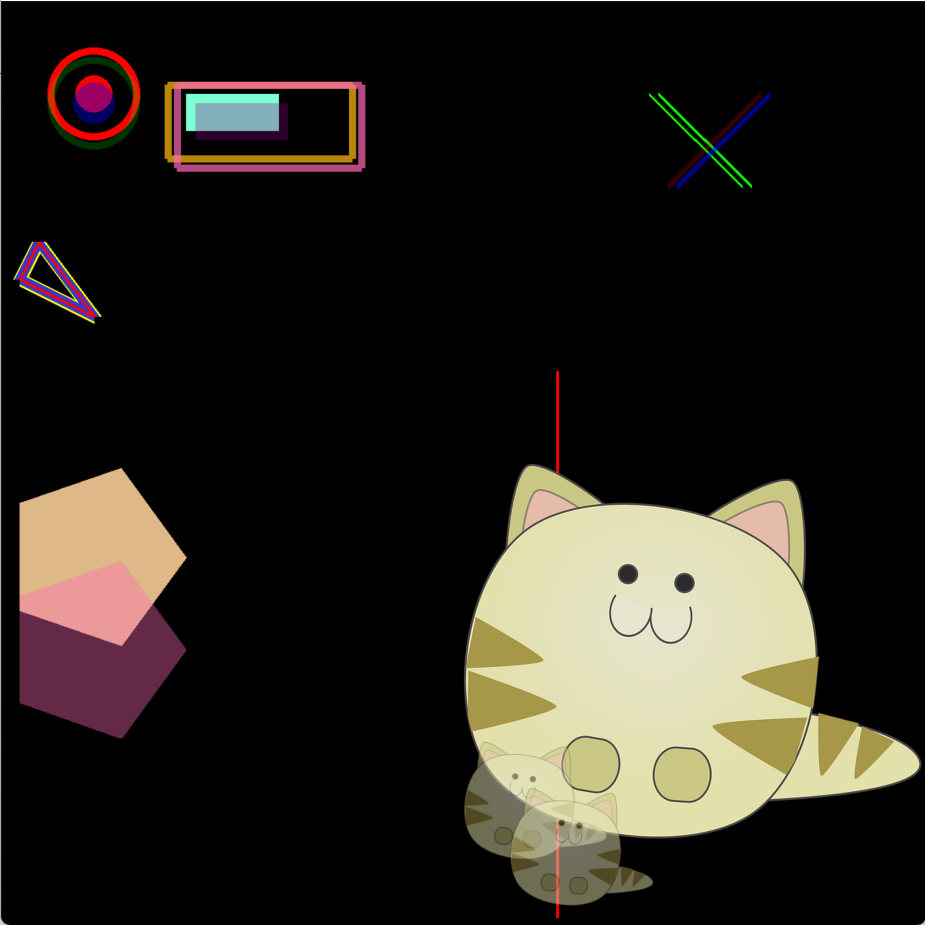
Transparency is also straightforward via alpha parameter or RGBA color:
from drawzero import *

clear()
fill(C.black)

filled_circle('red', (100, 100), 20)
filled_circle('blue', (100, 110), 22, alpha=100)  # <-- alpha
circle('red', (100, 100), 50, line_width=10)
circle((0, 255, 0, 50), (100, 110), 50, line_width=10)  # <-- RGBA
...
Full code for transparency and line width example
from drawzero import *

clear()
fill(C.black)

filled_circle('red', (100, 100), 20)
filled_circle('blue', (100, 110), 22, alpha=100)
circle('red', (100, 100), 50, line_width=10)
circle((0, 255, 0, 50), (100, 110), 50, line_width=10)
filled_rect(C.aquamarine, (200, 100), 100, 40)
filled_rect(C.darkmagenta, (210, 110), 100, 40, alpha=80)
rect(C.darkgoldenrod, (180, 90), 200, 80, line_width=10)
rect(C.hotpink, (190, 90), 200, 90, alpha=180, line_width=10)

line('red', 600, 400, 600, 990)
image('cat.png', (500, 500))
image('cat.png', (500, 800), width=200, alpha=128)
image('cat.png', (550, 850), width=200, alpha=128)

polygon('yellow', [(20, 300), (100, 340), (40, 260)], line_width=20)
polygon((0, 0, 255, 200), [(20, 300), (100, 340), (40, 260)], line_width=15)
polygon('red', [(20, 300), (100, 340), (40, 260)])

filled_polygon('burlywood', 200, 600, 130, 504, 20, 542, 20, 658, 130, 696)
filled_polygon(C.hotpink, 200, 700, 130, 604, 20, 642, 20, 758, 130, 796, alpha=100)

line(C.green, (700, 100), (800, 200))
line(C.green, (710, 100), (810, 200), line_width=5)
line(C.red, (820, 100), (720, 200), line_width=10, alpha=50)
line(C.blue, (830, 100), (730, 200), line_width=10, alpha=128)
Color gradients
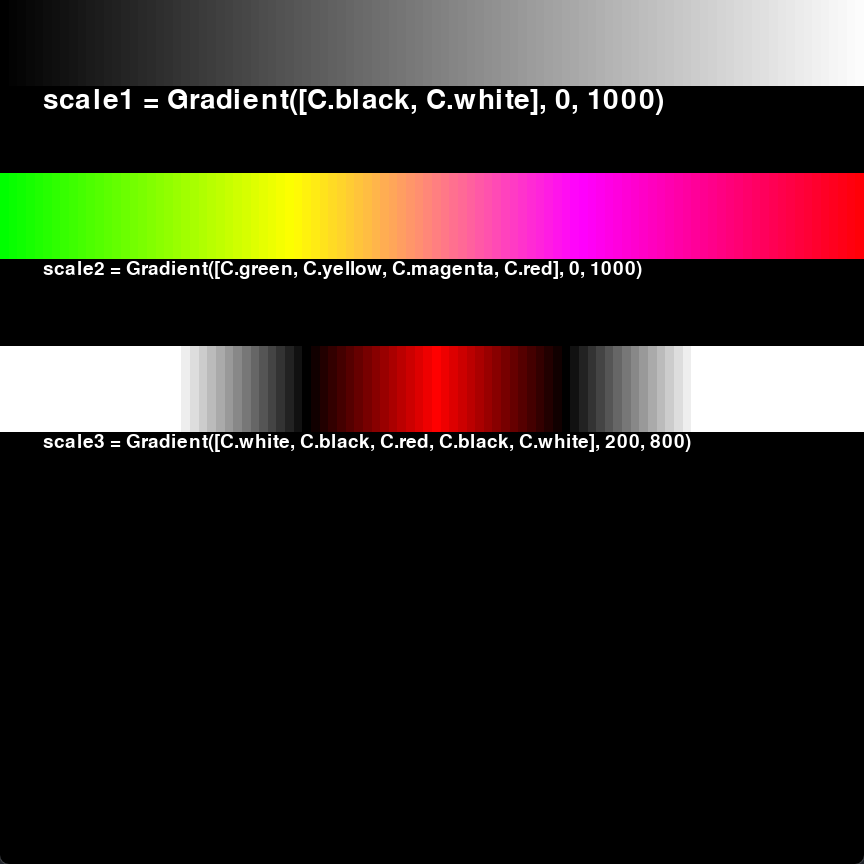
from drawzero import *


scale1 = Gradient([C.black, C.white], 0, 1000)
for x in range(0, 1000, 10):
    filled_rect(scale1(x), (x, 0), 10, 100)
text(C.white, 'scale1 = Gradient([C.black, C.white], 0, 1000)', (50, 100), 48, '<^')

scale2 = Gradient([C.green, C.yellow, C.magenta, C.red], 0, 1000)
for x in range(0, 1000, 10):
    filled_rect(scale2(x), (x, 200), 10, 100)
text(C.white, 'scale2 = Gradient([C.green, C.yellow, C.magenta, C.red], 0, 1000)', (50, 300), 32, '<^')

scale3 = Gradient([C.white, C.black, C.red, C.black, C.white], 200, 800)
for x in range(0, 1000, 10):
    filled_rect(scale3(x), (x, 400), 10, 100)
text(C.white, 'scale3 = Gradient([C.white, C.black, C.red, C.black, C.white], 200, 800)', (50, 500), 32, '<^')
Keyboard and mouse events
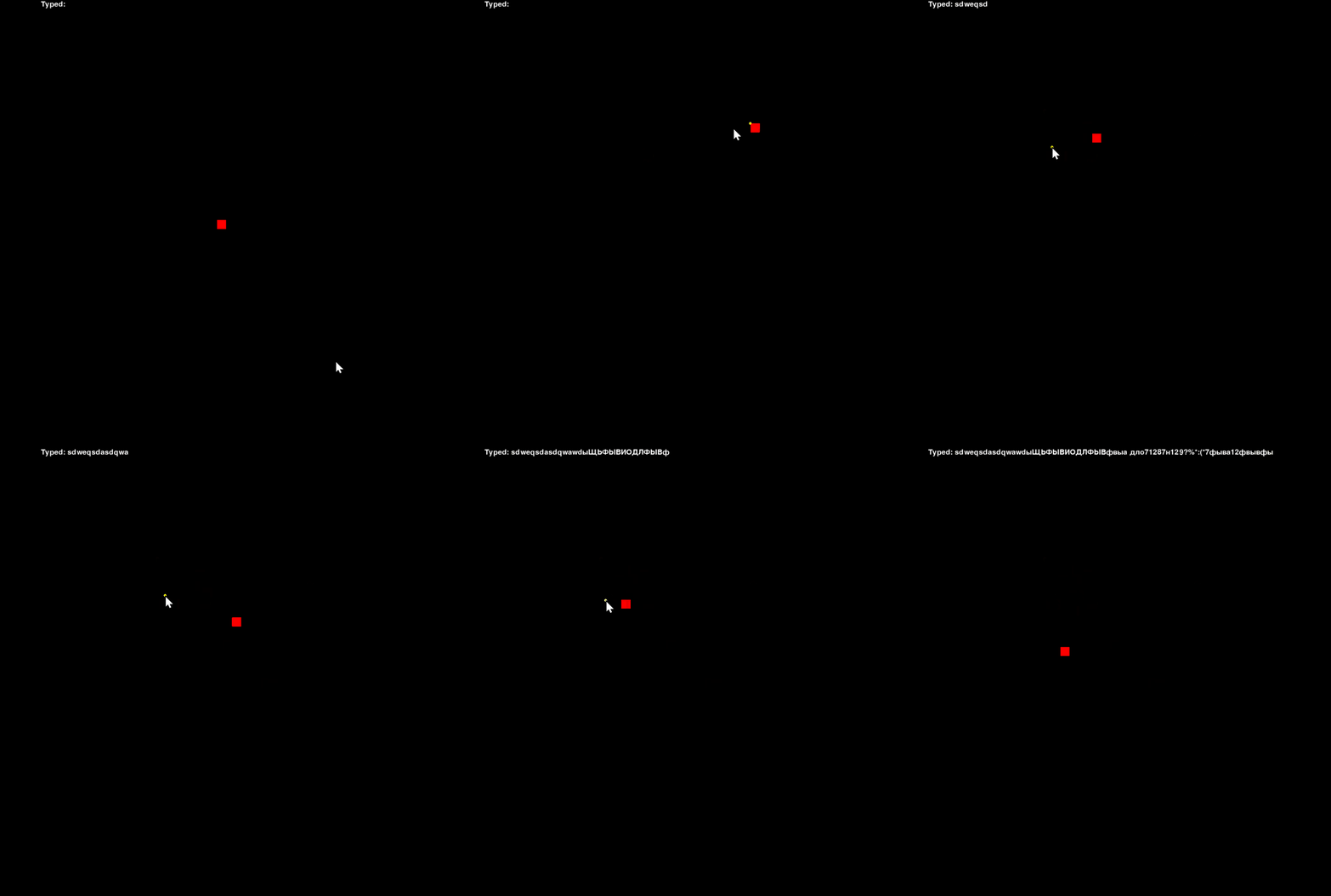
Process keyboard events in two ways: check if key is pressed via get_keys_pressed() or run throw keysdown or keysup events:
from drawzero import *

upper_text = 'Typed: '
SIZE = 20
x = y = 500 - SIZE // 2

while True:
    # Mouse buttons events
    if mousebuttonsdown:
        x, y = mousebuttonsdown[0].pos
    # Keys which are still pressed
    keys = get_keys_pressed()
    if keys[K.UP] or keys[K.w]:
        y -= 5
    if keys[K.DOWN] or keys[K.s]:
        y += 5
    if keys[K.LEFT] or keys[K.a]:
        x -= 5
    if keys[K.RIGHT] or keys[K.d]:
        x += 5
    # Keyboard events
    for ev in keysdown:
        if ev.unicode:
            upper_text += ev.unicode

    # Redraw everything
    clear()
    filled_rect(C.red, x, y, SIZE, SIZE)
    text(C.white, upper_text, (100, 5))
    filled_circle(C.yellow, mouse_pos(), 3)
    tick()
Installation
In a Terminal window, type:
pip install drawzero --upgrade --user
Or run the following program:
import os, sys
python = sys.executable
user = '--user' if 'venv' not in python and 'virtualenvs' not in python else ''
cmd = f'"{python}" -m pip install drawzero --upgrade {user}'
os.system(cmd)
from drawzero import *
Contributing
Release history Release notifications | RSS feed


Download files
Download the file for your platform. If you're not sure which to choose, learn more about installing packages.
Source Distribution
Built Distribution
Filter files by name, interpreter, ABI, and platform.
If you're not sure about the file name format, learn more about wheel file names.
Copy a direct link to the current filters
File details
Details for the file drawzero-0.6.0.tar.gz.
File metadata
- Download URL: drawzero-0.6.0.tar.gz
- Upload date:
- Size: 4.8 MB
- Tags: Source
- Uploaded using Trusted Publishing? No
- Uploaded via: uv/0.9.4
File hashes
| Algorithm | Hash digest | |
|---|---|---|
| SHA256 |
b1692768f016141c7d597f58c60179a2a5f7530859369daa07b2539734713a86
|
|
| MD5 |
50f526bd9bd122d9472e42aeaece1a64
|
|
| BLAKE2b-256 |
2e7fad324365bba07a599f0c68c69e02eb8dae0cb7acd7f522bfd0bc7d10085d
|
File details
Details for the file drawzero-0.6.0-py3-none-any.whl.
File metadata
- Download URL: drawzero-0.6.0-py3-none-any.whl
- Upload date:
- Size: 174.5 kB
- Tags: Python 3
- Uploaded using Trusted Publishing? No
- Uploaded via: uv/0.9.4
File hashes
| Algorithm | Hash digest | |
|---|---|---|
| SHA256 |
7cac10d4e74b58ac6aaaadfd3d8f87ee600f94fc7232f631e7c5d31642d491fc
|
|
| MD5 |
d6e116759bd81ee418b36f9d1fa6db0c
|
|
| BLAKE2b-256 |
9538f5e9129e964793e0280e58a2e0e09822019e40c5133892c5aa8e0a5e4993
|






