
Dynamic Range Analyzer - Fight the Loudness War

Project description
DR Check - Dynamic Range Analyzer


DR Check is a modern, fast, and accurate tool for measuring the dynamic range (DR) of audio files using the DR14 algorithm. Built from the ground up in Python, it provides professional-grade analysis with beautiful output formats.
Fight the Loudness War by analyzing and comparing the dynamic range of your music collection!
✨ Features
- 🎯 Accurate DR14 Calculation - Validated against professional tools (foobar2000 DR Meter)
- 📁 Multiple Audio Formats - FLAC, WAV, MP3, M4A, OGG, AIFF, and more
- 🎨 Beautiful HTML Reports - Modern, responsive design with automatic album art extraction
- 📊 Multiple Output Formats - Text tables, BBCode (for forums), CSV, and HTML
- 🔍 Batch Processing - Analyze entire albums or recursively scan music libraries
- ⚡ Parallel Processing - Multi-core support for high-speed library analysis
- 🎵 Metadata Support - Extracts artist, album, sample rate, bit depth, and format info
- ⚡ Fast & Modern - Clean Python 3.10+ codebase with type hints
- 🧪 Well Tested - Comprehensive test suite with 81+ passing tests
📸 Screenshots
Text Output
DR Check - Dynamic Range Analyzer v1.1.0
log date: 2026-01-10 10:40:05

--------------------------------------------------------------------------------
Analyzed: Willie Nelson / Red Headed Stranger
--------------------------------------------------------------------------------

DR     Peak           RMS            Duration  Track
--------------------------------------------------------------------------------
DR11   -1.28 dBFS     -16.66 dBFS    2:25      01. Time Of The Preacher
DR11   -1.60 dBFS     -17.18 dBFS    1:32      02. I Couldn't Believe It Was True
DR11   -0.16 dBFS     -16.93 dBFS    1:13      03. Time Of The Preacher Theme
DR14   -3.38 dBFS     -20.01 dBFS    1:35      04. Medley- Blue Rock Montana - Red Headed Stranger
DR11   -2.00 dBFS     -16.81 dBFS    2:21      05. Blue Eyes Crying In The Rain
DR12   -1.10 dBFS     -16.32 dBFS    3:59      06. Red Headed Stranger
DR12   -4.35 dBFS     -19.44 dBFS    0:26      07. Time Of The Preacher Theme
DR11   -1.91 dBFS     -19.03 dBFS    1:48      08. Just As I Am
DR12   -2.55 dBFS     -18.47 dBFS    0:53      09. Denver
DR12   -6.14 dBFS     -21.08 dBFS    0:47      10. O'er The Waves
DR11   -3.83 dBFS     -17.57 dBFS    1:56      11. Down Yonder
DR12   -2.12 dBFS     -18.11 dBFS    5:23      12. Can I Sleep In Your Arms
DR11   -1.60 dBFS     -15.38 dBFS    2:52      13. Remember Me (When The Candle Lights Are Gleaming)
DR12   -0.65 dBFS     -15.98 dBFS    4:22      14. Hands On The Wheel
DR11   -3.52 dBFS     -18.10 dBFS    2:15      15. Bandera
--------------------------------------------------------------------------------

Number of tracks:  15
Official DR value: DR12

Samplerate:        96000 Hz
Channels:          2
Bits per sample:   24
Bitrate:           4608 kbps
Codec:             FLAC
================================================================================
HTML Output
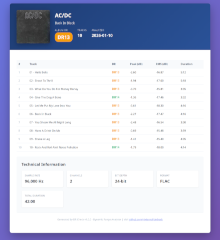
Beautiful, modern reports with:
- Album artwork (automatically extracted)
- Color-coded DR values (green/orange/red)
- Responsive design for desktop and mobile
- Complete technical information
- Professional styling
🚀 Quick Start
Installation
PyPi
# pip
pip install drcheck

# pipx
pipx install drcheck
Local git checkout w/ uv
# Clone the repository
git clone https://github.com/nixternal/drcheck.git
cd drcheck

# Install with uv (recommended)
uv pip install -e .

# Or with pip
pip install -e .
Basic Usage
# Analyze a single file
drcheck analyze song.flac

# Analyze an entire album
drcheck analyze /path/to/album/

# Recursive scan of music library
drcheck analyze -r /path/to/music/library/

# Save results to file
drcheck analyze album/ --save

# Generate HTML report
drcheck analyze album/ --save --format html
📖 Usage Guide
Commands
analyze
Analyze audio files and calculate DR14 values.
drcheck analyze [OPTIONS] PATHS...
Options:
-r, --recursive- Recursively scan subdirectories--show-channels- Show per-channel DR values for stereo files--save- Save results to file-o, --output DIR- Output directory (default: source directory)--format FORMAT- Output format:text,bbcode,csv,html(default: text)--filename NAME- Output filename (default: dr.txt, auto-adjusts extension)-j, --workers N- Number of parallel workers (auto-selects based on job size)
Examples:
# Single file analysis
drcheck analyze mysong.flac

# Album analysis with text output
drcheck analyze album_folder/

# Save as HTML report
drcheck analyze album/ --save --format html

# Recursive scan, save as CSV
drcheck analyze -r music_library/ --save --format csv -o ~/reports/

# Show per-channel DR values
drcheck analyze stereo_file.flac --show-channels

# Multiple paths
drcheck analyze album1/ album2/ single.flac

# Parallel processing with 4 workers
drcheck analyze -r music_library/ -j 4
scan
Preview files that would be analyzed without processing them.
drcheck scan [OPTIONS] PATH
Options:
-r, --recursive- Recursively scan subdirectories
Example:
drcheck scan -r /music/library/
formats
List all supported audio formats.
drcheck formats
Output Formats
Text (default)
Clean ASCII tables suitable for terminals and text files.
drcheck analyze album/ --save --format text
HTML
Beautiful, modern reports with album art and color-coded DR values.
drcheck analyze album/ --save --format html
Features:
- Automatic album art extraction (from files or folder images)
- Responsive design (mobile-friendly)
- Color-coded DR values
- Complete technical information
- Self-contained (single HTML file)
BBCode
Formatted for posting on audio forums.
drcheck analyze album/ --save --format bbcode
CSV
Spreadsheet-compatible format for data analysis.
drcheck analyze album/ --save --format csv
Or pipe directly:
drcheck analyze album/ --format csv > results.csv
🎵 Supported Audio Formats
Lossless (via libsndfile):
- FLAC (.flac)
- WAV (.wav)
- AIFF (.aiff, .aif, .aifc)
- OGG Vorbis (.ogg, .oga)
- Opus (.opus)
Lossy (requires pydub + ffmpeg):
- MP3 (.mp3)
- M4A/AAC (.m4a, .mp4, .aac)
- WMA (.wma)
To enable MP3/M4A support:
# Install pydub
uv pip install pydub

# Install ffmpeg (system package)
# Ubuntu/Debian:
sudo apt install ffmpeg

# macOS:
brew install ffmpeg

# Arch Linux:
sudo pacman -S ffmpeg
🔬 Understanding DR Values
The DR (Dynamic Range) scale measures the difference between the loudest and average loudness of an audio track:
| DR Value | Quality | Description |
|---|---|---|
| DR14+ | 🟢 Excellent | Wide dynamic range, natural sound |
| DR8-13 | 🟡 Good | Moderate compression, still enjoyable |
| DR0-7 | 🔴 Poor | Heavily compressed, "loudness war" victim |
Note: Higher DR doesn't always mean "better" - it depends on the genre and artistic intent. Classical and jazz typically have DR14+, while modern pop/rock often ranges from DR6-10.
🧪 Development
Running Tests
# Install dev dependencies
uv pip install pytest pytest-cov

# Run all tests
pytest tests/ -v

# Run with coverage report
pytest tests/ --cov=drcheck --cov-report=html

# Run specific test file
pytest tests/test_analysis.py -v
Project Structure
drcheck/
├── drcheck/              # Main package
│   ├── __init__.py
│   ├── analysis.py       # Core DR14 calculation
│   ├── audio.py          # Audio file reading
│   ├── cli.py            # Command-line interface
│   ├── formatters.py     # Output formatting
│   └── parallel.py       # Parallel processing
├── tests/                # Test suite
│   ├── test_analysis.py
│   ├── test_audio.py
│   ├── test_formatters.py
│   └── test_parallel.py
├── README.md
└── pyproject.toml
Code Quality
- ✅ Full type hints (pyright compliant)
- ✅ Modern Python 3.10+ features
- ✅ Comprehensive test coverage (81+ tests)
- ✅ Clean, documented code
- ✅ Follows Python best practices
🤝 Contributing
Contributions are welcome! Please feel free to submit a Pull Request.
Guidelines
- Fork the repository
- Create a feature branch (
git checkout -b feature/amazing-feature) - Make your changes
- Add tests for new functionality
- Ensure all tests pass (
pytest tests/) - Commit your changes (
git commit -m 'Add amazing feature') - Push to the branch (
git push origin feature/amazing-feature) - Open a Pull Request
📝 License
This project is licensed under the GNU General Public License v3.0 - see the LICENSE file for details.
🙏 Acknowledgments
- Based on the DR14 algorithm by the Pleasurize Music Foundation
- Inspired by the original dr14_t.meter by Simone Riva
- Validated against the foobar2000 DR Meter plugin
🔗 Related Resources
- Dynamic Range Database - Browse DR values for albums
- Pleasurize Music Foundation - Learn about the DR measurement
- Loudness War - Wikipedia article on the loudness war
📧 Contact
- Issues: GitHub Issues
- Discussions: GitHub Discussions
Made with ❤️ for music lovers who care about sound quality
Release history Release notifications | RSS feed


Download files
Download the file for your platform. If you're not sure which to choose, learn more about installing packages.
Source Distribution
Built Distribution
Filter files by name, interpreter, ABI, and platform.
If you're not sure about the file name format, learn more about wheel file names.
Copy a direct link to the current filters
File details
Details for the file drcheck-1.1.0.tar.gz.
File metadata
- Download URL: drcheck-1.1.0.tar.gz
- Upload date:
- Size: 81.2 kB
- Tags: Source
- Uploaded using Trusted Publishing? No
- Uploaded via: twine/6.2.0 CPython/3.10.19
File hashes
| Algorithm | Hash digest | |
|---|---|---|
| SHA256 |
817f4440681b90b0f8f4dd7a6be3144ef3ec51964be6cf6773a84e166662566d
|
|
| MD5 |
509424510f22112d7eca7d754d8b12cf
|
|
| BLAKE2b-256 |
4d4d15638c9df5cdba9f5decd1b6929ee91eaa157bbe06e38e7375736b2f1086
|
File details
Details for the file drcheck-1.1.0-py3-none-any.whl.
File metadata
- Download URL: drcheck-1.1.0-py3-none-any.whl
- Upload date:
- Size: 36.2 kB
- Tags: Python 3
- Uploaded using Trusted Publishing? No
- Uploaded via: twine/6.2.0 CPython/3.10.19
File hashes
| Algorithm | Hash digest | |
|---|---|---|
| SHA256 |
e25855ae613d8bbf27d8290e05ca8f6d9992682ec0f7a3f00fce93899aa48673
|
|
| MD5 |
33373da550dc364d6bb0d3941fb5aa75
|
|
| BLAKE2b-256 |
aab37bfb3c3b436300fdc17767d7d9c88fda638741d722f63c9c42929af71dac
|






