
Generate Markdown API docs from Django/DRF OpenAPI schema for MkDocs
Verified details
These details have been verified by PyPIProject links
GitHub Statistics
Maintainers

Project description
DRF to MkDocs
Unlock effortless API documentation for your Django REST Framework project. Automatically generate beautiful, interactive, and maintainable docs that accelerate developer onboarding and streamline your team's workflow.
Why DRF to MkDocs?
DRF to MkDocs bridges the gap between your API's OpenAPI schema and user-friendly, maintainable documentation. It introspects your Django models and DRF views to automatically generate a polished, feature-rich documentation site that stays in sync with your codebase, empowering your team to build better APIs, faster.
- Effortless Documentation: Automate the entire process of generating and updating your API docs. Say goodbye to manual work and outdated information.
- Accelerate Onboarding: Provide new joiners with interactive, easy-to-navigate documentation. The "Try-it-out" feature and clear model relationships help them become productive from day one.
- Deeply Integrated with DRF: Leverages
drf-spectacularfor accurate schema generation, ensuring your documentation is a true reflection of your API. - Enhance Developer Experience: Features like the interactive API console and in-depth model pages streamline development, testing, and debugging for the entire team.
- Beautiful & Professional: Built on MkDocs with the Material theme for a clean, modern, and responsive UI that you'll be proud to share.
Gallery
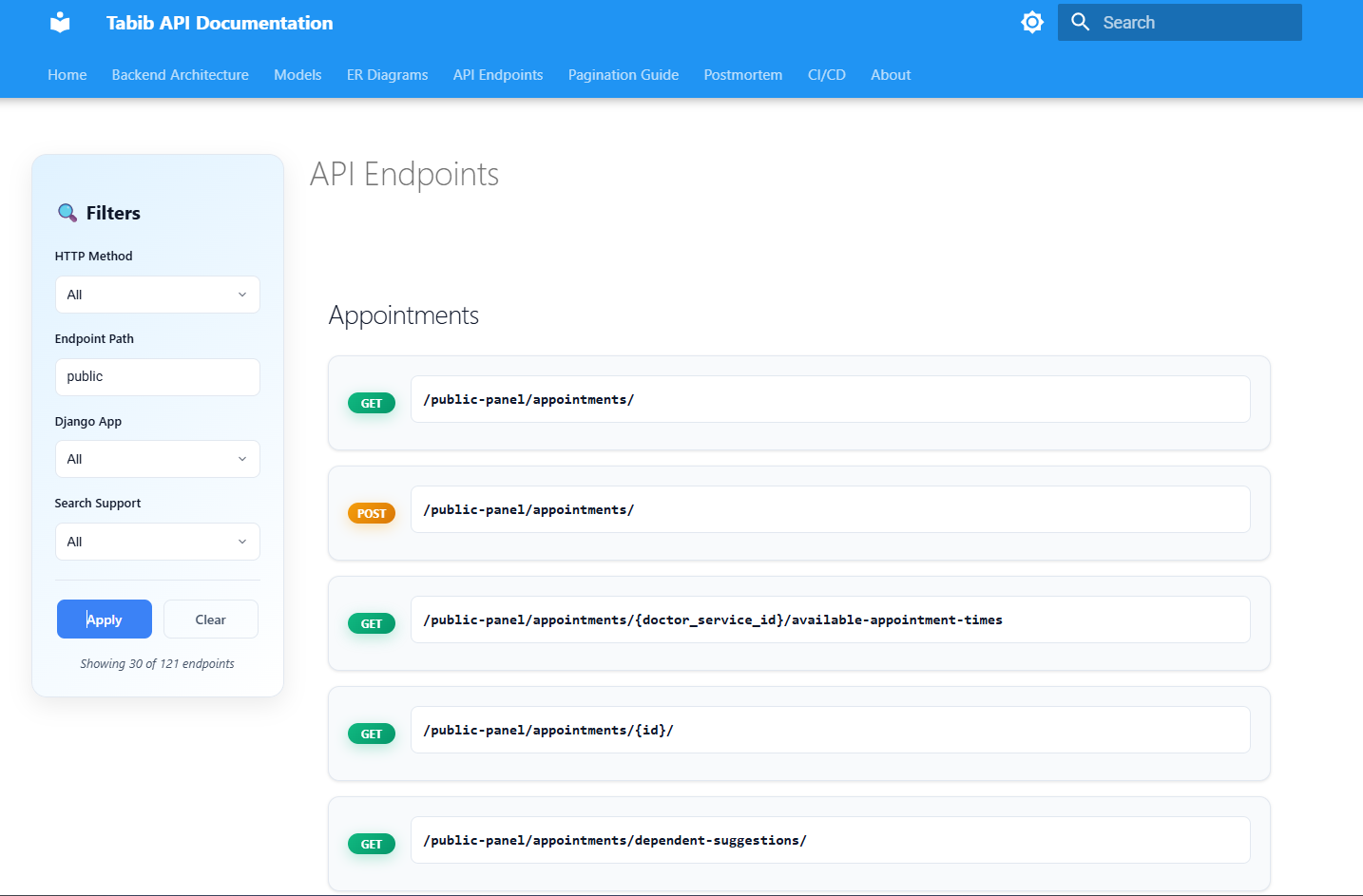
🚀 Interactive Endpoint List & Filtering
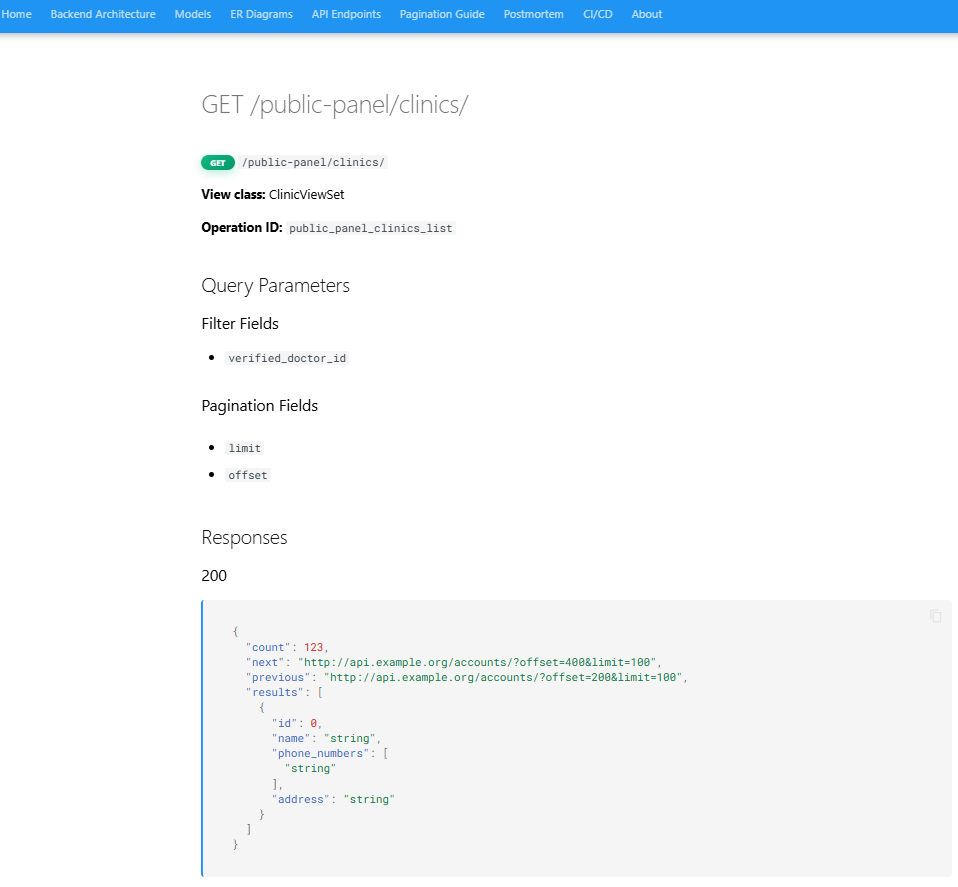
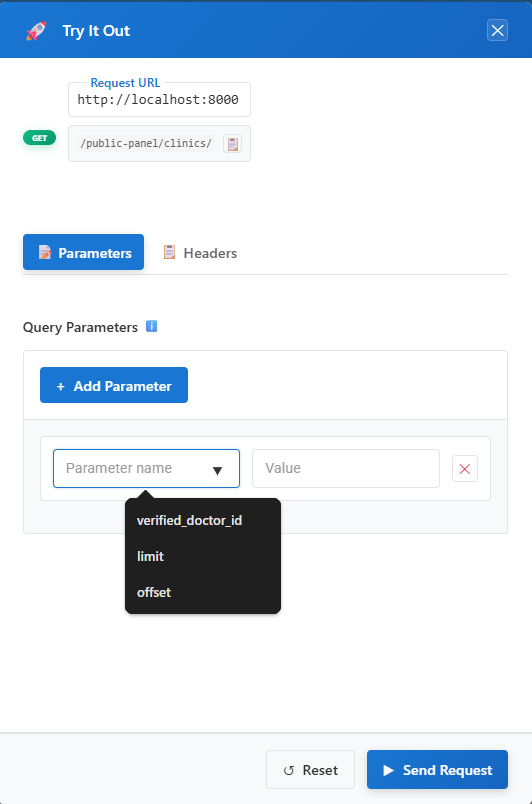
🔬 Detailed Endpoint View with "Try-it-out"
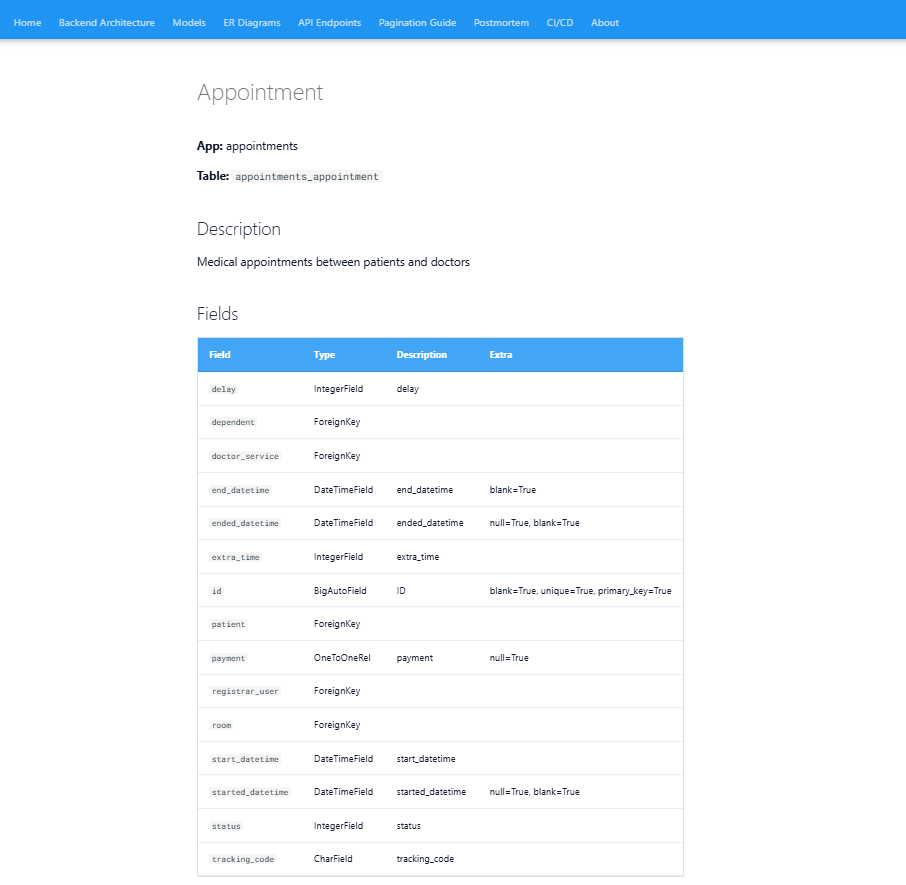
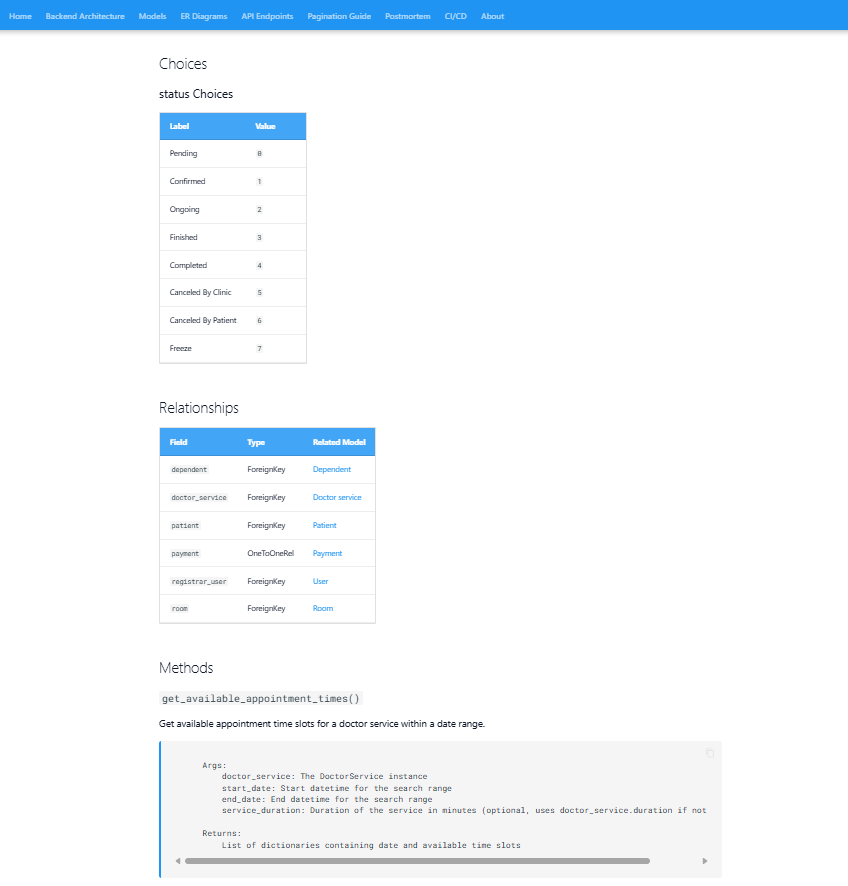
📚 Rich Model Documentation
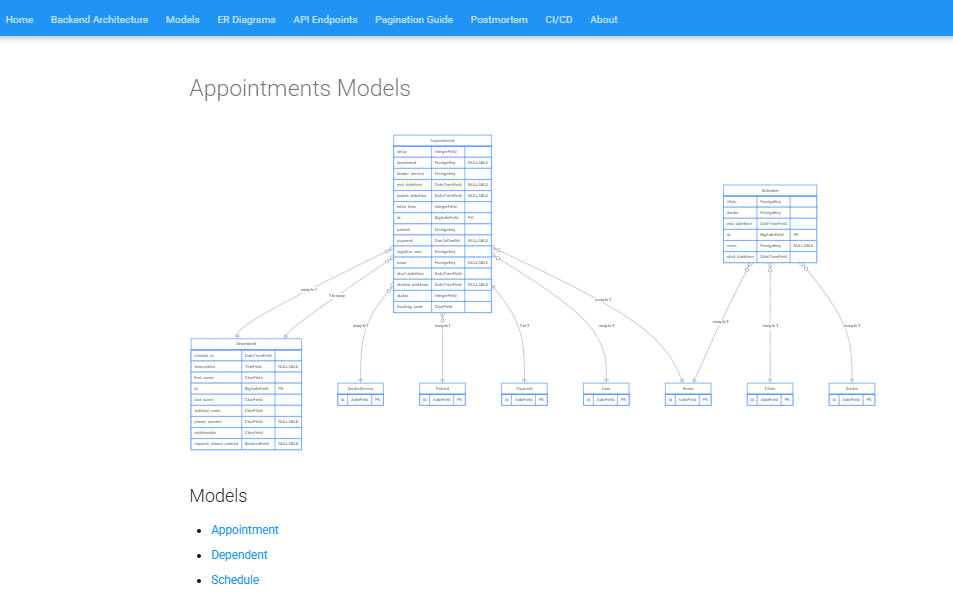
📈 Entity-Relationship Diagrams
Key Features
| Feature | Description |
|---|---|
| 🚀 Interactive API Console | Test endpoints directly from the documentation with a "Try-it-out" feature, complete with a request builder and response viewer. |
| 🔍 Advanced Filtering & Search | Instantly find endpoints with multi-criteria filtering by app, method, path, and a real-time search. |
| 📚 In-Depth Model Pages | Automatically generate detailed pages for each model, including fields, relationships, choices, and methods. |
| 📊 Entity-Relationship Diagrams | Visualize model relationships with auto-generated, interactive ER diagrams for each app and for the entire project. |
| 🎨 Modern & Responsive UI | A beautiful and intuitive interface powered by MkDocs Material, featuring light/dark themes and full mobile support. |
| 🔧 Highly Customizable | Override templates, configure settings, and use custom functions to tailor the documentation to your project's specific needs. |
| ⚙️ Simple Integration | Works seamlessly with existing DRF projects and drf-spectacular without requiring complex setup. |
| 🤖 AI-Powered Enhancements | (Working on it...) Leverage AI to generate smarter examples and more descriptive documentation for your API. |
Getting Started
1. Installation
pip install drf-to-mkdoc
2. Configure Your Django Project
In your settings.py:
# settings.py

INSTALLED_APPS = [
    # ... your other apps
    'drf_to_mkdoc',
    'drf_spectacular',  # Required for schema generation
]

# Required for OpenAPI schema generation
REST_FRAMEWORK = {
    'DEFAULT_SCHEMA_CLASS': 'drf_to_mkdoc.utils.schema.AutoSchema',
}

SPECTACULAR_SETTINGS = {
    'TITLE': 'Your API',
    'DESCRIPTION': 'Your API description',
    'VERSION': '1.0.0',
    # Optional: Override enum names to resolve naming collisions
    # If you see warnings about enum naming collisions (e.g., "Type909Enum"),
    # add entries here to provide custom names for your enums
    # 'ENUM_NAME_OVERRIDES': {
    #     'Type909Enum': 'YourCustomEnumName',
    # },
}

# DRF to MkDocs specific settings
DRF_TO_MKDOC = {
    'DJANGO_APPS': [
        'users',
        'products',
        # ... list all apps you want to document
    ],
}
3. Create MkDocs Configuration
Create an mkdocs.yml file in your project root. You can start with the default configuration and customize it.
4. Build Your Documentation
python manage.py build_docs
For more detailed instructions, see the full Installation and Setup Guide.
Usage and Customization
Building Your Documentation
To build the entire documentation site, run the following command. This will generate a static site in your site/ directory.
python manage.py build_docs
For more granular control, DRF to MkDocs provides several commands, such as build_endpoint_docs and build_model_docs.
Serving Docs with Django
You can serve your documentation directly from your Django application, protecting it with Django's authentication system. This is ideal for private or internal APIs.
For a complete guide, see Serving Docs with Django.
Customizing the OpenAPI Schema
DRF to MkDocs allows you to override and extend the auto-generated OpenAPI schema by providing a custom JSON file. This gives you fine-grained control over the final documentation, enabling you to add examples, descriptions, or even custom endpoints.
For more details, refer to the Customizing Endpoints guide.
Best Practices
For better project organization, we recommend creating a separate docs_settings.py for documentation-specific configurations and using the --settings flag:
python manage.py build_docs --settings=my_project.docs_settings
This keeps your production settings clean and your documentation configuration isolated.
Configuration
You can customize the behavior of DRF to MkDocs by configuring the DRF_TO_MKDOC dictionary in your settings file.
| Key | Description | Default |
|---|---|---|
DJANGO_APPS (required) |
A list of Django app names to process. | [] |
DOCS_DIR |
The base directory where documentation will be generated. | 'docs' |
ER_DIAGRAMS_DIR |
The directory for ER diagrams, relative to DOCS_DIR. |
'er_diagrams' |
FIELD_GENERATORS |
Custom field value generators for creating better examples. | {} |
ENABLE_AI_DOCS |
A flag to enable AI-powered documentation features. | False |
PATH_PARAM_SUBSTITUTE_FUNCTION |
A custom function for substituting path parameters in URLs. | None |
PATH_PARAM_SUBSTITUTE_MAPPING |
A mapping for substituting common path parameters (e.g., {'pk': 1}). |
{} |
How It Works
DRF to MkDocs operates in a few stages:
- Model Introspection: It deeply analyzes your Django models, mapping out their fields, relationships (like ForeignKeys and ManyToManyFields), and metadata.
- Schema Generation: It uses
drf-spectacularto generate a detailed OpenAPI schema for your API endpoints. - Template Rendering: It renders Jinja2 templates for each endpoint, model, and ER diagram, creating Markdown files.
- MkDocs Build: Finally, it invokes MkDocs to build a static HTML site from the generated Markdown files.
This process ensures that your documentation is always an accurate and comprehensive reflection of your codebase.
Contributing
Contributions are welcome! Whether it's a bug report, a new feature, or an improvement to the documentation, we appreciate your help. To ensure code quality, we use CoderabbitAI for automated code reviews on all pull requests.
Please see our Contributing Guidelines to get started.
Development Setup
git clone https://github.com/Shayestehhs/drf-to-mkdoc.git
cd drf-to-mkdoc
pip install -e ".[dev]"
License
This project is licensed under the MIT License - see the LICENSE file for details.
Project details
Verified details
These details have been verified by PyPIProject links
GitHub Statistics
Maintainers
Release history Release notifications | RSS feed


Download files
Download the file for your platform. If you're not sure which to choose, learn more about installing packages.
Source Distribution
Built Distribution
Filter files by name, interpreter, ABI, and platform.
If you're not sure about the file name format, learn more about wheel file names.
Copy a direct link to the current filters
File details
Details for the file drf_to_mkdoc-0.4.3.tar.gz.
File metadata
- Download URL: drf_to_mkdoc-0.4.3.tar.gz
- Upload date:
- Size: 160.0 kB
- Tags: Source
- Uploaded using Trusted Publishing? Yes
- Uploaded via: twine/6.1.0 CPython/3.13.7
File hashes
| Algorithm | Hash digest | |
|---|---|---|
| SHA256 |
e1a8340d6c7d45358b1857f755afef48f10255316c5b2bde298cec6da567e85f
|
|
| MD5 |
d3dd2d9ee9e11d5be2393ad44cc2288d
|
|
| BLAKE2b-256 |
fd53f9035717f058a5c4b24c6a381947abf10a926cae2681803752db170baaff
|
Provenance
The following attestation bundles were made for drf_to_mkdoc-0.4.3.tar.gz:
Publisher:
publish.yaml on ShayestehHS/drf-to-mkdoc
-
Statement:
-
Statement type:
https://in-toto.io/Statement/v1 -
Predicate type:
https://docs.pypi.org/attestations/publish/v1 -
Subject name:
drf_to_mkdoc-0.4.3.tar.gz -
Subject digest:
e1a8340d6c7d45358b1857f755afef48f10255316c5b2bde298cec6da567e85f - Sigstore transparency entry: 785148272
- Sigstore integration time:
-
Permalink:
ShayestehHS/drf-to-mkdoc@325efc3e231ea6c699c314d512f6fef351b44028 -
Branch / Tag:
refs/tags/v0.4.3 - Owner: https://github.com/ShayestehHS
-
Access:
public
-
Token Issuer:
https://token.actions.githubusercontent.com -
Runner Environment:
github-hosted -
Publication workflow:
publish.yaml@325efc3e231ea6c699c314d512f6fef351b44028 -
Trigger Event:
push
-
Statement type:
File details
Details for the file drf_to_mkdoc-0.4.3-py3-none-any.whl.
File metadata
- Download URL: drf_to_mkdoc-0.4.3-py3-none-any.whl
- Upload date:
- Size: 196.1 kB
- Tags: Python 3
- Uploaded using Trusted Publishing? Yes
- Uploaded via: twine/6.1.0 CPython/3.13.7
File hashes
| Algorithm | Hash digest | |
|---|---|---|
| SHA256 |
97ef4e6dbf6322453d5b7a89c16db74370d2d967f3e5c29fe77fd774b785538c
|
|
| MD5 |
bfbcf18d320a84a1f5e6669378a563d7
|
|
| BLAKE2b-256 |
0c97b3bd5a586d5c2390f4d86a683967627c613f5530602b333aa8acaf36d823
|
Provenance
The following attestation bundles were made for drf_to_mkdoc-0.4.3-py3-none-any.whl:
Publisher:
publish.yaml on ShayestehHS/drf-to-mkdoc
-
Statement:
-
Statement type:
https://in-toto.io/Statement/v1 -
Predicate type:
https://docs.pypi.org/attestations/publish/v1 -
Subject name:
drf_to_mkdoc-0.4.3-py3-none-any.whl -
Subject digest:
97ef4e6dbf6322453d5b7a89c16db74370d2d967f3e5c29fe77fd774b785538c - Sigstore transparency entry: 785148279
- Sigstore integration time:
-
Permalink:
ShayestehHS/drf-to-mkdoc@325efc3e231ea6c699c314d512f6fef351b44028 -
Branch / Tag:
refs/tags/v0.4.3 - Owner: https://github.com/ShayestehHS
-
Access:
public
-
Token Issuer:
https://token.actions.githubusercontent.com -
Runner Environment:
github-hosted -
Publication workflow:
publish.yaml@325efc3e231ea6c699c314d512f6fef351b44028 -
Trigger Event:
push
-
Statement type:






