
An intelligent compiler tool to convert Django Rest Framework code to Django Ninja.

Project description
🤖 DRF to Django Ninja Compiler



An intelligent, user-friendly compiler tool designed to automatically parse Django Rest Framework (DRF) code (serializers.py, views.py, urls.py, settings.py) and convert it into modern, fast Django Ninja equivalents (schemas.py, api.py).
Tired of manually migrating hundreds of legacy DRF endpoints? This tool automates the heavy lifting by leveraging Abstract Syntax Tree (AST) parsing to reverse-engineer your code.
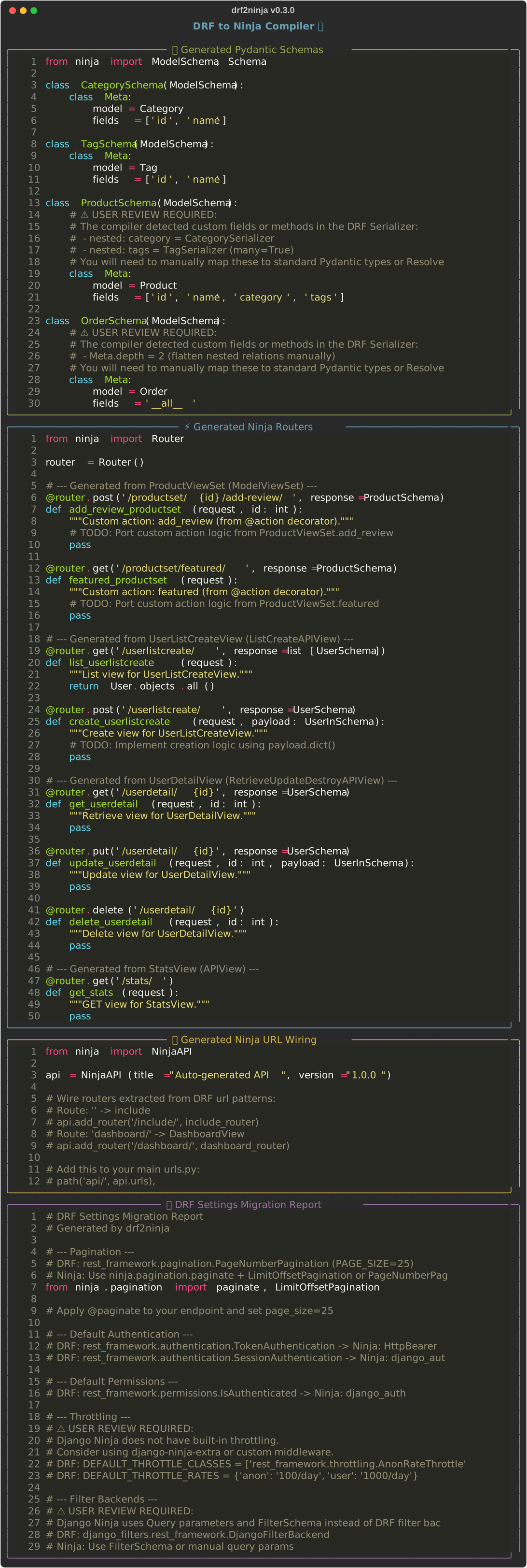
✨ Features
- Pydantic Schemas: Parses DRF
ModelSerializerand generates standard NinjaModelSchema. - Nested Serializer Detection: Detects nested
Serializer()fields (withmany=True) andMeta.depth. - Intelligent Routing: Parses
APIView,ModelViewSet, and allGenericAPIViewvariants (ListCreateAPIView,RetrieveUpdateDestroyAPIView, etc.). @actionSupport: Detects custom ViewSet@actiondecorators and generates dedicated routes.- URL Wiring: Parses
urls.pyand generatesNinjaAPIsetup with router registration. - Auth & Permissions: Detects
permission_classesandauthentication_classesand maps them to Ninja equivalents. - Settings Migration: Parses
REST_FRAMEWORKsettings dict and generates a migration report (pagination, throttling, filters). - User Review: Automatically flags custom overrides (like
SerializerMethodFieldor custom View methods) and injects helpfulTODOcomments so you know exactly what needs manual review. - Batch Mode:
--projectflag scans an entire Django app directory and auto-detects all DRF files. - Beautiful DX: Powered by
TyperandRichfor a stunning terminal experience. - 47 Tests: Comprehensive test suite with
CliRunnerintegration tests.
� Before & After
Your legacy DRF code:
# serializers.py
class OrderSerializer(serializers.ModelSerializer):
    total = serializers.SerializerMethodField()

    class Meta:
        model = Order
        fields = ['id', 'status', 'total']

    def get_total(self, obj):
        return sum(item.price for item in obj.items.all())
What the compiler generates:
# schemas.py (auto-generated)
class OrderSchema(ModelSchema):
    # ⚠️ USER REVIEW REQUIRED:
    # The compiler detected custom fields or methods in the DRF Serializer:
    #  - total
    #  - method:get_total
    # You will need to manually map these to Pydantic types or Resolve() blocks.
    class Meta:
        model = Order
        fields = ['id', 'status', 'total']
Your legacy DRF ViewSet:
# views.py
class OrderViewSet(viewsets.ModelViewSet):
    queryset = Order.objects.all()
    serializer_class = OrderSerializer

    def list(self, request): ...
    def create(self, request): ...
What the compiler generates:
# api.py (auto-generated)
@router.get('/order/', response=list[OrderSchema])
def list_order(request):
    """Automatically generated list view for OrderViewSet."""
    return Order.objects.all()

@router.post('/order/', response=OrderSchema)
def create_order(request, payload: OrderInSchema):
    """Automatically generated create view for OrderViewSet."""
    # TODO: Implement creation logic using payload.dict()
    pass
🚀 Installation
# Install from PyPI (recommended)
pip install drf-to-ninja

# Or install from source for development
git clone https://github.com/lektronik/drf-to-ninja-compiler.git
cd drf-to-ninja-compiler
python3 -m venv venv
source venv/bin/activate
pip install -e .
🛠 Usage
Simply point the compiler at your existing DRF files:
# Full migration — serializers, views, urls, and settings
drf2ninja -s myapp/serializers.py -v myapp/views.py -u myapp/urls.py --settings myapp/settings.py

# Use @api.get() syntax instead of @router.get()
drf2ninja -s myapp/serializers.py -v myapp/views.py --style api

# Preview without writing files
drf2ninja -s myapp/serializers.py --dry-run

# Write generated files to a directory
drf2ninja -s myapp/serializers.py -v myapp/views.py -o ./ninja_output/

# Scan entire Django app directory (auto-detects serializers, views, urls, settings)
drf2ninja --project myapp/
| Flag | Description |
|---|---|
-s, --serializers |
Path to DRF serializers.py |
-v, --views |
Path to DRF views.py |
-u, --urls |
Path to DRF urls.py |
--settings |
Path to Django settings.py |
--style |
Output style: router (default) or api |
--dry-run |
Preview output without writing files |
-o, --output |
Directory to write generated files |
-p, --project |
Scan a Django app directory (auto-detect all files) |
📖 Step-by-Step Migration Guide
This is the recommended workflow to migrate a DRF app to Django Ninja:
Step 1: Run the Compiler
drf2ninja -s myapp/serializers.py -v myapp/views.py -u myapp/urls.py --settings myapp/settings.py -o ./ninja_output/
This generates four files in ./ninja_output/:
schemas.py— Pydantic schemas (replaces serializers)api.py— Ninja route handlers (replaces views)urls.py— NinjaAPI wiring (replaces DRF router config)migration_report.py— Settings migration guide
Step 2: Handle Flagged Code
The compiler flags anything it can't fully auto-translate with a ⚠️ USER REVIEW REQUIRED comment. Here's what to do for each case:
| Flagged Pattern | What It Means | What To Do |
|---|---|---|
SerializerMethodField |
A computed field using get_*() |
Use a Resolver in your Schema |
Custom validate_*() |
DRF field validator | Use Pydantic's @field_validator decorator |
perform_create() / perform_update() |
Custom save logic in ViewSet | Move the logic into your Ninja route function body |
Custom @action methods |
Extra ViewSet endpoints | Create a separate @router.get() / @router.post() for each |
permission_classes |
DRF permission check | Use Ninja's auth= parameter or custom auth callables |
authentication_classes |
DRF auth backend | Use HttpBearer, django_auth, or HttpBasicAuth from ninja.security |
DEFAULT_THROTTLE_CLASSES |
DRF throttling | Use django-ninja-extra or custom middleware (Ninja has no built-in throttle) |
DEFAULT_FILTER_BACKENDS |
DRF filter backends | Use FilterSchema or manual query parameters in Ninja |
Step 3: Wire the API
In your main urls.py, add the Ninja API:
# urls.py
from ninja_output.api import router  # or api, depending on --style

from ninja import NinjaAPI

api = NinjaAPI()
api.add_router("/", router)

urlpatterns = [
    path("api/", api.urls),
]
Step 4: Install Django Ninja
pip install django-ninja
Add "ninja" to INSTALLED_APPS in settings.py and run your project:
python manage.py runserver
Your new API documentation is automatically available at /api/docs.
Step 5: Verify and Clean Up
- Visit
/api/docsto confirm all endpoints are live - Run your existing test suite to catch regressions
- Remove old DRF code once everything works
- Uninstall DRF:
pip uninstall djangorestframework
🔒 Security & Code Quality
This project uses pre-commit hooks to ensure code quality and security.
- Formatting:
black - Security Analysis:
bandit
To set up the hooks locally:
pip install pre-commit
pre-commit install
🤝 Contributing
See CONTRIBUTING.md for setup instructions and guidelines.
pytest tests/ # Run the test suite (22 tests)


Download files
Download the file for your platform. If you're not sure which to choose, learn more about installing packages.
Source Distribution
Built Distribution
Filter files by name, interpreter, ABI, and platform.
If you're not sure about the file name format, learn more about wheel file names.
Copy a direct link to the current filters
File details
Details for the file drf_to_ninja-0.3.1.tar.gz.
File metadata
- Download URL: drf_to_ninja-0.3.1.tar.gz
- Upload date:
- Size: 21.6 kB
- Tags: Source
- Uploaded using Trusted Publishing? No
- Uploaded via: twine/6.2.0 CPython/3.12.3
File hashes
| Algorithm | Hash digest | |
|---|---|---|
| SHA256 |
1a413a60b0a2fdb367b0667969a295df1bec4cc56cdb4e18b0f4e8348fdd2b76
|
|
| MD5 |
7234b0f71e875ba9c50ac3d95eb9935c
|
|
| BLAKE2b-256 |
a3fe2d6893b62a5e14bff16a0ead9b109f0d4dbcac68b0444e5c9ec8544cd374
|
File details
Details for the file drf_to_ninja-0.3.1-py3-none-any.whl.
File metadata
- Download URL: drf_to_ninja-0.3.1-py3-none-any.whl
- Upload date:
- Size: 18.6 kB
- Tags: Python 3
- Uploaded using Trusted Publishing? No
- Uploaded via: twine/6.2.0 CPython/3.12.3
File hashes
| Algorithm | Hash digest | |
|---|---|---|
| SHA256 |
fa62dc25a75f639319b0ed5d949ce3fde17abd39c0ca1ca31b9f0f0b6965aa26
|
|
| MD5 |
1242930ff14b6a82bb89b3cb002a14f0
|
|
| BLAKE2b-256 |
f44d9d3c48155d2d0f0172f2c3c0901199b95401f1c3ab61cb32cd7e9ed633c8
|






