
DrissionPage MCP Server
Professional browser automation for Codex, Claude Code, and MCP clients, powered by DrissionPage.
DrissionPage is a Python web automation library built around direct Chromium/CDP control with requests-style HTTP session support. This server exposes its browser-facing capabilities as typed, atomic MCP tools.







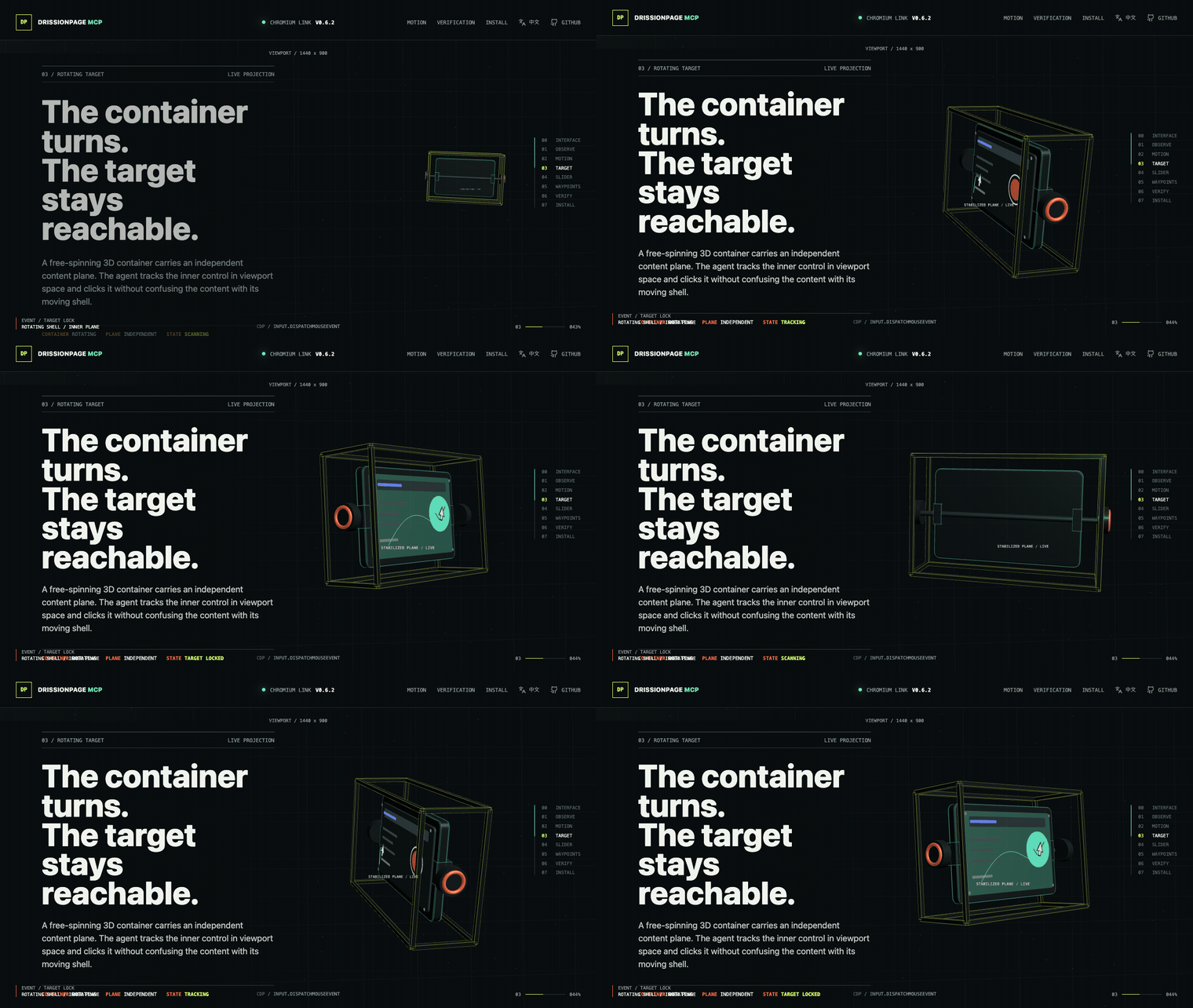
Open the interactive Browser Lab to replay bounded natural pointer motion, drag controls, and verify observable state.
Official Repositories: GitHub | GitCode
🖱️ Atomic Browser Control with Natural Pointer Motion
DrissionPage MCP 0.8.8 exposes 69 typed browser capabilities. The MCP server provides accurate low-level observation and interaction; the client or an optional Skill composes those capabilities for a site, component library, challenge, or business workflow.
The model decides what to do; the MCP executes the requested browser operation exactly.
Screenshot / page observation
        ↓
Multimodal model identifies viewport coordinates
        ↓
page_click_xy(x=442, y=369, profile="natural")
        ↓
24-step eased cubic path → exact target → press → release
        ↓
Observe and verify the resulting page state
Core interaction guarantees
- Two bounded profiles:
directemits one exact move;naturalemits a deterministic 24-step eased cubic path with reproducible 8-14ms intervals and exact final arrival. - No hidden randomness: the same start, target, and profile produce the same path; there is no jitter, overshoot, or anti-detection logic. Pointer position is stateful, so a repeated call can begin from the previous endpoint.
- Explicit sequences: click is the selected move profile, optional caller-specified delay, press, release; drag keeps one press across the selected path and ordered waypoints.
- Failure-safe input: a pressed pointer button is released if execution fails after the press.
- Fresh browser evidence: selector geometry is resolved immediately before selector-backed drag operations.
- Typed results: outputs report the executed coordinates, button, step count, and explicit delay metadata.
Use structured DOM targets when reliable selectors exist. Use coordinates, natural motion, and explicit drag waypoints for canvas controls, editors, maps, charts, and other visual-only surfaces. Component-specific target discovery, challenge observation, multi-click sequencing, login procedures, and other business policy belong in the client or an optional Skill.
{
  "x": 442,
  "y": 369,
  "profile": "natural",
  "button": "left",
  "element": "visually identified control"
}
Designed for authorized browser automation, testing, accessibility workflows, and technical research. The core does not provide challenge-specific or site-specific workflows.
🧭 Client Setup Navigation
- Atomic browser control
- Install + screenshot walkthrough
- Codex CLI/IDE quick setup
- Codex CLI/IDE integration example
- Skills and reusable procedures
- Claude Code setup
- Cursor setup
- Claude Desktop setup
- Troubleshooting
🚀 What is DrissionPage MCP?
DrissionPage MCP Server is a local Model Context Protocol (MCP) server that brings DrissionPage browser automation tools to Codex CLI/IDE, Claude Code, Claude Desktop, and other MCP clients.
The standalone server exposes 69 typed tools, zero MCP prompts, and one static optional-Skills catalog resource. Version 0.8.8 keeps that registry stable while adding correlated network-listener generations, explicit packet cursors, timeout evidence, cancellation recovery, and tab-owned cleanup. Every tool loads by default; there is no capability profile or opt-in full mode. Models compose these atomic capabilities, while reusable challenge and site procedures live outside the distribution as optional Skills. Browser execution is powered by DrissionPage.
🌟 Why Choose DrissionPage MCP?
- Structured-First, Vision-Ready: Uses DOM structure when available and multimodal coordinates when visual interaction is the better tool
- Deterministic: Reliable element selection with CSS/XPath normalization for LLM-friendly selectors
- Natural Pointer Motion: Offers exact direct movement and a bounded deterministic 24-step eased trajectory from the same atomic tools
- Fast & Lightweight: Built on DrissionPage's efficient engine with minimal overhead
- Type-Safe: Full type hints and Pydantic validation for all tools
- Open-source Friendly: Includes compatibility notes, troubleshooting, and CI checks for maintainable contributions
- Easy Integration: Simple
pip install+ Codex TOML or MCP JSON configuration
✅ Quality and Real-World Validation
DrissionPage MCP is backed by a strict regression suite and browser-backed scenario checks:
- Strict automated tests: unit, protocol, schema snapshot, response-contract, resource, release-metadata, security-policy, browser-integration, and coverage checks run in CI.
- 95% coverage floor: CI enforces the current 95% coverage threshold and uploads coverage reports.
- Real browser verification: Chrome/Chromium-backed integration tests exercise the same MCP tools exposed to clients.
- Document-boundary verification: focused browser tests prove cross-origin OOPIF reads and DrissionPage-exposed closed Shadow DOM lookup without JavaScript piercing fallbacks.
- Challenge-surface verification: local fixtures cover normal, hidden, off-viewport, delayed, and CSS 3D cross-origin widgets; official Turnstile dummy keys cover visible, invisible, pass, fail, and forced-interactive callbacks without retaining tokens.
- Scenario validation: the playground MCP Lab covers realistic forms, commerce pages, social feeds, timelines, dynamic waits, iframe cases, and recovery paths without depending on public demo websites.
⚡ First Success Path
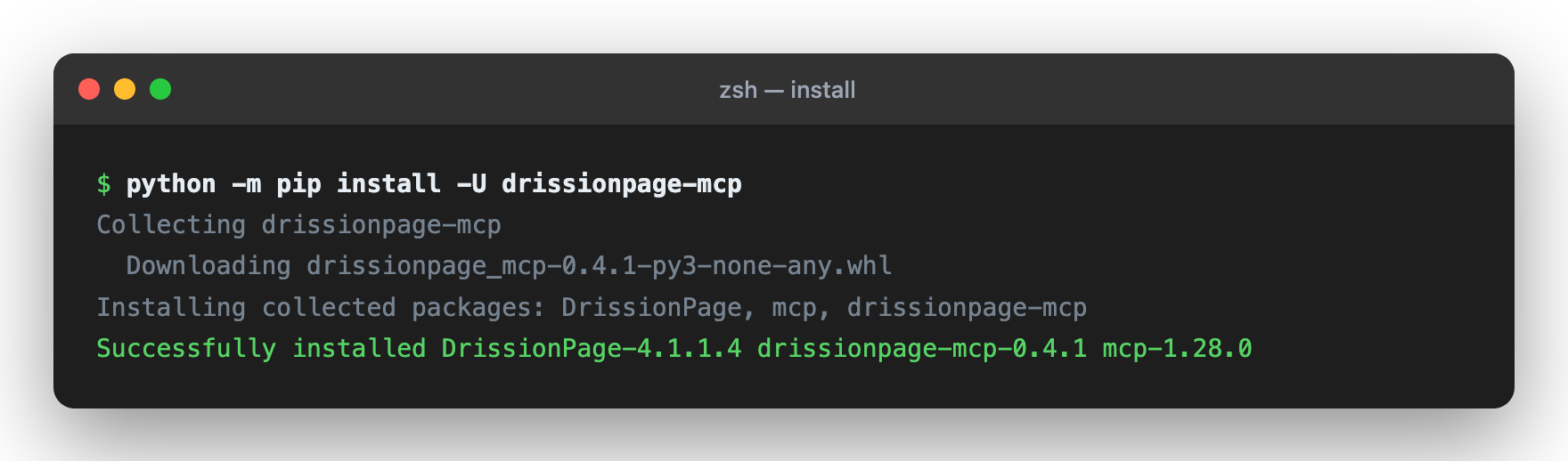
# Install or update Codex CLI (macOS/Linux)
curl -fsSL https://chatgpt.com/codex/install.sh | sh

# Install from PyPI
python -m pip install -U "drissionpage-mcp>=0.8.8"

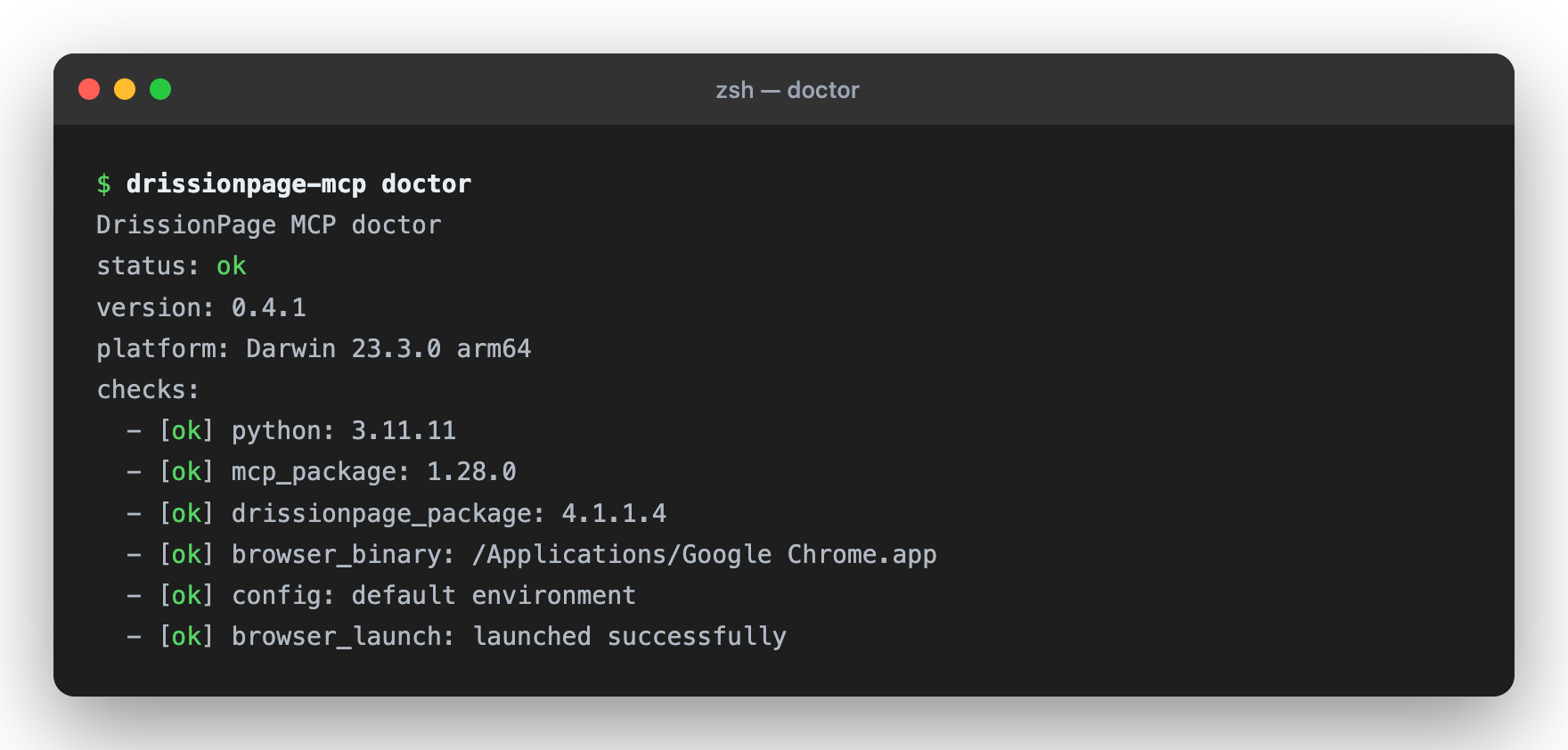
# Verify package and environment
drissionpage-mcp --version
drissionpage-mcp doctor
The official installer updates an existing Codex CLI installation as well. For Windows and the Codex desktop app, see the official Codex CLI and app documentation.
Then add the Codex or MCP client configuration below and restart your client.
📦 Setup in Codex CLI/IDE (30 seconds)
Codex supports local stdio MCP servers through config.toml; the CLI and IDE extension share the same MCP configuration.
-
Edit Codex configuration:
- User-level:
~/.codex/config.toml - Project-level:
.codex/config.tomlinside a trusted project
- User-level:
-
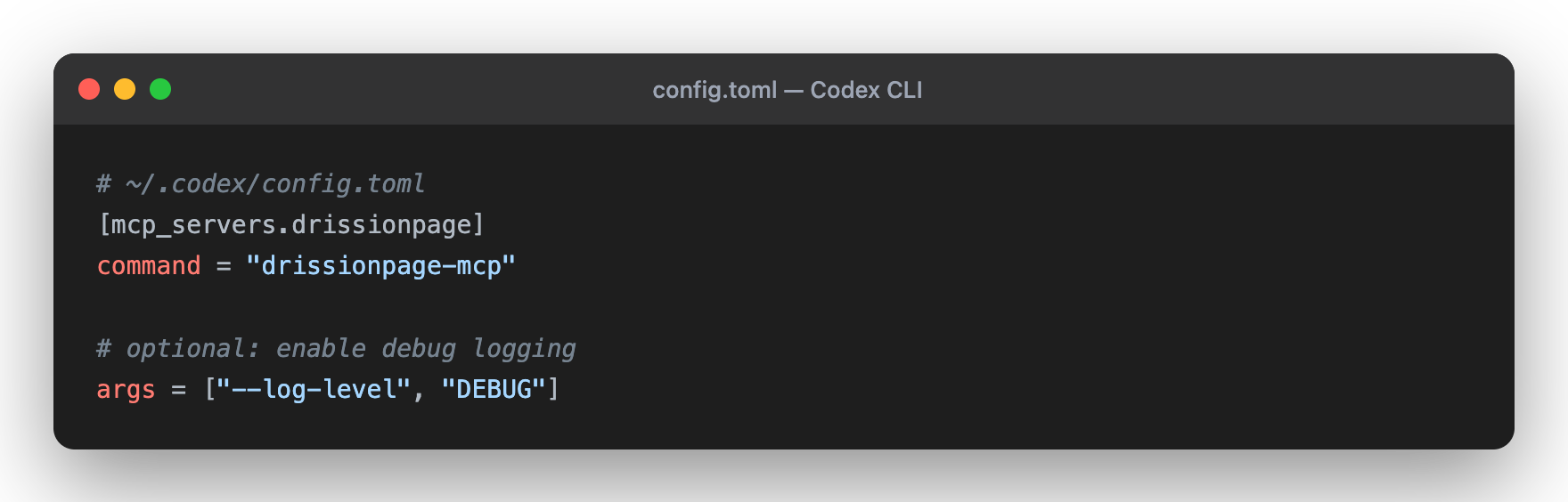
Add this configuration:
[mcp_servers.drissionpage]
command = "drissionpage-mcp"
startup_timeout_sec = 20
tool_timeout_sec = 60
-
Restart Codex. In the TUI, run
/mcp; from a shell, runcodex mcp list.
For Claude Code, Claude Desktop, and other JSON-based MCP clients, see Integration Examples.
🎯 Quick Examples
Navigate and Screenshot
"Visit https://example.com and take a screenshot for me"
Search and Extract
"Go to Wikipedia, search for Python, and get the first paragraph"
Form Automation
"Fill out the form at https://httpbin.org/forms/post and submit it"
Data Scraping
"Get the top 10 news headlines from news.ycombinator.com"
🛠️ 69 Typed Browser Tools
All 63 tab-scoped tools accept an optional tab_id. Omit it to capture the MCP
current tab once at call start, or pass an MCP/native DrissionPage tab id to
target explicitly. Successful tab-scoped results return the resolved MCP
tab_id; independent tabs can run concurrently while actions on one tab remain
serialized.
🌐 Navigation (5 tools)
page_navigate- Navigate to any URL; target an existingtab_id, or combinenew_tab=truewith optionalbackground,new_window, ornew_context;observereturns a change summarypage_navigate_with_http_auth- Navigate through a scoped HTTP auth challenge in a dedicated disposable Chromium context without returning credentialspage_go_back- Navigate backward in browser historypage_go_forward- Navigate forward in browser historypage_refresh- Reload current page
🗂️ Tab Operations (3 tools)
tab_list- List open browser tabs with stable MCP tab IDstab_switch- Switch to a tab returned bytab_listtab_close- Reject new work, drain in-flight actions, then close one tab without closing the whole browser
🎯 Element Interaction & Extraction (16 tools)
element_find- Find one element by CSS selector or XPath; bare selectors likeh1are treated as CSSelement_find_all- Extract bounded repeated elements with text, attributes, and recommended selectorselement_click- Click any element with additive left/right/middle and single/double-click semanticselement_click_and_download- Correlate one selector, coordinate, or keyboard trigger with one integrity-checked artifact underDP_MCP_DOWNLOAD_ROOTelement_type- Input text into elementselement_upload_file- Useelement_upload_file(paths=[...])to upload files fromDP_MCP_UPLOAD_ROOTtoinput[type=file]element_click_and_upload- Arm Chromium's file chooser, click its trigger, inject approved files, and clean interception without an operating-system pickerelement_scroll_into_view- Bring an element into the viewport before actingelement_hover- Hover an element to trigger menu/tooltip stateselement_select- Select an option by value, text, or indexelement_check- Check or uncheck checkbox/radio controlselement_get_text- Get element or page textelement_get_attribute- Get an HTML attributeelement_get_property- Get a live DOM property such as an input valueelement_get_html- Get element or page HTMLelement_state_get- Read live DrissionPage state flags and document/viewport geometry for one element
📸 Page Operations (18 tools)
page_screenshot- Capture an inline full-page or viewport screenshotpage_screenshot_save- Save a screenshot underDP_MCP_SCREENSHOT_ROOTpage_export_artifact- Generate a managed PDF or MHTML artifact underDP_MCP_ARTIFACT_ROOTwith SHA-256 and receipt evidencepage_snapshot- Return a bounded page outline with headings, links, buttons, inputs, forms, and selector recommendationspage_accessibility_snapshot- Return a bounded Chromium accessibility tree for the page or a scoped element, with field values redacted unless explicitly requestedpage_observe- Return a compact page fingerprint with URL, title, counts, visible text samples, active element, and recent console summarypage_evaluate- Run bounded JavaScript in the current page and return a JSON-safe resultpage_scroll- Usepage_scroll(pixels=...)for relative scrolling, or passx/yfor an absolute positionkeyboard_press- Send keys to the active element/page without echoing the input in resultspage_resize- Adjust browser windowpage_pointer_move- Move to exact viewport CSS coordinates withdirector bounded deterministicnaturalmotionpage_pointer_drag- Perform one failure-safe coordinate drag through up to six optional ordered waypoints with the selected profilepage_pointer_drag_element- Resolve source and destination geometry immediately before dragging; supports CSS/XPath in the top document or one same-origin iframe, plus CSS paths through nested open Shadow DOM hostspage_click_xy- Move withdirectornaturalmotion, optionally wait for an explicit delay, then press and release at the exact targetpage_close- Close browserpage_get_url- Get current URLpage_dialog_observe- Wait for and inspect a pending native alert, confirm, or prompt without handling itpage_dialog_respond- Usepage_dialog_respond(action="accept")(or"dismiss") for one pending alert, confirm, or prompt
🧱 Frame / Shadow DOM (5 tools)
frame_list- List iframe/frame contexts without changing global frame stateframe_snapshot- Useframe_snapshot(frame_selector="...")orframe_indexto inspect one iframe with bounded outline dataframe_find- Find an element inside a selected iframeshadow_find- Find one element inside a shadow root exposed by the current supported DrissionPage runtime, including tested closed rootsshadow_find_all- Extract repeated elements from a DrissionPage-exposed shadow root
🌍 Browser Environment (6 tools)
browser_headers_set- Replace extra request headers and return names with redacted values; an empty object clears thembrowser_user_agent_set- Override the user agent and optional platform, returning both the accepted and previous user agentsbrowser_cache_clear- Clear HTTP cache while preserving Cookies, localStorage, and sessionStoragebrowser_permission_get- Query one browser permission for the current document origin without opening an OS promptbrowser_permission_set- Usebrowser_permission_set(setting="granted")(or"denied"/"prompt") for an exact origin/current Chromium contextbrowser_permissions_reset- Reset permission overrides for the current Chromium context
🍪 Cookies & Storage (7 tools)
browser_cookies_get- Read normalized cookies with values redacted by defaultbrowser_cookies_set- Set up to 100 cookies in one call and return accepted metadata with redacted valuesbrowser_cookies_delete- Delete one named cookie with optional URL/domain/path scopebrowser_cookies_clear- Clear all browser cookiesstorage_get- Read localStorage/sessionStorage by key or as a map, with values redacted unlessinclude_values=truestorage_set- Set one localStorage/sessionStorage item without echoing the valuestorage_clear- Clear one storage key or an entire storage area
🧪 Debug / Observability (1 tool)
page_console_logs- Read bounded browser console messages with level filtering, cursor pagination, and limits
⏱️ Wait Operations (4 tools)
wait_for_element- Wait for element to appear (with timeout)wait_for_url- Usewait_for_url(url_pattern="...")until the current URL contains the supplied textwait_until- Usewait_until(condition="text_contains", value="...")or another documented condition/value pairwait_time- Delay execution
🌐 Network Control & Observation (4 tools)
network_listen_start- Start bounded HTTP/XHR/Fetch observation through DrissionPagenetwork_listen_wait- Wait for bounded packet metadata with optional redacted headers or body excerptsnetwork_listen_stop- Stop observation and optionally clear queued packetsnetwork_blocked_urls_set- Usenetwork_blocked_urls_set(urls=[...])to replace blocked URL patterns; an empty list clears them
🧩 Optional Skills Discovery
- Resource:
drissionpage://skills/catalog - Prompts: none
- Repository examples:
cross-origin-iframe-probe,turnstile-testing, andxiaohongshu-content-research - Entry point:
skills/<skill-name>/SKILL.md; catalog schema v2 includes Skill/MCP versions, required tools, fixture, fixedv0.8.4source revision, verification status, and SHA-256 - Skills are Markdown procedures for the MCP host. They are not Python modules, are not executed by the server, and are excluded from wheel/sdist packages.
Validate a source checkout with python playground/validate_skills.py --json.
Install the fixed catalog release from
skills-manager@v0.8.4
with python install.py install --client codex --json or
python install.py install --client claude --json.
📖 Skills and Reusable Procedures
The MCP core exposes atomic browser operations. Skills provide reusable, reviewable procedures outside the server:
| Example Skill | What it demonstrates | Stop boundary |
|---|---|---|
cross-origin-iframe-probe |
Frame discovery, cross-origin diagnosis, coordinate fallback, and outside verification | Cannot read the inner DOM of a cross-origin iframe |
turnstile-testing |
Cloudflare test fixtures, authorized production challenge interaction, coordinate geometry, and parent-page checks | Use the documented support matrix and verify the resulting page state |
xiaohongshu-content-research |
Bounded read-only note research and the deterministic social-notes fixture |
Stop on robots, login, captcha, safety page, or rate limit |
Read the full Skills guide before publishing a new procedure.
Skills must use existing typed tools, collect fresh evidence, verify
postconditions, redact secrets, and state unsupported cases. They do not add
new MCP tools or override the server's navigation and safety policy. Multi-tab
Skills should carry the returned MCP tab_id into later tab-scoped calls rather
than relying on mutable current-tab state.
📚 Documentation
| Guide | Description |
|---|---|
| README.md | Installation, tools, and architecture |
| docs/compatibility.md | Supported Python, DrissionPage, MCP, and browser versions |
| docs/tool-contract.md | Public MCP tool names, inputs, annotations, and response shape |
| docs/troubleshooting.md | Doctor command, browser startup, and client setup fixes |
| CHANGELOG.md | Release notes |
🏗️ Architecture
Built with clean, modular design:
DrissionMCP/
├── drissionpage_mcp/
│   ├── cli.py              # Process entry point
│   ├── server.py           # MCP transport and request routing
│   ├── context.py          # Browser and tab lifecycle facade
│   ├── runtime.py          # Operation keys, receipts, artifacts, and capability state
│   ├── tool_outputs.py     # Typed public result contracts
│   ├── browser/            # Focused DrissionPage capabilities and page scripts
│   └── tools/              # 69 typed MCP tool definitions and thin adapters
├── tests/                  # Unit tests
└── playground/             # MCP Lab business-scenario playground
Key Principles:
- ✅ Type-safe Pydantic models for all tools
- ✅ Async/await throughout
- ✅ Clean separation of concerns
- ✅ Comprehensive error handling
- ✅ Unit and protocol test coverage for core tool registration/response behavior
🔧 Configuration
Codex CLI / IDE (Recommended)
[mcp_servers.drissionpage]
command = "drissionpage-mcp"
startup_timeout_sec = 20
tool_timeout_sec = 60

# Optional browser/runtime environment variables:
# [mcp_servers.drissionpage.env]
# CHROME_PATH = "/custom/path/to/chrome"
# DP_HEADLESS = "1"
You can also add it with the Codex CLI:
codex mcp add drissionpage -- drissionpage-mcp
If Codex/Cursor/Claude Desktop is launched from a GUI and cannot see your shell
PATH or virtualenv, use the absolute Python executable instead:
[mcp_servers.drissionpage]
command = "/absolute/path/to/python"
args = ["-m", "drissionpage_mcp.cli"]
startup_timeout_sec = 20
tool_timeout_sec = 60
JSON MCP Clients
{
  "mcpServers": {
    "drissionpage": {
      "command": "drissionpage-mcp"
    }
  }
}
Advanced JSON Setup
{
  "mcpServers": {
    "drissionpage": {
      "command": "drissionpage-mcp",
      "args": ["--log-level", "DEBUG"],
      "env": {
        "CHROME_PATH": "/custom/path/to/chrome"
      }
    }
  }
}
Absolute-Python fallback for GUI clients:
{
  "mcpServers": {
    "drissionpage": {
      "command": "/absolute/path/to/python",
      "args": ["-m", "drissionpage_mcp.cli"],
      "env": {
        "CHROME_PATH": "/custom/path/to/chrome",
        "DP_HEADLESS": "1"
      }
    }
  }
}
📋 Requirements
- Python 3.10+ (3.11+ recommended)
- Chrome or Chromium browser
- Any MCP-compatible client: Codex CLI/IDE, Claude Code, Claude Desktop, Cursor, VS Code, etc.
🧪 Testing
Verify Installation
# Environment diagnostics; add --launch-browser for a browser startup check
drissionpage-mcp doctor
drissionpage-mcp doctor --launch-browser

# Source checkout tests
python -m pip install -e ".[dev]"
python -m pytest tests/

# Coverage report (CI enforces the current 95% floor and uploads coverage.xml)
python -m pytest tests/ --cov=drissionpage_mcp --cov-report=term-missing --cov-report=xml

# Browser-backed MCP Lab scenario checks
DP_HEADLESS=1 python playground/run_mcp_lab.py --all --json
GitHub Actions runs lint, unit, protocol, package, browser integration, and
coverage jobs. Codecov is configured through codecov.yml and the CI workflow.
Try It Out
# No-browser MCP registry check
python playground/run_mcp_lab.py --case registry

# Local deterministic site check
python playground/run_mcp_lab.py --case site

# Browser-backed form inspection scenario
DP_HEADLESS=1 python playground/run_mcp_lab.py --case form-inspect
🚀 Use Cases
✅ Automated Testing - Test web applications ✅ Data Scraping - Extract structured data from websites ✅ Form Automation - Fill and submit forms ✅ Monitoring - Check for updates or changes ✅ Screenshot Verification - Capture and verify page state ✅ Content Analysis - Analyze web content programmatically
🐛 Troubleshooting
Tools Not Loading?
drissionpage-mcp --version
Should output the installed package version, for example drissionpage-mcp 0.8.8.
drissionpage-mcp doctor must also report both mcp_supported and
mcp_server_wiring as ok; package-version output alone does not prove that an
MCP client can initialize the server.
Browser Issues?
# Check browser installation
which google-chrome    # Linux
which chromium         # macOS
Codex / MCP Client Not Finding Server?
- Codex: run
codex mcp list; in the TUI, run/mcp - JSON clients: verify config file path and JSON syntax
- Restart Codex or your MCP client after changes
- Check logs:
drissionpage-mcp --log-level DEBUG
See docs/troubleshooting.md for the complete troubleshooting guide.
📊 Project Status
| Component | Status |
|---|---|
| Core Features | ✅ Complete |
| Testing | ✅ Strict unit/protocol/schema checks plus browser-backed scenarios |
| Documentation | ✅ Setup, compatibility, troubleshooting, and public tool contracts |
| Package | ✅ PyPI metadata and build checks |
| Status | 🟡 Beta; real browser behavior depends on local Chrome/Chromium and target sites |
Version: 0.8.8 | License: Apache 2.0 | Maintained: ✅ Active
🗺️ Roadmap
Current (v0.8.8)
- 69 atomic navigation, tab/frame/shadow, accessibility, observation, interaction, browser-environment, network, Cookie/storage, wait, and console tools, all loaded by default
- stdio MCP server integration
- Doctor diagnostics for local setup
- Stable JSON mirror,
structuredContent, and typed per-tool MCPoutputSchema - Structured recovery hints in
error.details.hintsfor common failures - Sanitized browser failures with
DIALOG_PENDING/DIALOG_NOT_FOUNDrecovery and strict standards-compliant JSON for non-finite JavaScript values - Balanced
page_snapshotoutput so link-heavy pages still expose controls and forms - Atomic type, select, check, click, keyboard, upload, wait, and state-read tools cover native controls and framework-driven widgets without library-specific branches
- Stable optional
tab_idtargeting across 63 tab-scoped tools, per-tab action serialization, cross-tab parallelism, and draining close/cleanup semantics - Tab management with
tab_list,tab_switch,tab_close, andpage_navigate(new_tab=true, background=..., new_window=..., new_context=...) - Tab-owned network listener tokens, packet cursors, timeout evidence, cancellation-safe packet recovery, and deterministic close cleanup
- Observable actions with
page_observe,page_evaluate,wait_until, and optionalobserve=truechanges on navigation, click, and type - Console observability with
page_console_logs, console summary inpage_observe, and console change fields inobserve=true - Form, component-library, challenge, and convenience workflows remain outside the MCP core
- Repository example Skills for cross-origin iframes, authorized Turnstile fixtures, and bounded Xiaohongshu-like research are discoverable through the static catalog and excluded from wheel/sdist packages
- Capability-probed
page_dialog_respond, additive double/context click behavior, and selector/coordinate/keyboard download correlation with safeArtifactRefmetadata - Secret-bearing Web Storage values require
include_values=true; keyboard and keyboard-download results expose redacted metadata only - Per-tab download trigger locking, shared deadlines, cleanup/replay guarantees, and a 250ms fail-closed late-mission guard
- Reproducible W01-W08 public-tool benchmark with ten isolated runs per workload, machine-readable evidence, and zero duplicate side effects
- Network listener beta with
network_listen_start,network_listen_wait, andnetwork_listen_stopfor HTTP/XHR/Fetch observation - Public-response redaction for URLs, credentials, headers, Cookies, network bodies, errors, receipts, and text mirrors; listener waits are isolated from unrelated browser actions
- Browser-only request environment control with redacted header, user-agent, and blocked-URL write results plus cache-only clearing that preserves Cookies and Web Storage
-
directand deterministic boundednaturalprofiles forpage_pointer_move,page_pointer_drag, andpage_click_xy, with exact endpoints and failure-safe release - Optional bounded
page_pointer_drag.waypointsfor one held multi-segment canvas, map, box-selection, or visual-editor gesture - File upload, scrolling, hover, select/check, keyboard, iframe, shadow DOM, cookie, and storage tools for DrissionPage 4.x
- Pure browser Cookie set/get/delete/clear flow, including bounded batch writes whose successful results retain metadata with redacted values
- Ten-cycle controlled and validation input replacement through native DrissionPage input on the supported browser matrix
- Cross-origin OOPIF reads through
frame_*and closed Shadow DOM lookup through DrissionPage-backedshadow_*, with narrower pointer targeting documented separately - Frame boundary/document-access classification plus outer presentation, top-level viewport coordinate, scroll receipt, and coordinate-actionability evidence for production challenge workflows
- Local challenge-surface and opt-in official Turnstile test-key benchmarks with parent-page postconditions, screenshots, and token-safe evidence
- Backward-compatible string or structured selector/accessibility targets across element reads, actions, waits, uploads, and click-download correlation, resolving ordered frames first and then ordered Shadow DOM hosts
- Bounded accessibility snapshots, non-handling native dialog observation, and live element state/geometry for autonomous locate-act-verify loops
- Browser permission observation/set/reset, managed PDF/MHTML artifacts, automatic file chooser interception, and credential-redacted HTTP auth isolated by disposable Chromium context
- Chrome sandbox remains enabled by default;
DP_NO_SANDBOX=1is reserved for restricted container/root environments - No retained action history, generated code snippets, or absolute screenshot paths in public results
- Opt-in local safety policy for navigation and screenshot paths
- One optional-Skills catalog resource with repository example metadata, zero prompts, plus Skills, eval, compatibility, and troubleshooting documentation
- PyPI distribution
- Official MCP Registry package metadata and tag-gated publishing workflow
📖 Integration Examples
Codex CLI / IDE
[mcp_servers.drissionpage]
command = "drissionpage-mcp"
startup_timeout_sec = 20
tool_timeout_sec = 60
Verify with:
codex mcp list
Claude Code
{
  "mcpServers": {
    "drissionpage": {
      "command": "drissionpage-mcp"
    }
  }
}
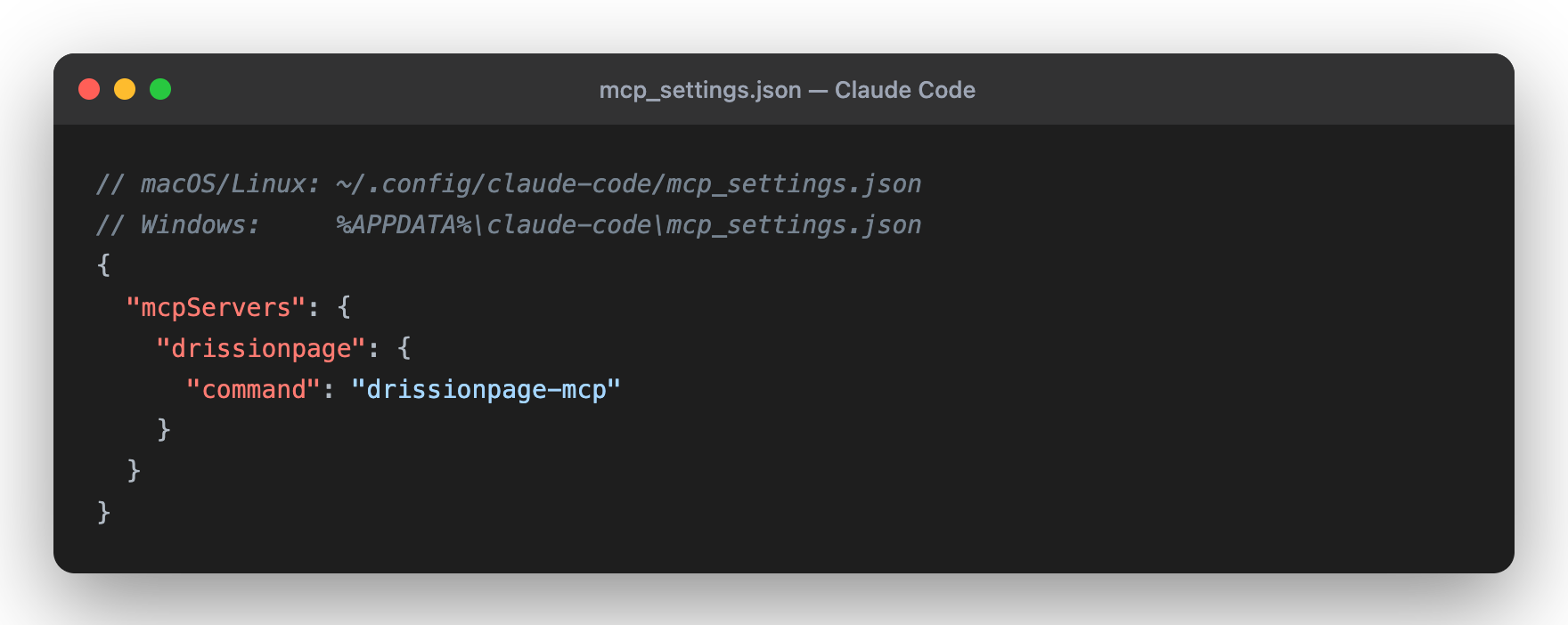
Config file: ~/.config/claude-code/mcp_settings.json (macOS/Linux) or
%APPDATA%\claude-code\mcp_settings.json (Windows).
Cursor
{
  "mcpServers": {
    "drissionpage": {
      "command": "drissionpage-mcp"
    }
  }
}
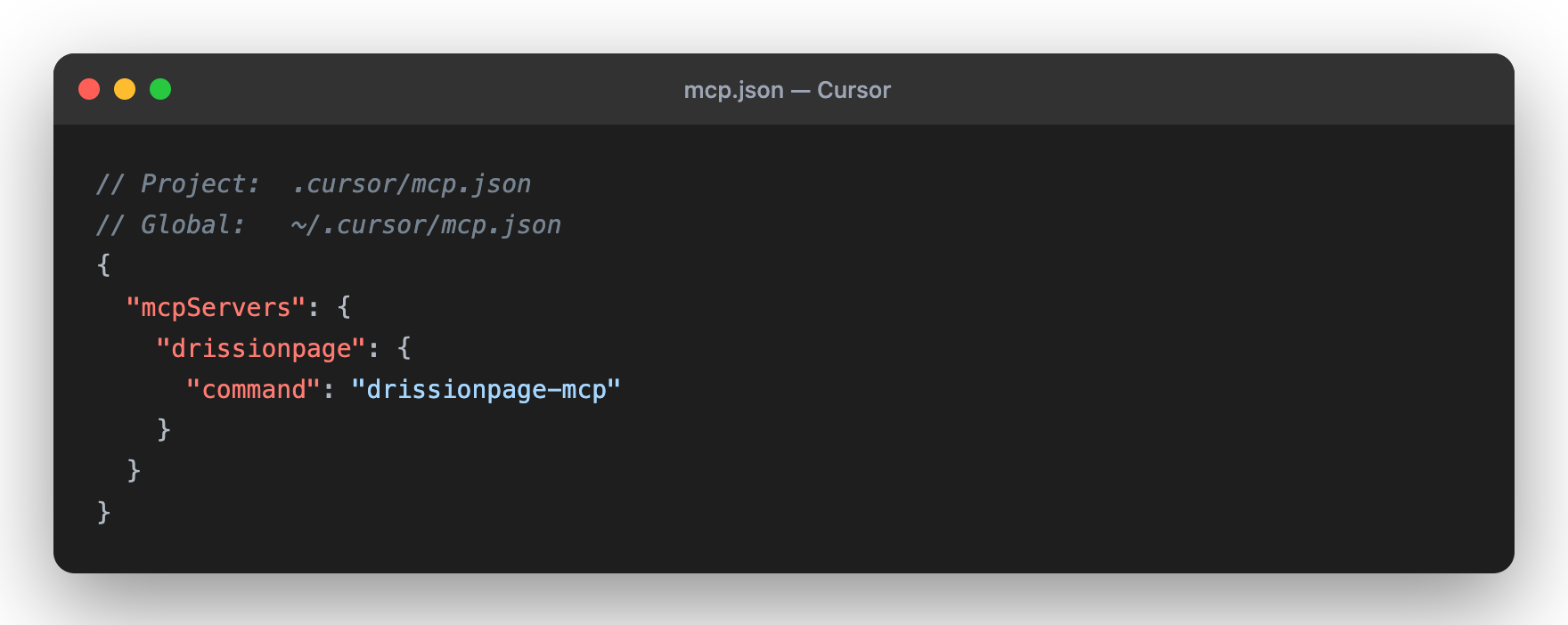
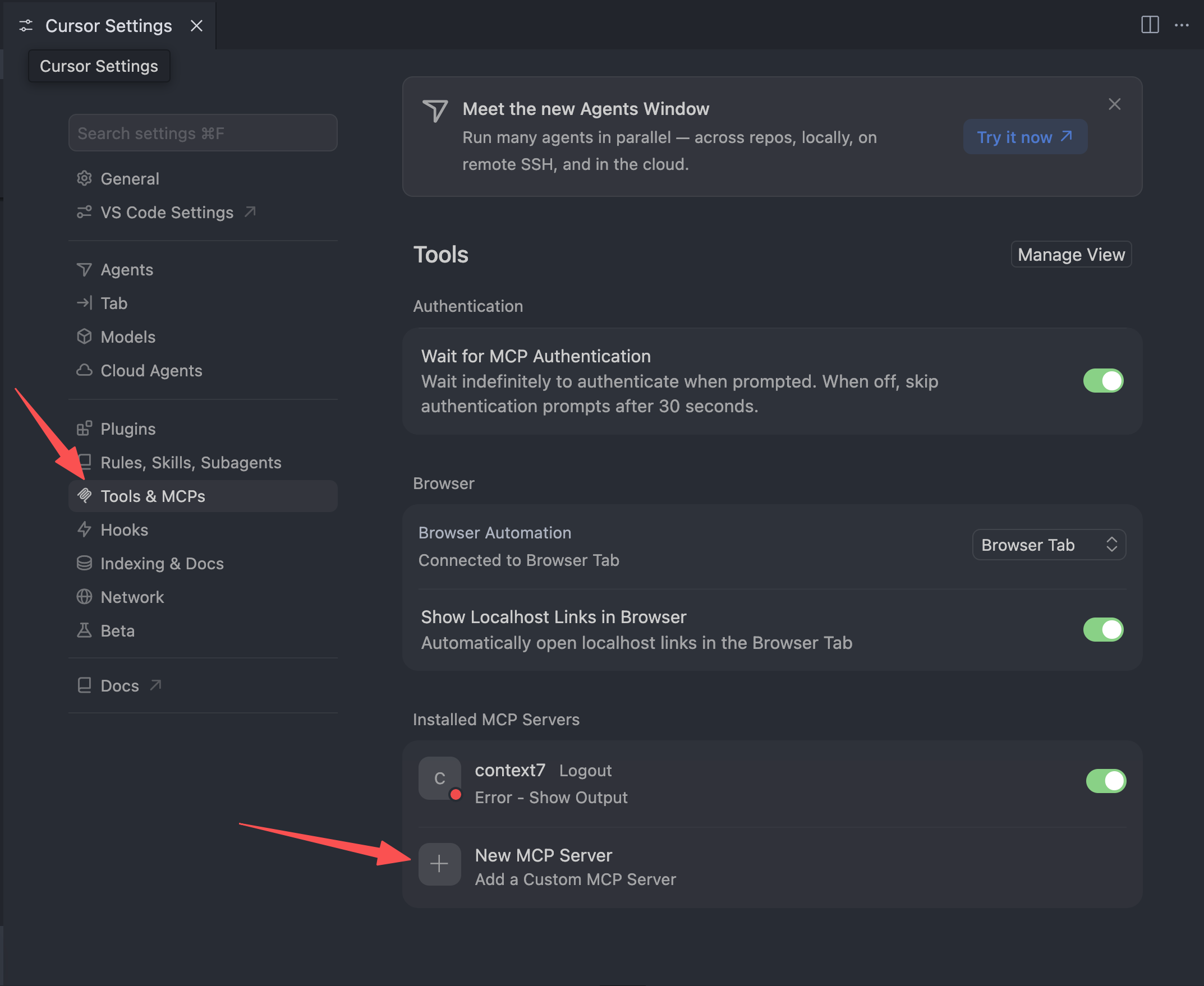
Config file: ~/.cursor/mcp.json (global) or .cursor/mcp.json (project). You
can also add it from Cursor Settings → Tools & MCPs → New MCP Server.
Claude Desktop
{
  "mcpServers": {
    "drissionpage": {
      "command": "drissionpage-mcp"
    }
  }
}
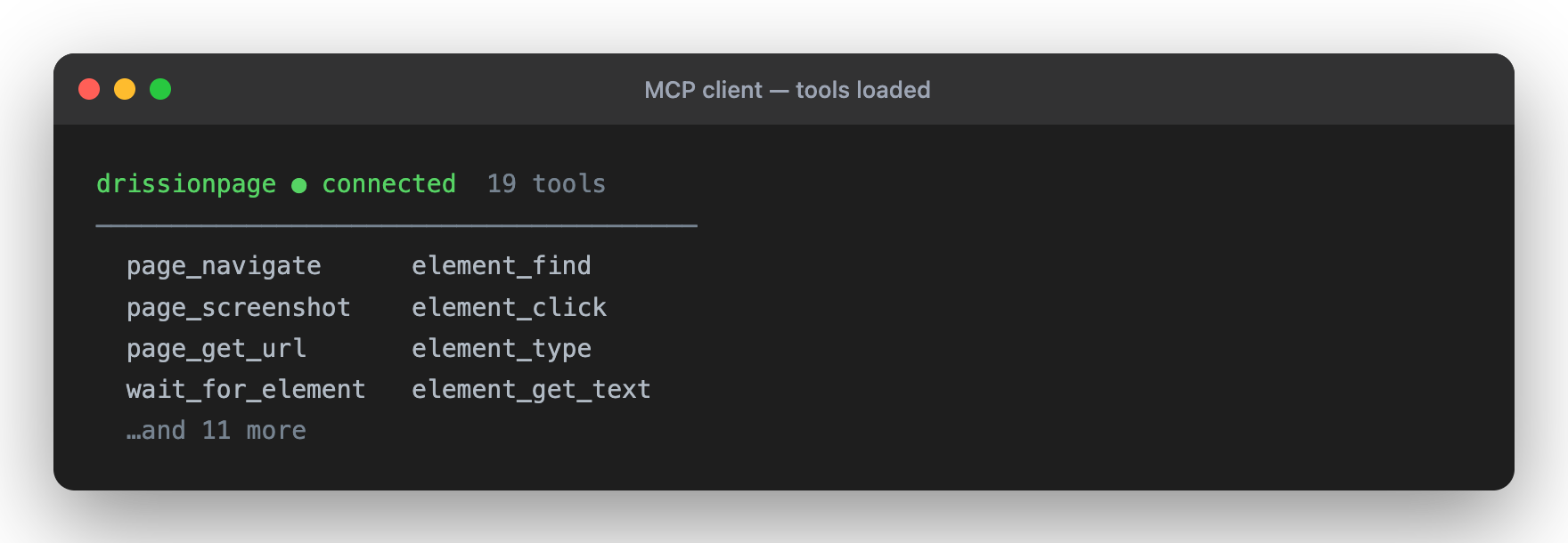
Once connected, the tools load automatically:
🤝 Contributing
Contributions are welcome!
- Fork the repository
- Create a feature branch
- Make focused changes
- Run the relevant checks
- Submit a pull request
See CONTRIBUTING.md for setup, validation, and compatibility expectations.
🔒 Security
- Runs locally in your environment
- Uses a local browser that may have access to authenticated sessions, cookies, downloads, and page content
- Can open and interact with any site reachable from the local machine
- Does not require external API credentials
Best Practices:
- Use a dedicated browser profile for sensitive workflows
- Review MCP client prompts before allowing actions on authenticated or production systems
- Respect website terms of service, robots.txt, and rate limits
- See SECURITY.md for reporting and safe-usage guidance
📄 License
Licensed under Apache License 2.0 - see LICENSE
📈 Statistics

🌟 Show Your Support
If you find this project useful, please consider:
- ⭐ Starring on GitHub
- 📤 Sharing with your network
- 💬 Leaving feedback or suggestions
- 🐛 Reporting issues to help improve
Made with ❤️ by Wukunyun
Ready to automate your workflows? Install now: python -m pip install -U drissionpage-mcp
🆕 Latest Version: v0.8.8
Released on 2026-09-08. This release keeps the 69-tool registry while making network listener lifetimes explicit and recoverable:
network_listen_startreturns a newlistener_token, lifecycle state, packet cursor, and startup timing for each listener generation.network_listen_waitaccepts the token and reports cumulative consumption, monotonic packet indices, elapsed time, explicit timeout status, and remaining timeout budget.network_listen_stoprejects stale tokens withLISTENER_NOT_FOUND, preventing an old task from stopping a replacement listener on the same tab.- Cancelled waits preserve packets already removed by DrissionPage, and tab close performs best-effort listener stop/queue cleanup before native teardown.
- Real Chromium tests isolate listeners across tabs and run 100 start/stop cycles without active driver or queue residue. The public surface remains 69 tools, zero prompts, and one Skills catalog resource.
1 maintainer

Metadata
1 maintainer
Release files for drissionpage-mcp 0.8.8
For a detailed explanation of source distributions (sdists) and built distributions (wheels), please see the package formats documentation.
Source distribution (sdist)
| File | Size | Uploaded | |
|---|---|---|---|
| drissionpage_mcp-0.8.8.tar.gz | 367.4 kB | Details |
Built distribution (wheel)
| File | Interpreter | ABI | Platform | Reset |
|---|---|---|---|---|
| drissionpage_mcp-0.8.8-py3-none-any.whl | Python 3 | none | any | Details |
Total release size: 543.3 kB
Release files / drissionpage_mcp-0.8.8.tar.gz
| Download URL | drissionpage_mcp-0.8.8.tar.gz |
|---|---|
| Size | 367.4 kB |
| Tags | Source |
|
SHA-256 checksum How to use checksums |
6505ea4328b7e04a5cc8667fdb433cf6ccaebb0af7040df5a6273bb3649c421a
|
|
BLAKE2b-256 checksum How to use checksums |
04ecc4bfcdde4774d1cce8bbbd126e64dd86116d528fd7bdec3133cf4283ae2a
|
| Upload date | |
|
Uploaded using Trusted Publishing? What is trusted publishing? |
No |
| Uploaded via |
twine/6.2.0 CPython/3.11.11
|
Release files / drissionpage_mcp-0.8.8-py3-none-any.whl
| Download URL | drissionpage_mcp-0.8.8-py3-none-any.whl |
|---|---|
| Size | 175.9 kB |
| Tags | Python 3 |
|
SHA-256 checksum How to use checksums |
6354e32c80b98f4eab3aea592da14e1b1df0f58243c122918335feb7ed5a00dd
|
|
BLAKE2b-256 checksum How to use checksums |
c69bbb1d452b54aa66cbc20119d326167cb73bcc27c8abdc577386f9ec9e3e70
|
| Upload date | |
|
Uploaded using Trusted Publishing? What is trusted publishing? |
No |
| Uploaded via |
twine/6.2.0 CPython/3.11.11
|














