
Google Drive Utility
What is Google Drive Utility?
Google Drive Utility provides an easy way to use Google Drive from command line, tasks such as uploading files/folders, downloading them, moving folders/files. Additionally, using the provided .reg files it can be added to the Windows Context Menu, giving the opportunity of using it anywhere in an very easy and friendly way. It is written in Python 2.7. It is licensed under the MIT license, see LICENSE.
Installation
Download and installation
You can download it with Pip:
pip install DriveUtilityity
Usage
Command line utility
Usage:
DriveUtil [Args]
or:
python -m DriveUtility [Args]
Available options are:
  -h, --help            show this help message and exit
  -u, --upload Path(s) [Path(s) ...]
                        Path of folder or file to upload.
  -s, --specificf Path(s) [Path(s) ...]
                        Path of folder or file to upload to a specific folder.
  -cr, --createf        Creates a folder.
  -re, --remove         Remove access to Drive.
  -l, --list            List Drive files and folders.
  -de, --delete         Delete selected file or folder.
  -g, --get [Path]      Download file or folder. Optionally, you can specify a
                        path to downlaod there.
  -m, --move            Move file or folder.
  -cb, --clean          Clean bin.
  -co, --copy           Copy a file.
  -se, --search         Search by name.
  -aS, --addS           Star a file.
  -rS, --removeS        Remove star from an starred file.
  -sL, --shareLink      Enable share linking and get the share link.
  -dS, --disableShare   Disable link sharing.
  -rn, --rename         Rename item.
Windows Context Menu
Adding it
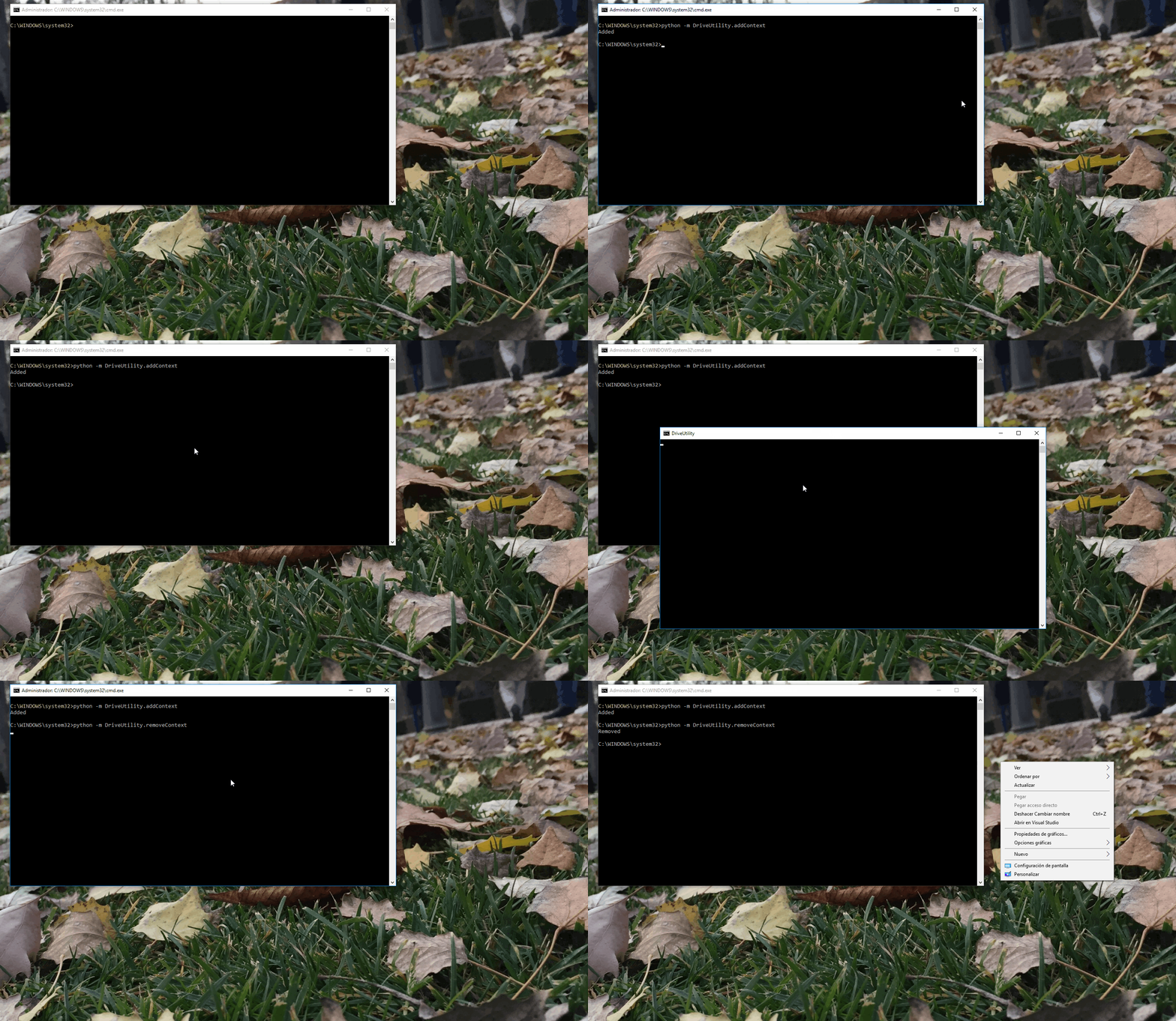
The provided python scripts, addContext.py and removeContext.py add new options to the Context Menu, making DriveUtility more flexible to use. These two scripts must be run with admin rights. You can use:
python -m DriveUtility.addContext
and
python -m DriveUtility.removeContext
from an elevetad Windows command prompt.
Examples
example.py is a sample script. It will upload the contents of Test folder.
Contributing
All pull requests and issues are welcome. I'm very thankful for any type of help, improvement or tests.
1 maintainer

Metadata
1 maintainer
Release files for DriveUtility 1.1.18
For a detailed explanation of source distributions (sdists) and built distributions (wheels), please see the package formats documentation.
Source distribution (sdist)
| File | Size | Uploaded | |
|---|---|---|---|
| DriveUtility-1.1.18.tar.gz | 11.8 kB | Details |
Built distribution (wheel)
| File | Interpreter | ABI | Platform | Reset |
|---|---|---|---|---|
| DriveUtility-1.1.18-py2-none-any.whl | Python 2 | none | any | Details |
Total release size: 29.0 kB
Release files / DriveUtility-1.1.18.tar.gz
| Download URL | DriveUtility-1.1.18.tar.gz |
|---|---|
| Size | 11.8 kB |
| Tags | Source |
|
SHA-256 checksum How to use checksums |
518ddede8f38543043cffd5e0b45f194988f4dfc95e5248e8bad31fc92a08a12
|
|
BLAKE2b-256 checksum How to use checksums |
b27443bc106164ee65f76c9bb5a9972eef002c0960f15c4c77f56d4d3c19ea9d
|
| Upload date | |
|
Uploaded using Trusted Publishing? What is trusted publishing? |
No |
| Uploaded via |
twine/1.11.0 pkginfo/1.4.2 requests/2.19.1 setuptools/39.2.0 requests-toolbelt/0.8.0 tqdm/4.23.4 CPython/2.7.15
|
Release files / DriveUtility-1.1.18-py2-none-any.whl
| Download URL | DriveUtility-1.1.18-py2-none-any.whl |
|---|---|
| Size | 17.2 kB |
| Tags | Python 2 |
|
SHA-256 checksum How to use checksums |
d2e2060dc97b99210fbbf0588f1d3d908f29dd191d55b072cd7b2688c4a57790
|
|
BLAKE2b-256 checksum How to use checksums |
d0ea823ca3dde861299046ff5813a00fc4f652eb2cf09263ed43379ea1896b3f
|
| Upload date | |
|
Uploaded using Trusted Publishing? What is trusted publishing? |
No |
| Uploaded via |
twine/1.11.0 pkginfo/1.4.2 requests/2.19.1 setuptools/39.2.0 requests-toolbelt/0.8.0 tqdm/4.23.4 CPython/2.7.15
|














