
Dronefly command-line client
The dronefly-cli command-line client will provide a standalone text user interface that can perform a usable subset of Dronefly Discord bot's capabilities, built solely with Dronefly core.
Installation
The fastest and most reliable way to get up and running with dronefly-cli is
with uvx:
- First install
uv: https://docs.astral.sh/uv - Run it with
uvx:
$ uvx --from dronefly-cli dronefly
If all went well, it will fetch any dependencies, initialize the environment,
and run the dronefly cli. You should arrive at a Dronefly (=) prompt where
you can test it with the taxon command to look up taxa by name. For example:
$\tt\textcolor{gold}{(=)}$ taxon picoides pubescens
Dryobates pubescens (Downy Woodpecker) (Picoides pubescens)
is a species with 98,638 observations in:
Animalia >
Chordata > Vertebrata >
Aves >
Piciformes >
Picidae > Dryobates
$\tt\textcolor{gold}{(=)}$ quit
Configuration
There is no config storage yet. You can provide the default user with User.inat_place_id and User.inat_user_id values by setting the corresponding INAT_PLACE_ID and INAT_USER_ID environment variables.
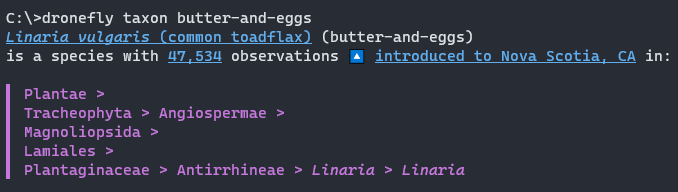
For example, with INAT_PLACE_ID=6853, the taxon command shows introduction means for the configured place, Nova Scotia.
On Windows, run it in Windows Terminal for the best results, as it supports all of the rich formatting: clickable links, italics, strikethrough, and colour. This is a screenshot produced on the developer's workstation:
Related packages
Dronefly core
The dronefly-core package is an incomplete rewrite of Dronefly Discord bot's core components.
Dronefly Discord bot
Dronefly Discord bot brings iNaturalist taxa, observations, and other data from the site into conversations on the Discord chat platform.
1 maintainer

Metadata
1 maintainer
Release files for dronefly-cli 0.3.1
For a detailed explanation of source distributions (sdists) and built distributions (wheels), please see the package formats documentation.
Source distribution (sdist)
| File | Size | Uploaded | |
|---|---|---|---|
| dronefly_cli-0.3.1.tar.gz | 56.3 kB | Details |
Built distribution (wheel)
| File | Interpreter | ABI | Platform | Reset |
|---|---|---|---|---|
| dronefly_cli-0.3.1-py3-none-any.whl | Python 3 | none | any | Details |
Total release size: 78.6 kB
Release files / dronefly_cli-0.3.1.tar.gz
| Download URL | dronefly_cli-0.3.1.tar.gz |
|---|---|
| Size | 56.3 kB |
| Tags | Source |
|
SHA-256 checksum How to use checksums |
f3cf403154f4655c09166f27e9d2332f1cf9d742fe34919e20e1796672f0cdc0
|
|
BLAKE2b-256 checksum How to use checksums |
84e1d663a3e4dc25eeb0288bd0fb8d33a4123bfca76db13ebf2954a0302baf1f
|
| Upload date | |
|
Uploaded using Trusted Publishing? What is trusted publishing? |
No |
| Uploaded via |
uv/0.11.29 {"installer":{"name":"uv","version":"0.11.29","subcommand":["publish"]},"python":null,"implementation":{"name":null,"version":null},"distro":{"name":"Debian GNU/Linux","version":"13","id":"trixie","libc":null},"system":{"name":null,"release":null},"cpu":null,"openssl_version":null,"setuptools_version":null,"rustc_version":null,"ci":null}
|
Release files / dronefly_cli-0.3.1-py3-none-any.whl
| Download URL | dronefly_cli-0.3.1-py3-none-any.whl |
|---|---|
| Size | 22.3 kB |
| Tags | Python 3 |
|
SHA-256 checksum How to use checksums |
f4bcef92dbf65cd140d739bbd2148a219d0a2fd5636d6682668e2fd8b05f7d57
|
|
BLAKE2b-256 checksum How to use checksums |
fb77285746cf438925d2eec0c696e31029b59c925717390e49b84f0cf0a785ee
|
| Upload date | |
|
Uploaded using Trusted Publishing? What is trusted publishing? |
No |
| Uploaded via |
uv/0.11.29 {"installer":{"name":"uv","version":"0.11.29","subcommand":["publish"]},"python":null,"implementation":{"name":null,"version":null},"distro":{"name":"Debian GNU/Linux","version":"13","id":"trixie","libc":null},"system":{"name":null,"release":null},"cpu":null,"openssl_version":null,"setuptools_version":null,"rustc_version":null,"ci":null}
|














