
A microscopical image and video platform applied to the analysis of levitating droplet clusters

Project description
DropClust





DropClust is an analytical tool that combines computer vision and machine learning algorithms to assess the morphology, geometry, and dynamics of frame videos of droplet clusters (or similar objects).
Feature extraction capabilities were also added for further visual representation of the results.
Developed by the InfoChemistry scientific center, part of ITMO University.
Installation
We suggest throught conda and pip (with python>=3.9).
- Install Anaconda.
- Open an
anacondaprompt / command prompt which has conda for python 3 in the path. - For a new environment for CPU only, run:
conda create -n dropclust 'python==3.9' - To activate the new environment, run
conda activate dropclust - For NVIDIA GPUs, run:
pip install torch torchvision
We suggest to install CUDA 12.6 - To install the latest PyPi release of Dropclust and its dependencies (see setup.py), run:
pip install dropclust.
System requirements
Linux, Windows and Mac OS are supported for running the code. For running the graphical interface you will need a Mac OS later than Yosemite. At least 8GB of RAM is required to run the software. 16GB-32GB may be required for larger images. The software has been tested on Windows 10, Windows 11, Ubuntu 24.04, Manjaro and limitedly tested on Mac OS.
Features
We calculate the following metrics / algorithms:
- Subject counting (amount of subjects).
- Area of subject (𝜇𝑚²).
- Roundness (0.0 - 1.0), having 1.0 for a perfect circle.
- Relative center coordinates.
- Voronoi diagram based on the centers.
- Voronoi entropy, a measure of order/chaos in the cells' positions.
- Convex hull.
- Continuous symmetry measure (CSM).
- Subjects segmentation and clustering.
- Color classification.
- Subject detection + tracking.
General workflow
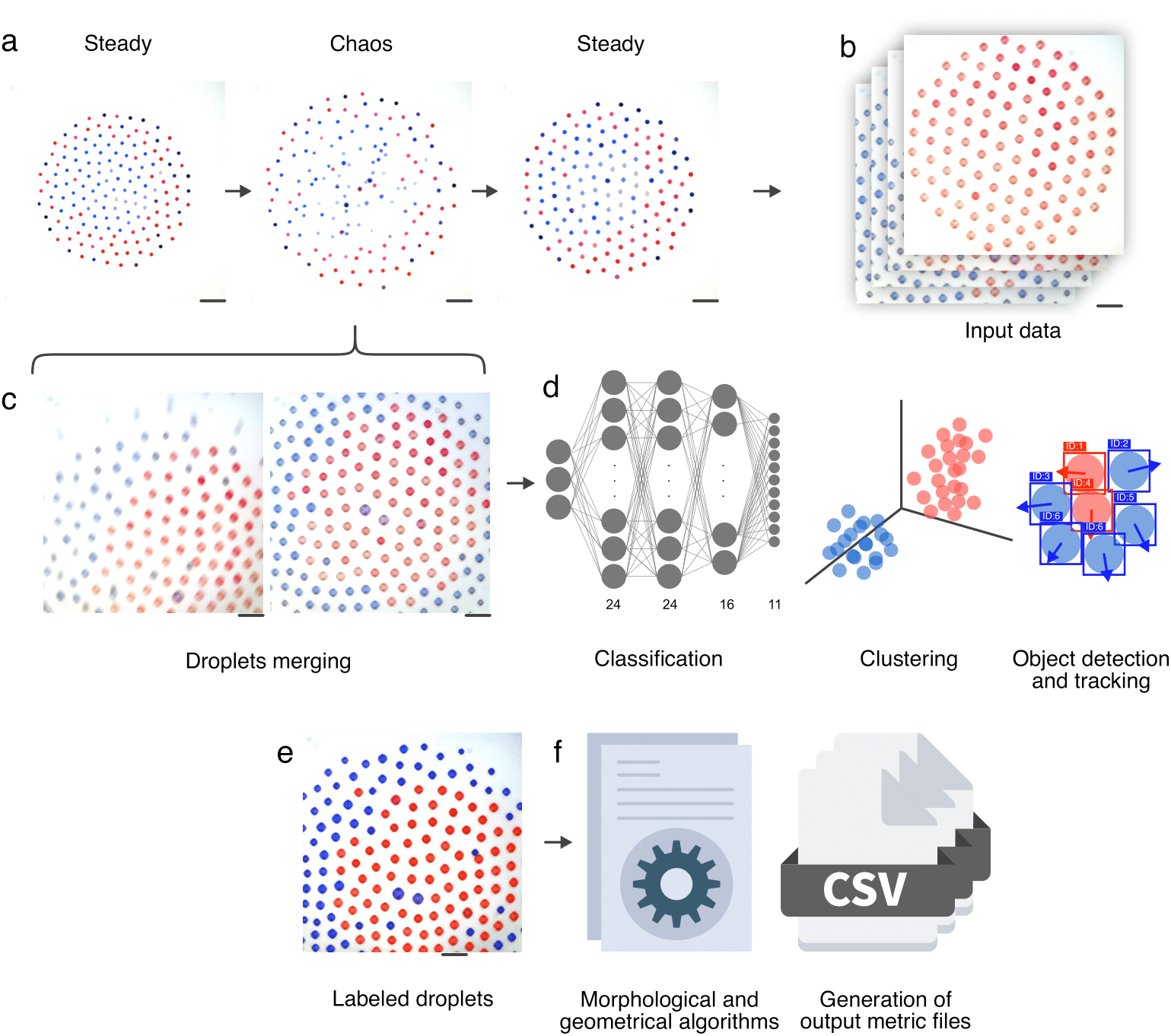
In order to obtain metrics from segmented cells, the initial stained images are merged into a single image and organized into sub folders to be processed. A cell segmentation procedure is performed using Cellpose, then we extract the metrics and finally we store the results in the form of images and CSV files.
How to use
Launching Dropclust GUI:
- Activate the conda environment:
conda activate dropclust - Enter to launch the GUI
python -m dropclust - Now, you can load or drag-drop your desired image/video for analysis
Further, we present a usage example:

IMPORTANT: It’s mandatory to set a pixel-to-micrometer(μm) conversion value (μm per pixel), in order to calculate the droplets area. The input field for this value in the GUI, is named as “Length in μm”. By default this value is automatically acquired if the corresponding metadata file (generated by the microscope after image obtaining) is present in the same folder as the image, and if it shares the same name of the image + ”_Properties.xml”.
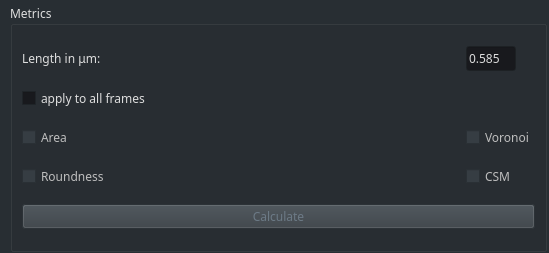
Along, there are geometrical and morphological metrics for droplets and droplets clusters respectively as: area, roundness, Voronoi entropy and Continuous Symmetry Measure.
There is also the option to calculate these metrics for a current single frame or a whole set of frames (video or gif).
After clicking "calculate" it will take a few moments until we get a folder with the same name as the source image, containing the result values in .csv and .png formats. For extra feedback about the processes and alerts, we suggest to stay pending of the python shell.
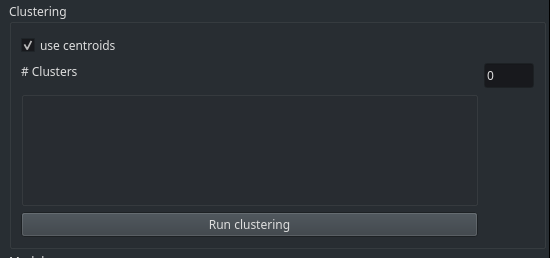
The second section offers to perform a clustering of droplets (with the option to use centroids as color seeds for each cluster).
This functionality can be performed post-segmentation, and it is aimed to group droplets by color as their most distinctive feature.
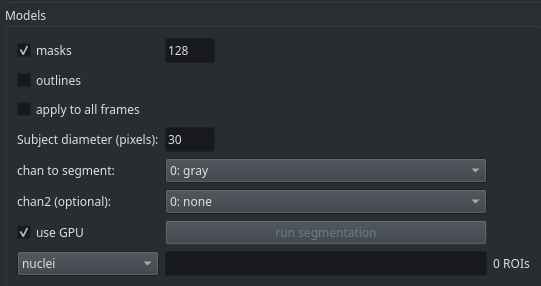
The third section presents a set of models and custom parameters for droplet segmentation. Allowing the user to preview the result of the segmentation and their outlines once is done (masks and outlines checkboxes), to estimate the size of each droplet (subject diameter) and to make a color distinction based on a predominant primary color present in the droplets (chan to segment).
Citation
Work in progress
Release history Release notifications | RSS feed


Download files
Download the file for your platform. If you're not sure which to choose, learn more about installing packages.
Source Distribution
Built Distribution
Filter files by name, interpreter, ABI, and platform.
If you're not sure about the file name format, learn more about wheel file names.
Copy a direct link to the current filters
File details
Details for the file dropclust-0.0.6.tar.gz.
File metadata
- Download URL: dropclust-0.0.6.tar.gz
- Upload date:
- Size: 16.2 MB
- Tags: Source
- Uploaded using Trusted Publishing? No
- Uploaded via: twine/6.1.0 CPython/3.9.22
File hashes
| Algorithm | Hash digest | |
|---|---|---|
| SHA256 |
1bffa83be308daf0c8dac70f47fb002fe6e8ff628c94b0a2eeb07d48a8af1145
|
|
| MD5 |
0f6077c6087f002b249b8819a2ca5a14
|
|
| BLAKE2b-256 |
8ed658dfb940488baf83e19c86928b5152c4c050feaf59fb142307ee62cb75fc
|
File details
Details for the file dropclust-0.0.6-py3-none-any.whl.
File metadata
- Download URL: dropclust-0.0.6-py3-none-any.whl
- Upload date:
- Size: 120.9 kB
- Tags: Python 3
- Uploaded using Trusted Publishing? No
- Uploaded via: twine/6.1.0 CPython/3.9.22
File hashes
| Algorithm | Hash digest | |
|---|---|---|
| SHA256 |
4a3213c4d3ec6952b3183744eea1e7b89066e7c6085de8cbf1b703e12de0720c
|
|
| MD5 |
06b7f9fdd5f61dbccad0a7df1378fc8b
|
|
| BLAKE2b-256 |
1b730a00c226c1ff19747edb6ffbcf281d3c8d5bb3b89d059092a6cd9631e5d5
|






