

dsoxlab — DevSecOps XL Labs CLI






Read this in another language: Français
dsoxlab turns declarative exercises into reproducible, runnable and
verifiable environments. A catalog states what it offers through a root
meta.yml and one lab.yaml per lab; the engine provisions what each lab
asks for, opens it, and proves the result with tests that read the state of
the system rather than the commands typed into it.
Nothing about a specific domain lives in the engine: it serves Linux, Ansible, Kubernetes or Terraform labs equally well, and any other catalog that honors the declarative contract. It also scores progress and keeps the history locally, per catalog.
Originally built for the tutorials on blog.stephane-robert.info, and usable without them.

Two ways in
| Install the tool | Download the appliance | |
|---|---|---|
| For | Linux, and macOS or Windows with Python at hand | Windows and macOS, or anyone who prefers a throwaway machine |
| You need | Python 3.11+ and uv or pipx |
VirtualBox or VMware, and 8 GB of RAM to spare |
| You get | one command, a few megabytes | a Debian 13 VM with desktop, Ansible and Terraform, ~450 MB to download |
| Read | the section right below | The appliance |
On Linux, installing the tool is the right answer: downloading half a gigabyte to avoid one command makes no sense, and this README says so rather than selling both equally.
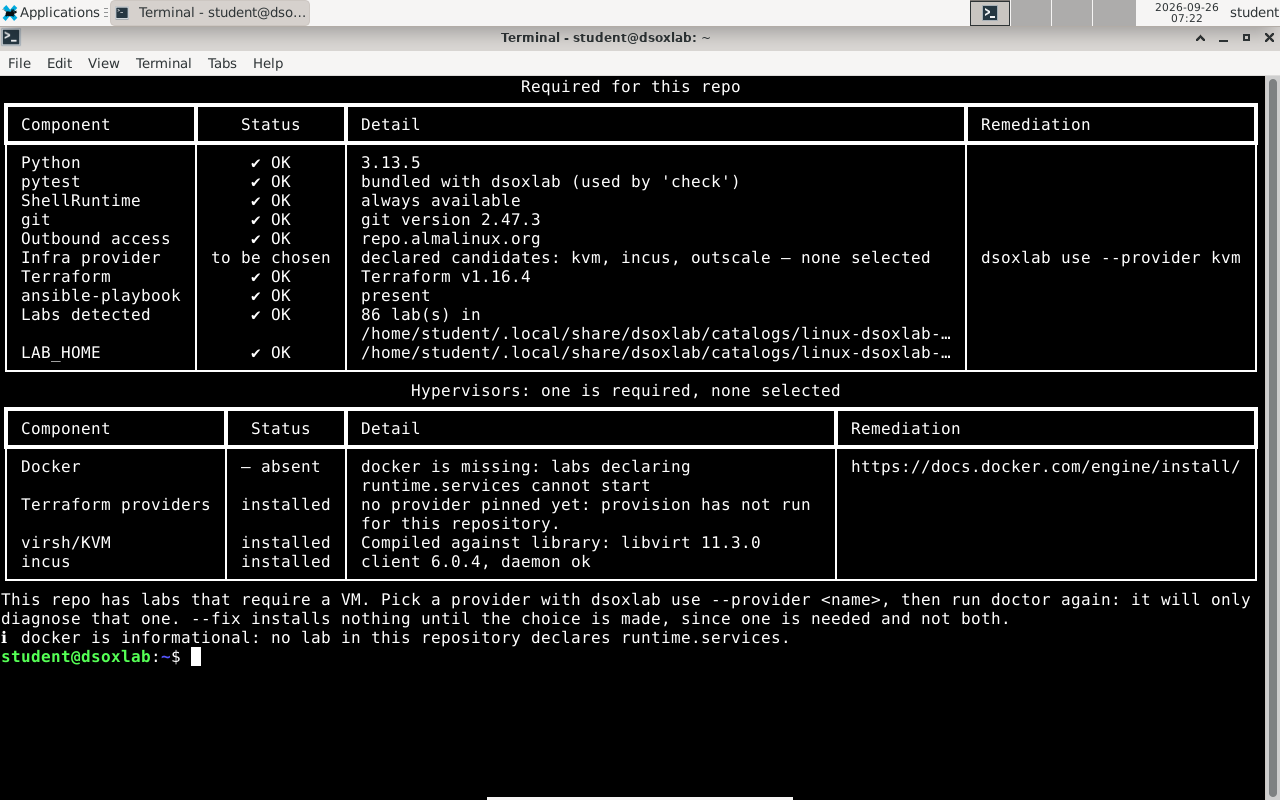
The appliance a few minutes after import: the desktop, 86 labs discovered, and the only choice left named with the command that settles it.
Install and play, in five minutes
Requires Python 3.11+ and either uv
or pipx to install it with. Nothing to clone, nothing to build.
uv tool install dsoxlab      # or: pipx install dsoxlab
dsoxlab demo                 # installs a one-lab demonstration catalog
cd ~/.local/share/dsoxlab/demo

dsoxlab course premiers-pas     # the lesson
dsoxlab run premiers-pas        # drops you into the lab's work directory
dsoxlab challenge premiers-pas  # the mission
dsoxlab check premiers-pas      # the tests, and the score
The demonstration lab is about dsoxlab itself, and needs no VM, no container and no Docker: it runs anywhere dsoxlab runs.
Or: the appliance, in four steps
For Windows and macOS, where uv tool install is not an option. No knowledge
of virtualization required.
-
Install VirtualBox from https://www.virtualbox.org/wiki/Downloads. The Extension Pack it offers is not needed.
-
Download the
.ovafrom the latest release that carries one, and check its digest against theSHA256SUMSpublished next to it. -
Import and start: in VirtualBox, File → Import Appliance, pick the
.ova, Finish, then Start. The first boot installs dsoxlab, the hypervisors and the desktop, then reboots on its own: count five to fifteen minutes, with nothing to type. -
Log in with
student/dsoxlab— the machine requires you to change that password, which is public — then, in the desktop's terminal:dsoxlab demo && cd ~/.local/share/dsoxlab/demo dsoxlab course premiers-pas
vm labs need one more step, nested virtualization, which is enabled on
your computer and not inside the machine: Settings → System → Processor →
Enable Nested VT-x/AMD-V, appliance powered off. dsoxlab doctor says so when
it is missing.
Every step in detail, the actual requirements and a troubleshooting table are on the appliance page.
Documentation
Every page names its audience in its first lines, and the index lists them all.
| I want to… | Read |
|---|---|
| Install dsoxlab, play labs, understand my score | For the learner |
| Play labs on Windows or macOS, without installing anything | The appliance, a ready-to-play VM |
| Write my own catalog of labs | For the catalog author, then the v1 contract field by field |
| Run the machines the labs need | For the trainer |
| Get throwaway VMs, with no exercise to write | Infrastructure without labs |
| Call dsoxlab from a script or a CI, and branch on the result | Exit codes, then the machine output for --json |
| Know where dsoxlab writes on my disk | Where dsoxlab writes |
| See every command | Command reference, generated from the CLI |
In the terminal, dsoxlab fullhelp prints the whole platform guide, in English
or in French.
Why dsoxlab
- One engine, many catalogs. A single CLI drives every training
repository. Add a new domain by writing a
meta.yml, not by patching the tool. - Validation proves, it does not trust. Labs are graded on the actual
state of the system (
pytest-testinfra) and, when it matters, on persistence after reboot — the trap that fails RHCSA/LFCS candidates. - Two runtimes. A lab runs either in a shell on your own machine, or in a vm provisioned for you. Which backend serves that VM (KVM/libvirt, Incus, Outscale) is the catalog's decision, not the lab's.
- Progress that sticks, per catalog. Scores, hint costs and history are persisted inside the catalog itself, so two catalogs never mix their histories.
- Bilingual UX. Every user-facing string ships in English and French
(
DSOXLAB_LANG=en|fr).
Contributing
git clone https://github.com/stephrobert/dsoxlab.git
cd dsoxlab
uv tool install --editable .
See CONTRIBUTING.md for the development setup, the quality
gates and the non-negotiable rules (the engine stays domain-agnostic, every
user-facing string goes through _() in both languages).
Security
Security posture is enforced, not aspirational — every workflow is scanned by its own tooling on each push and pull request:
- Hardened GitHub Actions. Every action is pinned to a full commit SHA, the
default token has no permissions (jobs opt into least privilege), and
checkoutnever persists credentials. - zizmor statically analyzes the
workflows on every PR (
ci.yml). - Plumber validates the CI/CD against a trust
policy (
.plumber.yaml) at a 100% compliance threshold, and publishes the score badge (plumber.yml). - OpenSSF Scorecard tracks the
supply-chain posture (
scorecard.yml). - PyPI Trusted Publishing (OIDC). Releases carry no long-lived token and
ship PEP 740 attestations (
release.yml). - Pre-commit secret scanning. TruffleHog and private-key detection run locally before every commit (see CONTRIBUTING.md).
To report a vulnerability, follow SECURITY.md.
The mark and its files are documented in docs/brand.md; the name and the logo are not covered by the Apache 2.0 licence.
Thanks
Several people outside the project have made dsoxlab better by reporting what they hit, with the diagnosis and often the fix. Naming what each report changed seems more useful than a list of handles.
@cedric-ribier has been the most persistent, and four releases come from his reports:
doctorno longer fails a healthy install over nominal disk sizes (0.1.94). He pointed out the information was confusing, which was exactly the defect: the check compared declared maximums against a measurement;- KVM provisioning works again on libvirt 8 (0.1.92). He reproduced the
os.firmwaredefect of the libvirt provider, documented the workaround upstream, and that is what made a fix possible on three libvirt versions; - the Incus agent is installed on AlmaLinux, whose RHEL kernel lacks the 9p driver, and the host-ready wait became configurable (0.1.41). Both from a single report, tested on three hosts;
doctornames missing nested virtualization instead of pointing at a BIOS a virtual machine does not have (0.1.95). That came out of his work on a ready-to-use appliance, discussed in #91.
And the appliance itself is his idea. He did not ask for it: he had already built one end to end, then documented it in #91. The one dsoxlab ships today is directly inspired by his — the idea and the approach both. It is the contribution a changelog shows least and the product owes most: without it, there would be nothing to offer anyone working on Windows or macOS.
@Gedd18 found that the lab catalog's
conftest.py failed to load whenever no infrastructure provider was resolved,
which silently blocked every shell lab — the very first ones a learner
plays. His traceback is what made it a five-minute fix instead of a hunt.
@VictorVare diagnosed two labs whose starting
state was unusable: a closed port 80 on a backend, and a closed LDAP port. In both
cases he distinguished No route to host from Connection refused and from a
timeout, which named the cause instead of leaving us to guess between HAProxy,
SELinux and the firewall.
If you hit something, the report is worth more than the workaround: dsoxlab support --issue fills in the diagnosis for you.
License & attribution
Licensed under the Apache License 2.0 — see LICENSE and NOTICE.
You may use, share and adapt this project, including commercially, provided you give appropriate credit to Stephane Robert and link back to https://blog.stephane-robert.info, and indicate whether changes were made. Apache-2.0 keeps those same two obligations — attribution and stating your changes — and adds an express patent grant.
Up to and including 0.1.12, dsoxlab was distributed under Creative Commons
Attribution 4.0 (CC BY 4.0). That grant is irrevocable, so those releases remain
available under CC BY 4.0. From 0.1.13 onwards the project is Apache-2.0:
Creative Commons licences are not designed for software, and this one left the
patent question open while marking the package as Other/NOASSERTION on PyPI.
© 2026 Stephane Robert.
1 maintainer

Release files for dsoxlab 0.2.3
For a detailed explanation of source distributions (sdists) and built distributions (wheels), please see the package formats documentation.
Source distribution (sdist)
| File | Size | Uploaded | |
|---|---|---|---|
| dsoxlab-0.2.3.tar.gz | 2.0 MB | Details |
Built distribution (wheel)
| File | Interpreter | ABI | Platform | Reset |
|---|---|---|---|---|
| dsoxlab-0.2.3-py3-none-any.whl | Python 3 | none | any | Details |
Total release size: 2.4 MB
Release files / dsoxlab-0.2.3.tar.gz
| Download URL | dsoxlab-0.2.3.tar.gz |
|---|---|
| Size | 2.0 MB |
| Tags | Source |
|
SHA-256 checksum How to use checksums |
5eebbd8f12ae9a5cdef0c21e9a66fadfd6f159518e101e4c49469615448e59a1
|
|
BLAKE2b-256 checksum How to use checksums |
e6f8cd9c70508b015cefa868a0d6b9db37bd1dae13ccf4b6aeeeeb46ffdeaca4
|
| Upload date | |
|
Uploaded using Trusted Publishing? What is trusted publishing? |
Yes |
| Uploaded via |
twine/7.0.0 CPython/3.13.14
|
Provenance
Provenance describes where a file came from. On PyPI, provenance is shared via attestations, which provide a verifiable record of the build or publishing details. View details, limitations and caveats.


PyPI Publish Attestation
PyPI verified that this artifact, at this checksum, originated from the publisher listed below.
Signed by GitHub Actions, verified by PyPI on Sep 26, 2026.
Transparency logRelease files / dsoxlab-0.2.3-py3-none-any.whl
| Download URL | dsoxlab-0.2.3-py3-none-any.whl |
|---|---|
| Size | 404.8 kB |
| Tags | Python 3 |
|
SHA-256 checksum How to use checksums |
04519a17602d20a44afb6b76ed30c73cded7912582a794c51e98619ef3f7e9c9
|
|
BLAKE2b-256 checksum How to use checksums |
6927db1e6504bc84a9cb882246a99a6aa6915202fadce69b877a71b0d643ae4e
|
| Upload date | |
|
Uploaded using Trusted Publishing? What is trusted publishing? |
Yes |
| Uploaded via |
twine/7.0.0 CPython/3.13.14
|
Provenance
Provenance describes where a file came from. On PyPI, provenance is shared via attestations, which provide a verifiable record of the build or publishing details. View details, limitations and caveats.
PyPI Publish Attestation
PyPI verified that this artifact, at this checksum, originated from the publisher listed below.
Signed by GitHub Actions, verified by PyPI on Sep 26, 2026.
Transparency log













