
Optimize Pydantic model field descriptions using DSPy

Project description
🚀 DSPydantic: Auto-Optimize Your Pydantic Models with DSPy
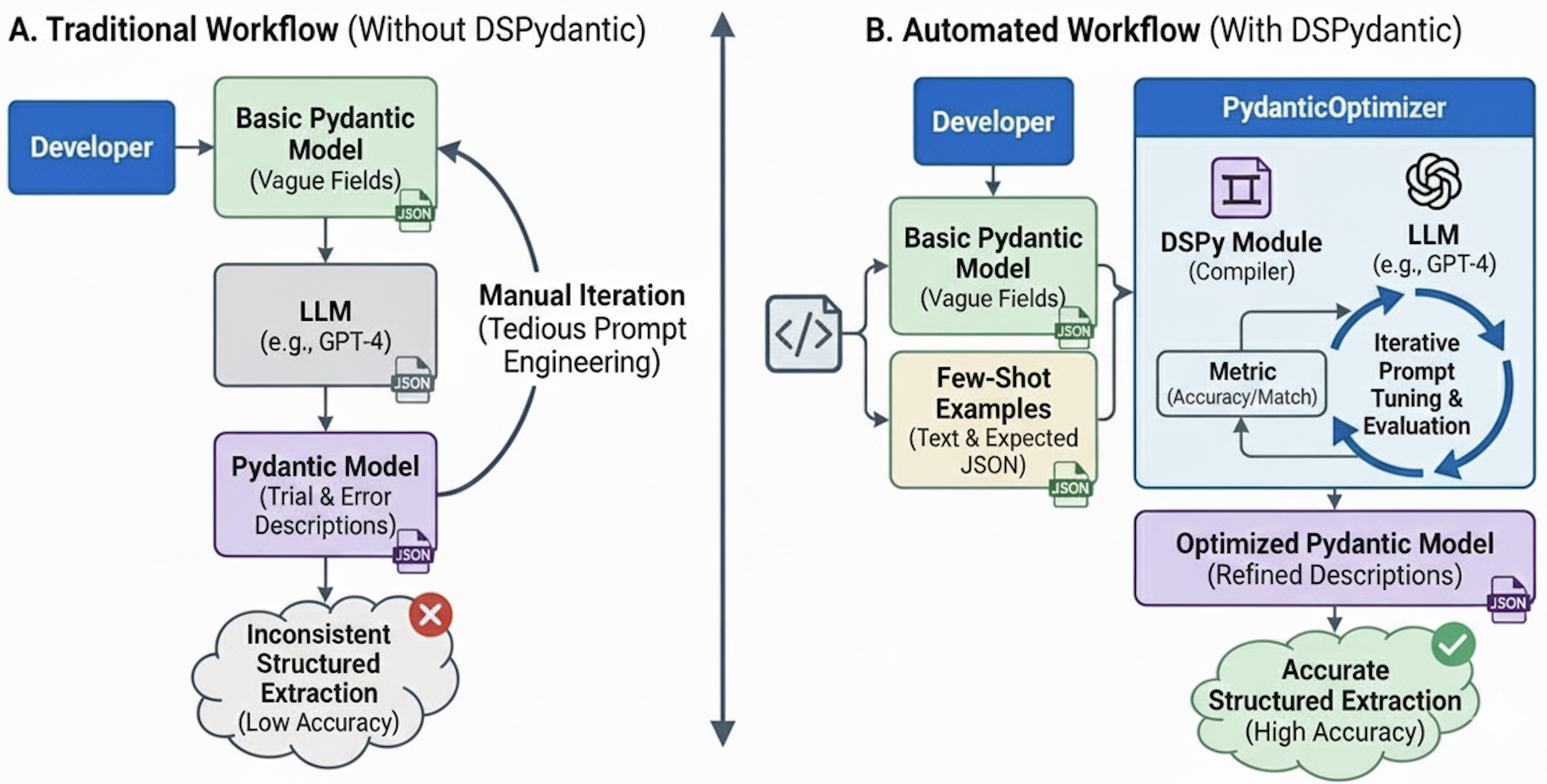
Automatically optimize Pydantic model field descriptions and prompts using DSPy. Get better structured data extraction from LLMs with less manual tuning.
✨ What It Does
Instead of spending hours crafting the perfect field descriptions for your Pydantic models, DSPydantic uses DSPy's optimization algorithms to automatically find the best descriptions based on your examples. Just provide a few examples, and watch your extraction accuracy improve.
🎯 Quick Start
from pydantic import BaseModel, Field
from typing import Literal
from dspydantic import PydanticOptimizer, Example, create_optimized_model

# 1. Define your model (any Pydantic model works)
class TransactionRecord(BaseModel):
    broker: str = Field(description="Financial institution or brokerage firm")
    amount: str = Field(description="Transaction amount with currency")
    security: str = Field(description="Stock, bond, or financial instrument")
    date: str = Field(description="Transaction date")
    transaction_type: Literal["equity", "bond", "option", "future", "forex"] = Field(
        description="Type of financial instrument"
    )

# 2. Provide examples (just input text + expected output)
examples = [
    Example(
        text="Transaction Report: Goldman Sachs processed a $2.5M equity trade for Tesla Inc. on March 15, 2024.",
        expected_output=TransactionRecord(
            broker="Goldman Sachs",
            amount="$2.5M",
            security="Tesla Inc.",
            date="March 15, 2024",
            transaction_type="equity"
        )
    ),
    Example(
        text="JPMorgan executed $500K bond purchase for Apple Corp dated 2024-03-20.",
        expected_output=TransactionRecord(
            broker="JPMorgan",
            amount="$500K",
            security="Apple Corp",
            date="2024-03-20",
            transaction_type="bond"
        )
    ),
]

# 3. Optimize and use
optimizer = PydanticOptimizer(
    model=TransactionRecord,
    examples=examples,
    model_id="gpt-4o",
    system_prompt="You are a financial document analysis assistant.",
    instruction_prompt="Extract transaction details from the financial report.",
)
result = optimizer.optimize()

OptimizedTransactionRecord = create_optimized_model(
    TransactionRecord,
    result.optimized_descriptions
)
print(result.optimized_descriptions)
print(result.optimized_system_prompt)
print(result.optimized_instruction_prompt)
# Use OptimizedTransactionRecord just like your original model, but with better accuracy!
That's it! Your model now has optimized descriptions that extract data more accurately.
📦 Installation
pip install dspydantic
Or with uv:
uv pip install dspydantic
🌟 Key Features
- Auto-optimization: Finds best field descriptions automatically
- Simple input: Just examples (text/images/PDFs) + your Pydantic model
- Better output: Optimized model ready to use with improved accuracy
- Template prompts: Dynamic prompts with
{placeholders}for context-aware extraction - Enum & Literal support: Optimize classification models
- Multiple formats: Text, images, PDFs—works with any input type
- Smart defaults: Auto-selects best optimizer, no configuration needed
📚 Examples
Check out the examples directory for complete working examples:
- Veterinary EHR extraction: Extract diseases, ICD-11 labels, and anonymized entities from clinical narratives—real-world medical data extraction
- Image classification: Classify MNIST handwritten digits using
Literal[0, 1, 2, 3, 4, 5, 6, 7, 8, 9]—demonstrates vision capabilities and Literal type optimization - Text classification: Classify IMDB movie review sentiment with
Literal["positive", "negative"]and template prompts—shows dynamic prompt formatting with{review}placeholders - Human-in-the-loop: Interactive evaluation with GUI—get human feedback during optimization
Basic Usage
1. Define Your Pydantic Model
from pydantic import BaseModel, Field
from typing import Literal

class ProductInfo(BaseModel):
    name: str = Field(description="Full product name and model")
    storage: str = Field(description="Storage capacity like 256GB or 1TB")
    processor: str = Field(description="Chip or processor information")
    price: str = Field(description="Product price with currency")
    colors: list[str] = Field(description="Available color options")
    availability: Literal["in_stock", "pre_order", "sold_out"] = Field(
        description="Current availability status"
    )
2. Create Examples
Simple input format—just text + expected output:
from dspydantic import Example

# Plain text input
examples = [
    Example(
        text="iPhone 15 Pro Max with 256GB storage, A17 Pro chip, priced at $1199. Available in titanium and black colors.",
        expected_output=ProductInfo(
            name="iPhone 15 Pro Max",
            storage="256GB",
            processor="A17 Pro chip",
            price="$1199",
            colors=["titanium", "black"],
            availability="in_stock"
        )
    ),
    Example(
        text="MacBook Air M3, 512GB SSD, M3 processor, $1299. Colors: space gray, silver. Currently on pre-order.",
        expected_output=ProductInfo(
            name="MacBook Air M3",
            storage="512GB SSD",
            processor="M3 processor",
            price="$1299",
            colors=["space gray", "silver"],
            availability="pre_order"
        )
    ),
]

# Or use dictionaries for template prompts (see Template Usage section)
# Or use images: Example(image_path="product.png", expected_output=...)
# Or use PDFs: Example(pdf_path="catalog.pdf", expected_output=...)
3. Optimize
from dspydantic import PydanticOptimizer

optimizer = PydanticOptimizer(
    model=ProductInfo,
    examples=examples,
    model_id="gpt-4o"
)

result = optimizer.optimize()  # Returns optimized descriptions

# Access optimized results
result.optimized_descriptions        # dict[str, str] - optimized field descriptions
result.optimized_system_prompt      # str | None - optimized system prompt
result.optimized_instruction_prompt # str | None - optimized instruction prompt
Template Formatting: When using text as a dictionary, instruction prompt templates with placeholders like {key} are automatically formatted with values from each example's text dict. This allows you to create dynamic, example-specific prompts. See the Template Usage section for a complete example.
4. Use Your Optimized Model
Simple output—just use the optimized model like your original:
from dspydantic import create_optimized_model
from openai import OpenAI

# Create optimized model (drop-in replacement)
OptimizedProductInfo = create_optimized_model(
    ProductInfo,
    result.optimized_descriptions
)

# Use with OpenAI structured outputs
client = OpenAI()
messages = []

# Add optimized system prompt if available
if result.optimized_system_prompt:
    messages.append({
        "role": "system",
        "content": result.optimized_system_prompt
    })

# Prepare user content with optimized instruction prompt
user_content = (
    "Samsung Galaxy S24 Ultra, 1TB storage, Snapdragon 8 Gen 3 processor, "
    "$1299. Available in titanium black, titanium gray, and titanium violet. In stock now."
)
if result.optimized_instruction_prompt:
    user_content = f"{result.optimized_instruction_prompt}\n\n{user_content}"

messages.append({
    "role": "user",
    "content": user_content
})

# Call OpenAI API with optimized model
response = client.chat.completions.create(
    model="gpt-4o",
    messages=messages,
    response_format=OptimizedProductInfo
)

# Parse response using the optimized model
product = OptimizedProductInfo.model_validate_json(
    response.choices[0].message.content
)
That's it! Your optimized model extracts data more accurately with zero code changes.
🏭 Real-World Usage Scenarios
Financial Document Processing
class Transaction(BaseModel):
    broker: str = Field(description="Financial institution")
    amount: str = Field(description="Transaction amount")
    security: str = Field(description="Financial instrument")
    transaction_type: Literal["equity", "bond", "option"] = Field(description="Transaction type")

examples = [
    Example(
        text="Goldman Sachs processed a $2.5M equity trade for Tesla Inc. on March 15, 2024.",
        expected_output=Transaction(broker="Goldman Sachs", amount="$2.5M", security="Tesla Inc.", transaction_type="equity")
    ),
    Example(
        text="JPMorgan executed $500K bond purchase for Apple Corp dated 2024-03-20.",
        expected_output=Transaction(broker="JPMorgan", amount="$500K", security="Apple Corp", transaction_type="bond")
    ),
]
Healthcare Information Extraction
from pydantic import BaseModel, Field
from dspydantic import Example

class MedicalRecord(BaseModel):
    patient_name: str = Field(description="Patient name")
    symptoms: list[str] = Field(description="Symptoms")
    medications: list[str] = Field(description="Prescribed medications")

examples = [
    Example(
        text="Patient: Sarah Johnson, 34. Symptoms: chest pain, shortness of breath. Prescribed: Lisinopril 10mg daily.",
        expected_output=MedicalRecord(
            patient_name="Sarah Johnson",
            symptoms=["chest pain", "shortness of breath"],
            medications=["Lisinopril 10mg daily"]
        )
    ),
    Example(
        text="Patient: Michael Chen, 45. Symptoms: headache, fatigue. Prescribed: Ibuprofen 400mg twice daily.",
        expected_output=MedicalRecord(
            patient_name="Michael Chen",
            symptoms=["headache", "fatigue"],
            medications=["Ibuprofen 400mg twice daily"]
        )
    ),
]
Legal Contract Analysis
from pydantic import BaseModel, Field
from typing import Literal
from dspydantic import Example

class ContractAnalysis(BaseModel):
    parties: list[str] = Field(description="Contracting parties")
    effective_date: str = Field(description="Effective date")
    monthly_fee: str = Field(description="Monthly fee")
    contract_type: Literal["service", "employment", "nda"] = Field(description="Contract type")

examples = [
    Example(
        text="Service Agreement between TechCorp LLC and DataSystems Inc., effective January 1, 2024. Monthly fee: $15,000.",
        expected_output=ContractAnalysis(
            parties=["TechCorp LLC", "DataSystems Inc."],
            effective_date="January 1, 2024",
            monthly_fee="$15,000",
            contract_type="service"
        )
    ),
]
Advanced Usage
Other modalities
Working with Images
Just provide image paths + expected output:
from pydantic import BaseModel, Field
from typing import Literal
from dspydantic import Example

class DigitClassification(BaseModel):
    digit: Literal[0, 1, 2, 3, 4, 5, 6, 7, 8, 9] = Field(description="Digit 0-9")

examples = [
    Example(
        image_path="digit_5.png",
        expected_output=DigitClassification(digit=5)
    ),
    Example(
        image_path="digit_3.png",
        expected_output=DigitClassification(digit=3)
    ),
]
Working with PDFs
Just provide PDF paths + expected output:
from pydantic import BaseModel, Field
from dspydantic import Example

class Invoice(BaseModel):
    invoice_number: str = Field(description="Invoice number")
    total_amount: float = Field(description="Total amount of the invoice")
    vendor: str = Field(description="Vendor or supplier name")
    date: str = Field(description="Invoice date")

examples = [
    Example(
        pdf_path="invoice_001.pdf",
        expected_output=Invoice(
            invoice_number="INV-2024-001",
            total_amount=1234.56,
            vendor="Acme Corporation",
            date="2024-03-15"
        )
    ),
]
Optimizing Prompt Templates
Optional system_prompt and instruction_prompt are optimized along with field descriptions. Use template prompts with placeholders that are automatically filled from example data dictionaries:
from pydantic import BaseModel, Field
from typing import Literal
from dspydantic import Example

class ProductReview(BaseModel):
    sentiment: Literal["positive", "negative", "neutral"] = Field(description="Review sentiment")
    rating: int = Field(description="Rating 1-5")
    aspects: list[Literal["camera", "performance", "battery"]] = Field(description="Product aspects")

examples = [
    Example(
        text={"review": "Amazing camera quality and fast performance!", "product": "iPhone 15 Pro", "category": "smartphone"},
        expected_output=ProductReview(sentiment="positive", rating=4, aspects=["camera", "performance"])
    ),
    Example(
        text={"review": "Poor battery life and overpriced.", "product": "Samsung Galaxy S24", "category": "smartphone"},
        expected_output=ProductReview(sentiment="negative", rating=2, aspects=["battery"])
    ),
]

# Template prompts with {placeholders} are automatically filled from dict keys
optimizer = PydanticOptimizer(
    model=ProductReview,
    examples=examples,
    system_prompt="You are an expert analyst specializing in {category} reviews.",
    instruction_prompt="Analyze the {category} review about {product}: {review}",
    model_id="gpt-4o"
)
result = optimizer.optimize()
# Access: result.optimized_system_prompt, result.optimized_instruction_prompt, result.optimized_descriptions
Placeholders like {category}, {product}, {review} are automatically filled from each example's text dictionary. Both prompts are optimized along with field descriptions.
Working with Enums and Literals
Literal and Enum types work automatically and are taken into account for optimization.
from pydantic import BaseModel, Field
from typing import Literal
from dspydantic import Example

class ReviewAnalysis(BaseModel):
    sentiment: Literal["positive", "negative", "neutral"] = Field(description="Review sentiment")
    aspects: list[Literal["camera", "performance", "battery", "display", "price"]] = Field(description="Product aspects")
    rating: int = Field(description="Rating 1-5")

examples = [
    Example(
        text="Great camera quality and amazing performance. Overall 4/5.",
        expected_output=ReviewAnalysis(sentiment="positive", aspects=["camera", "performance"], rating=4)
    ),
    Example(
        text="Poor display quality and overpriced. Not worth it. Rating: 2 stars.",
        expected_output=ReviewAnalysis(sentiment="negative", aspects=["display", "price"], rating=2)
    ),
]
Excluding Fields from Evaluation
If you have fields that shouldn't affect the evaluation score (e.g., metadata, timestamps, or fields you're not optimizing), you can exclude them:
from pydantic import BaseModel, Field

class PatientRecord(BaseModel):
    patient_name: str = Field(description="Patient full name")
    urgency: Literal["low", "medium", "high", "critical"] = Field(
        description="Urgency level of the case"
    )
    diagnosis: str = Field(description="Primary diagnosis")
    metadata: str = Field(description="Internal metadata")  # Not important for evaluation
    timestamp: str = Field(description="Record timestamp")  # Not important for evaluation

optimizer = PydanticOptimizer(
    model=PatientRecord,
    examples=examples,
    model_id="gpt-4o",
    exclude_fields=["metadata", "timestamp"],  # These fields won't affect scoring
)
result = optimizer.optimize()
Excluded fields will still be extracted by the model, but they won't be included in the evaluation score calculation. This is useful when you have fields that are not critical for optimization or that you don't want to optimize for.
Nested Models
Nested models work automatically and are taken into account for optimization. Field paths like "address.street" are handled automatically:
from pydantic import BaseModel, Field
from dspydantic import Example

class Address(BaseModel):
    street: str = Field(description="Street")
    city: str = Field(description="City")
    zip_code: str = Field(description="ZIP code")

class Customer(BaseModel):
    name: str = Field(description="Name")
    address: Address = Field(description="Address")

examples = [
    Example(
        text="Jane Smith, 456 Oak Ave, San Francisco, CA 94102",
        expected_output=Customer(
            name="Jane Smith",
            address=Address(street="456 Oak Ave", city="San Francisco", zip_code="94102")
        )
    ),
]
Evaluation Options
Built-in Evaluation
Use built-in options: "exact", "levenshtein", "exact-hitl", "levenshtein-hitl":
from dspydantic import PydanticOptimizer

optimizer = PydanticOptimizer(
    model=PatientRecord,
    examples=examples,
    evaluate_fn="exact",  # or "levenshtein" for fuzzy matching
    model_id="gpt-4o"
)
Custom Evaluation Function
from dspydantic import PydanticOptimizer

def evaluate(example, optimized_descriptions, system_prompt, instruction_prompt) -> float:
    # Returns score 0.0 to 1.0
    return 0.85

optimizer = PydanticOptimizer(model=Customer, examples=examples, evaluate_fn=evaluate, model_id="gpt-4o")
LLM Judge (No Expected Output)
When expected_output is None, use an LLM as a judge for unlabeled data:
from pydantic import BaseModel, Field
from typing import Literal
from dspydantic import Example, PydanticOptimizer
import dspy

class Transaction(BaseModel):
    broker: str = Field(description="Financial institution")
    amount: str = Field(description="Transaction amount")
    security: str = Field(description="Financial instrument")
    transaction_type: Literal["equity", "bond", "option"] = Field(description="Transaction type")

examples = [
    Example(text="Goldman Sachs processed a $2.5M equity trade for Tesla Inc.", expected_output=None),
    Example(text="JPMorgan executed $500K bond purchase for Apple Corp.", expected_output=None),
]

# Uses model_id LLM as judge by default
optimizer = PydanticOptimizer(model=Transaction, examples=examples, model_id="gpt-4o")

# Or use a separate judge LLM
judge_lm = dspy.LM("gpt-4", api_key="your-api-key")
optimizer = PydanticOptimizer(model=Transaction, examples=examples, evaluate_fn=judge_lm, model_id="gpt-4o-mini")
Optimizer Selection
Auto-selects optimizer based on dataset size, or specify manually:
- Auto (default):
< 20 examples→BootstrapFewShot,>= 20 examples→BootstrapFewShotWithRandomSearch - Manual: Pass string (
"miprov2","gepa","copro", etc.) or Teleprompter instance
from dspydantic import PydanticOptimizer
from dspy.teleprompt import MIPROv2

# Auto-select (default)
optimizer = PydanticOptimizer(model=PatientRecord, examples=examples, model_id="gpt-4o")

# Manual selection
optimizer = PydanticOptimizer(model=PatientRecord, examples=examples, optimizer="miprov2", model_id="gpt-4o")

# Custom optimizer instance
custom_optimizer = MIPROv2(metric=my_metric, num_threads=8)
optimizer = PydanticOptimizer(model=PatientRecord, examples=examples, optimizer=custom_optimizer)
API Reference
PydanticOptimizer
Main optimizer class.
Parameters:
model(type[BaseModel]): Pydantic model class to optimizeexamples(list[Example]): Examples for optimization (typically 5-20)evaluate_fn(Callable | dspy.LM | str | None): Evaluation function, built-in ("exact", "levenshtein", "exact-hitl", "levenshtein-hitl"), or dspy.LM instancesystem_prompt(str | None): Optional system prompt to optimizeinstruction_prompt(str | None): Optional instruction prompt to optimize (supports{placeholders})lm(dspy.LM | None): Optional DSPy LM instance (overrides model_id/api_key)model_id(str): LLM model ID (default: "gpt-4o")api_key(str | None): API key (default: from OPENAI_API_KEY env var)api_base(str | None): API base URL (for Azure OpenAI)api_version(str | None): API version (for Azure OpenAI)num_threads(int): Optimization threads (default: 4)init_temperature(float): Initial temperature (default: 1.0)verbose(bool): Print progress (default: False)optimizer(str | Teleprompter | None): Optimizer name or instance (auto-selects if None)train_split(float): Training split fraction (default: 0.8)optimizer_kwargs(dict[str, Any] | None): Additional kwargs for optimizerexclude_fields(list[str] | None): Field names to exclude from evaluation
Returns: OptimizationResult with optimized descriptions, prompts, and metrics
Example
Example data for optimization.
Parameters:
expected_output(dict | BaseModel | None): Expected output (Pydantic model or dict). IfNone, uses LLM judgetext(str | dict | None): Plain text input or dict for template promptsimage_path(str | Path | None): Path to image fileimage_base64(str | None): Base64-encoded imagepdf_path(str | Path | None): Path to PDF filepdf_dpi(int): DPI for PDF conversion (default: 300)
Examples:
# Text input
Example(text="Goldman Sachs processed $2.5M equity trade", expected_output=Transaction(...))

# Image input
Example(image_path="report.png", expected_output=Transaction(...))

# PDF input
Example(pdf_path="statement.pdf", expected_output=Transaction(...))

# Template prompt (dict)
Example(text={"report": "...", "date": "..."}, expected_output=Transaction(...))

# LLM judge (no expected_output)
Example(text="...", expected_output=None)
create_optimized_model(model, optimized_descriptions)
Create a new Pydantic model class with optimized descriptions.
Parameters:
model(type[BaseModel]): Original Pydantic modeloptimized_descriptions(dict[str, str]): Fromresult.optimized_descriptions
Returns: type[BaseModel] - New model class with optimized descriptions
Example:
OptimizedTransaction = create_optimized_model(Transaction, result.optimized_descriptions)
response = client.chat.completions.create(model="gpt-4o", messages=messages, response_format=OptimizedTransaction)
apply_optimized_descriptions(model, optimized_descriptions)
Get optimized JSON schema without creating a new model class.
Parameters:
model(type[BaseModel]): Original Pydantic modeloptimized_descriptions(dict[str, str]): Fromresult.optimized_descriptions
Returns: dict - JSON schema with optimized descriptions
Example:
optimized_schema = apply_optimized_descriptions(ProductInfo, result.optimized_descriptions)
response = client.chat.completions.create(
    model="gpt-4o",
    messages=messages,
    response_format={"type": "json_schema", "json_schema": {"schema": optimized_schema}}
)
License
Apache 2.0
Contributing
Contributions are welcome! Please open an issue or submit a pull request.
Release history Release notifications | RSS feed


Download files
Download the file for your platform. If you're not sure which to choose, learn more about installing packages.
Source Distribution
Built Distribution
Filter files by name, interpreter, ABI, and platform.
If you're not sure about the file name format, learn more about wheel file names.
Copy a direct link to the current filters
File details
Details for the file dspydantic-0.0.7.tar.gz.
File metadata
- Download URL: dspydantic-0.0.7.tar.gz
- Upload date:
- Size: 232.3 kB
- Tags: Source
- Uploaded using Trusted Publishing? No
- Uploaded via: uv/0.5.18
File hashes
| Algorithm | Hash digest | |
|---|---|---|
| SHA256 |
cbe9b5b767030bc887c2d19b2133792aaf3d50260057c20d31bb6f6a67a15f03
|
|
| MD5 |
9dccfe4c227f4017c94ff2957747f7fb
|
|
| BLAKE2b-256 |
4073cc394c5a3e845fb9c55990c467b18c66836e75e29c3147d7272b72baa853
|
File details
Details for the file dspydantic-0.0.7-py3-none-any.whl.
File metadata
- Download URL: dspydantic-0.0.7-py3-none-any.whl
- Upload date:
- Size: 49.6 kB
- Tags: Python 3
- Uploaded using Trusted Publishing? No
- Uploaded via: uv/0.5.18
File hashes
| Algorithm | Hash digest | |
|---|---|---|
| SHA256 |
46c0b103943d2d66980b42185ad6d4b1818e5e968c4be6c0e0a0965c0c3b69f6
|
|
| MD5 |
dcf5f6a3bfaa4b1bdaee02b8855b5317
|
|
| BLAKE2b-256 |
6ba4b5aca839c658ca1aa6872ac3d6a5a7680c3992a0dfb74430f486d2849c58
|






