
DSPyUI
A Gradio user interface for DSPy - making DSPy accessible to non-technical users through a visual web interface.
Quick Start
Install from PyPI
pip install dspyui-gradio
dspyui
The package is called dspyui-gradio on PyPI (the plain dspyui name was not available); the command it installs is dspyui.
Or run it without installing anything, in its own isolated environment, using uv:
uvx dspyui-gradio
Then open http://127.0.0.1:7860. Compiled programs, prompts and datasets are saved in the folder you launch from, and API keys are read from a .env file in that folder (or entered in the Settings tab).
API key: use OpenRouter (recommended)
The easiest way to run DSPyUI is with a single OpenRouter key. Put it in a .env file in the folder you launch from:
OPENROUTER_API_KEY=sk-or-...
That one key works for every model in the Model and Teacher lists, including the defaults (openai/gpt-5.6-luna and openai/gpt-5.6-sol) and the Claude, Gemini and open-source models: when a provider's own key is not set, DSPyUI sends that model through OpenRouter for you. Keys for OpenAI, Anthropic, Google Gemini and Groq are optional and only needed if you want to call that provider directly.
Reading Context Engineering with DSPy? Install DSPyUI in its own environment (
uvx dspyui-gradiodoes this for you) rather than into the book's companion repository environment, so its pinned package versions stay untouched.
From a clone of this repository
bash webui.sh
Gradio Spaces (Cloud)
Deploy to Hugging Face Spaces for free cloud hosting! See README_SPACES.md for detailed instructions.

Coming from the book?
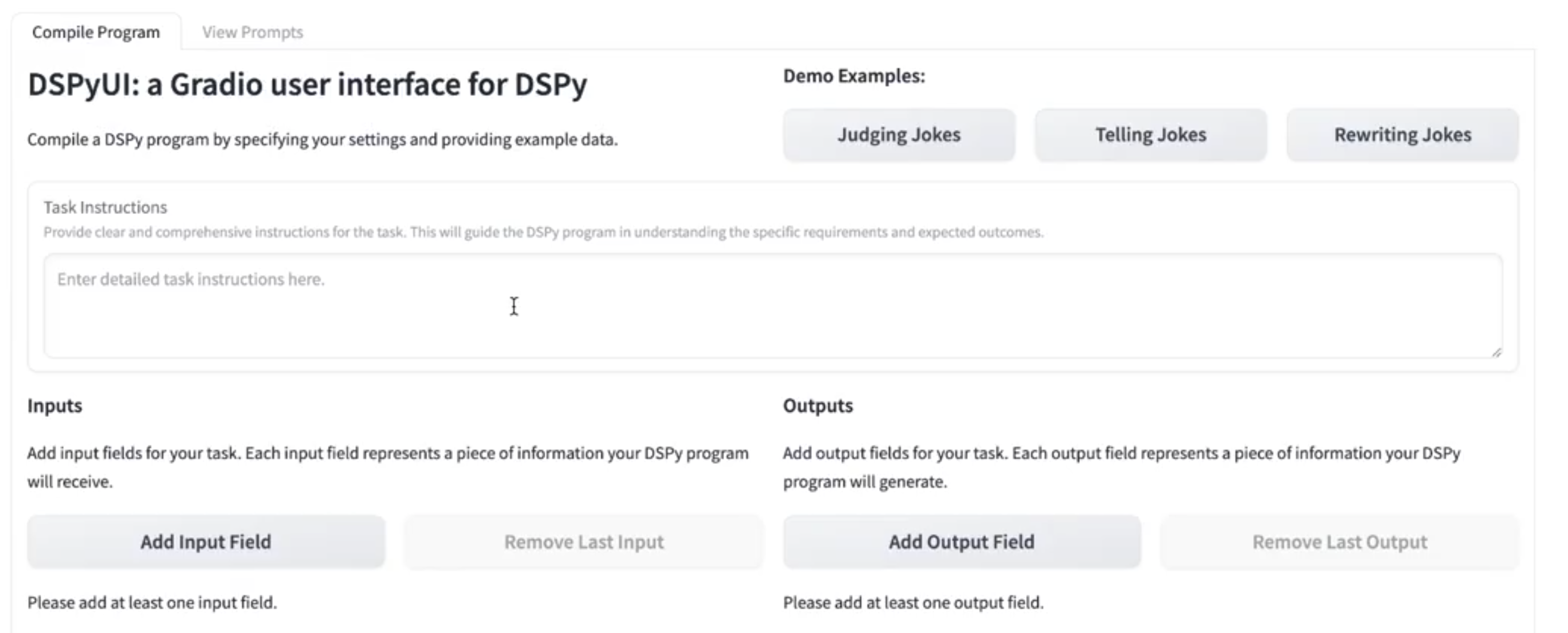
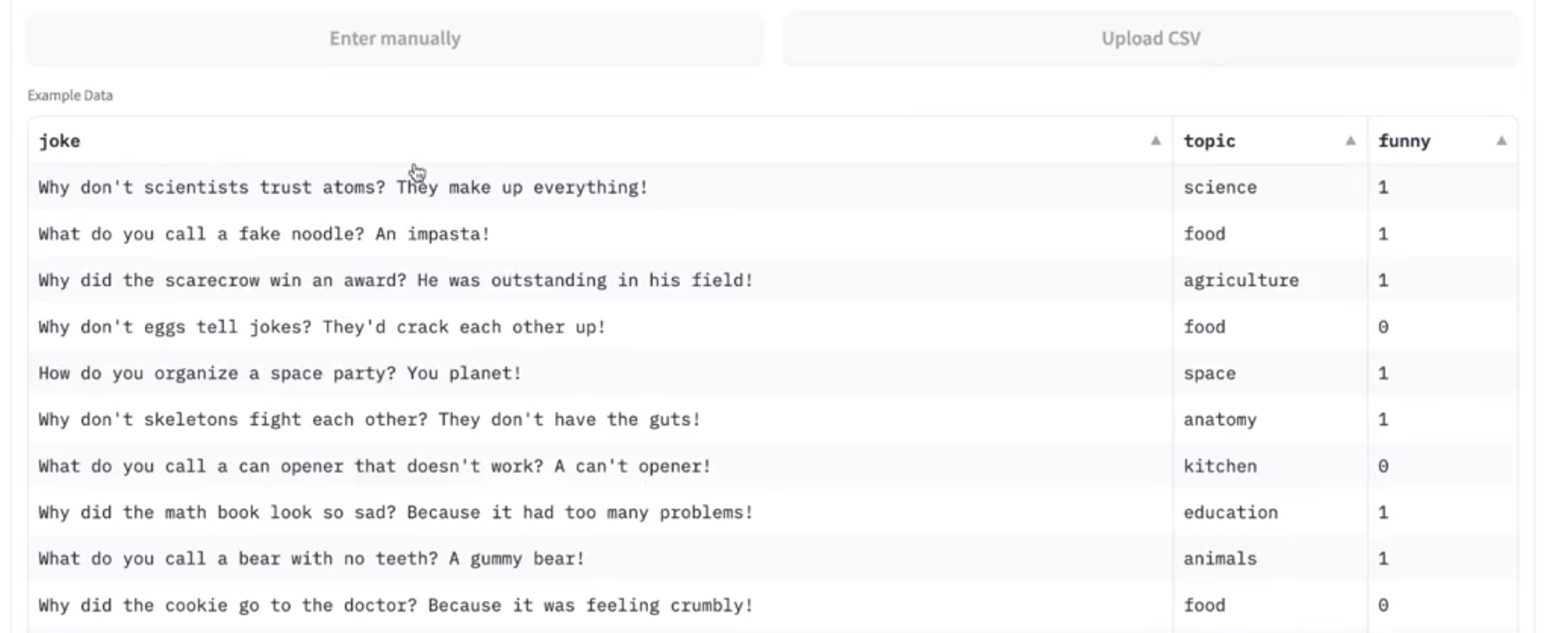
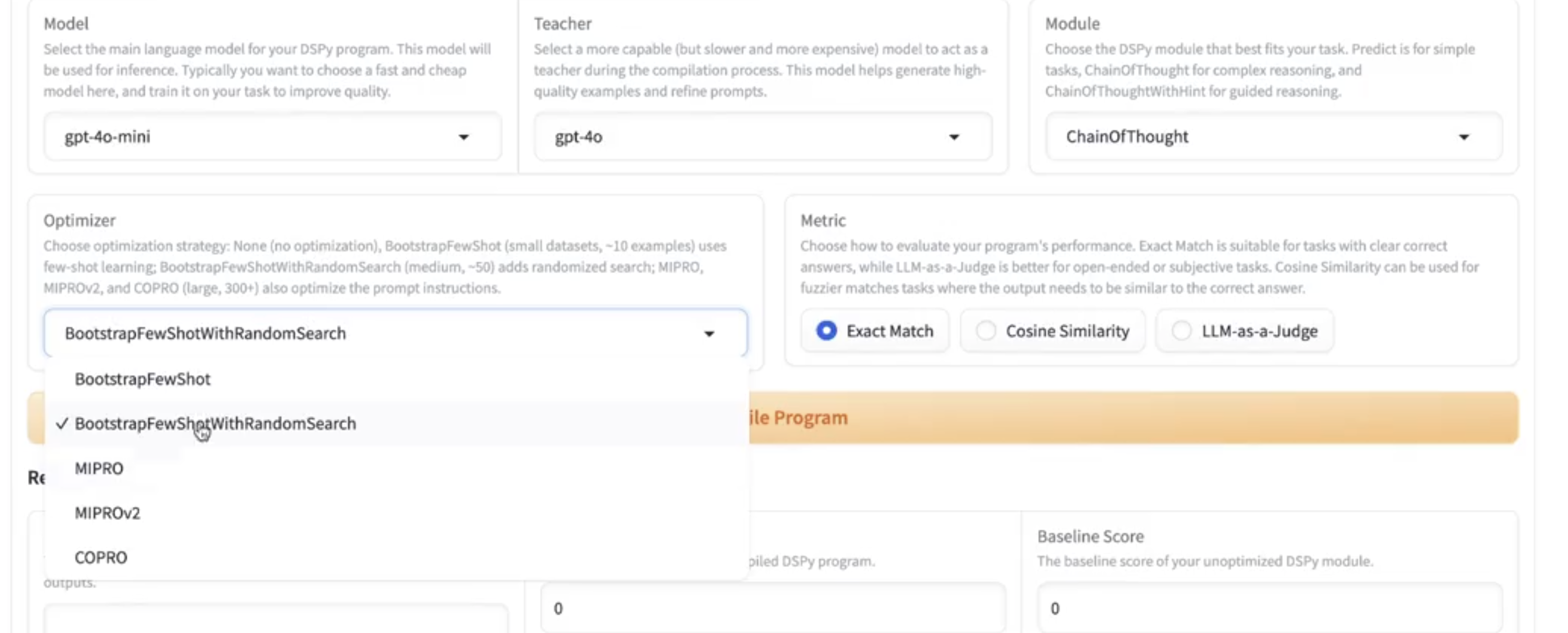
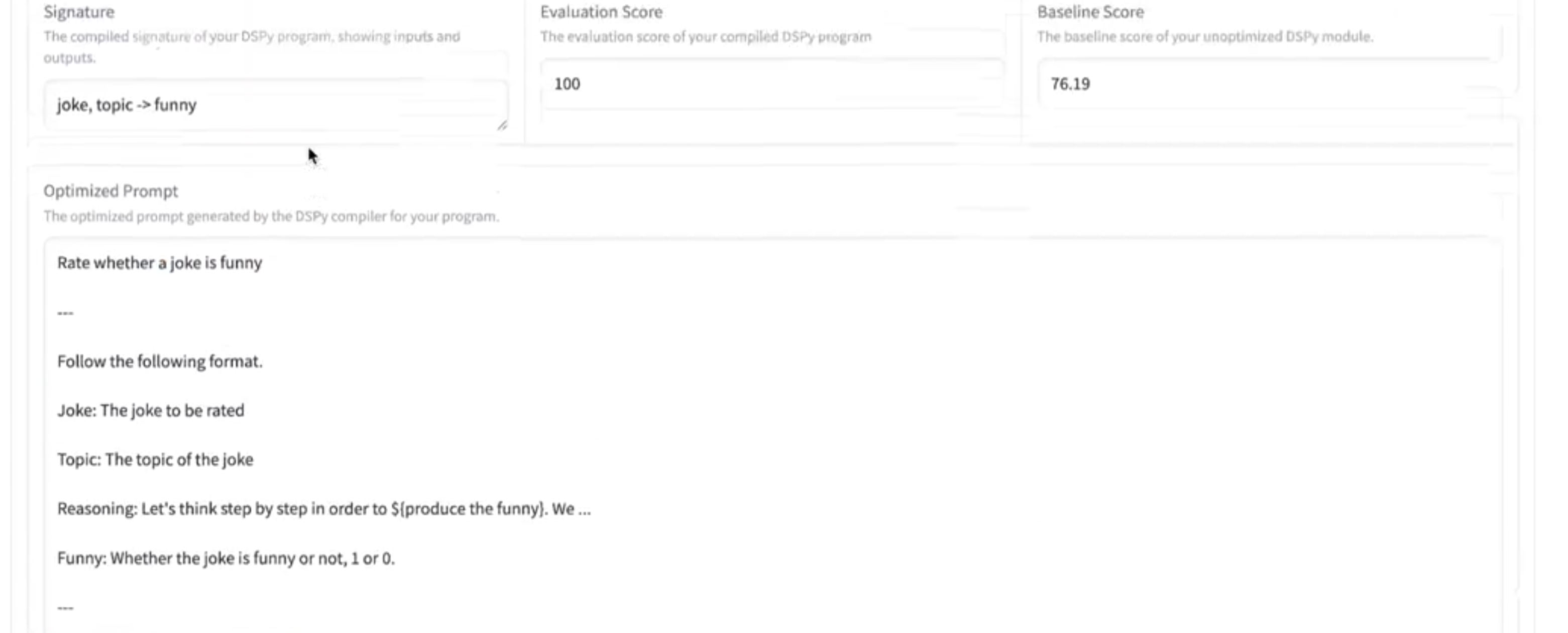
Chapter 10 of Context Engineering with DSPy ("Building a Gradio User Interface (DSPyUI)") and its companion notebook walk through a compact version of this app. The same building blocks, with the same names, live in dspyui/core.py in the same order as the chapter. Search that file for BOOK: to jump between them.
| Book section | In the code (dspyui/core.py) |
In the app ("Compile Program" tab) |
|---|---|---|
| Signatures | create_custom_signature() |
Task Instructions, Inputs, Outputs |
| Modules | MODEL_OPTIONS, create_module() |
Settings: Model (student), Teacher, Module |
| Datasets | load_and_split() |
Data: Upload CSV / Enter manually, and the three Demo Examples |
| Optimization | create_metric(), compile_program() |
Settings: Optimizer, Metric, then Compile Program and Results |
| Inference | run_inference() |
Select a row, Generate, and the Optimized Prompt box |
The full app adds a few things the chapter leaves out: two more modules (ChainOfThoughtWithHint, ProgramOfThought), two more optimizers (COPRO, LabeledFewShot), cost tracking, the View Prompts tab for saved programs, the Build Chain tab and the Settings tab. In the code these are marked "Beyond the book".
Requirements
- Python 3.10 to 3.14
- An API key. OpenRouter is recommended: one
OPENROUTER_API_KEYcovers every model in the lists- Set it in a
.envfile (see.env.example), or in the Settings tab (no .env file needed for Spaces!) - Keys for OpenAI, Anthropic, Google Gemini and Groq are optional. If you set one, that provider's models are called directly; otherwise they go through OpenRouter
- Local models (
local:<name>) need no key
- Set it in a
Setup
- Clone the repository
- Create a
.envfile with your API keys (see.env.example) - Run
bash webui.shto start the application
The script will automatically:
- Create a virtual environment
- Install dependencies (Gradio 5.x and DSPy 3.x)
- Load environment variables from
.env - Launch the Gradio interface
Manual Installation
python3 -m venv dspyui_env
source dspyui_env/bin/activate
pip install -r requirements.txt
gradio interface.py
Project Layout
dspyui/
├── core.py          # The DSPy logic: signatures, modules, datasets, optimizers, inference
├── interface.py     # The Gradio web form
├── cli.py           # The `dspyui` command
└── example_data/    # Demo datasets and a pre-compiled judge
interface.py         # Launcher for `gradio interface.py` / webui.sh
app.py               # Hugging Face Spaces entry point
Features
- Visual interface for DSPy program compilation
- 🔗 Chain Builder - create multi-step DSPy programs by chaining modules together
- ⚙️ Settings Tab - configure API keys directly in the UI (no .env file needed!)
- OpenRouter support (recommended) - one API key for every model, or use OpenAI, Anthropic, Google Gemini and Groq keys directly
- Local LLM support (LM Studio, Ollama, llama.cpp)
- Built-in DSPy modules (Predict, ChainOfThought, ChainOfThoughtWithHint, ProgramOfThought)
- Built-in optimizers (BootstrapFewShot, BootstrapRS, MIPROv2, GEPA, COPRO, LabeledFewShot)
- Evaluation metrics (Exact Match, Cosine Similarity, LLM-as-a-Judge)
- Evaluation in generate interface - see scores when testing predictions
- Cost tracking and display - track actual costs and token usage for all compilations
- Consolidated .dspyui file format - all program data in a single file
- Example datasets and pre-compiled programs
- Export and reuse compiled programs
- Load existing prompts back into the compiler
- Gradio Spaces ready - deploy to cloud with zero configuration
Technology Stack
- UI Framework: Gradio 5 (5.50 or newer; Gradio 6 is not supported yet because it renders the interface differently)
- DSPy Version: 3.3 or newer (tested with 3.4.0)
- Python: 3.10 to 3.14
- Type Safety: mypy with comprehensive type hints
- Data Validation: Pydantic models for configuration
- Testing: Playwright for end-to-end tests, pytest for unit tests
Supported Modules
- Predict - Simple prediction for straightforward tasks
- ChainOfThought - Step-by-step reasoning for complex tasks
- ChainOfThoughtWithHint - Guided reasoning with custom hints
- ProgramOfThought - Code execution for computational tasks (requires deno)
Supported Optimizers
| Optimizer | Best for |
|---|---|
| BootstrapFewShot | Small datasets (~10 examples), quick iteration |
| BootstrapRS | Medium datasets (50+), need reliable improvement |
| MIPROv2 | Large datasets (100+), production optimization |
| GEPA | Creative/subjective tasks, instruction tuning |
| COPRO | Instruction-only optimization |
| LabeledFewShot | Simple labeled examples without optimization (any dataset size) |
BootstrapRS is DSPy's short name for BootstrapFewShotWithRandomSearch. The Build Chain tab also offers BootstrapFinetune, which distills prompts into fine-tuned model weights.
Supported Models
The Model and Teacher dropdowns use DSPy's provider/model names, for example openai/gpt-5.6-luna (the default student), openai/gpt-5.6-sol (the default teacher), anthropic/claude-opus-4.8 and gemini/gemini-3.5-flash. The list lives in MODEL_OPTIONS in dspyui/core.py, and you can type any other model name that DSPy understands, including openrouter/... models and local:<name> for a local server.
Evaluation Features
DSPyUI provides comprehensive evaluation capabilities:
During Compilation
- Choose from three evaluation metrics:
- Exact Match: Compare outputs for exact equality
- Cosine Similarity: Semantic similarity using embeddings
- LLM-as-a-Judge: Use a separate DSPy program as an evaluator
- Automatic train/dev split (80/20) for validation
- Baseline and optimized scores displayed
During Generation
- When testing individual predictions, evaluation scores are automatically displayed
- Works with the same metrics as compilation
- Requires gold/expected output data to be present
- Helpful for debugging and quality assurance
Cost Tracking
DSPyUI automatically tracks and displays costs for all program compilations:
Features
- Automatic tracking: Costs calculated from actual API usage after each compilation
- Real-time display: See costs and token usage immediately in results
- Historical tracking: All costs saved to program JSON files
- Sort by cost: Find expensive compilations in the View Prompts tab
- Token breakdown: View input tokens, output tokens, and total usage
What's Tracked
- Actual cost in USD: Based on official provider pricing
- Input tokens: Tokens sent to the model
- Output tokens: Tokens generated by the model
- Total tokens: Sum of input and output
- Per-model pricing: Separate tracking for student and teacher models
Supported Providers
- OpenRouter (recommended), OpenAI, Anthropic, Google Gemini and Groq
- Local LLMs ($0 cost)
Pricing Data
Costs are the ones DSPy records for each call (via LiteLLM's price list), added up across the student and teacher models. A small fallback table for local and older models is kept in dspyui/core.py.
Local LLM Support
DSPyUI supports running local LLMs through OpenAI-compatible endpoints:
- LM Studio: Start LM Studio server (default: http://127.0.0.1:1234/v1)
- Ollama: Use with OpenAI compatibility enabled
- llama.cpp: Run server with
--api-keyflag
To use:
- In the model dropdown, select a model name starting with
local: - Enter your local server's base URL (or use the default for LM Studio)
- Compile and run as normal - data stays completely private and costs $0!
Consolidated File Format (.dspyui)
DSPyUI automatically saves compiled programs in two formats:
- Legacy format: Three separate files (dataset.csv, program.json, prompt.json)
- Consolidated format: Single
.dspyuifile containing all program data
Benefits of .dspyui Format
- Single file for easy sharing and backup
- Complete program package - includes configuration, compiled program, and training data
- Version controlled - includes DSPy and DSPyUI version info
- Future-proof - foundation for workflow chaining and other advanced features
Export & Import Programs
Export: Click the "💾 Export .dspyui" button in the View Prompts tab to convert any existing program to the consolidated format. Files are saved to consolidated_programs/.
Import: Upload a .dspyui file using the "📥 Import .dspyui File" section in the View Prompts tab. The file will be automatically extracted and saved to your local directories, making it available for viewing and execution.
🔗 Chain Building (Agentic Workflows)
The Chain Builder allows you to create multi-step DSPy programs where the output from one module becomes input to the next. This enables complex, agentic workflows similar to ComfyUI or N8N.
Use Cases
- Multi-stage analysis: Extract entities → Classify sentiment → Generate summary
- Research pipelines: Generate query → Search docs → Synthesize answer
- Data transformation: Parse input → Validate → Transform → Format output
- Reasoning chains: Generate hypotheses → Test each → Select best
How to Build a Chain
-
Navigate to Build Chain tab
-
Configure chain basics:
- Name your chain
- Add description
- Define initial inputs (fields provided to the chain)
- Define final outputs (fields to evaluate)
-
Add steps sequentially:
- Select module type (Predict, ChainOfThought, etc.)
- Define signature:
input_fields -> output_fields - Add instructions (optional)
- Map inputs: Specify where each input comes from (chain inputs or previous step outputs)
-
Upload training data: CSV with all fields needed across the chain
-
Configure and compile:
- Select model, optimizer, and evaluation metric
- Click "🔨 Compile Chain"
- View results including cost and evaluation score
Example Chain
Task: Analyze text and generate a summary with keywords
Step 1: Extract Keywords
- Module:
ChainOfThought - Signature:
text -> keywords - Input Mapping:
{"text": "text"}
Step 2: Generate Summary
- Module:
ChainOfThought - Signature:
text, keywords -> summary - Input Mapping:
{"text": "text", "keywords": "keywords"}
Technical Details
- Chains are saved as
.jsonfiles in thechains/directory - Also exported to consolidated
.dspyuiformat - Each step is a DSPy module that can access:
- Initial chain inputs
- Outputs from all previous steps
- DSPy optimizers train the entire chain end-to-end
- Cost tracking included for full chain compilation
Code Quality & Testing
DSPyUI maintains high code quality standards:
Type Safety
- Comprehensive type hints on all core functions
- mypy configuration for static type checking
- Pydantic models for runtime data validation
- Clear function signatures for better IDE support
Testing Infrastructure
- Automated Gradio test runner (
gradio_test_runner.py) - Playwright end-to-end tests (15/20 passing)
- REST API testing via Gradio Python Client
- Mock data generation for realistic testing
- Comprehensive logging and error tracking
Run tests:
source dspyui_env/bin/activate

# Fast offline unit tests for the core (no API keys or browser needed)
pytest tests/test_core.py

# Run all tests (pytest + REST API)
python gradio_test_runner.py

# Run only pytest tests
python gradio_test_runner.py --pytest-only

# Run only REST API tests
python gradio_test_runner.py --rest-api-tests

# Generate mock data
python gradio_test_runner.py --generate-mocks

# Run with verbose logging
python gradio_test_runner.py --verbose

# Type checking
mypy dspyui/core.py dspyui/interface.py gradio_test_runner.py
The test runner:
- Starts Gradio server automatically on port 7862
- Logs all output to
test_logs/run_<timestamp>/ - Generates mock CSV datasets for testing
- Runs Playwright UI tests and REST API tests
- Aggregates results and creates summary reports
1 maintainer

Metadata
1 maintainer
Release files for dspyui-gradio 1.0.0
For a detailed explanation of source distributions (sdists) and built distributions (wheels), please see the package formats documentation.
Source distribution (sdist)
| File | Size | Uploaded | Provenance | |
|---|---|---|---|---|
| dspyui_gradio-1.0.0.tar.gz | 66.3 kB | With provenance | Details |
Built distribution (wheel)
| File | Interpreter | ABI | Platform | Reset |
|---|---|---|---|---|
| dspyui_gradio-1.0.0-py3-none-any.whl | Python 3 | none | any | Details |
Total release size: 124.8 kB
Release files / dspyui_gradio-1.0.0.tar.gz
| Download URL | dspyui_gradio-1.0.0.tar.gz |
|---|---|
| Size | 66.3 kB |
| Tags | Source |
|
SHA-256 checksum How to use checksums |
75717ebf8abde037c508c452938ae7008c10e7d29daebb98e360883c26df1bb3
|
|
BLAKE2b-256 checksum How to use checksums |
7eb82c222b783d8a150e74bed472b5a7e4b99a2e848188d6882a139c4fbb7baf
|
| Upload date | |
|
Uploaded using Trusted Publishing? What is trusted publishing? |
Yes |
| Uploaded via |
twine/7.0.0 CPython/3.13.14
|
Provenance
Provenance describes where a file came from. On PyPI, provenance is shared via attestations, which provide a verifiable record of the build or publishing details. View details, limitations and caveats.


PyPI Publish Attestation
PyPI verified that this artifact, at this checksum, originated from the publisher listed below.
Signed by GitHub Actions, verified by PyPI on Oct 9, 2026.
Transparency logRelease files / dspyui_gradio-1.0.0-py3-none-any.whl
| Download URL | dspyui_gradio-1.0.0-py3-none-any.whl |
|---|---|
| Size | 58.5 kB |
| Tags | Python 3 |
|
SHA-256 checksum How to use checksums |
e8216c76bfe2f04d96aa56aaac4de40a6c20fe9cf2f6d5fda00e1aadc8e1840f
|
|
BLAKE2b-256 checksum How to use checksums |
514f4ad07ec4b74a0b6ba241ebea825246a6af4be88c4ec86079569dca0b7a29
|
| Upload date | |
|
Uploaded using Trusted Publishing? What is trusted publishing? |
Yes |
| Uploaded via |
twine/7.0.0 CPython/3.13.14
|
Provenance
Provenance describes where a file came from. On PyPI, provenance is shared via attestations, which provide a verifiable record of the build or publishing details. View details, limitations and caveats.
PyPI Publish Attestation
PyPI verified that this artifact, at this checksum, originated from the publisher listed below.
Signed by GitHub Actions, verified by PyPI on Oct 9, 2026.
Transparency logSecurity for dspyui-gradio 1.0.0
Provenance
Provenance describes where a file came from. On PyPI, provenance is shared via attestations, which provide a verifiable record of the build or publishing details. View details, limitations and caveats.
Full provenance
All 2 files in this release have been uploaded with provenance metadata.
Attestation for dspyui_gradio-1.0.0.tar.gz
PyPI Publish Attestation
PyPI verified that this artifact, at this checksum, originated from the publisher listed below.
Signed by GitHub Actions, verified by PyPI on Oct 9, 2026.
Transparency logA note on package security
PyPI is a repository for distributing packages, not a service for auditing them. While third-party security researchers and our staff do their best to detect and remove malicious packages, PyPI cannot guarantee the quality, security or suitability of any given package.
To learn more about protecting yourself from malicious actors, visit our package security documentation.













