

data serve tool (dst)
dst serves your warehouse to AI, and brings engineering best practice to the whole lifecycle of doing it. The AI asks in plain language; dst answers from definitions your team wrote down, with the SQL that produced the answer, a confidence grade, and a receipt attached.
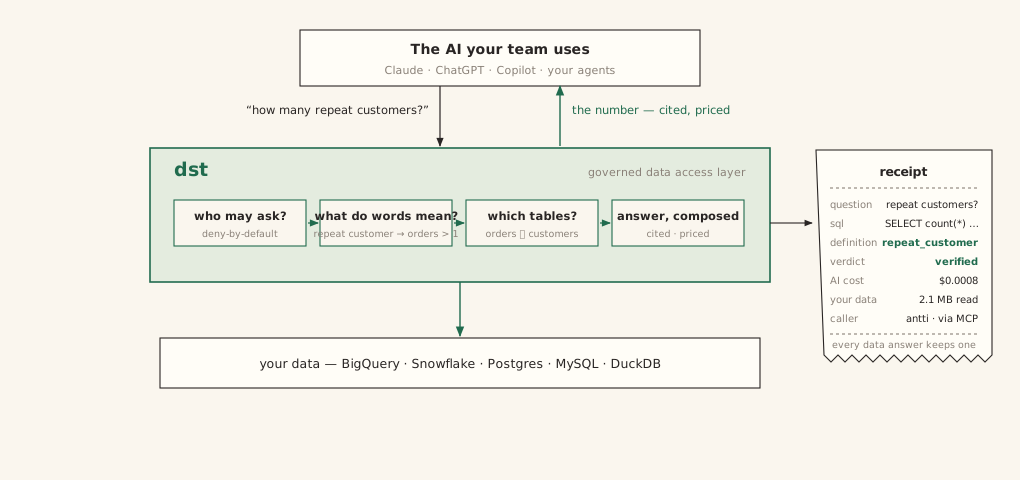
The problem
- Point an AI at a warehouse and it answers everything. It never fails to answer, and that is the failure mode: a wrong answer is worse than no answer.
- It guesses what "revenue" means, and the number it returns looks exactly like a right one.
- Context alone does not fix this. AI is nondeterministic, and what works for another team, another model, or another quarter may not work for you.
- The only way to know is to test it, on your data, continuously.
The solution
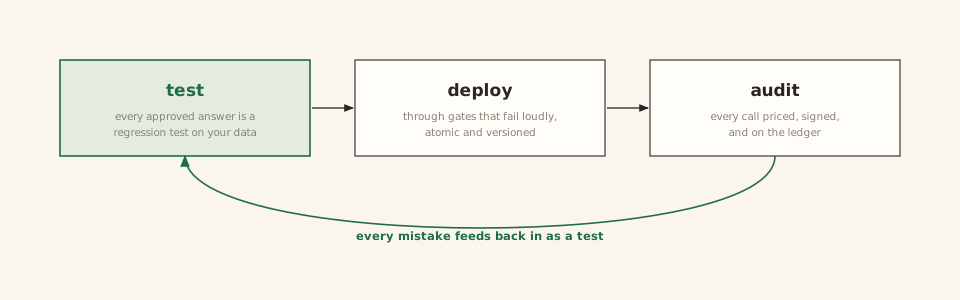
- Declare how your data is served, as files in version control.
- Test what actually works for you: every approved answer is a regression test, and every switch in the pipeline can be flipped and re-measured.
- Deploy only what passes, through gates that fail loudly.
- Audit everything that served: who asked, what ran, what it cost. Every mistake feeds back in as a new test.
Built by practitioners, for practitioners: files, pull requests, CI, and exit codes, not a new workflow.
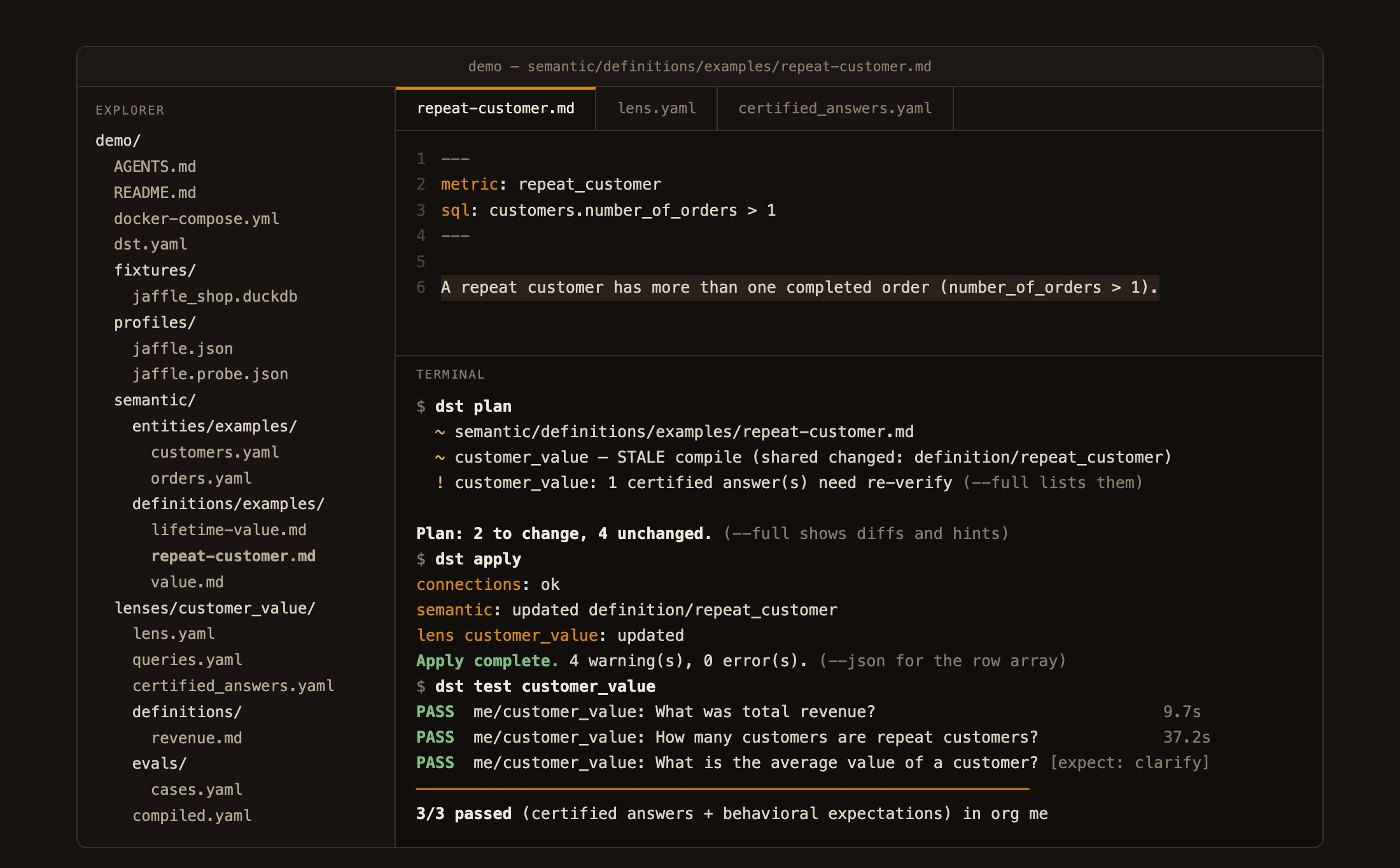
The whole surface: a folder of files, and the dst CLI.
Interactive version →
Test: the engine
Generation is nondeterministic at its core, so dst treats testing as the product, not an afterthought.
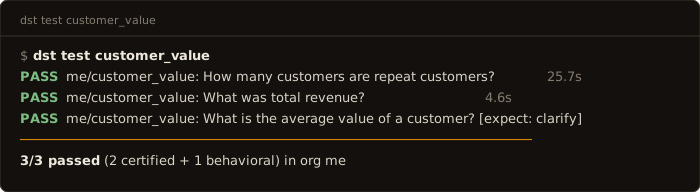
- Every approved answer is a regression test. A certified answer is a
question→SQL pair a person vouched for.
dst testre-asks the question through the real generation pipeline, executes both the stored SQL and the generated SQL against your warehouse, and compares the results. - Behavior is pinned too. Cases in
evals/cases.yamlassert response shape:expect: clarify | refuse | answer. A lens that starts refusing answerable questions, or guessing instead of clarifying, fails its suite. - Every result is recorded. Test runs land in the database, so accuracy is a number you can watch move, and deployments gate on it: a change that scores worse than the last publish is rejected.
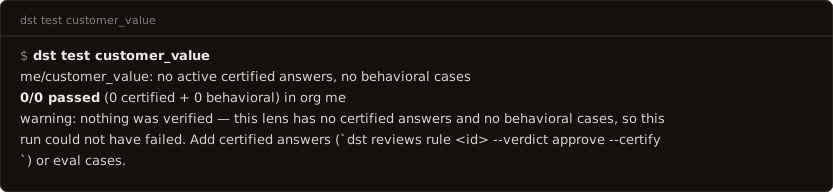
The pipeline is tunable per lens (answer strictness, self-repair, per-answer
judging, gate hardness), and every flip is measurable: change one, run
dst test, and know. And when you want to know which parts earn their keep
on your questions, the bundled proving ground runs your question set through
the pipeline with features stripped one at a time:
python -m services.benchmark --data ./data --strip <feature>. The full tunable surface is
in the configuration reference.
Deploy: through gates
A lens is files. Changing what an answer means is a deployment, not an edit:
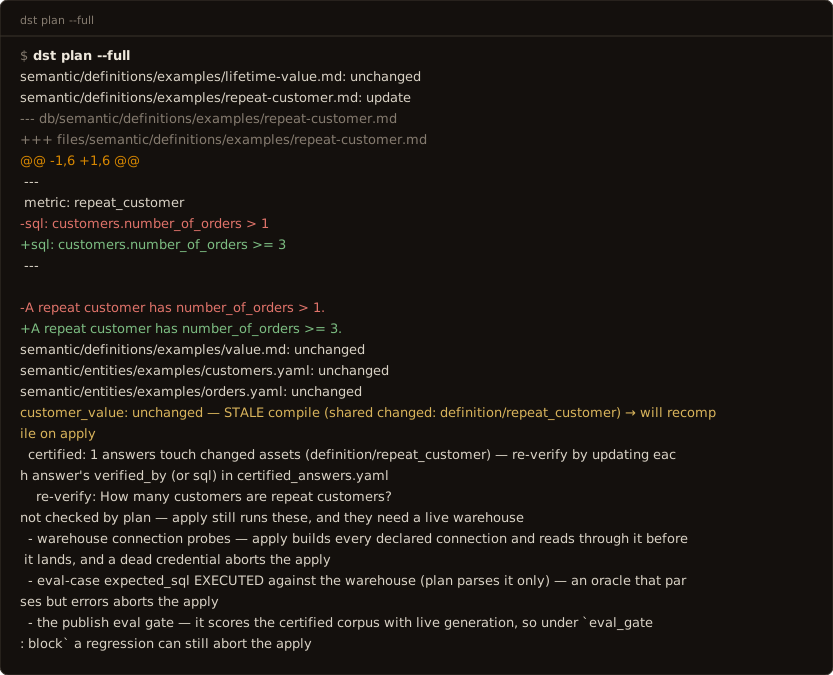
edit files → dst plan (dry run) → dst apply (gated, atomic)
dst plan shows what a change would do and exits 1 if apply would reject it:
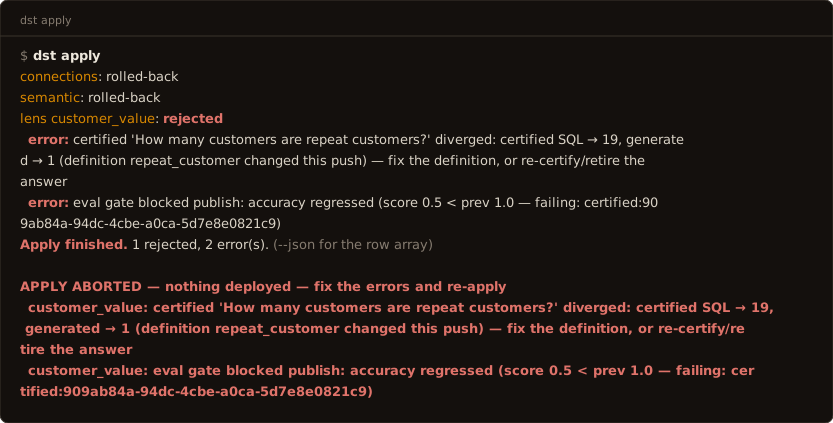
plan predicts apply. dst apply is one transaction: connections are probed,
every stale certified answer re-runs against live generation, and any failure
deploys nothing; the prior version keeps serving.
- Versions: every publish snapshots a lens version;
dst lens logshows what changed, when, and by whom (human:ana@corp/token:ci). Rollback isgit revert+dst apply. - Environments are where you try things. Each one is a separate dst: your
laptop, a shared sandbox, production. Aim a sandbox at a different model, a
different temperature, other tables, or a reworded definition, run
dst test, and compare the scores — a sandbox costs onedst bootstrapon a server you already run. Shipping is applying the same git commit to production; nothing is copied between environments, and the files carry no per-environment sections to keep in sync. - CI runs the same commands you do. The exit codes are the interface: a PR
job runs
dst plan; merge runsdst apply --require-gates; a schedule runsdst test --allanddst drift. A shipped GitHub Actions example is in the environments guide.
Audit: every answer, priced and signed
- Receipts. Every data answer carries a portable, HMAC-signed receipt:
request id, lens, certification, and a hash of the exact SQL. It is
verifiable later via the API or the
verify_receiptMCP tool. Refusals carry no receipt: they make no data claim. - The ledger.
dst observeanswers "who has been using this, and what for": every call with its question, SQL, outcome, and cost on both meters (AI and warehouse). Answered, declined, and errored are counted apart; a governed decline is an outcome, not an error. - Access, both ways. Every allow and every deny lands in an append-only audit log, with the caller, the lens, and the reason.
- The warehouse is watched.
dst driftdiffs the live schema against the committed baseline and cross-references every change with the definitions and entities that read the changed tables. Exit codes:0clean,2changes,1changes that break something declared,4no baseline yet. - Doubt is a first-class input. Any caller can send an answer for review;
low-confidence answers can flag themselves (
auto_review). An AI judge triages the full trace, a human rules, and the fix lands as a file plus a new test, which closes the loop:
---
config:
  theme: base
  themeVariables:
    fontFamily: "ui-monospace, Menlo, monospace"
    fontSize: "14px"
    primaryColor: "#faf6ee"
    primaryBorderColor: "#b45309"
    primaryTextColor: "#292524"
    lineColor: "#b45309"
    edgeLabelBackground: "#faf6ee"
---
flowchart TD
    serve(["an answer is served,<br/>with its receipt"])
    doubt["someone doubts it"]
    test["it becomes a test:<br/>an approved answer + its check"]
    gate["it gates every deploy"]
    serve -- "flagged by the asker,<br/>or by dst itself" --> doubt
    doubt -- "AI drafts the fix,<br/>a person approves it" --> test
    test -- "commit + dst apply" --> gate
    gate -- "the corrected answer serves<br/>from then on, and the AI learns from it" --> serve
A mistake fixed once stays fixed, and you can prove it: the corrected question is served from its approved SQL from then on, and its test re-runs on every apply. Details: the correction loop.
The model
Lens: the unit of serving. A use case (churn, sales comp, board metrics) declared as a selection over your shared semantic assets, plus access rules and its own clock. An agent asks a lens a natural-language question and gets a grounded, cited answer.
Semantic files: entities and business definitions, written once as files, shared by every lens that selects them. One metric, one definition; the word an agent uses is what varies, never the meaning.
Curated context: the reviewed statements a lens may ground an answer on. Each entry is deliberate, attributable, and versioned with the lens.
Certified answers: reviewed question-to-SQL pairs, served verbatim on a
match and re-run as regression tests by dst test and on every dst apply. A
corrected mistake becomes one of these, which is how it stays fixed.
Govern: access is managed the way you choose: per-lens allow-lists for
people and groups, per-caller API keys (dst_…), rate limits, and tenant
isolation enforced in the database (Postgres RLS). Stored warehouse
credentials are encrypted at rest.
Observe: every call is traced. Which lens, which caller, the question, the SQL, the AI + warehouse cost, and the outcome, with answered, declined, and errored counted apart. Answers can be sent for review: an AI judge audits the reasoning trace and escalates to a human when needed.
Agents are the interface
There is no query UI. The consumer is an agent: connect any MCP client (Claude
Desktop, Claude Code, Cursor, the agent inside your product) to the governed MCP
server at /mcp with just a URL and a scoped dst_… key
(services/mcp/README.md). Every question runs the same
governed pipeline, so the answer is identical whichever agent asks:
agent (Claude Desktop · Claude Code · Cursor · your product's agent)
        │  MCP — one scoped dst_… key per person
        ▼
   dst  ── lens: semantic model + context + access
        │   ground → SQL guard → execute → compose (cited)
        ▼
   your warehouse (BigQuery · Snowflake · Postgres · MySQL · DuckDB)
        │
   trace + cost + review  →  Observe
Humans stay in the loop, not in the query path: the dashboard is the cockpit for
governing and observing what the files declare: the review queue, drift audits,
access, cost. Lenses are authored as files (dst init → edit → plan/apply),
never in a UI. (A REST door exists for wiring dst into your own agent:
API reference.)
What a project looks like
A project is files: versioned, reviewed in PRs, applied like infrastructure.
These are lightly trimmed from what dst init actually scaffolds (which parks
its demo semantic assets under examples/, so you can delete that folder
wholesale; the demo lens itself lives at lenses/customer_value/):
semantic/entities/examples/orders.yaml: a business object (source, fields, metrics, joins)
name: orders
description: One row per order.
source:
  connection: jaffle
  table: orders
default_time_field: order_date
primary_key: [order_id]
fields:
  - {name: order_id,    type: integer}
  - {name: customer_id, type: integer}
  - {name: order_date,  type: date}
  - {name: status,      type: string}
  - {name: amount,      type: number, description: Order total (USD).}
metrics:
  - {name: revenue,     agg: sum,   expr: orders.amount, format: currency}
  - {name: order_count, agg: count, expr: orders.order_id}
  - name: average_order_value
    type: ratio
    numerator: revenue
    denominator: order_count
    format: currency
joins:
  - {right: customers, on: customers.customer_id = orders.customer_id,
     type: left, relationship: many_to_one}
semantic/definitions/*.md: what terms mean, including “ask, don’t guess”
A definition binds a business term to SQL:
---
metric: repeat_customer
sql: customers.number_of_orders > 1
---

A repeat customer has number_of_orders > 1.
And an ambiguous one makes dst clarify instead of guessing:
---
metric: value
status: ambiguous
possible_mappings:
  - lifetime value — customers.customer_lifetime_value
  - order amount — orders.amount
---
The mappings are all it takes: dst builds the clarification from them, in code, before any generation runs.
lenses/customer_value/lens.yaml: a lens selects assets and sets policy
name: customer_value
description: Customer lifetime value and order activity.
connections: [jaffle]
select:
  entities:
    - name: customers
    - name: orders
  definitions: [lifetime_value, repeat_customer, value]
model:
  temperature: 0.0
  answer_mode: balanced
instructions: Select explicit columns.
access:
  allow:
    - caller: alex        # deny-by-default; or `- group: everyone`
eval_gate: block          # a failing eval suite blocks the apply
auto_review: unverified   # low-confidence answers open review tickets
lenses/customer_value/certified_answers.yaml: approved question→SQL pairs, served verbatim
# Served VERBATIM on a match — and each one is a regression test:
# `dst test` re-asks the question and compares against this SQL's result.
- question: How many customers are repeat customers?
  sql: SELECT count(*) AS n FROM customers WHERE number_of_orders > 1
- question: What was total revenue?
  sql: SELECT sum(amount) AS revenue FROM orders
dst.yaml: providers (BYOK) and warehouse connections; secrets stay in .env
name: analytics

providers:
  anthropic:
    type: anthropic
    api_key_env: DST_API_KEY_ANTHROPIC
  # any openai-compatible endpoint works: deepseek, ollama, vllm, groq …

connections:
  jaffle:
    type: duckdb
    config: {path: fixtures/jaffle_shop.duckdb}
  wh:
    type: bigquery                  # or snowflake, postgres, mysql
    config: {project: my-gcp-project}
    secret_env: DST_API_KEY_WH      # an inline key is a parse error
dst query: a governed answer, with receipts
$ dst query customer_value "How many customers are repeat customers?"
19 of the 100 customers are repeat customers.

sql: SELECT count(*) AS n FROM customers WHERE number_of_orders > 1
basis: A repeat customer has number_of_orders > 1.
confidence: verified · definition: repeat_customer

$ dst query customer_value "What is the average value of a customer?"
clarify: 'value' is ambiguous in this dataset — lifetime value (total
historical revenue per customer) or order amount (a single order's total)?
  - lifetime value — customers.customer_lifetime_value
  - order amount — orders.amount
A refusal or clarify is an outcome, not an error: dst asks rather than guesses.
Quickstart
Install the package. Prerequisites: Python 3.12+, Docker (dst runs its own Postgres), and an API key for at least one model provider: Anthropic, or any openai-compatible endpoint (DeepSeek, Ollama, vLLM, Groq, most gateways).
pip install dst-core            # the CLI is `dst`
dst init analytics --warehouse demo --yes
cd analytics                    # put your provider key in the generated .env
dst dev                         # Postgres up + migrate + serve, one command

# in a second terminal, same directory
dst bootstrap --org me --email you@example.com
dst apply
dst query customer_value "How many customers are repeat customers?"
dst init scaffolds a project over a bundled jaffle DuckDB warehouse, so
apply and query work before you connect a real one. The released wheel carries
the migrations and the dashboard, so dst dev serves both at
http://localhost:8000. The
quickstart is the primary route and walks the
same path on to your own warehouse.
Running from source
The contributor path: a checkout, the repo's own Makefile, and the dashboard built by Vite instead of bundled. Prerequisites: the above plus uv, Node 22+ and pnpm.
# 1. Backend deps
make install                 # uv sync

# 2. Configure — create .env in the repo root (see "Configuration" below)
echo 'DST_PROVIDERS={"anthropic": {"type": "anthropic", "api_key": "sk-ant-..."}}' > .env
# openai-compatible works the same:
#   {"ollama": {"type": "openai-compatible", "base_url": "http://localhost:11434/v1", "api_key": "unused"}}

# 3. Start Postgres (pgvector), run migrations, seed an org + admin token
make up
make migrate
make seed                    # prints a dstadm_… admin token — copy it

# 4. Run the API (http://localhost:8000)
make dev
Then the dashboard:
cd apps/web
pnpm install
pnpm dev                     # http://localhost:5173
Open the dashboard and paste the dstadm_… admin token (top-right) to govern the org:
review queue, drift audits, callers, cost. Lenses themselves are authored as files:
uv run dst init scaffolds one over the bundled jaffle DuckDB warehouse, so
uv run dst apply and uv run dst query work before you connect a real warehouse.
A source checkout does not put dst on your PATH — every command runs as
uv run dst …, which is what the Makefile targets do.
To let an agent query a lens: issue a caller key in Settings, add it to the lens's
allow-list in lens.yaml, uv run dst apply, and connect the agent over MCP.
Configuration
Settings load from .env (see services/config.py). Common keys:
| Var | Required | Purpose |
|---|---|---|
DST_PROVIDERS |
yes, at least one entry | Model providers, JSON keyed by name (BYOK; no vendor-named key vars). Types: anthropic, openai-compatible, local. Declaration order is the tier/cost preference; grounding, composition, the review judge, and the router all resolve through it. |
| embedding provider | for context features | An entry in DST_PROVIDERS serving an embedding model: any openai-compatible endpoint, or the keyless in-process local type (uv sync --extra local-embed). Certified matching is cosine over this. With no usable embedder it cannot fire at all, which every response's degraded list and /ready's certified_matching say. |
FASTEMBED_CACHE_PATH |
optional | Where the local tier keeps its ONNX weights. Default ~/.cache/dst/fastembed ($XDG_CACHE_HOME honoured), deliberately NOT fastembed's own default, which is the OS scratch directory macOS reaps out from under it. Point it at a mounted volume in a container. |
DST_SECRET_KEY |
to store creds | Fernet key encrypting stored warehouse/context credentials. dst init generates one; by hand: python -c "from cryptography.fernet import Fernet; print(Fernet.generate_key().decode())". |
DATABASE_URL / DATABASE_ADMIN_URL |
defaults ok locally | App (RLS-enforced, non-superuser) and admin (migrations/seed) connections. |
CLERK_SECRET_KEY / CLERK_PUBLISHABLE_KEY |
optional | Hosted dashboard auth; the local login + admin token work without it. |
Warehouse and context-source credentials are not env vars: declare connections in
dst.yaml with a secret_env reference (see the quickstart).
.env.example is generated from services/config.py: the full,
never-stale surface.
Project layout
services/          FastAPI app (services.app:app)
  api/             control plane (/mgmt/*) + data plane (/v1/*)
  contracts/       lens config, semantic model, protocols
  connectors/      warehouse connectors
  context/         embedding providers + the serving error surface
  runtime/         the query pipeline (ground → guard → execute → compose)
  reviews/         AI-judge + human review queue
  governance/      access policy, credentials, rate limits, audit
  mcp/             remote + stdio MCP server (see its README)
apps/web/          React + Vite dashboard
migrations/        Alembic migrations
fixtures/          built-in jaffle DuckDB warehouse
Development
| Command | What it does |
|---|---|
make up / make down |
Start / stop local Postgres (pgvector) |
make migrate |
Apply DB migrations (dst migrate: schema + app-role password sync) |
make seed |
Seed a dev org + admin token |
make dev |
Run the API with reload on :8000 |
make lint |
ruff + format check + mypy + the UI style gate |
make fmt |
Auto-format + fix |
make test |
Backend tests (pytest) |
pnpm --dir apps/web dev |
Dashboard on :5173 |
Architecture: a FastAPI backend over Postgres + pgvector (lens config, the context
vector store, request traces, reviews) reads from your warehouse; the result set
itself is not persisted. What a trace does keep is the question, the SQL, the
composed answer and its citations; the first few result rows are kept only when a lens
opts in with logging.log_samples. Warehouse profiling additionally
stores per-column statistics and low-cardinality value lists; a column named in
exclude_columns is read for shape alone and its values are never collected. dst
does not classify or redact personal data: do not expose columns whose values you
do not want leaving your network. The dashboard is a same-origin or split React SPA.
User documentation lives in docs/ (quickstart, concepts, guides, reference) and is published at https://www.dataservetool.com; the subsystem map for contributors is ARCHITECTURE.md.
License
Apache-2.0. Contributions: CONTRIBUTING.md · vulnerabilities: SECURITY.md · issues and questions: github.com/get-dst/dst/issues.
1 maintainer

Download files
Download the file for your platform. If you're not sure which to choose, learn more about installing packages.
Source Distribution
Built Distribution
Filter files by name, interpreter, ABI, and platform.
If you're not sure about the file name format, learn more about wheel file names.
Copy a direct link to the current filters
File details
Details for the file dst_core-0.1.1.tar.gz.
File metadata
- Download URL: dst_core-0.1.1.tar.gz
- Upload date:
- Size: 4.0 MB
- Tags: Source
- Uploaded using Trusted Publishing? Yes
- Uploaded via:
twine/7.0.0 CPython/3.13.14
File hashes
| Algorithm | Hash digest | |
|---|---|---|
| SHA256 |
b50924fdc3b9732b4f5d4e47a7a2c642d43bf0e6ab54c81072f1cd8351b096e3
|
|
| MD5 |
746137a11246e7ff19f92a60b6e20378
|
|
| BLAKE2b-256 |
e807ef8c8badf47b4ea199a93a8a4007dbe6856ecc73c8d2855c5574dc72514c
|
Provenance
The following attestation bundles were made for dst_core-0.1.1.tar.gz:
Publisher:
release.yml on get-dst/dst
-
Statement:
-
Statement type:
https://in-toto.io/Statement/v1 -
Predicate type:
https://docs.pypi.org/attestations/publish/v1 -
Subject name:
dst_core-0.1.1.tar.gz -
Subject digest:
b50924fdc3b9732b4f5d4e47a7a2c642d43bf0e6ab54c81072f1cd8351b096e3 - Sigstore transparency entry: 2635479696
- Sigstore integration time:
-
Permalink:
get-dst/dst@5880bf6d4fa469c218656849e06f2f7f3638cff2 -
Branch / Tag:
refs/tags/v0.1.1 - Owner: https://github.com/get-dst
-
Access:
public
-
Token Issuer:
https://token.actions.githubusercontent.com -
Runner Environment:
github-hosted -
Publication workflow:
release.yml@5880bf6d4fa469c218656849e06f2f7f3638cff2 -
Trigger Event:
push
-
Statement type:
File details
Details for the file dst_core-0.1.1-py3-none-any.whl.
File metadata
- Download URL: dst_core-0.1.1-py3-none-any.whl
- Upload date:
- Size: 2.8 MB
- Tags: Python 3
- Uploaded using Trusted Publishing? Yes
- Uploaded via:
twine/7.0.0 CPython/3.13.14
File hashes
| Algorithm | Hash digest | |
|---|---|---|
| SHA256 |
2d82c59ab080ad332d51e7304ff83419451e331517c6c366d990eb25c4caad38
|
|
| MD5 |
c497b65ddeb65eb8b1d68ce08a63e463
|
|
| BLAKE2b-256 |
be4b0f524e72a92f3b7a1cdb69351004ced1bcd7a0c01f5c88a50734555972ad
|
Provenance
The following attestation bundles were made for dst_core-0.1.1-py3-none-any.whl:
Publisher:
release.yml on get-dst/dst
-
Statement:
-
Statement type:
https://in-toto.io/Statement/v1 -
Predicate type:
https://docs.pypi.org/attestations/publish/v1 -
Subject name:
dst_core-0.1.1-py3-none-any.whl -
Subject digest:
2d82c59ab080ad332d51e7304ff83419451e331517c6c366d990eb25c4caad38 - Sigstore transparency entry: 2635479876
- Sigstore integration time:
-
Permalink:
get-dst/dst@5880bf6d4fa469c218656849e06f2f7f3638cff2 -
Branch / Tag:
refs/tags/v0.1.1 - Owner: https://github.com/get-dst
-
Access:
public
-
Token Issuer:
https://token.actions.githubusercontent.com -
Runner Environment:
github-hosted -
Publication workflow:
release.yml@5880bf6d4fa469c218656849e06f2f7f3638cff2 -
Trigger Event:
push
-
Statement type:














